
ThreadLocal ——android消息机制handler在非主线程创建not called Looper.prepare() 错误的原因
引用自:https://www.jianshu.com/p/a8fa72e708d3
引出:
使用Handler的时候,其必须要跟一个Looper绑定。在UI线程可直接初始化Handler来使用。但是在非主线程中直接new Handler() 会报错: E/AndroidRuntime( 6173): Uncaught handler: thread Thread-8 exiting due to uncaught exception E/AndroidRuntime( 6173): java.lang.RuntimeException: Can't create handler inside thread that has not called Looper.prepare()
原因是非主线程中默认没有创建Looper对象,需要先调用Looper.prepare()启用Looper。 当初始化Handler的时候,其会通过Looper来获取当前的Looper,代码如下:
public Handler(Callback callback, boolean async) {

  //省略

  mLooper = Looper.myLooper();

  if (mLooper == null) {

      throw new RuntimeException(

          "Can't create handler inside thread that has not called Looper.prepare()");

  }

  //省略

}
那么,问题来了,为什么在子线程中,通过Looper.myLooper()方法获取的就是为空呢?如果有人回答了Looper是线程相绑定的,那它是如何做到绑定的? 如果还知道答案的话,那就可以跳过本篇文章了。
代码分析
1. Looper的myLooper方法
public static @Nullable Looper myLooper() {

    return sThreadLocal.get();

}
此方法只是通过从变量sThreadLocal中取出一个值。那么它的值是哪里来的呢?
2. Looper的prepare方法
private static void prepare(boolean quitAllowed) {

    if (sThreadLocal.get() != null) {

        throw new RuntimeException("Only one Looper may be created per thread");

    }

    sThreadLocal.set(new Looper(quitAllowed));

}
可以看出的是调用了这个方法之后,会在sThreadLocal中存在一个新建的Looper对象。那么看看这个sThreadLocal是什么东西呢?
ThreadLocal分析:
1. 定义 (本地线程副本变量工具类)
先看一下官方的解释:
Implements a thread-local storage, that is, a variable for which each thread

has its own value. All threads share the same {@code ThreadLocal} object,

but each sees a different value when accessing it, and changes made by one

thread do not affect the other threads. The implementation supports

{@code null} values.
这段话的意思是实现了一个线程相关的存储,即每个线程都有自己独立的变量。所有的线程都共享着这一个ThreadLocal对象,
并且当一个线程的值发生改变之后,不会影响其他的线程的值。
threadlocal是一个范型类,这标志着threadlocal可以存储所有数据,作为存储数据来说,我们首先想到的是会对外提供set(),get(),remove(),等方法,顺着我们的想法来看源码,果然如此。
2. 核心机制
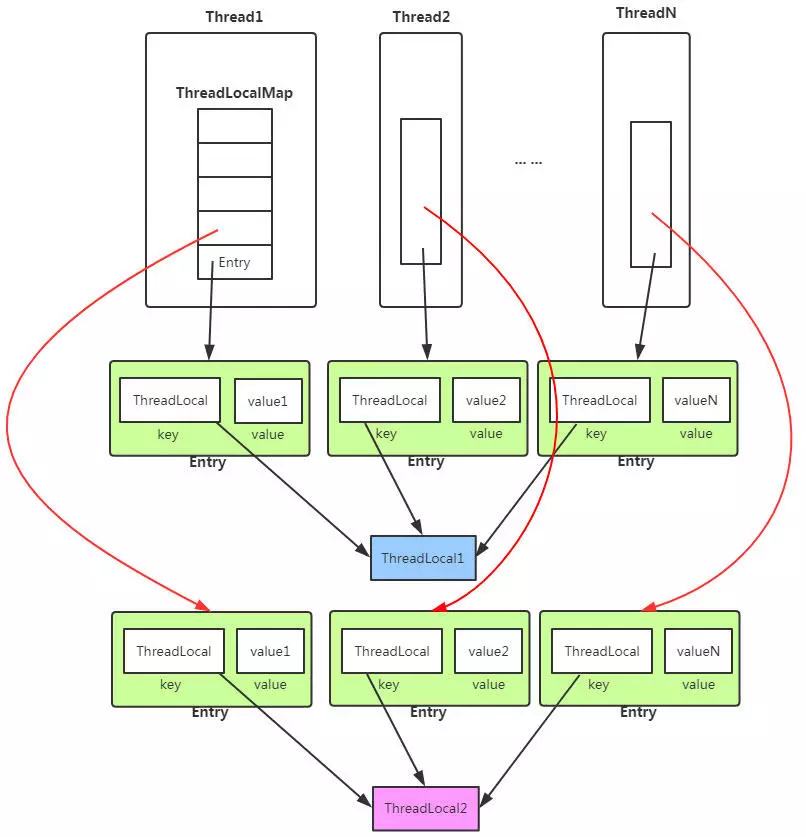
ThreadLocal的核心机制:
- 每个Thread线程内部都有一个Map。
- Map里面存储线程本地对象(key)和线程的变量副本(value)
- 但是,Thread内部的Map是由ThreadLocal维护的,由ThreadLocal负责向map获取和设置线程的变量值。
3. 实现
ThreadLocal的类定义使用了泛型ThreadLocal<T>,其中T指代的是在线程中存取值的类型。(对应Android中使用的ThreadLocal, T则存放的类型为Looper)
- set方法
/**

 * Sets the current thread's copy of this thread-local variable

 * to the specified value.  Most subclasses will have no need to

 * override this method, relying solely on the {@link #initialValue}

 * method to set the values of thread-locals.

 *

 * @param value the value to be stored in the current thread's copy of

 *        this thread-local.

 */

public void set(T value) {

    Thread t = Thread.currentThread();

    ThreadLocalMap map = getMap(t);

    if (map != null)

        map.set(this, value);

    else

        createMap(t, value);

}

ThreadLocalMap getMap(Thread t) {

    return t.threadLocals;

}

void createMap(Thread t, T firstValue) {

    t.threadLocals = new ThreadLocalMap(this, firstValue);

}
步骤:
1.获取当前线程的成员变量map
2.map非空,则重新将ThreadLocal和新的value副本放入到map中。
3.map空,则对线程的成员变量ThreadLocalMap进行初始化创建,并将ThreadLocal和value副本放入map中。
- get方法
/**

 * Returns the value in the current thread's copy of this

 * thread-local variable.  If the variable has no value for the

 * current thread, it is first initialized to the value returned

 * by an invocation of the {@link #initialValue} method.

 *

 * @return the current thread's value of this thread-local

 */

public T get() {

    Thread t = Thread.currentThread();

    ThreadLocalMap map = getMap(t);

    if (map != null) {

        ThreadLocalMap.Entry e = map.getEntry(this);

        if (e != null)

            return (T)e.value;

    }

    return setInitialValue();

}

ThreadLocalMap getMap(Thread t) {

    return t.threadLocals;

}

private T setInitialValue() {

    T value = initialValue();

    Thread t = Thread.currentThread();

    ThreadLocalMap map = getMap(t);

    if (map != null)

        map.set(this, value);

    else

        createMap(t, value);

    return value;

}

protected T initialValue() {

    return null;

}
1.获取当前线程的ThreadLocalMap对象threadLocals
2.从map中获取线程存储的K-V Entry节点。
3.从Entry节点获取存储的Value副本值返回。
4.map为空的话返回初始值null,即线程变量副本为null,在使用时需要注意判断NullPointerException。
remove()方法
public void remove() {

 ThreadLocalMap m = getMap(Thread.currentThread());

 if (m != null)

     m.remove(this);

}

ThreadLocalMap getMap(Thread t) {

    return t.threadLocals;

}
---------------------
Thread线程内部的Map在类中描述如下:
public class Thread implements Runnable {

    /* ThreadLocal values pertaining to this thread. This map is maintained

     * by the ThreadLocal class. */

    ThreadLocal.ThreadLocalMap threadLocals = null;

}
总结
举例:
package test;

import test.*;

public class Test {

static final    ThreadLocal<ThreadValue> mThreadLocal = new ThreadLocal<ThreadValue>();

    /**

     * @param args

     */

    public static void main(String[] args) {

        // TODO Auto-generated method stub

        ThreadValue threadValue = new ThreadValue("主线程");

         mThreadLocal.set(threadValue);

         System.out.print("in main thread : mThreadLocal:" + mThreadLocal +"\n");

         System.out.print("in main thread : 名字:" + mThreadLocal.get().name +"\n");

         mThreadLocal.get().print();

         new Thread(new Runnable() {

                @Override

                public void run() {

                    ThreadValue childThreadValue = new ThreadValue("子线程");

                     mThreadLocal.set(childThreadValue);

                     System.out.print("in child thread : mThreadLocal:" + mThreadLocal +"\n");

                     System.out.print("in child thread : 名字:" + mThreadLocal.get().name +"\n");

                     mThreadLocal.get().print();

                }

              }).start();

    }

}

package test;

public class ThreadValue  {

      String name;

      public ThreadValue() {

      }

      public ThreadValue(String name) {

          this.name=name;

      }

      public void print()

      {

          System.out.print("this = " + this+" \n");

      }

    }
结果:
然后编译:javac test/*.java

运行:java test.Test

输出:

in main thread : mThreadLocal:java.lang.ThreadLocal@788bf135

in main thread : 名字:主线程

this = test.ThreadValue@2b890c67

in child thread : mThreadLocal:java.lang.ThreadLocal@788bf135

in child thread : 名字:子线程

this = test.ThreadValue@4f93b604
可以看出由于mThreadLocal定义为静态最终变量,所以在主线程和子线程中,mThreadLocal都是同一个实例。
但是在两个线程中调用mThreadLocal.get(),得到的ThreadValue对象却并不相同。
这是因为mThreadLocal.get(),取到的对象是线程内的局部变量,相互之间并不干扰。
---------------------
作者:??-D-Luffy
来源:CSDN
原文:https://blog.csdn.net/zyfzhangyafei/article/details/64927617
版权声明:本文为博主原创文章,转载请附上博文链接!
ThreadLocal ——android消息机制handler在非主线程创建not called Looper.prepare() 错误的原因的更多相关文章
- Android消息机制——Handler
/**android的消息处理有三个核心类:Looper,Handler和Message.其实还有一个MessageQueue(消息队列), * 但是MessageQueue被封装到Looper里 ...
- Android消息机制
每一个Android应用在启动的时候都会创建一个线程,这个线程被称为主线程或者UI线程,Android应用的所有操作默认都会运行在这个线程中. 但是当我们想要进行数据请求,图片下载,或者其他耗时操作时 ...
- 在非主线程里面使用NSTimer创建和取消定时任务
为什么要在非主线程创建NSTimer 将 timer 添加到主线程的Runloop里面本身会增加线程负荷 如果主线程因为某些原因阻塞卡顿了,timer 定时任务触发的时间精度肯定也会受到影响 有些定时 ...
- Android消息机制:Looper,MessageQueue,Message与handler
Android消息机制好多人都讲过,但是自己去翻源码的时候才能明白. 今天试着讲一下,因为目标是讲清楚整体逻辑,所以不追究细节. Message是消息机制的核心,所以从Message讲起. 1.Mes ...
- Android开发之漫漫长途 ⅥI——Android消息机制(Looper Handler MessageQueue Message)
该文章是一个系列文章,是本人在Android开发的漫漫长途上的一点感想和记录,我会尽量按照先易后难的顺序进行编写该系列.该系列引用了<Android开发艺术探索>以及<深入理解And ...
- Android开发之漫漫长途 Ⅶ——Android消息机制(Looper Handler MessageQueue Message)
该文章是一个系列文章,是本人在Android开发的漫漫长途上的一点感想和记录,我会尽量按照先易后难的顺序进行编写该系列.该系列引用了<Android开发艺术探索>以及<深入理解And ...
- Android消息机制之ThreadLocal的工作原理
来源: http://blog.csdn.net/singwhatiwanna/article/details/48350919 很多人认为Handler的作用是更新UI,这说的的确没错,但是更新UI ...
- Android 进阶14:源码解读 Android 消息机制( Message MessageQueue Handler Looper)
不要心急,一点一点的进步才是最靠谱的. 读完本文你将了解: 前言 Message 如何获取一个消息 Messageobtain 消息的回收利用 MessageQueue MessageQueue 的属 ...
- Android消息机制探索(Handler,Looper,Message,MessageQueue)
概览 Android消息机制是Android操作系统中比较重要的一块.具体使用方法在这里不再阐述,可以参考Android的官方开发文档. 消息机制的主要用途有两方面: 1.线程之间的通信.比如在子线程 ...
随机推荐
- vue:在路由跳转中使用拦截器
1:首先在路由对象中的某一个具体的路由对象加这样一个属性 meta: { requireAuth:true } 2:然后在main.js中添加这段代码 router.beforeEach((to, ...
- C++复习:异常
异常处理机制专题 前言 1)异常是一种程序控制机制,与函数机制独立和互补 函数是一种以栈结构展开的上下函数衔接的程序控制系统,异常是另一种控制结构,它依附于栈结构,却可以同时设置多个异常类型作 ...
- ReactiveX 学习笔记(4)过滤数据流
Filtering Observables 本文主题为过滤 Observable 的操作符. 这里的 Observable 实质上是可观察的数据流. RxJava操作符(三)Filtering Deb ...
- Mybatis动态sql及性能优化-3
内容简介 1.回顾 2.动态sql 3.性能优化 懒加载机制 一级缓存 二级缓存 一.回顾 1.config文件常用标签 properties标签:引入外部properties文件资源. settin ...
- ORA-01078和LRM-00109问题导致ORACLE启动失败解决方法
操作环境 SuSE11sp3 + ORACLE11gR2(11.2.0.3) 问题现象 新安装的ORACLE启动失败,提示ORA-01078和LRM-00109错误.具体错误现象如下 SQL> ...
- 19.struts-配置详解.md
目录 1.package name extends abstract namespace 2.action name class method 3.result name type 标签体 <p ...
- idea2017授权
http://blog.csdn.net/qq_27686779/article/details/78870816 文章中注册码: BIG3CLIK6F-eyJsaWNlbnNlSWQiOiJCSUc ...
- ArcGIS案例学习笔记4_2_城乡规划容积率计算和建筑景观三维动画
ArcGIS案例学习笔记4_2_城乡规划容积率计算和建筑景观三维动画 概述 计划时间:第4天下午 目的:城市规划容积率计算和建筑三维景观动画 教程: pdf page578 数据:实验数据\Chp13 ...
- WIN7系统 如何上传文件到FTP服务器中
https://zhidao.baidu.com/question/214644671.html
- frambuffer 相关函数理解
1. framebuffer_alloc()功能是向内核申请一段大小为sizeof(struct fb_info) + sizeprivate的空间,其中sizeprivate的大小代表设备的私有数据 ...