
cocos2d-x游戏开发(十五)游戏载入动画loading界面
这个资源载入的loading界面demo是在玩客网做逆转三国的时候随手写的,尽管我在那仅仅待了2个礼拜。可是也算參与了一个商业游戏项目了,学到不少东西。当时使用的cocos2d-x还是1.0版的,我用2.1.2的调试过了。
上图:
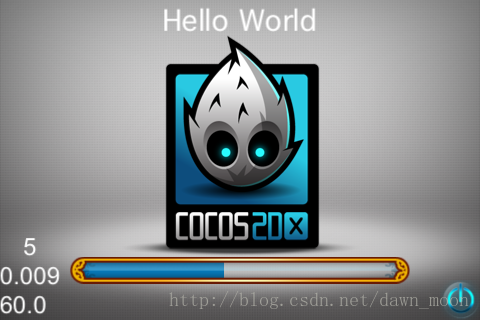
好了,非常easy,代码有凝视
上代码:
- #include "HelloWorldScene.h"
- #include "SimpleAudioEngine.h"
- using namespace cocos2d;
- using namespace CocosDenshion;
- CCScene* HelloWorld::scene()
- {
- // 'scene' is an autorelease object
- CCScene *scene = CCScene::create();
- // 'layer' is an autorelease object
- HelloWorld *layer = HelloWorld::create();
- // add layer as a child to scene
- scene->addChild(layer);
- // return the scene
- return scene;
- }
- // on "init" you need to initialize your instance
- bool HelloWorld::init()
- {
- //////////////////////////////
- // 1. super init first
- if ( !CCLayer::init() )
- {
- return false;
- }
- m_iLoadIdex = 0;
- /////////////////////////////
- // 2. add a menu item with "X" image, which is clicked to quit the program
- // you may modify it.
- // add a "close" icon to exit the progress. it's an autorelease object
- CCMenuItemImage *pCloseItem = CCMenuItemImage::create(
- "CloseNormal.png",
- "CloseSelected.png",
- this,
- menu_selector(HelloWorld::menuCloseCallback) );
- pCloseItem->setPosition( ccp(CCDirector::sharedDirector()->getWinSize().width - 20, 20) );
- // create menu, it's an autorelease object
- CCMenu* pMenu = CCMenu::create(pCloseItem, NULL);
- pMenu->setPosition( CCPointZero );
- this->addChild(pMenu, 1);
- /////////////////////////////
- // 3. add your codes below...
- // add a label shows "Hello World"
- // create and initialize a label
- CCLabelTTF* pLabel = CCLabelTTF::create("Hello World", "Thonburi", 34);
- // ask director the window size
- CCSize size = CCDirector::sharedDirector()->getWinSize();
- // position the label on the center of the screen
- pLabel->setPosition( ccp(size.width / 2, size.height - 20) );
- // add the label as a child to this layer
- this->addChild(pLabel, 1);
- // add "HelloWorld" splash screen"
- CCSprite* pSprite = CCSprite::create("HelloWorld.png");
- // position the sprite on the center of the screen
- pSprite->setPosition( ccp(size.width/2, size.height/2) );
- // add the sprite as a child to this layer
- this->addChild(pSprite, 0);
- // loading边框
- m_progressFrame = CCSprite::create("loading_fr.png");
- addChild(m_progressFrame,1);
- m_progressFrame->setPosition(ccp(240, 50));
- // loading的动作条
- m_progressBar = CCProgressTimer::create(CCSprite::create("loading_bar.png"));
- m_progressBar->setType(kCCProgressTimerTypeBar);
- addChild(m_progressBar);
- m_progressBar->setVisible(true);
- m_progressBar->setPosition(ccp(241, 51));
- // 进度动画运动方向,从左到右
- m_progressBar->setMidpoint(ccp(0, 0));
- // 宽高变化,这里是宽度变化
- m_progressBar->setBarChangeRate(ccp(1, 0));
- m_progressBar->setPercentage(0);
- // loading动画,没有逻辑处理,实际情况则凝视掉
- CCProgressTo *to = CCProgressTo::create(10, 100);
- m_progressBar->runAction(to);
- // 实际的loading逻辑,能够在这里加入
- // scheduleUpdate();
- return true;
- }
- void HelloWorld::update(float dt)
- {
- m_iLoadIdex++;
- if (m_iLoadIdex <= 50) {
- loadResource(m_iLoadIdex);
- m_progressBar->setPercentage(m_iLoadIdex * 100.0 / 50);
- }
- if (m_iLoadIdex >=50) {
- unscheduleUpdate();
- }
- }
- // 实际的loading逻辑。载入资源能够在这里加入。
- // 这里仅仅用了sleep来模拟
- void HelloWorld::loadResource(int index)
- {
- CCLog("loading ....");
- switch (index) {
- case 0:
- break;
- default:
- sleep(1.0);
- break;
- }
- }
- void HelloWorld::menuCloseCallback(CCObject* pSender)
- {
- CCDirector::sharedDirector()->end();
- #if (CC_TARGET_PLATFORM == CC_PLATFORM_IOS)
- exit(0);
- #endif
- }
东西太简单,还须要上传demo源代码么。要的留言
cocos2d-x游戏开发(十五)游戏载入动画loading界面的更多相关文章
- cocos2d-x游戏开发(十五)游戏加载动画loading界面
个人原创,欢迎转载:http://blog.csdn.net/dawn_moon/article/details/11478885 这个资源加载的loading界面demo是在玩客网做逆转三国的时候随 ...
- unity3D游戏开发十八之NGUI动画
我们先来看下帧动画,顾名思义,就是一帧帧的图片组成的动画,我们须要用到UISprite Animation组件,它的属性例如以下: Framerate:播放速率,也就是每秒钟播放的帧数 Name Pr ...
- 【读书笔记《Android游戏编程之从零开始》】19.游戏开发基础(游戏音乐与音效)
在一款游戏中,除了华丽的界面 UI 直接吸引玩家外,另外重要的就是游戏的背景音乐与音效:合适的背景音乐以及精彩的音效搭配会令整个游戏上升一个档次. 在 Android 中.常用于播放游戏背景音乐的类是 ...
- Unity 4.2.0 官方最新破解版(Unity3D 最新破解版,3D游戏开发工具和游戏引擎套件)
Unity是一款跨平台的游戏开发工具,从一开始就被设计成易于使用的产品.作为一个完全集成的专业级应用,Unity还包含了价值数百万美元的功能强大的游戏引擎.Unity作为一个游戏开发工具,它的设计主旨 ...
- Unity 2D游戏开发教程之游戏精灵的开火状态
Unity 2D游戏开发教程之游戏精灵的开火状态 精灵的开火状态 “开火”就是发射子弹的意思,在战争类型的电影或者电视剧中,主角们就爱这么说!本节打算为精灵添加发射子弹的能力.因为本游戏在后面会引入敌 ...
- Unity 2D游戏开发教程之游戏中精灵的跳跃状态
Unity 2D游戏开发教程之游戏中精灵的跳跃状态 精灵的跳跃状态 为了让游戏中的精灵有更大的活动范围,上一节为游戏场景添加了多个地面,于是精灵可以从高的地面移动到低的地面处,如图2-14所示.但是却 ...
- 《C++游戏开发》笔记十一 平滑动画:不再颤抖的小雪花
本系列文章由七十一雾央编写,转载请注明出处. http://blog.csdn.net/u011371356/article/details/9430645 作者:七十一雾央 新浪微博:http:/ ...
- STC8H开发(十五): GPIO驱动Ci24R1无线模块
目录 STC8H开发(一): 在Keil5中配置和使用FwLib_STC8封装库(图文详解) STC8H开发(二): 在Linux VSCode中配置和使用FwLib_STC8封装库(图文详解) ST ...
- [Unity3D]Unity3D游戏开发Lua随着游戏的债券(于)
---------------------------------------------------------------------------------------------------- ...
随机推荐
- ETH功能类
<?php /** * Ethereum JSON-RPC interface * * See Ethereum API documentation for more information: ...
- Django项目:CRM(客户关系管理系统)--32--24PerfectCRM实现King_admin自定义操作数据
#admin.py # ————————01PerfectCRM基本配置ADMIN———————— from django.contrib import admin # Register your m ...
- BZOJ 1099 树网的核
题面 解题思路 搞了三个多小时.... noip时的数据很水,直接暴力n^3过. 我们考虑优化,首先可以贪心,我们要在直径上选肯定越插长越好,所以n^2其实就可以解决.但这还不够,根据直径的最长性,我 ...
- TZ_11_Spring-Boot的整合SpringMvc和MyBatis
1.整合SpringMVC 虽然默认配置已经可以使用SpringMVC了,不过我们有时候需要进行自定义配置. 1>修改方式 通过application.yaml 此名字不需要使用@Propert ...
- 用javascript实现简单的用户登录验证
用javascript实现简单的用户登录验证 <!DOCTYPE html> <html lang="en"> <head> <meta ...
- java 7,8 排序异常
排序报 java.lang.IllegalArgumentException: Comparison method violates its general contract! 要明确返回-1, 0, ...
- GIT → 04:Git与代码托管平台
4.1 Git 与 GitHub比较 Git 是一个版本管理工具 , 只在本地使用的一个版本管理工具,其作用就是可以让你更好的管理你的程序,比如你原来提交过的内容,后面虽然修改过,但是通过git这个工 ...
- 命令模式(Command、Recevier、Invoker)(电脑开机命令)
(将一个请求封装成一个对象,从而让你使用不同的请求把客户端参数化,对请求排队或者记录请求日志,可以提供命令的撤销和恢复功能.) 在软件设计中,我们经常需要向某些对象发送请求,但是并不知道请求的接收者是 ...
- Struts_登录练习(未配置拦截器)
1.在domain中建个User.java和其配置文件 并在hibernate.cfg.xml中加入配置 2.配置struts文件 3.在jsp文件中修改action地址和name属性,并标注错误信息 ...
- Codeforces Round #436 (Div. 2) 题解864A 864B 864C 864D 864E 864F
A. Fair Game time limit per test 1 second memory limit per test 256 megabytes input standard input o ...