
openerp学习笔记 webkit 打印
1.webkit 打印需要安装的支持模块
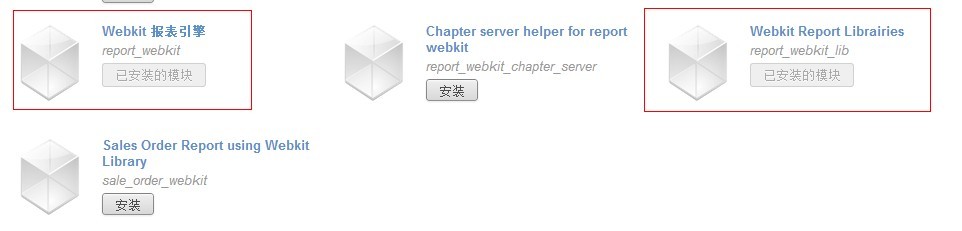
请首先安装 Webkit 报表引擎(report_webkit),再安装 Webkit 报表的支持库(report_webkit_lib),该模块讲自动安装和设置 wkhtml2pdf 的路径。
另外,安装 oecn_base_fonts 模块可解决打印中文乱码问题,安装 web_pdf_preview 模块可以实现在浏览器中直接预览打印 pdf 文件。
2.webkit 打印模块文件结构
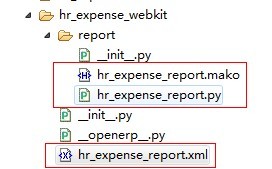
其中:hr_expense_report.xml 定义了报表名称和菜单,hr_expense_report.py 定义了报表解析类,hr_expense_report.mako 定义了报表模版。
3.报表定义文件(hr_expense_report.xml)
<?xml version="1.0" encoding="utf-8"?>

<openerp>

    <data>

        <report id="report_hr_expense_webkit"

                name="hr.expense.webkit"

                model="hr.expense.expense"

                file="hr_expense_webkit\\report\\hr_expense_report.mako"

                string="员工费用申请(html)"

                report_type="webkit"

                menu="True"

                auto="False"

                header="False" />

    </data>

</openerp>
说明:
id: 报表id,任意字符串,不重复即可。
name: 报表名称,为报表解析类(hr_expense_report.py)中 webkit_report.WebKitParser() 函数第一个参数去掉 report. 。
string: 打印菜单中显示的名字。
model: 报表渲染对象,打印菜单创建在该对象上。
file: 报表模版(.mako)文件路径,路径以本模块的路径开始,注意7.0早期版本webkit类型的报表中报表模版的路径必须用\\分割,7.0升级后的版本已经修正该Bug,使用/分割路径即可。
report_type: 报表类型,此处为 webkit 。
menu: True or False,是否在客户端上显示菜单, False 一般用语Wizard 向导时,不需要菜单。
auto: 是否利用缺省方法分析 .RML文件。
4.报表解析类定义文件(hr_expense_report.py)
# -*- coding: utf-8 -*-

import time

from report import report_sxw

from report_webkit import webkit_report

class hr_expense_report_webkit(report_sxw.rml_parse):

    def __init__(self, cr, uid, name, context):

        super(hr_expense_report_webkit, self).__init__(cr, uid, name, context=context)

        self.localcontext.update({

            'time': time,

            'cr':cr,

            'uid': uid,

        })

webkit_report.WebKitParser('report.hr.expense.webkit',

                       'hr.expense.expense',

                       'addons/hr_expense_webkit/report/hr_expense_report.mako',

                       parser=hr_expense_report_webkit, header=False)
说明:
解释器继承自 report_sxw.rml_parse 对象 并且增加了 time、cr、uid 变量,因此在报表中可以调用。
webkit_report.WebKitParser 实例生成之后,需要如下参数:
报表的名字
report关联的 object 名字
mako文件的路径
parser,默认的 mako 解释器(默认为 rml_parse)
header=False,使用报表自己定义的报表头
5.hr_expense_report.mako
<html>

<head>

</head>

% for expense in objects:

<body>

<table width="1369" height="363" border="3" bordercolordark="#000000" frame="border" rules="groups">

  <tr>

    <td height="42" colspan="8"><h2 align="center">员工费用申请单</h2></td>

  </tr>

  <tr>

    <td width="144" height="32">员工:</td>

    <td width="146" height="32">${ expense.employee_id.name or '' }</td>

    <td width="221" height="32">日期:</td>

    <td height="32" colspan="2">${ expense.date or '' }</td>

    <td width="150" height="32">部门:</td>

    <td height="32" colspan="2">${ expense.department_id.name or '' }</td>

  </tr>

  <tbody>

  <tr>

    <td height="32">产品</td>

    <td height="32">费用日期</td>

    <td height="32">费用备注</td>

    <td width="154" height="32">单号</td>

    <td width="137" height="32"><div align="center">计量单位</div></td>

    <td height="32"><div align="right">单价</div></td>

    <td width="159" height="32"><div align="center">数量</div></td>

    <td width="206" height="32"><div align="right">合计</div></td>

  </tr>

  % for line in expense.line_ids:

  <tr>

    <td width="144" height="32">${ line.product_id.name or '' }</td>

    <td width="146" height="32">${ line.date_value or '' }</td>

    <td width="221" height="32">${ line.name or '' }</td>

    <td width="154" height="32">${ line.ref or '' }</td>

    <td width="137" height="32"><div align="center">${ line.uom_id.name or '' }</div></td>

    <td width="150" height="32"><div align="right">${ line.unit_amount or '' }</div></td>

    <td width="159" height="32"><div align="center">${ line.unit_quantity or '' }</div></td>

    <td width="206" height="32"><div align="right">${ line.total_amount or '' }</div></td>

  </tr>

  % endfor

  <tr>

    <td height="32" colspan="7"><div align="right">合计:</div></td>

    <td height="32"><div align="right">${ expense.amount or '' }</div></td>

  </tr>

  </tbody>

  <tr>

    <td height="32">说明:</td>

    <td height="32" colspan="7">${ expense.name or '' }</td>

  </tr>

  <tr>

    <td height="32">备注:</td>

    <td height="32" colspan="7">${ expense.note or '' }</td>

  </tr>

</table>

</body>

 % endfor

</html>
说明,以下关于Mako模版的介绍引用自:http://www.cnblogs.com/alangwansui/archive/2013/02/05/2892839.html
Mako的是用Python编写一个模板库。它提供了一个熟悉的,非XML的语法,编译成Python模块以获得最佳性能.
Mako 模板
语法
Mako模板可以解析 XML, HTML, email text, 等文字流(parsed from a text stream) .
Mako模板含有Mako特有的指令(Mako-specific directives), 包括变量、表达式替换(expression substitution),控制结构(比如条件和循环,conditionals and loops),服务器端命令,完整的Python代码块,这些就像不同功能的标签(tag)一样易用。所有这些指令都解析为Python代码.
这意味着在Mako模板中,你可以最大化发挥Python的优势.
表达式替换
最简单的表达式是变量替换。 Mako模板中使用 ${} 结构,而不是rml中的 [[ ]] .
eg:
this is x: ${x}

    上式被模板输出流解析(template output stream),从本地上下文(localcontext)传递给模板生成函数(template rendering function).

    标签 ${} 中的代码直接被Python解析.
| 控制结构: | |
|---|
在Mako中,控制结构 (i.e. if/else, 循环 (像 while 和 for), 包括 try/except) 都使用 % 标记,之后接上普通的Python控制表达式即可。在控制结构结束时,使用 "end<name>" 标记,"<name>" 是控制结构的关键字:
eg:
% if x==5:

  this is some output

% endif
Python 块
在 <% %> 标记中, 你可以加入普通的Python代码块。虽然之中的代码可以加入任意的空格,但是还是注意下格式比较好。Mako的编译器会根据周围生成的 Python代码结构,调整Python代码块中的格式.
openerp学习笔记 webkit 打印的更多相关文章
- openerp学习笔记 跟踪状态,记录日志,发送消息
跟踪状态基础数据: kl_qingjd/kl_qingjd_data.xml <?xml version="1.0"?><openerp> <d ...
- openerp学习笔记 对象间关系【多对一(一对一)、一对多(主细结构)、多对多关系、自关联关系(树状结构)】
1.多对一(一对一)关系:采购单与供应商之间的关系 'partner_id':fields.many2one('res.partner', 'Supplier', required=True, sta ...
- openerp学习笔记 模块结构分析
以OpenERP7.0中的 hr_expense 模块为例: 如图中代码所示: __init__.py :和普通 Python 模块中的__init__.py 作用相同,主要用于引用模块根目录下的.p ...
- openerp学习笔记 计算字段支持搜索
示例1: # -*- encoding: utf-8 -*-import poolerimport loggingimport netsvcimport toolslogger = netsvc.Lo ...
- openerp学习笔记 domain 增加扩展支持,例如支持 <field name="domain">[('type','=','get_user_ht_type()')]</field>
示例代码1,ir_action_window.read : # -*- coding: utf-8 -*-from openerp.osv import fields,osv class res_us ...
- openerp学习笔记 自定义小数精度(小数位数)
小数位数标识定义: lx_purchase/data/lx_purchase_data.xml <?xml version="1.0" encoding="utf- ...
- openerp学习笔记 视图样式(表格行颜色、按钮,字段只读、隐藏,按钮状态、类型、图标、权限,group边距,聚合[合计、平均],样式)
表格行颜色: <tree string="请假单列表" colors="red:state == 'refuse';blue:state = ...
- openerp学习笔记 domain 的应用
1.在Action中定义,domain用于对象默认的搜索条件: 示例: <record id="action_orders" model="ir.actions.a ...
- openerp学习笔记 日期时间相关操作
日期格式化字符串:DATE_FORMAT = "%Y-%m-%d" 日期时间格式字符串:DATETIME_FORMAT = "%Y-%m-%d %H:%M:%S" ...
随机推荐
- java 动态代理范例 InvocationHandler与Proxy
java 动态代理范例 InvocationHandler与Proxy,拦截与代理 java.lang.reflect.Proxy,Proxy 提供用于创建动态代理类和实例的静态方法.newProxy ...
- 使用JSON进行数据传输的总结
一.选择的意义 在异步应用程序中发送和接收信息时,可以选择以纯文本和 XML 作为数据格式.为了更好的使用ajax, 我们将学习一种有用的数据格式 JavaScript Object Notation ...
- php 短信网关短信内容不能有空格
最近在做一个短信通知功能,接口参数都按文档写好了,就是不能发送短信,查了半天,原来是短信内容有空格,之前短信用的英文标点符号,符号后都有一个空格,用了date('Y-m-d H,i,s')函数,后来把 ...
- 转:MediaCoder H.264格式编码参数设置及详解
转: http://mediacoder.com.cn/node/81 由于现在大部分视频转码都选择H.264格式进行编码,同时CUDA编码的画质还达不到x264软编码的质量(如果你对画质无要求,可以 ...
- TOP 10 BEST LINUX GAMES RELEASED IN 2016
Gaming on Linux used to be a very rare phrase. But since the arrival of Steam on Linux, the Linux ga ...
- 修改的某人的SqlHelper FOR ODBC
随便找来的,源作者不明. 本来是SQL SERVER 的 修改为 ODBC使用. 并且修改了连接字符串,可以允许修改一次. using System; using System.Collections ...
- 【转载】Deep Learning(深度学习)学习笔记整理
http://blog.csdn.net/zouxy09/article/details/8775360 一.概述 Artificial Intelligence,也就是人工智能,就像长生不老和星际漫 ...
- 关于DB2 SQL0805N找不到程序包的错误解决办法
DB2在执行SQL语句的时候会使用内部定义的包(package)来保持不同级别的游标的稳定性, 包的名字就是“ULLID.SYSLH2XX“. DB2 里面默认的时候会创建3个这样的包即SYSLH20 ...
- js 平滑定位
<script type="text/javascript"> function intval(v){ v = parseInt(v); return isNaN(v) ...
- UIActionSheet
#import <UIKit/UIKit.h> @interface ViewController : UIViewController<UIActionSheetDelegate& ...