
nginx1.14的安装
编译安装nginx1.14.2
#拷贝指定文件到当前目录下
[root@localhost ~]# find /usr/share -iname "*.jpg" -exec cp {} ./ \;
1、运行环境包
yum -y install gcc gcc-c++ make libtool zlib zlib-devel openssl openssl-devel pcre pcre-devel lua-devel perl

yum groupinstall "Development Tools" "Server Platform Development"
2、额外的软件包
LuaJit: http://luajit.org/download.html

ningx:  https://nginx.org/download/nginx-1.14.2.tar.gz

pcre:    https://ftp.pcre.org/pub/pcre/pcre-8.42.zip

ngx_devel_kit:    https://github.com/simplresty/ngx_devel_kit/tags

lua-nginx-module    https://github.com/openresty/lua-nginx-module/tags

wget https://github.com/openresty/lua-nginx-module/archive/v0.10.14rc3.tar.gz --no-check-certificate

wget http://ftp.17gogoing.com:8852/pub/nginx/nginx_upstream_check_module-master.tar.gz   —— 检查后端服务器的状态

nginx_goodies: https://bitbucket.org/nginx-goodies/nginx-sticky-module-ng/downloads/?tab=downloads   下载地址 —— 后端做负载均衡解决session sticky问题
注释:所有的软件包均下载到/usr/local/src目录下
百度云链接地址:
3、安装编译
cd /usr/local/src/nginx-1.14.2

patch -p1 < /usr/local/src/nginx_upstream_check_module-master/check_1.12.1+.patch

#编译参数如下:

./configure \

--user=nginx \

--group=nginx \

--prefix=/usr/local/nginx \

--sbin-path=/usr/sbin/nginx \

--conf-path=/etc/nginx/nginx.conf \

--error-log-path=/var/log/nginx/error.log \

--pid-path=/var/log/nginx/nginx.pid \

--lock-path=/usr/local/nginx/lock/nginx.lock \

--http-log-path=/var/log/nginx/access.log \

--with-openssl=/usr/local/src/openssl-1.0.2k \

--with-http_ssl_module \

--with-http_flv_module \

--with-http_mp4_module \

--http-proxy-temp-path=/usr/local/nginx/proxy_tmp \

--with-http_stub_status_module \

--with-http_gzip_static_module \

--with-pcre=/usr/local/src/pcre-8.42 \

--add-module=/usr/local/src/ngx_devel_kit-0.3. \

--add-module=/usr/local/src/lua-nginx-module-master \

--add-module=/usr/local/src/nginx_upstream_check_module-master

make -j  && make install
4、其他操作(压力测试)
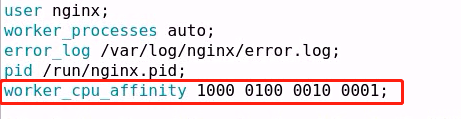
1、nginx绑定cpu(纯nginx服务时才能进行绑定)
在没有绑定cpu的情况下,nginx会动态调用cpu,降低缓存命中率;
#动态每5秒刷新一次

[root@localhost nginx]# watch -n . "ps axo comm,pid,psr |grep nginx"

nginx

nginx

nginx

nginx

nginx

#进行压力测试

[root@localhost ~]# yum -y install httpd-tools

#一次10万并发,连接100次

[root@localhost ~]# ab -n  -c  http://11.11.11.2/index.html

#在链接的过程中会发现nginx调用的cpu是不固定的;

如果只绑定3个的话,优先不使用第一个cpu;
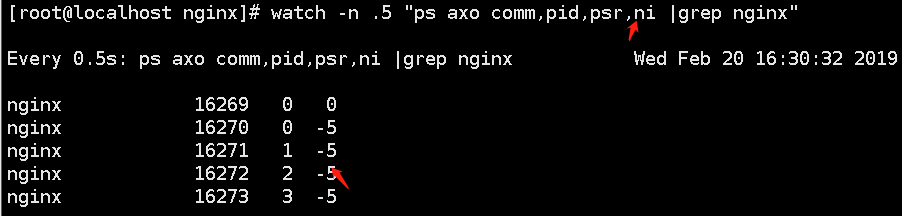
2、指定worker进程的nice值(运行优先级 -20~20之间)
worker_priority -;
3、指定某些IP地址不能访问,其他可以正常访问
server {

      listen ;

      server_name www.yanqi.org;

      root /www/nginx/html;

      location ~* \.(jpg|png)$ {

               deny 11.11.11.3;

               allow all;

}

}
location / {

    satisfy any;

    allow 192.168.1.0/;

    deny  all;

    auth_basic           "closed site";

    auth_basic_user_file conf/htpasswd;

}
4、location配置说明
4.1、配置文件位置说明(优选级说明)

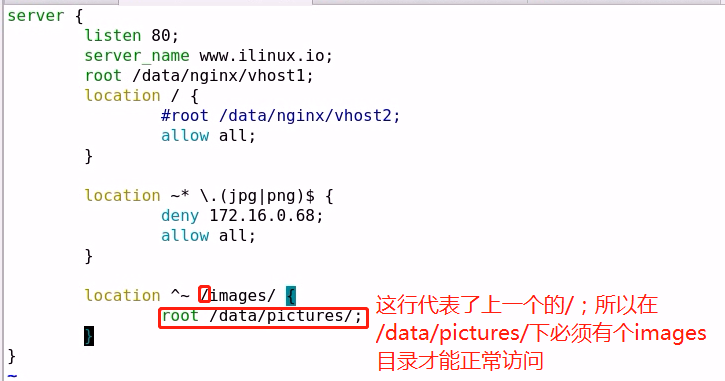
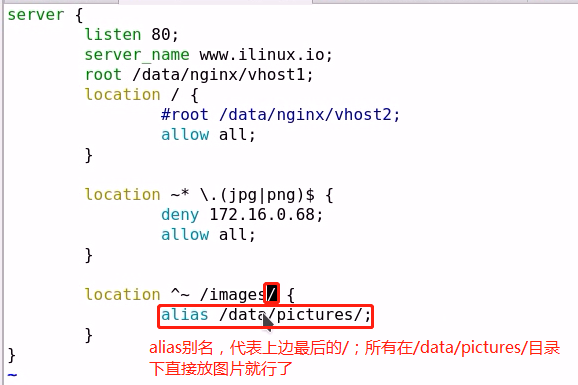
4.2、配置路径说明(定义文件位置 根/别名)
5、定义错误页面
server {

        listen ;

        server_name www.yanqi.org;

        root /data/nginx/vhost;

        location / {

             #root /data/nginx/vhost2;

             allow all;

        }

        error_page  =  /.html

         location = /404.html {

             root /data/nginx/error_pages;

         }

        error_page     /50x.html;

            location = /50x.html {

        }

}

说明:
如果访问404页面:会到 /data/nginx/error_pages 目录下找 404.html 文件;   注释:=200 是定义响应码,就算是访问是吧,返回的状态码也是200
如果访问50x页面:会到 /data/nginx/vhost 目录下找50x.html;
6、定义客户端请求的相关配置
只要记住前两个的使用即可

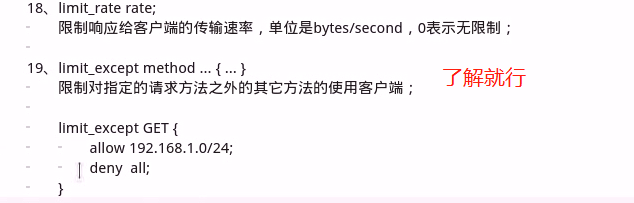
7、对客户端进行限制的相关配置
8、文件操作优化配置

9、模块的说明介绍
9.1、ngx_http_access_module (基于IP地址的访问控制模块)
http://nginx.org/en/docs/http/ngx_http_access_module.html
location / {

    deny  192.168.1.1;

    allow 192.168.1.0/;

    allow 10.1.1.0/;

    allow :0db8::/;

    deny  all;

}
9.2、ngx_http_auth_basic_module(网页密码登陆验证)
http://nginx.org/en/docs/http/ngx_http_auth_basic_module.html
location / {

    auth_basic           "closed site";

    auth_basic_user_file conf/htpasswd;

}


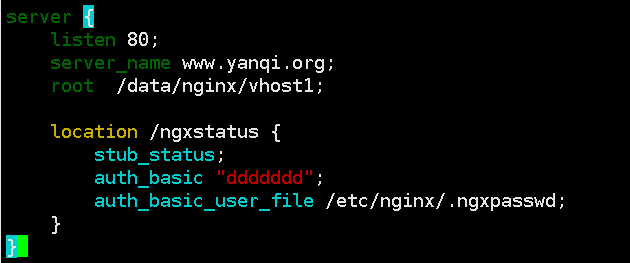
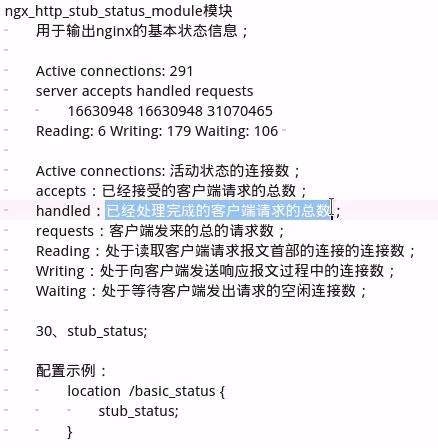
9.3、nginx连接状态

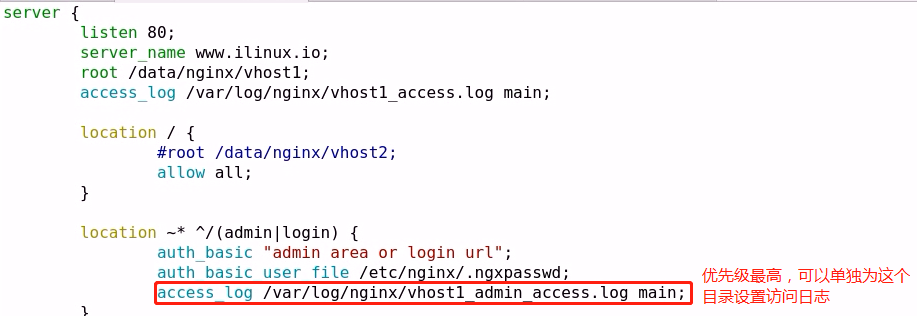
9.4、nginx的访问日志
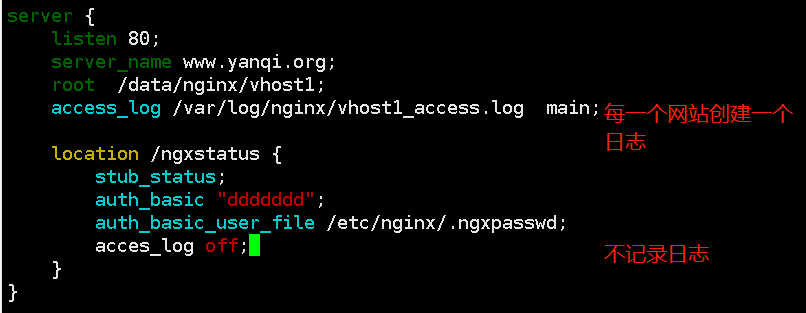
http://nginx.org/en/docs/http/ngx_http_log_module.html
9.5、传输压缩
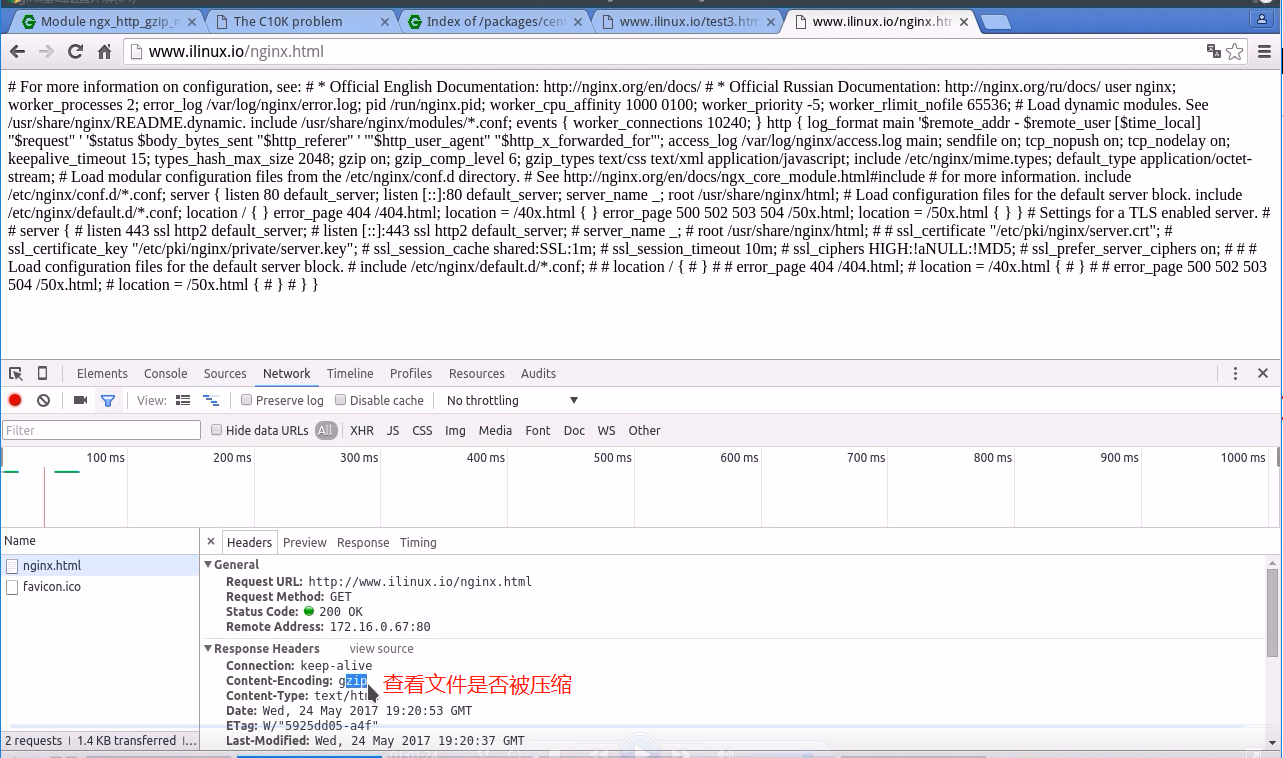
http://nginx.org/en/docs/http/ngx_http_gzip_module.html
gzip on | off;    开启压缩

gzip_comp_level ;  压缩级别

gzip_buffers  4k| 8k;  压缩缓冲  16段 每段8k   默认值

gzip_min_length ;   低于20字节的内容不压缩   默认值

gzip_types text/html text/css application/javascript;   指定压缩目标  #这个可以在/etc/nginx/mime.types 中查看
 前段有代理不开启,默认配置
9.5、 ngx_http_ssl_module(http server)
http://nginx.org/en/docs/http/ngx_http_ssl_module.html
http {

    ...

    server {

        listen               ssl;

        keepalive_timeout   ;

        ssl_protocols       TLSv1 TLSv1. TLSv1.;

        ssl_ciphers         AES128-SHA:AES256-SHA:RC4-SHA:DES-CBC3-SHA:RC4-MD5;

        ssl_certificate     /usr/local/nginx/conf/cert.pem;

        ssl_certificate_key /usr/local/nginx/conf/cert.key;

        ssl_session_cache   shared:SSL:10m;

        ssl_session_timeout 10m;

        ...

    }
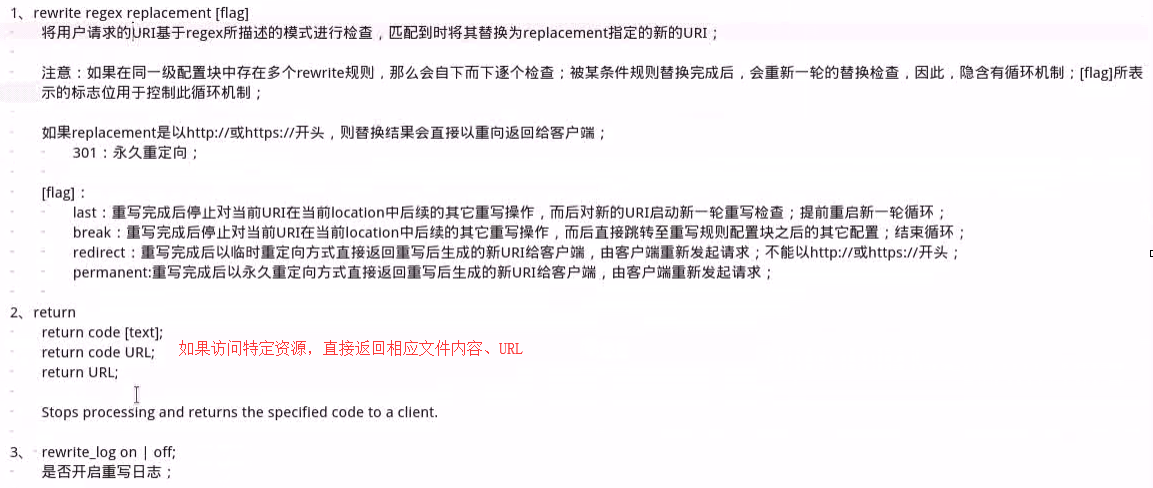
9.6、ngx_http_rewrite_module(重定向)
http://nginx.org/en/docs/http/ngx_http_rewrite_module.html
问题:
http://www.yanqi.org/bbs/    --> http://bbs.yanqi.org

http://www.yanqi.org/media/audio/a.wmv  --> http://www.yanqi.org/media/mp3/a.mp3
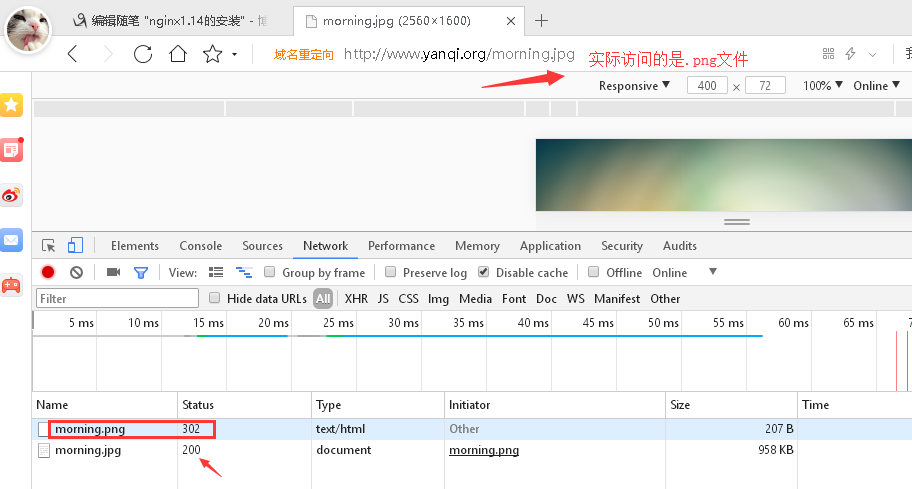
1、只要访问资源为.png结尾的,全部定义成.jpg
注释:图片资源之前是.png文件格式,后来全部转换成了.jpg;返还的状态仍是200
server {

listen ;

server_name www.yanqi.org;

root /data/nginx/vhost1;

rewrite /(.*)\.png$ /$.jpg;

}
2、域名跳转

[root@nginx conf.d]# cat vhost1.conf

server {

  listen  ssl;

  server_name cahost.zzidc.com;

  root /data/nginx/vhost1;

  access_log /var/log/nginx/vhost1_ssl_access.log main;

  ssl on;

  ssl_certificate /etc/nginx/ssl/nginx.crt;

  ssl_certificate_key /etc/nginx/ssl/nginx.key;

  ssl_protocols sslv3 TLSv1 TLSv1. TLSv1.;

  ssl_session_cache   shared:SSL:10m;

  ssl_session_timeout 10m;

}

server {

   listen ;

   server_name www.yanqi.org;

   root /data/nginx/vhost1;

   #rewrite /(.*)\.png$ /$.jpg;   #只要是以.png结尾的uri统一转成访问同名下格式为.jpg

   #rewrite /(.*)$ https://cahost.zzidc.com/$1;   #不管你访问什么,最终都跳转到后边的域名,默认301永久
   #rewrite /(.*).png$ /$1.jpg;   #服务端自行转换,返回给用户的响应码仍然是200
   rewrite /(.*).png$ /$1.jpg redirect;   #返回给客户一个新的URL,客户端再去访问新的URL  302 临时重定向
   rewrite /(.*).png$ /$1.jpg redirect;   #同样需要客户端重新请求,  301 永久重定向
注释:
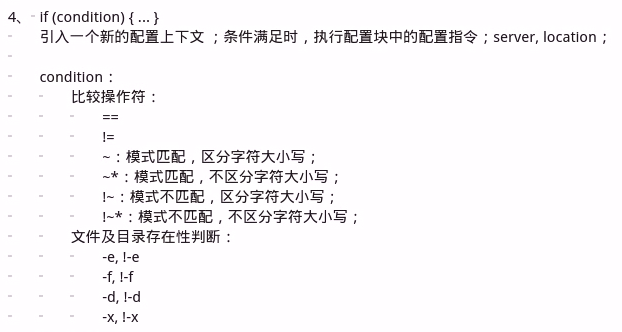
3、if 判断
if ($http_user_agent ~ MSIE) {          #如果浏览器是IE的话,所有请求跳转到/msie/下,然后跳出本次循环

    rewrite ^(.*)$ /msie/$ break;

}

if ($http_cookie ~* "id=([^;]+)(?:;|$)") {

    set $id $;

}

if ($request_method = POST) {     #如果客户端请求方法为post的话,直接返回405

    return ;

}

if ($slow) {

    limit_rate 10k;

}

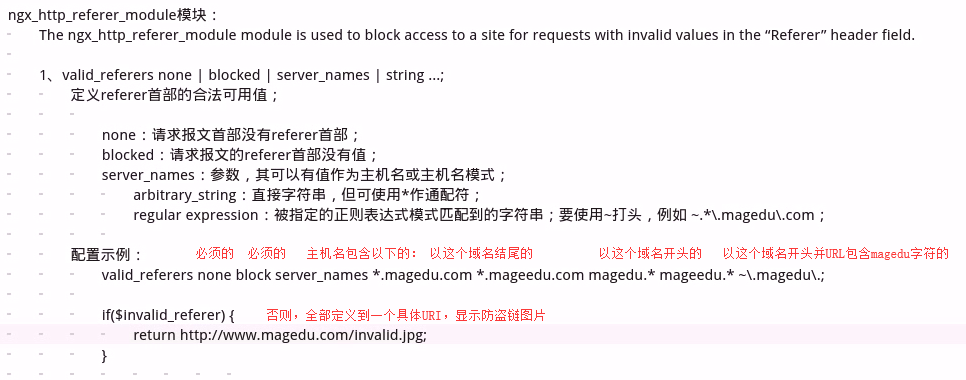
if ($invalid_referer) {    #防盗链,在定义中没有配置的,直接返回403;这个内容后续有写明。

    return ;

}
4、ngx_http_referer_module (防盗链)
http://nginx.org/en/docs/http/ngx_http_referer_module.html
nginx1.14的安装的更多相关文章
- nginx-1.14.0安装
1.百度搜索Nginx,点击Nginx news官网,点击nginx-1.13.10进入下载网页,选择Stable version的版本之后下载. 2.进入根目录,cd / 3.在根目录下创建soft ...
- centos 7.2 下 nginx 1.14.1 安装部署
Nginx1.14.1安装部署 1.环境: 所有源码在跳板机kx的/web/soft下 2.安装依赖: [root@bogon src]# yum install -y libxml2 openssl ...
- nginx1.14.0下载、安装、启动
nginx1.14.0下载及安装 wget http://nginx.org/download/nginx-1.14.0.tar.gztar -zxvf nginx-1.14.0.tar.gzcd n ...
- CentOS 安装Nginx1.14.0
原文地址:http://www.cnblogs.com/ascd-eg/p/9275441.html 一.安装所需环境 1.gcc 安装 yum install gcc-c++ ...
- Centos7 安装nginx1.14
一丶官网 http://nginx.org/en/download.html 至于安装那个版本首先要看清楚版本代表什么意思 Nginx官网提供了三个类型的版本Mainline version:Main ...
- 编译安装和apt安装Nginx1.14.0
安装依赖 yum -y install gcc gcc-c++yum -y install zlib zlib-devel openssl openssl-devel pcre-devel 在Ubun ...
- (转)CentOS7安装Nginx1.14.2
原文:https://blog.csdn.net/zhyfyz/article/details/84957381 https://blog.csdn.net/q85795362/article/det ...
- 源码编译安装lnmp环境(nginx-1.14.2 + mysql-5.6.43 + php-5.6.30 )------踩了无数坑,重装了十几次服务器才会的,不容易啊!
和LAMP不同的是,LNMP中的N指的是Nginx(类似于Apache的一种web服务软件),并且php是作为一个独立服务存在的,这个服务叫做php-fpm,Nginx直接处理静态请求,动态请求会转发 ...
- centos7.6 安装nginx-1.14.2
一.安装所需依赖环境 yum -y install gcc-c++ pcre pcre-devel zlib zlib-devel openssl openssl-devel 二.下载nginx官方源 ...
随机推荐
- 使用.NET Core与Google Optimization Tools实现加工车间任务规划
前一篇文章<使用.NET Core与Google Optimization Tools实现员工排班计划Scheduling>算是一种针对内容的规划,而针对时间顺序任务规划,加工车间的工活儿 ...
- nginx部分实现原理解析
nginx底层实现有几个主要的模块: 进程模块 事件模块 网络模块 进程模块 默认采用守护模式启动,守护模式让master进程启动后在后台运行,不在窗口上卡住. Nginx 启动后会有一个 Maste ...
- 从零开始学 Web 之 移动Web(三)Zepto
大家好,这里是「 从零开始学 Web 系列教程 」,并在下列地址同步更新...... github:https://github.com/Daotin/Web 微信公众号:Web前端之巅 博客园:ht ...
- Mysql 5.7 基于组复制(MySQL Group Replication) - 运维小结
之前介绍了Mysq主从同步的异步复制(默认模式).半同步复制.基于GTID复制.基于组提交和并行复制 (解决同步延迟),下面简单说下Mysql基于组复制(MySQL Group Replication ...
- FCKEditor的使用步骤
在线发布信息难免要用到在线编辑器,下面就说下在线编辑器的使用步骤: 1.下载FCK,这个不说了 2.把ZZGSEditor文件夹放到网站根目录 3.把FredCK.FCKeditorV2.dll文件放 ...
- 【Core】在mvc使用EF
引用DLL: 继续上一篇的内容我们来添加EF实体: 首先:工具> NuGet程序包管理器>程序包管理器控制台: Install-Package Microsoft.EntityFramew ...
- ubuntu安装ftp server服务
原文地址: https://jingyan.baidu.com/article/7908e85c988b23af481ad2ae.html 首先,更新软件源,保证源是最新的,这样有利于下面在线通过ap ...
- Docker 安装MySQL5.7(三)
Docker 安装MySQL5.7 1.搜索docker镜像(可以看到搜索的结果,这个结果是按照一定的星级评价规则排序的) docker search mysql 2.拉取docker的mysql镜像 ...
- ServiceFramework作为Java Web框架都有哪些不错的设计
前言 最近需要开发一个纯API的项目,mlsql-cluster,从无到有,到最后完整的proxy功能开发完毕,只花了四个小时不到,自己不尽小感叹了一把 ServiceFramework的高效. 关于 ...
- create pdf file using Spire.Pdf or iTextSharp or PdfSharp
Spire.Pdf: 注:pdf 显示中文一定要设置相应的中文字体,其他外文类似.否则显示为乱码( 如果繁体的服务器上生成的中文内容PDF文档,在简体操作系统保存或并传给简体系统上查看,会存在乱码问题 ...