
AutoIt介绍
AutoIt的下载网址: https://www.autoitscript.com/site/autoit/downloads/
AutoIt在线文档:http://www.autoit3.cn/Doc/
AutoIt的优势:
- 简单易懂的类BASIC 表达式
- 模拟键盘,鼠标动作事件
- 操作窗口与进程
- 直接与窗口的"标准控件"交互(设置/获取文字,移动,关闭,等等)
- 脚本可以编译为标准可执行文件
- 创建用户图形界面接口(GUI)
- COM 支持
- 正则表达式
- 直接调用外部DLL 和Windows API 函数
- 程序运行为功能(让程序运行于其它账户)
- 详细易懂的帮助文件于基于社区的支持论坛
- 完全兼容于Windows 2000 / XP / 2003 / Vista / 2008
- Unicode 与64位运算支持
- 高精度,易使用的数学运算
- 可以运行于Windows Vista Account Control (UAC)
运行AutoIt程序:
1.先打开SciTE Script Editor, 在Editor中输入以下程序:
Msgbox(0,"Autoit窗口","欢迎来到Autoit的世界")
2.编译:Tools --> Complie, 会生成.exe文件
3.双击.exe文件,就能看到运行结果
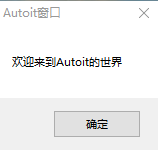
Autoit程序例子
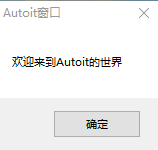
例1: 消息框显示
Msgbox(0,"Autoit窗口","欢迎来到Autoit的世界")
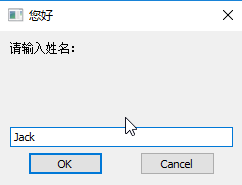
例2:带交互的消息框显示
Dim $name

$name=InputBox("您好","请输入姓名:")

Msgbox(0,"欢迎",$name&",欢迎来到Autoit的世界")

在AU3中变量使用关键字Dim, Local 和Global 来声明并创建变量。一般变量是以美元符号$
开头的。
Dim $a, $b

$a=InputBox("运算","输入a:")

$b=InputBox("运算","输入b:")

Msgbox(0,"结果",$a&'*'&$b&'='&($a*$b))


例4 条件判断语句
Dim $age

$age=inputbox("您好","请输入年龄")

if $age < 18 then

msgbox(0,"结果","未成年人")

else

msgbox(0,"结果","年龄"& $age &",成年人")

endif


例5 循环结构 While...WEnd
Dim $sum, $i, $end

$sum = 0

$end = inputbox("输入","输入结尾数字")

$i = 1

While $i <= $end

    $sum = $sum + $i

	$i = $i +1

WEnd

MsgBox(0,"输出","1到"& $end &"的和是:"& $sum)


例6 循环结构 For...Next
Dim $sum, $i, $end

$sum = 0

$end = inputbox("输入","输入结尾数字")

For $i = 1 To $end

    $sum = $sum + $i

Next

MsgBox(0,"输出","1到"& $end &"的和是:"& $sum)
例7 九九乘法表
@CRLF 换行
@TAB 制表符
ACSII值:Chr(9)=@TAB
Dim $i, $j

Dim $s

For $i=1 To 9

    For $j=1 To $i

	    $s = $s&$i&"*"&$j&"="&($i*$j)&@TAB

    Next

	$s = $s & @CRLF

Next

MsgBox(0,"九九乘法表",$s)

例8 数组的使用
Const $N=50

Dim $a[$N], $i, $s=""

For $i=0 To $N-1

    $a[$i] = $i

Next

For $i=0 To $N-1

    $s = $s&$a[$i]&"  "

Next

MsgBox(0,"数组的使用", $s)

例9 数组的显示及随机数
#include<Array.au3>

Const $N=11

Dim $i, $RandomArray[$N]

For $i=0 To $N-1

    $RandomArray[$i] = Random(1,100,1)

Next

_ArrayDisplay($RandomArray,"随机数组")

例10 函数的使用
Func <函数名>([参数1][,参数2]...[,参数n])

     [函数体]

     [Return 数据]

EndFunc
样例代码:
Func Max($x, $y)

    Local $max

	If $x >= $y Then

	    $max = $x

    Else

	    $max = $y

    EndIf

	Return $max

EndFunc

Local $a, $b, $c

$a = 10

$b = 20

$c = Max($a, $b)

MsgBox(0,"函数", $a&"和"&$b&"的最大值为:"&$c)

Autoit中的函数参考网址: http://kone-wu.iteye.com/blog/1910019
例11 自动化控制1:新建txt文件, 往记事本里输文字并不保存
#include <Constants.au3>

; Script Function:

;   Opens Notepad, types in some text and then quits the application.

;

; Prompt the user to run the script - use a Yes/No prompt with the flag parameter set at 4 (see the help file for more details)

Local $iAnswer = MsgBox(BitOR($MB_YESNO, $MB_SYSTEMMODAL), "AutoIt Example", "This script will run Notepad, type in some text and then quit.  Do you want to run it?")

; Check the user's answer to the prompt (see the help file for MsgBox return values)

; If "No" was clicked (7) then exit the script

If $iAnswer = 7 Then

	MsgBox($MB_SYSTEMMODAL, "AutoIt", "OK.  Bye!")

	Exit

EndIf

; Run Notepad

Run("notepad.exe")

; Wait for the Notepad to become active. The classname "Notepad" is monitored instead of the window title

WinWaitActive("[CLASS:Notepad]")

; Now that the Notepad window is active type some text

Send("Hello from Notepad.{ENTER}1 2 3 4 5 6 7 8 9 10{ENTER}")

Sleep(500)

Send("+{UP 2}")

Sleep(500)

; Now quit by pressing Alt-F and then scrolling down (simulating the down arrow being pressed six times) to the Exit menu

Send("!f")

Sleep(1000)

Send("{DOWN 6}{ENTER}")

; Now a screen will pop up and ask to save the changes, the classname of the window is called

; "#32770" and simulating the "TAB" key to move to the second button in which the "ENTER" is simulated to not "save the file"

WinWaitActive("[CLASS:#32770]")

Sleep(500)

Send("{TAB}{ENTER}")

; Now wait for Notepad to close before continuing

WinWaitClose("[CLASS:Notepad]")

; Finished!
Send 函数参考网址:http://blog.csdn.net/u012248603/article/details/52706093
例12 自动化控制2: 自己新建txt文件,然后往记事本里面写入文字并保存
自己新建txt文件放在桌面, 利用AutoIt Window Info工具查到其位置(x,y)

; using AutoIt Window Info to find the location of new created txt file

MouseClick('left', 409, 234, 2)

; sleep for 2 seconds, then type some words into txt file

sleep(2000)

Send("Hello{Enter}{Space}from{Enter}{Space}Autoit{Enter}{!}{Enter}")

; Now quit by pressing Alt-F and then scrolling down (simulating the down arrow being pressed six times) to the Exit menu

Send("!f")

Sleep(1000)

Send("{DOWN 6}{ENTER}")

; Now a screen will pop up and ask to save the changes, the classname of the window is called

; "#32770" and simulating the "TAB" key to move to the second button in which the "ENTER" is simulated to not "save the file"

WinWaitActive("[CLASS:#32770]")

Sleep(500)

Send("{ENTER}")

; Now wait for Notepad to close before continuing

WinWaitClose("[CLASS:Notepad]")
编译上述文件,生成first_au3.exe, 并将exe文件E盘中。这样就能通过CMD来运行exe文件了,该命令为: E://first_au3.exe.
本地分享到此结束,欢迎大家交流~
AutoIt介绍的更多相关文章
- selenium+java利用AutoIT实现文件上传
转自https://www.cnblogs.com/yunman/p/7112882.html?utm_source=itdadao&utm_medium=referral 1.AutoIT介 ...
- Python + Selenium + AutoIt 模拟键盘实现另存为、上传、下载操作详解
前言 在web页面中,可以使用selenium的定位方式来识别元素,从而来实现页面中的自动化,但对于页面中弹出的文件选择框,selenium就实现不了了,所以就需引用AutoIt工具来实现. Auto ...
- 利用Selenium实现图片文件上传的两种方式介绍
在实现UI自动化测试过程中,有一类需求是实现图片上传,这种需求根据开发的实现方式,UI的实现方式也会不同. 一.直接利用Selenium实现 这种方式是最简单的一种实现方式,但是依赖于开发的实现. 当 ...
- 使用AutoIt实现文件上传
在网页上上传文件的时候,Selenium无法直接操作如Flash.JavaScript 或Ajax 等技术所实现的上传功能,这时候我们需要借用一个叫做AutoIt的软件来帮助我们事先自动化的上传操作. ...
- C/S架构自动化测试入门
所谓C/S架构即Client/Server(客户端/服务器架构).虽然近年来C/S架构产品越来越少,大有被B/S(Browser/Server 浏览器/服务器)架构超越的趋势,但C/S还是有B/S不可 ...
- C/S架构系统自动化测试入门
所谓C/S架构即Client/Server(客户端/服务器架构).虽然近年来C/S架构产品越来越少,大有被B/S(Browser/Server 浏览器/服务器)架构超越的趋势,但C/S还是有B/S不可 ...
- Selenium图片上传
方式1: 如果是input类型的标签则可直接赋值 部分代码: driver.find_element_by_name("file").send_keys("E:\\tes ...
- PyAutoGUI-python版的autoit/AHK
简单介绍各个图形界面自动操作的python库,类似按键精灵\autoit\ahk(autohotkey)等等这些自动化工具.这类python库不是只是用来实现自动游戏之类的程序,业界也用这些库来做GU ...
- 如何使用AutoIT完成单机测试
下面我们来介绍如何使用AutoIT完成单机程序的自动化测试.使用AutoIT完成桌面应用程序的自动化测试,最重要的是找到识别GUI对象的方法,然后调用AutoIT函数来操纵它或读取它的属性值,并与正确 ...
随机推荐
- JavaScript 函数定义和调用
普通的函数定义方法: function abs(x):{ if (x >= 0){ return x; }else { return -x ; } } 两种方法是等价的 var abs = fu ...
- [C#]GetFloat提示"指定的转换无效"
数据库中没有double型,float就表示double值.sql server数据库字段类型与.net的数据类型的对应关系: real(数据库)<--> float(.NET)float ...
- SpringMVC 学习 十一 springMVC控制器向jsp或者别的控制器传递参数的四种方法
以后的开发,大部分是发送ajax,因此这四种传递参数的方法,并不太常用.作为了解吧 第一种:使用原生 Servlet 在控制器的响应的方法中添加Servlet中的一些作用域:HttpRequestSe ...
- 第二节——vue多页面开发
我们平常用vue开发的时候总觉得vue好像就是专门为了单页面应用而诞生的,其实不是.因为vue在工程化开发的时候很依赖webpack,而webpack是将所有的资源整合到一块,弄成一个单页面. 但是v ...
- Django——用户认证和判断用户是否登录
用户认证 必须通过认证之后才能login(request,user)这样才能保存会话到request中,注销后会话结束 注意 自定义的用户登陆时只不止需要验证用户名和密码的需要写认证,就例如在线教育平 ...
- 使用 PLSQL 提示动态执行表不可访问,本会话的自动统计被禁止
使用PLSQL,第一次执行表的select操作的时候,提示"动态执行表不可访问,本会话的自动统计被禁止",如上图: 这种问题,一看就是当前连接用户没有对sys用户下的表v$sess ...
- 在IIS建立的ftp,可以成功连接登录,但是不显示目录
IIS建立FTP站点很简单,不作说明 Windows的防火墙也开通了FTP端口(默认21),Telnet也是通的,在本机可以打开,在局域网其它电脑或外网也可以连接,但就是不显示目录,如果用浏览器打开提 ...
- lombok的介绍及使用
参考:https://blog.csdn.net/motui/article/details/79012846 介绍 在项目中使用Lombok可以减少很多重复代码的书写.比如说getter/sette ...
- LDO和DC-DC的概念,区别及优缺点
最近在做蓝牙项目的时候,遇到了需要配置这两种不同的供电模式的问题,这里顺便温习一下这种供电方式的概念,做个总结. LDO :LOW DROPOUT VOLTAGE 低压差线性稳压器,故名思意,为线性的 ...
- [视频]K8飞刀 一键免杀 IE神洞网马教程
[视频]K8飞刀 一键免杀 IE神洞网马教程 https://pan.baidu.com/s/16ZrTs