
DataAnnotations - InverseProperty Attribute:
DataAnnotations - InverseProperty Attribute:
We have seen in the Code-First Convention section that Code-First creates {Class Name}_{Primary Key} foreign key column if you have not included foreign key property in a parent class. The InverseProperty attribute is used when you have multiple relationships between classes.
Consider the following example.
public class Student

{

    public Student()

    {

    }

    public int StudentID { get; set; }

    public string StudentName { get; set; }

    public Standard CurrentStandard { get; set; }

    public Standard PreviousStandard { get; set; }

}

public class Standard

{

    public Standard()

    {

    }

    public int StandardId { get; set; }

    public string StandardName { get; set; }

    public ICollection<Student> CurrentStudents { get; set; }

    public ICollection<Student> PreviousStudents { get; set; }

    }
As you can see in the above example, Student class includes two navigation properties to Standard class. The same way Standard class includes two collection navigation properties for Student. Code-First creates four columns for this relationship, as shown below.
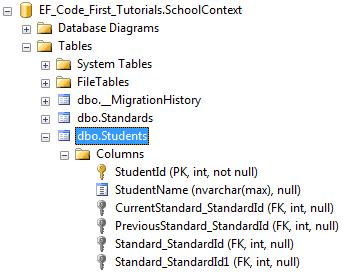
InverseProperty overrides this convention and specifies alignment of the properties. The following example uses InverseProperty in Standard class to fix this problem.
public class Student

{

    public Student()

    {

    }

    public int StudentID { get; set; }

    public string StudentName { get; set; }

    public Standard CurrentStandard { get; set; }

    public Standard PreviousStandard { get; set; }

}

public class Standard

{

    public Standard()

    {

    }

    public int StandardId { get; set; }

    public string StandardName { get; set; }

    [InverseProperty("CurrentStandard")]

    public ICollection<Student> CurrentStudents { get; set; }

    [InverseProperty("PreviousStandard")]

        public ICollection<Student> PreviousStudents { get; set; }

    }
As you can see in the above example, we have applied InverseProperty attribute to CurrentStudents & PreviousStudents property and specify which reference property of Student class it belongs to. Now, Code-First will create only two foreign key column in Student table as shown below.
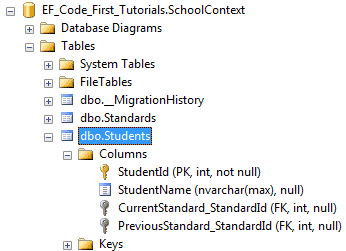
You can also use ForeignKey attribute to include foreign key property with different name as shown below.
public class Student

{

    public Student()

    {

    }

    public int StudentID { get; set; }

    public string StudentName { get; set; }

    public int CurrentStandardId { get; set; }

    public int PreviousStandardId { get; set; }

    [ForeignKey("CurrentStandardId")]

    public Standard CurrentStandard { get; set; }

    [ForeignKey("PreviousStandardId")]

    public Standard PreviousStandard { get; set; }

}

public class Standard

{

    public Standard()

    {

    }

    public int StandardId { get; set; }

    public string StandardName { get; set; }

    [InverseProperty("CurrentStandard")]

    public ICollection<Student> CurrentStudents { get; set; }

    [InverseProperty("PreviousStandard")]

    public ICollection<Student> PreviousStudents { get; set; }

}
The above example will create the following columns.
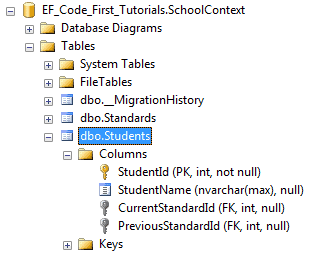
Thus, you can use InverseProperty and ForeignKey attribute for multiple relationships between the same classes.
DataAnnotations - InverseProperty Attribute:的更多相关文章
- Entity Framework Code-First(9.11):DataAnnotations - InverseProperty Attribute
DataAnnotations - InverseProperty Attribute: We have seen in the Code-First Convention section that ...
- Entity Framework Code-First(9.10):DataAnnotations - NotMapped Attribute
DataAnnotations - NotMapped Attribute: NotMapped attribute can be applied to properties of a class. ...
- Entity Framework Code-First(9.9):DataAnnotations - ForeignKey Attribute
DataAnnotations - ForeignKey Attribute: ForeignKey attribute can be applied to properties of a class ...
- Entity Framework Code-First(9.8):DataAnnotations - Column Attribute
DataAnnotations - Column Attribute: Column attribute can be applied to properties of a class. Defaul ...
- Entity Framework Code-First(9.7):DataAnnotations - Table Attribute
DataAnnotations - Table Attribute: Table attribute can be applied to a class. Default Code-First con ...
- Entity Framework Code-First(9.6):DataAnnotations - StringLength Attribute
DataAnnotations - StringLength Attribute: StringLength attribute can be applied to a string type pro ...
- Entity Framework Code-First(9.5):DataAnnotations - MaxLength Attribute
DataAnnotations - MaxLength Attribute: MaxLength attribute can be applied to a string or array type ...
- Entity Framework Code-First(9.2):DataAnnotations - TimeStamp Attribute
DataAnnotations - TimeStamp Attribute: TimeStamp attribute can be applied to only one byte array pro ...
- Entity Framework Code-First(9.1):DataAnnotations - Key Attribute
DataAnnotations - Key Attribute: Key attribute can be applied to properties of a class. Default Code ...
随机推荐
- 对hadoop namenode -format执行过程的探究
引言 本文出于一个疑问:hadoop namenode -format到底在我的linux系统里面做了些什么? 步骤 第1个文件bin/hadoop Hadoop脚本位于hadoop根目录下的bi ...
- zeromq学习记录(一)最初的简单示例使用ZMQ_REQ ZMQ_REP
阅读zeromq guide的一些学习记录 zeromq官方例子 在VC下运行会有些跨平台的错误 我这里有做修改 稍后会发布出来 相关的代码与库 http://download.zeromq.org ...
- 使用Maven搭建SpringMVC
1.创建Maven Project 注意选择webapp 2.添加Maven依赖 <project xmlns="http://maven.apache.org/POM/4.0.0&q ...
- 充分利用CPU多核的处理能力 innodb_read_io_threads和innodb_write_io_threads
https://book.2cto.com/201402/40300.html 在MySQL5.1.X版本中,innodb_file_io_threads参数默认是4,该参数在Linux系统上是不可更 ...
- 使用itext生成pdf的,各种布局
代码如下,jar包为itext.jar,itextAsia.jar,最好都是最新的 :2张图片也在最后贴出,把图片放到D盘可以直接生成制定格式的pdf. 最后生成的pdf如下: 代码如下: packa ...
- 05 IO和管道
目录 三种I/O设备 把I/O重定向至文件 使用管道 知识铺垫 1)查看fd-文件描述符 (L) ll /proc/$$/fd 在Linux中,系统打开文件时会随机分配一个编号 ...
- Django积木块一——验证码
验证码 在github中搜验证码,那个有使用文档 # pip install django-simple-captcha==0.4.6 # setting app captcha # url url( ...
- Django——用户认证和判断用户是否登录
用户认证 必须通过认证之后才能login(request,user)这样才能保存会话到request中,注销后会话结束 注意 自定义的用户登陆时只不止需要验证用户名和密码的需要写认证,就例如在线教育平 ...
- MFS故障测试及维护总结
一.测试环境说明: 10.2.2.230 mfsmaster VIP:10.2.2.130 10.2.2.231 mfsbackup 10.2.2.253 mfsdata01 10.2.2.2 ...
- ReactNative学习笔记(七)Navigator的使用
前言 Navigator主要用于ReactNative中的跳转,中文文档: http://reactnative.cn/docs/0.39/using-navigators.html 懒得打字介绍更多 ...