
DataAnnotations - InverseProperty Attribute:
DataAnnotations - InverseProperty Attribute:
We have seen in the Code-First Convention section that Code-First creates {Class Name}_{Primary Key} foreign key column if you have not included foreign key property in a parent class. The InverseProperty attribute is used when you have multiple relationships between classes.
Consider the following example.
public class Student

{

    public Student()

    {

    }

    public int StudentID { get; set; }

    public string StudentName { get; set; }

    public Standard CurrentStandard { get; set; }

    public Standard PreviousStandard { get; set; }

}

public class Standard

{

    public Standard()

    {

    }

    public int StandardId { get; set; }

    public string StandardName { get; set; }

    public ICollection<Student> CurrentStudents { get; set; }

    public ICollection<Student> PreviousStudents { get; set; }

    }
As you can see in the above example, Student class includes two navigation properties to Standard class. The same way Standard class includes two collection navigation properties for Student. Code-First creates four columns for this relationship, as shown below.
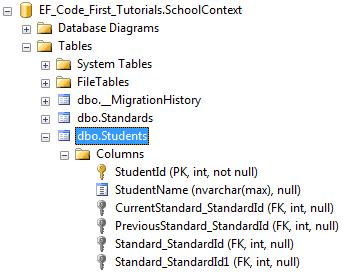
InverseProperty overrides this convention and specifies alignment of the properties. The following example uses InverseProperty in Standard class to fix this problem.
public class Student

{

    public Student()

    {

    }

    public int StudentID { get; set; }

    public string StudentName { get; set; }

    public Standard CurrentStandard { get; set; }

    public Standard PreviousStandard { get; set; }

}

public class Standard

{

    public Standard()

    {

    }

    public int StandardId { get; set; }

    public string StandardName { get; set; }

    [InverseProperty("CurrentStandard")]

    public ICollection<Student> CurrentStudents { get; set; }

    [InverseProperty("PreviousStandard")]

        public ICollection<Student> PreviousStudents { get; set; }

    }
As you can see in the above example, we have applied InverseProperty attribute to CurrentStudents & PreviousStudents property and specify which reference property of Student class it belongs to. Now, Code-First will create only two foreign key column in Student table as shown below.
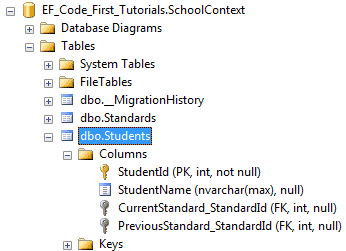
You can also use ForeignKey attribute to include foreign key property with different name as shown below.
public class Student

{

    public Student()

    {

    }

    public int StudentID { get; set; }

    public string StudentName { get; set; }

    public int CurrentStandardId { get; set; }

    public int PreviousStandardId { get; set; }

    [ForeignKey("CurrentStandardId")]

    public Standard CurrentStandard { get; set; }

    [ForeignKey("PreviousStandardId")]

    public Standard PreviousStandard { get; set; }

}

public class Standard

{

    public Standard()

    {

    }

    public int StandardId { get; set; }

    public string StandardName { get; set; }

    [InverseProperty("CurrentStandard")]

    public ICollection<Student> CurrentStudents { get; set; }

    [InverseProperty("PreviousStandard")]

    public ICollection<Student> PreviousStudents { get; set; }

}
The above example will create the following columns.
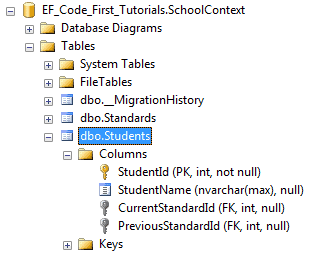
Thus, you can use InverseProperty and ForeignKey attribute for multiple relationships between the same classes.
DataAnnotations - InverseProperty Attribute:的更多相关文章
- Entity Framework Code-First(9.11):DataAnnotations - InverseProperty Attribute
DataAnnotations - InverseProperty Attribute: We have seen in the Code-First Convention section that ...
- Entity Framework Code-First(9.10):DataAnnotations - NotMapped Attribute
DataAnnotations - NotMapped Attribute: NotMapped attribute can be applied to properties of a class. ...
- Entity Framework Code-First(9.9):DataAnnotations - ForeignKey Attribute
DataAnnotations - ForeignKey Attribute: ForeignKey attribute can be applied to properties of a class ...
- Entity Framework Code-First(9.8):DataAnnotations - Column Attribute
DataAnnotations - Column Attribute: Column attribute can be applied to properties of a class. Defaul ...
- Entity Framework Code-First(9.7):DataAnnotations - Table Attribute
DataAnnotations - Table Attribute: Table attribute can be applied to a class. Default Code-First con ...
- Entity Framework Code-First(9.6):DataAnnotations - StringLength Attribute
DataAnnotations - StringLength Attribute: StringLength attribute can be applied to a string type pro ...
- Entity Framework Code-First(9.5):DataAnnotations - MaxLength Attribute
DataAnnotations - MaxLength Attribute: MaxLength attribute can be applied to a string or array type ...
- Entity Framework Code-First(9.2):DataAnnotations - TimeStamp Attribute
DataAnnotations - TimeStamp Attribute: TimeStamp attribute can be applied to only one byte array pro ...
- Entity Framework Code-First(9.1):DataAnnotations - Key Attribute
DataAnnotations - Key Attribute: Key attribute can be applied to properties of a class. Default Code ...
随机推荐
- 判断是否是json
转:https://blog.csdn.net/dy_smile/article/details/46739251 function isJson(obj) { var isjson = typeof ...
- sendmail发送邮件
#echo 'hello!' | mail -s "hello test" 119733@qq.com
- python中使用OpenCV处理图片
1.导入OpenCV包 import cv2 2.读取图片 cv2.imread(image_path, mode) 读入函数,包含两个参数,第一个为图片路径及图片名,第二个为读取图片方 ...
- Chapter3_操作符_算术操作符
java中的算术操作符与其它语言并无太大区别,常用到的是以下这些: (1)加号(+),减号(-),除号(\),乘号(*),取模操作符(%),其中除号需要特别注意的是,会自动截取掉小数点后面的部分,而不 ...
- ABP框架系列之五十:(Swagger-UI-集成)
Introduction From it's web site: "....with a Swagger-enabled API, you get interactive documenta ...
- 走进JDK(八)------AbstractSet
说完了list,再说说colletion另外一个重要的子集set,set里不允许有重复数据,但是不是无序的.先看下set的整个架构吧: 一.类定义 public abstract class Abst ...
- javascript(作业九)
1.javascript简介: JavaScript一种直译式脚本语言,是一种动态类型.弱类型.基于原型的语言,内置支持类型.它的解释器被称为JavaScript引擎,为浏览器的一部分,广泛用于客户端 ...
- java.security.SecureRandom源码分析 java.security.egd=file:/dev/./urandom
SecureRandom在java各种组件中使用广泛,可以可靠的产生随机数.但在大量产生随机数的场景下,性能会较低. 这时可以使用"-Djava.security.egd=file:/dev ...
- mysql数据库到底是什么?!
MySql是MySql.AB公司开发的,采用客户/服务器模型的开放源码关系型SQL数据库管理系统,它可以在多种操作系统上运行. 客户端/服务器:C/S.需要给不同系统安装不同的软件,是专用的协议,比较 ...
- jenkins net编译部署 笔记 tips
1 忘记密码 的话,C:\Users\quyongshuo.jenkins\config.xml 修改 true 为false 重新启动 可以重新设置用户信息. 2 修改端口 Java -jar je ...