
Android 手机卫士--导航界面3、4和功能列表界面跳转逻辑处理
刚刚花了一点时间,将导航界面3、4的布局和相应的跳转逻辑写了一下:
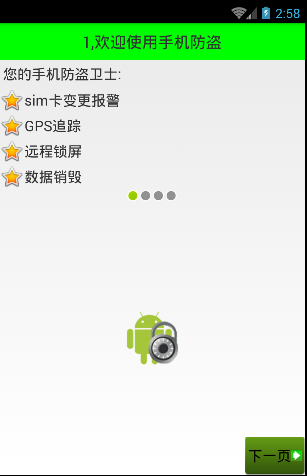
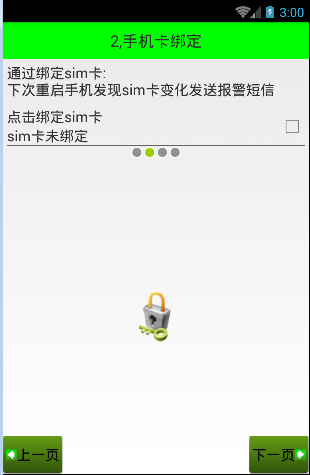
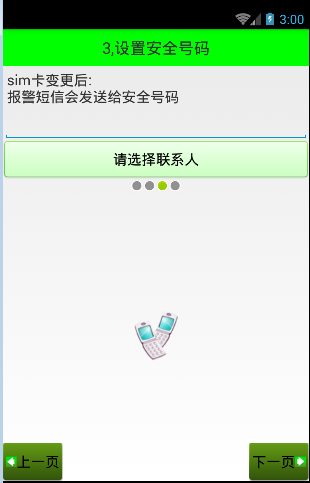
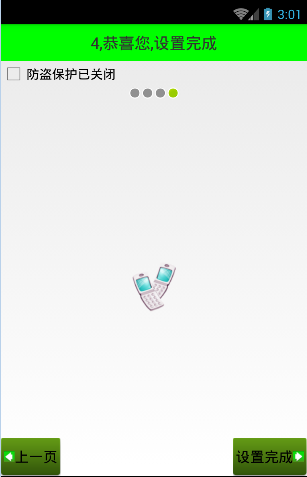
Setup3Activity代码如下:
/**

 * Created by wuyudong on 2016/10/10.

 */

public class Setup3Activity extends Activity{

    @Override

    protected void onCreate(Bundle savedInstanceState) {

        super.onCreate(savedInstanceState);

        setContentView(R.layout.activity_setup3);

    }

    public void nextPage(View view) {

        Intent intent = new Intent(getApplicationContext(), Setup4Activity.class);

        startActivity(intent);

        finish();

    }

    public void prePage(View view) {

        Intent intent = new Intent(getApplicationContext(), Setup2Activity.class);

        startActivity(intent);

        finish();

    }

}
对应的布局文件activity_setup3.xml:
<?xml version="1.0" encoding="utf-8"?>

<LinearLayout xmlns:android="http://schemas.android.com/apk/res/android"

    android:layout_width="match_parent"

    android:layout_height="match_parent"

    android:orientation="vertical">

    <TextView

        style="@style/TitleStyle"

        android:text="3.设置安全号码" />

    <TextView

        android:layout_width="wrap_content"

        android:layout_height="wrap_content"

        android:textColor="#000"

        android:textSize="18sp"

        android:layout_margin="5dp"

        android:text="sim卡变更后\n就会发送报警短信安全号码" />

    <EditText

        android:layout_width="match_parent"

        android:layout_height="wrap_content"

        android:id="@+id/et_phone_number"

        android:hint="请输入电话号码"

        />

    <Button

        android:layout_width="match_parent"

        android:layout_height="wrap_content"

        android:id="@+id/bt_select_number"

        android:text="选择联系人"

        android:background="@drawable/selector_number_btn"

        />

    <!-- 让内部点的空间水平居中 -->

    <LinearLayout

        android:layout_width="match_parent"

        android:layout_height="wrap_content"

        android:gravity="center_horizontal">

        <ImageView

            android:layout_width="wrap_content"

            android:layout_height="wrap_content"

            android:background="@android:drawable/presence_invisible" />

        <ImageView

            android:layout_width="wrap_content"

            android:layout_height="wrap_content"

            android:background="@android:drawable/presence_invisible" />

        <ImageView

            android:layout_width="wrap_content"

            android:layout_height="wrap_content"

            android:background="@android:drawable/presence_online" />

        <ImageView

            android:layout_width="wrap_content"

            android:layout_height="wrap_content"

            android:background="@android:drawable/presence_invisible" />

    </LinearLayout>

    <RelativeLayout

        android:layout_width="match_parent"

        android:layout_height="match_parent">

        <!-- 图片选择器,在选中和未选中的过程中,切换展示图片 -->

        <Button style="@style/preBtn" />

        <Button style="@style/nextBtn" />

        <ImageView

            android:layout_width="wrap_content"

            android:layout_height="wrap_content"

            android:background="@drawable/phone"

            android:layout_centerVertical="true"

            android:layout_centerHorizontal="true" />

    </RelativeLayout>

</LinearLayout>
Setup4Activity代码如下:
/**

 * Created by wuyudong on 2016/10/10.

 */

public class Setup4Activity extends Activity{

    @Override

    protected void onCreate(Bundle savedInstanceState) {

        super.onCreate(savedInstanceState);

        setContentView(R.layout.activity_setup4);

    }

   public void nextPage(View view) {

        Intent intent = new Intent(getApplicationContext(), SetupOverActivity.class);

        startActivity(intent);

        finish();

        SpUtil.putBoolean(this, ConstantValue.SETUP_OVER, true);

    }

    public void prePage(View view) {

        Intent intent = new Intent(getApplicationContext(), Setup3Activity.class);

        startActivity(intent);

        finish();

    }

}
对应的布局文件activity_setup4.xml:
<?xml version="1.0" encoding="utf-8"?>

<LinearLayout xmlns:android="http://schemas.android.com/apk/res/android"

    android:layout_width="match_parent"

    android:layout_height="match_parent"

    android:orientation="vertical">

    <TextView

        style="@style/TitleStyle"

        android:text="4.恭喜您,设置完成" />

    <CheckBox

        android:layout_width="wrap_content"

        android:layout_height="wrap_content"

        android:text="防盗保护已关闭"

        />

    <!-- 让内部点的空间水平居中 -->

    <LinearLayout

        android:layout_width="match_parent"

        android:layout_height="wrap_content"

        android:gravity="center_horizontal">

        <ImageView

            android:layout_width="wrap_content"

            android:layout_height="wrap_content"

            android:background="@android:drawable/presence_invisible" />

        <ImageView

            android:layout_width="wrap_content"

            android:layout_height="wrap_content"

            android:background="@android:drawable/presence_invisible" />

        <ImageView

            android:layout_width="wrap_content"

            android:layout_height="wrap_content"

            android:background="@android:drawable/presence_invisible" />

        <ImageView

            android:layout_width="wrap_content"

            android:layout_height="wrap_content"

            android:background="@android:drawable/presence_online" />

    </LinearLayout>

    <RelativeLayout

        android:layout_width="match_parent"

        android:layout_height="match_parent">

        <ImageView

            android:layout_width="wrap_content"

            android:layout_height="wrap_content"

            android:layout_centerInParent="true"

            android:background="@drawable/phone" />

        <!-- 图片选择器,在选中和未选中的过程中,切换展示图片 -->

        <Button style="@style/preBtn" />

        <Button style="@style/nextBtn"

            android:text="设置完成"

            />

    </RelativeLayout>

</LinearLayout>
Android 手机卫士--导航界面3、4和功能列表界面跳转逻辑处理的更多相关文章
- Android 手机卫士--导航界面1的布局编写
本文地址:http://www.cnblogs.com/wuyudong/p/5943005.html,转载请注明出处. 本文实现导航界面1的布局的实现,效果如下图所示: 首先分析所使用的布局样式: ...
- Android 手机卫士--导航界面2
本文地址:http://www.cnblogs.com/wuyudong/p/5947504.html,转载请注明出处. 在之前的文章中,实现了导航界面1布局编写与相关的逻辑代码,如下图所示: 点击“ ...
- Android 手机卫士--导航界面4的业务逻辑
本文实现导航界面4的业务逻辑,导航界面4的界面如下: 本文地址:http://www.cnblogs.com/wuyudong/p/5952640.html,转载请注明出处. 相应的代码如下: pri ...
- Android 手机卫士--参照文档编写选择器
本文来实现<Android 手机卫士--导航界面1的布局编写>中的图片选择器部分的代码. 本文地址:http://www.cnblogs.com/wuyudong/p/5944356.ht ...
- Android 手机卫士--设置界面&功能列表界面跳转逻辑处理
在<Android 手机卫士--md5加密过程>中已经实现了加密类,这里接着实现手机防盗功能 本文地址:http://www.cnblogs.com/wuyudong/p/5941959. ...
- Android 手机卫士--确认密码对话框编写
本文接着实现“确认密码”功能,也即是用户以前设置过密码,现在只需要输入确认密码 本文地址:http://www.cnblogs.com/wuyudong/p/5940718.html,转载请注明出处. ...
- Android 手机卫士--签名文件说明&包名说明
在<Android 手机卫士--打包生成apk维护到服务器>一文中,实现了新版本的apk到服务器,当打开客户端apk的时候,发现有新版本,提示更新.还实现了利用xutils工具实现了从服务 ...
- Android 手机卫士--弹出对话框
在<Android 手机卫士--解析json与消息机制发送不同类型消息>一文中,消息机制发送不同类型的信息还没有完全实现,在出现异常的时候,应该弹出吐司提示异常,代码如下: private ...
- android手机卫士、3D指南针、动画精选、仿bilibli客户端、身份证银行卡识别等源码
Android精选源码 android身份证.银行卡号扫描源码 android仿bilibili客户端 android一款3D 指南针 源码 android手机卫士app源码 android提醒应用, ...
随机推荐
- Android(1)—Mono For Android 环境搭建及破解
0.前言 最近公司打算开发一款Android平台的简单报表查询软件,因本人之前一直是.NET开发的,和领导商定之后决定采用Mono For Android 进行开发,暂时采用破解版进行开发: 下文是记 ...
- Xamarin.Android之ActionBar与菜单
一.选项卡 如今很多应用都会使用碎片以便在同一个活动中能够显示多个不同的视图.在Android 3.0 以上的版本中,我们已经可以使用ActionBar提供的Tab来实现这种效果,而不需要我们自己去实 ...
- 绿色版的Linux.NET——“Jws.Mono”(续)
在前一篇文章中,我们简略的介绍了jws.mono的安装使用,以及我们如何自己动手做一个jws.mono出来. 在文章发表之后的几天里,我一直觉得有点不妥之处,直到后来猛然的意识到:我们自己动手做的jw ...
- Vue.js——vue-router 60分钟快速入门
概述 vue-router是Vue.js官方的路由插件,它和vue.js是深度集成的,适合用于构建单页面应用.vue的单页面应用是基于路由和组件的,路由用于设定访问路径,并将路径和组件映射起来.传统的 ...
- salesforce 零基础学习(六十)Wizard样式创建数据
项目中表之间关联关系特别多,比如三个表中A,B,C C作为主表,A,B作为从表,有时候C表需要创建数据时,同时需要创建A,B两个表的数据,这种情况下,使用Wizard样式会更加友好. 以Goods_ ...
- salesforce 零基础学习(五十八)通过sObject的field返回其对应的基础类型
项目中有时候会要求通过sObject的Field的type类型返回其对应的基本类型,然后对其进行相关的处理,创建sObject的field可以选择的type类型是固定多的. 上述类型可以转换成几种基本 ...
- SQLServer 数据库镜像+复制方案
目标: 主机做了Mirror和Replication,当主机出现问题时,Replication和Mirror实现自动的故障转移(Mirror 和Replication都切换到备机,而当主机 重新启动后 ...
- 【Win 10 应用开发】手写识别
记得前面(忘了是哪天写的,反正是前些天,请用力点击这里观看)老周讲了一个14393新增的控件,可以很轻松地结合InkCanvas来完成涂鸦.其实,InkCanvas除了涂鸦外,另一个大用途是墨迹识别, ...
- 【Win 10 应用开发】文件读写的三种方案
本文老周就跟伙伴们探讨一下关于文件读写的方法.总得来说嘛,有三种方案可以用,而且每种方案都各有特色,也说不上哪种较好.反正你得记住老祖宗留给我们的大智慧——事无定法,灵活运用者为上. OK,咱们开始吧 ...
- jQuery UI与jQuery easyUI的冲突解决办法
jQuery UI与jQuery easyUI都是基于jQuery开发的.难免里面会有些方法名冲突! 因此对jQuery.easyui其中的两个方法名:resizable 和 draggable进行替 ...