
Android 手机卫士--导航界面2
本文地址:http://www.cnblogs.com/wuyudong/p/5947504.html,转载请注明出处。
在之前的文章中,实现了导航界面1布局编写与相关的逻辑代码,如下图所示:
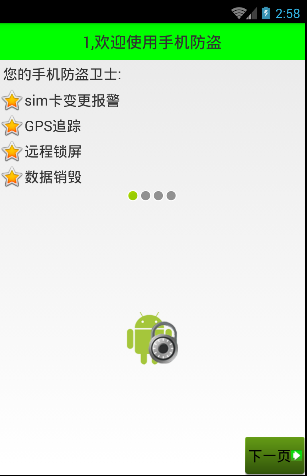
点击“下一页”
public class Setup1Activity extends Activity{

    @Override

    protected void onCreate(Bundle savedInstanceState) {

        super.onCreate(savedInstanceState);

        setContentView(R.layout.activity_setup1);

    }

    public void nextPage(View view) {

        Intent intent = new Intent(getApplicationContext(), Setup2Activity.class);

        startActivity(intent);

        finish();

    }

}
进入新的activity:
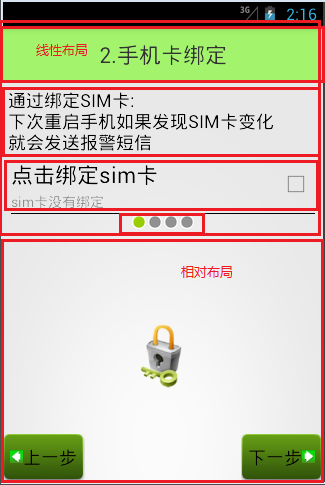
可以看到,布局和之前的类似,代码如下:
<?xml version="1.0" encoding="utf-8"?>

<LinearLayout xmlns:android="http://schemas.android.com/apk/res/android"

    android:layout_width="match_parent"

    android:layout_height="match_parent"

    android:orientation="vertical">

    <TextView

        style="@style/TitleStyle"

        android:text="2.手机卡绑定" />

    <TextView

        android:layout_width="wrap_content"

        android:layout_height="wrap_content"

        android:textColor="#000"

        android:textSize="18sp"

        android:layout_margin="5dp"

        android:text="通过绑定SIM卡:\n下次重启手机如果发现SIM卡发生变化\n就会发送报警短信" />

    <com.wuyudong.mobilesafe.view.SettingItemView

        xmlns:mobilesafe="http://schemas.android.com/apk/res/com.wuyudong.mobilesafe"

        android:id="@+id/siv_sim_bound"

        android:layout_width="match_parent"

        android:layout_height="wrap_content"

        mobilesafe:destitle="点击绑定sim卡"

        mobilesafe:desoff="sim卡未绑定"

        mobilesafe:deson="sim卡已绑定" >

    </com.wuyudong.mobilesafe.view.SettingItemView>

    <!-- 让内部点的空间水平居中 -->

    <LinearLayout

        android:layout_width="match_parent"

        android:layout_height="wrap_content"

        android:gravity="center_horizontal">

        <ImageView

            android:layout_width="wrap_content"

            android:layout_height="wrap_content"

            android:background="@android:drawable/presence_invisible" />

        <ImageView

            android:layout_width="wrap_content"

            android:layout_height="wrap_content"

            android:background="@android:drawable/presence_online" />

        <ImageView

            android:layout_width="wrap_content"

            android:layout_height="wrap_content"

            android:background="@android:drawable/presence_invisible" />

        <ImageView

            android:layout_width="wrap_content"

            android:layout_height="wrap_content"

            android:background="@android:drawable/presence_invisible" />

    </LinearLayout>

    <RelativeLayout

        android:layout_width="match_parent"

        android:layout_height="match_parent">

        <ImageView

            android:layout_width="wrap_content"

            android:layout_height="wrap_content"

            android:layout_centerInParent="true"

            android:background="@mipmap/bind" />

        <!-- 图片选择器,在选中和未选中的过程中,切换展示图片 -->

        <Button style="@style/preBtn" />

        <Button style="@style/nextBtn" />

    </RelativeLayout>

</LinearLayout>
效果如下:

Android 手机卫士--导航界面2的更多相关文章
- Android 手机卫士--导航界面1的布局编写
本文地址:http://www.cnblogs.com/wuyudong/p/5943005.html,转载请注明出处. 本文实现导航界面1的布局的实现,效果如下图所示: 首先分析所使用的布局样式: ...
- Android 手机卫士--导航界面3、4和功能列表界面跳转逻辑处理
刚刚花了一点时间,将导航界面3.4的布局和相应的跳转逻辑写了一下: Setup3Activity代码如下: /** * Created by wuyudong on 2016/10/10. */ pu ...
- Android 手机卫士--导航界面4的业务逻辑
本文实现导航界面4的业务逻辑,导航界面4的界面如下: 本文地址:http://www.cnblogs.com/wuyudong/p/5952640.html,转载请注明出处. 相应的代码如下: pri ...
- Android 手机卫士--设置界面&功能列表界面跳转逻辑处理
在<Android 手机卫士--md5加密过程>中已经实现了加密类,这里接着实现手机防盗功能 本文地址:http://www.cnblogs.com/wuyudong/p/5941959. ...
- Android 手机卫士--home界面布局
本文实现当从splash界面进入hone界面的时候,产生一种渐进淡入的动画效果,在onCreate中调用一个方法initAnimation(),代码如下: /** * 添加淡入的动画效果 */ pri ...
- Android 手机卫士--参照文档编写选择器
本文来实现<Android 手机卫士--导航界面1的布局编写>中的图片选择器部分的代码. 本文地址:http://www.cnblogs.com/wuyudong/p/5944356.ht ...
- Android 手机卫士--确认密码对话框编写
本文接着实现“确认密码”功能,也即是用户以前设置过密码,现在只需要输入确认密码 本文地址:http://www.cnblogs.com/wuyudong/p/5940718.html,转载请注明出处. ...
- Android 手机卫士--签名文件说明&包名说明
在<Android 手机卫士--打包生成apk维护到服务器>一文中,实现了新版本的apk到服务器,当打开客户端apk的时候,发现有新版本,提示更新.还实现了利用xutils工具实现了从服务 ...
- Android 手机卫士--弹出对话框
在<Android 手机卫士--解析json与消息机制发送不同类型消息>一文中,消息机制发送不同类型的信息还没有完全实现,在出现异常的时候,应该弹出吐司提示异常,代码如下: private ...
随机推荐
- ASP.NET Aries JSAPI 文档说明:AR.DataGrid、AR.Dictionary
AR.Global 文档 1:对象或属性: 名称 类型 说明 DG 对象 DataGrid操作对象 //datagrid集合,根据ID取出DataGrid对象,将Json当数组用. Items: ne ...
- ES6+ 现在就用系列(二):let 命令
系列目录 ES6+ 现在就用系列(一):为什么使用ES6+ ES6+ 现在就用系列(二):let 命令 ES6+ 现在就用系列(三):const 命令 ES6+ 现在就用系列(四):箭头函数 => ...
- vs 2015 "加载该页时出错。" 解决方案
错误信息: 加载该页时出错. 未找到与约束 ContractName Microsoft.CodeAnalysis.Editor.TypeScript.ScriptContexts.ITypeSc ...
- 透过浏览器看HTTP缓存
作为前端开发人员,对于我们的站点或应用的缓存机制我们能做的似乎不多,但这些却是与我们关注的性能息息相关的部分,站点没有做任何缓存机制,我们的页面可能会因为资源的下载和渲染变得很慢,但大家都知道去找前端 ...
- 1、利用蓝牙定位及姿态识别实现一个智能篮球场套件(一)——用重写CC2541透传模块做成智能手环
一.预言 要实现一个智能篮球场套件,需要设计一个佩戴在篮球运动员手臂上的可以检测投篮.记步的手环,以及一套可以根据RSSI定位运动员的蓝牙定位装置.下面是大致需要的步骤: 首先,需要用CC2541透传 ...
- mysql sleep进程过多,应用级配置
<property name="hibernateProperties"> <props> <prop key="hibernate.dia ...
- stm32GPIO的速度是什么意思
[引]: I/O口输出模式下,有3种输出速度可选(2MHz.10MHz和50MHz),这个速度是指I/O口驱动电路的响应速度而不是输出信号的速度,输出信号的速度与程序有关(芯片内部在I/O口的输出部分 ...
- 【MSP是什么】MSP认证之项目群管理学习心得
学习了项目群管理后,我深受启发,在此发表下自己的一些个人感想. 项目群是指经过协调统一管理以便获取单独管理时无法取得的效益和控制的一组相互联系的项目. 项目群中的项目需要共享组织的资源, 需要进行项目 ...
- cookies,sessionStorage和localStorage的区别---web前端sessionStorage和localStorage区别
sessionStorage用于本地存储一个会话(session)中的数据,这些数据只有在同一个会话中的页面才能访问并且当会话结束后数据也随之销毁.因此sessionStorage不是一种持久化的本地 ...
- 5.C#WinForm基础登陆失败三次退出系统
目标: 登陆界面,登陆错误三次退出程序.假设用户名密码是admin.888888,不区分大小写,(易错点:局部变量与类变量) 局部变量每次运行完毕变量的值都会被销毁,下次再运行,会重新初始化. ...