
Android 手机卫士--导航界面1的布局编写
本文地址:http://www.cnblogs.com/wuyudong/p/5943005.html,转载请注明出处。
本文实现导航界面1的布局的实现,效果如下图所示:
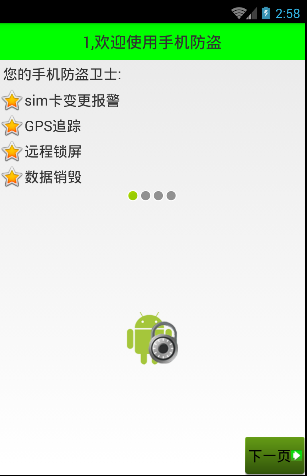
首先分析所使用的布局样式:
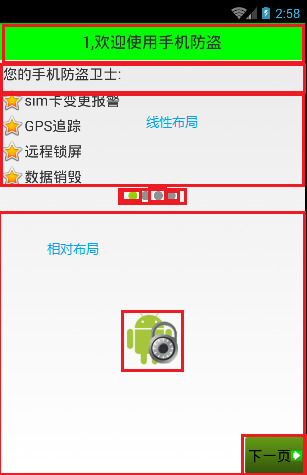
对应的activity_setup1.xml布局文件内容如下:
<?xml version="1.0" encoding="utf-8"?>

<LinearLayout xmlns:android="http://schemas.android.com/apk/res/android"

    android:orientation="vertical"

    android:layout_width="match_parent"

    android:layout_height="match_parent">

    <TextView

        style="@style/TitleStyle"

        android:text="1.欢迎使用手机防盗"

        />

    <TextView

        android:layout_width="wrap_content"

        android:layout_height="wrap_content"

        android:textColor="#000"

        android:textSize="18sp"

        android:layout_margin="5dp"

        android:text="您的手机防盗卫士"

        />

    <TextView

        android:layout_width="wrap_content"

        android:layout_height="wrap_content"

        android:drawableLeft="@android:drawable/star_big_on"

        android:gravity="center_vertical"

        android:textColor="#000"

        android:textSize="18sp"

        android:text="sim卡变更报警"

        />

    <TextView

        android:layout_width="wrap_content"

        android:layout_height="wrap_content"

        android:drawableLeft="@android:drawable/star_big_on"

        android:gravity="center_vertical"

        android:textColor="#000"

        android:textSize="18sp"

        android:text="GPS追踪"

        />

    <TextView

        android:layout_width="wrap_content"

        android:layout_height="wrap_content"

        android:drawableLeft="@android:drawable/star_big_on"

        android:gravity="center_vertical"

        android:textColor="#000"

        android:textSize="18sp"

        android:text="远程数据销毁"

        />

    <TextView

        android:layout_width="wrap_content"

        android:layout_height="wrap_content"

        android:drawableLeft="@android:drawable/star_big_on"

        android:gravity="center_vertical"

        android:textColor="#000"

        android:textSize="18sp"

        android:text="远程锁屏"

        />

    <!-- 让内部点的空间水平居中 -->

    <LinearLayout

        android:gravity="center_horizontal"

        android:layout_width="match_parent"

        android:layout_height="wrap_content">

        <ImageView

            android:layout_width="wrap_content"

            android:layout_height="wrap_content"

            android:background="@android:drawable/presence_online"

            />

        <ImageView

            android:layout_width="wrap_content"

            android:layout_height="wrap_content"

            android:background="@android:drawable/presence_invisible"

            />

        <ImageView

            android:layout_width="wrap_content"

            android:layout_height="wrap_content"

            android:background="@android:drawable/presence_invisible"

            />

        <ImageView

            android:layout_width="wrap_content"

            android:layout_height="wrap_content"

            android:background="@android:drawable/presence_invisible"

            />

    </LinearLayout>

    <RelativeLayout

        android:layout_width="match_parent"

        android:layout_height="match_parent">

        <ImageView

            android:background="@drawable/setup1"

            android:layout_centerInParent="true"

            android:layout_width="wrap_content"

            android:layout_height="wrap_content" />

        <!-- 图片选择器,在选中和未选中的过程中,切换展示图片 -->

        <Button

            android:text="下一页"

            android:layout_width="wrap_content"

            android:layout_height="wrap_content" />

    </RelativeLayout>

</LinearLayout>
最后还剩下右下角的布局还没有实现,将在下篇文章中单独讲解
Android 手机卫士--导航界面1的布局编写的更多相关文章
- Android 手机卫士--导航界面2
本文地址:http://www.cnblogs.com/wuyudong/p/5947504.html,转载请注明出处. 在之前的文章中,实现了导航界面1布局编写与相关的逻辑代码,如下图所示: 点击“ ...
- Android 手机卫士--导航界面3、4和功能列表界面跳转逻辑处理
刚刚花了一点时间,将导航界面3.4的布局和相应的跳转逻辑写了一下: Setup3Activity代码如下: /** * Created by wuyudong on 2016/10/10. */ pu ...
- Android 手机卫士--导航界面4的业务逻辑
本文实现导航界面4的业务逻辑,导航界面4的界面如下: 本文地址:http://www.cnblogs.com/wuyudong/p/5952640.html,转载请注明出处. 相应的代码如下: pri ...
- Android 手机卫士--设置界面&功能列表界面跳转逻辑处理
在<Android 手机卫士--md5加密过程>中已经实现了加密类,这里接着实现手机防盗功能 本文地址:http://www.cnblogs.com/wuyudong/p/5941959. ...
- Android 手机卫士--home界面布局
本文实现当从splash界面进入hone界面的时候,产生一种渐进淡入的动画效果,在onCreate中调用一个方法initAnimation(),代码如下: /** * 添加淡入的动画效果 */ pri ...
- Android 手机卫士--参照文档编写选择器
本文来实现<Android 手机卫士--导航界面1的布局编写>中的图片选择器部分的代码. 本文地址:http://www.cnblogs.com/wuyudong/p/5944356.ht ...
- Android 手机卫士--确认密码对话框编写
本文接着实现“确认密码”功能,也即是用户以前设置过密码,现在只需要输入确认密码 本文地址:http://www.cnblogs.com/wuyudong/p/5940718.html,转载请注明出处. ...
- android手机卫士、3D指南针、动画精选、仿bilibli客户端、身份证银行卡识别等源码
Android精选源码 android身份证.银行卡号扫描源码 android仿bilibili客户端 android一款3D 指南针 源码 android手机卫士app源码 android提醒应用, ...
- Android 手机卫士--签名文件说明&包名说明
在<Android 手机卫士--打包生成apk维护到服务器>一文中,实现了新版本的apk到服务器,当打开客户端apk的时候,发现有新版本,提示更新.还实现了利用xutils工具实现了从服务 ...
随机推荐
- CSharpGL(26)在opengl中实现控件布局/渲染文字
CSharpGL(26)在opengl中实现控件布局/渲染文字 效果图 如图所示,可以将文字.坐标轴固定在窗口的一角. 下载 CSharpGL已在GitHub开源,欢迎对OpenGL有兴趣的同学加入( ...
- Android开发学习之路-Git的极简教程?
Git是一个代码版本管理工具,也就是允许我们的一个项目拥有多个版本,这样我们可以随心所欲的修改我们的代码,如果出现问题,可以回退到某一个提交点.如果你还在用一堆堆注释来更新你的代码,那么可以尝试一下G ...
- jQuery的几个应例题、JSON基础
1.下拉列表取值.赋值 (1)写个下拉列表,如下: <select id="sel"> <option value="山东">山东< ...
- SQLSERVER误删除了Windows登录用户验证方式使用Windows身份验证的解决方法
SQLSERVER误删Windows登录用户验证方式使用Windows身份验证的解决方法 今天看到这篇文章:没有了SA密码,无法Windows集成身份登录,DBA怎么办? 想起来之前着急哥问我的一个问 ...
- 前端学HTTP之WEB服务器
前面的话 Web服务器每天会分发出数以亿计的Web页面,它是万维网的骨干.本文主要介绍WEB服务器的相关内容 总括 Web服务器会对HTTP请求进行处理并提供响应.术语“Web服务器”可以用来表示We ...
- ECharts 初识(基于MVC+jQuery+Angularjs实现的Demo)
一.背景: 我们这行做web开发的,很多时候都需要做数据统计报表,现在我所使用的是来自百度团队的ECharts.官方网址:http://echarts.baidu.com/ 我们知 ...
- MUI跨域请求数据的例子:
<, , success: function(data) { ...
- react+redux教程(六)redux服务端渲染流程
今天,我们要讲解的是react+redux服务端渲染.个人认为,react击败angular的真正“杀手锏”就是服务端渲染.我们为什么要实现服务端渲染,主要是为了SEO. 例子 例子仍然是官方的计数器 ...
- 《你不知道的JavaScript》整理(三)——对象
一.语法 两种形式定义:文字形式和构造形式. //文字形式 var myObj = { key: value }; //构造形式 var myObj = new Object(); myObj.key ...
- PHP用单例模式实现一个数据库类
使用单例模式的出发点: 1.php的应用主要在于数据库应用, 所以一个应用中会存在大量的数据库操作, 使用单例模式, 则可以避免大量的new 操作消耗的资源. 2.如果系统中需要有一个类来全局控制某些 ...