
【Netty4】深入学习Netty
Netty is an asynchronous event-driven network application framework
for rapid development of maintainable high performance protocol servers & clients
学习前,建议了解下java NIO相关知识,有助于对Netty中对象的理解。
NIO介绍,博客地址:https://blog.csdn.net/the_fool_/article/details/83000648
AIO、BIO、NIO的区别,博客地址:https://blog.csdn.net/anxpp/article/details/51512200
Netty如何封装Java NIO,博客地址::https://blog.csdn.net/tjreal/article/details/79751342
应用场景:https://blog.csdn.net/LIAN_XL/article/details/79799072
版本:目前最新版本为4.1.30
环境:JDK 5 (Netty 3.x) or 6 (Netty 4.x) is enough
八卦:Netty5被干掉的原因?极大增加了复杂度,效率却没有提升,作者干掉了master分支。
模块,结构:
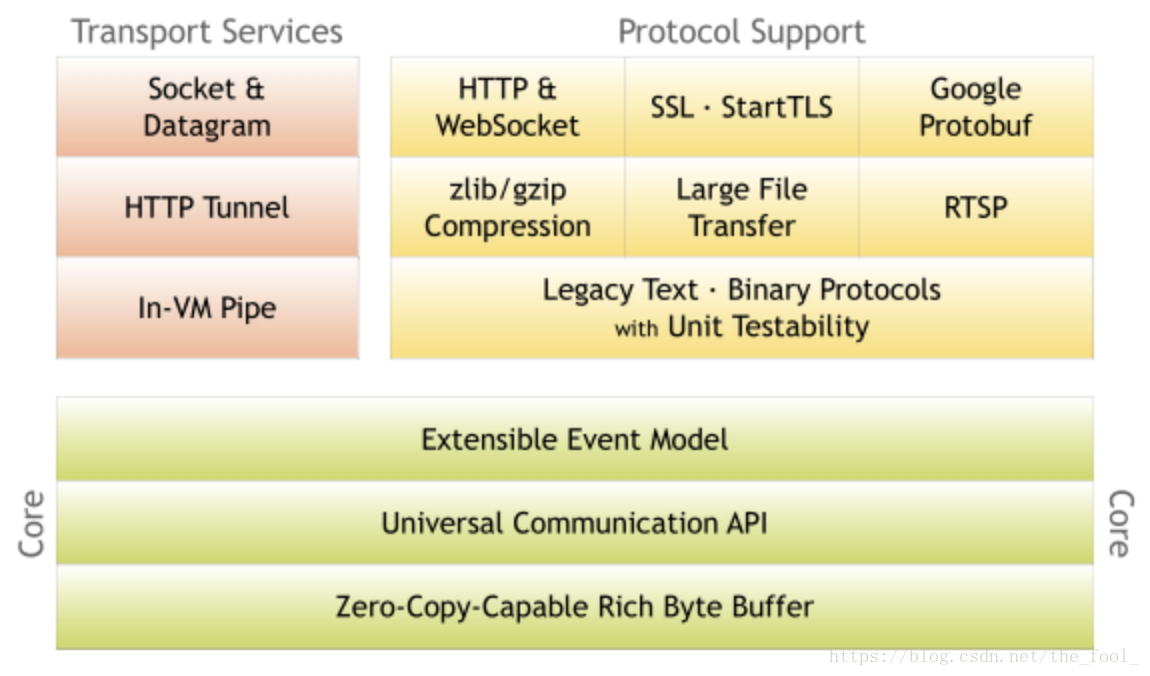
支持的链接类型:普通链接、长连接、心跳检测等。
使用:官方的简单demo,用于介绍Netty 创建过程:
完整代码:https://blog.csdn.net/the_fool_/article/details/80611148
1、根据实际业务创建handle处理类,处理客户端请求实际信息:
package com.xxx.ann.netty.mostsimple;

import io.netty.buffer.ByteBuf;

import io.netty.channel.ChannelHandlerContext;

import io.netty.channel.ChannelInboundHandlerAdapter;

import io.netty.util.ReferenceCountUtil;

/**

 * Handles a server-side channel.

 * 实际上自定义的业务流程使用的是本类

 */

public class DiscardServerHandler extends ChannelInboundHandlerAdapter { // (1)

    /**

     * Server读取信息的方法

     * @param ctx

     * @param msg

     */

    @Override

    public void channelRead(ChannelHandlerContext ctx, Object msg) {

        ByteBuf in = (ByteBuf) msg;

        try {

            while (in.isReadable()) { // (1)

                System.out.print((char) in.readByte());

                System.out.flush();

            }

            // 向客户端发送消息

            String response = "hello client!";

            // 在当前场景下,发送的数据必须转换成ByteBuf数组

            ByteBuf encoded = ctx.alloc().buffer(4 * response.length());

            encoded.writeBytes(response.getBytes());

            ctx.write(encoded);

            ctx.flush();

        } finally {

            ReferenceCountUtil.release(msg); // (2)

        }

    }

    /**

     * 处理异常

     * @param ctx

     * @param cause

     */

    @Override

    public void exceptionCaught(ChannelHandlerContext ctx, Throwable cause) { // (4)

        // Close the connection when an exception is raised.

        cause.printStackTrace();

        ctx.close();

    }

}
2、Server 端代码:
package com.xxx.ann.netty.mostsimple;

import io.netty.bootstrap.ServerBootstrap;

import io.netty.channel.ChannelFuture;

import io.netty.channel.ChannelInitializer;

import io.netty.channel.ChannelOption;

import io.netty.channel.EventLoopGroup;

import io.netty.channel.nio.NioEventLoopGroup;

import io.netty.channel.socket.SocketChannel;

import io.netty.channel.socket.nio.NioServerSocketChannel;

/**

 * server 端

 */

public class DiscardServer {

    private int port;

    public DiscardServer(int port){

        this.port=port;

    }

    public void run() throws Exception{

        /**EventLoopGroup:IO操作的多线程组

         *boss:

         * accepts an incoming connection 处理链接

         *worker:

         * handles the traffic of the accepted connection once

         * the boss accepts the connection and registers the accepted

         * connection to the worker 处理实际逻辑

         * 使用多少线程以及如何将它们映射到创建的通道取决于EventLoopGroup实现,甚至可以通过构造函数进行配置。

         * */

        EventLoopGroup bossGroup = new NioEventLoopGroup();

        EventLoopGroup workerGroup = new NioEventLoopGroup();

        try {

        /**ServerBootstrap是一个建立服务器的助手类。可以直接使用通道设置服务器。

        */

            ServerBootstrap b = new ServerBootstrap();

            b.group(bossGroup, workerGroup)

            /**Here, we specify to use the NioServerSocketChannel class which is used to

             * instantiate a new Channel to accept incoming connections.*/

                    .channel(NioServerSocketChannel.class)

                    /***

                     * 这里指定处理程序将始终由新接受的通道进行处理

                     * ChannelInitializer:是专门帮助用户配置新通道的特殊处理程序。

                     * 实际使用需要抽取到顶级类并自定义业务逻辑代码

                     */

                    .childHandler(new ChannelInitializer<SocketChannel>() {

                        @Override

                        public void initChannel(SocketChannel ch) throws Exception {

                            ch.pipeline().addLast(new DiscardServerHandler());

                        }

                    })

                    /**特定通道实现参数,具体含义:https://netty.io/4.1/api/io/netty/channel/ChannelOption.html

                     *option() is for the NioServerSocketChannel that accepts incoming connections

                     * childOption() is for the Channels accepted by the parent ServerChannel

                     * */

                    .option(ChannelOption.SO_BACKLOG, 128)

                    .childOption(ChannelOption.SO_KEEPALIVE, true);

            /** Bind and start to accept incoming connections.*/

            ChannelFuture f = b.bind(port).sync();

            /**

             * Wait until the server socket is closed.

             * In this example, this does not happen, but you can do that to gracefully

             * shut down your server.

             * */

            f.channel().closeFuture().sync();

        } catch (InterruptedException e) {

            e.printStackTrace();

        }finally {

            workerGroup.shutdownGracefully();

            bossGroup.shutdownGracefully();

        }

    }

    public static void main(String[] args) throws Exception {

        int port=8081;

        new DiscardServer(port).run();

    }

}
3、浏览器进入licalhost:8081或者telnet localhost 8081可访问服务端,可在控制台查看到已经建立连接并访问成功(本demo不会成功返回数据)。
更多参考资料:https://mp.weixin.qq.com/s/IyWWeI7oWjvMgIWwizbLqA
【Netty4】深入学习Netty的更多相关文章
- Netty4.0学习笔记系列之一:Server与Client的通讯
http://blog.csdn.net/u013252773/article/details/21046697 本文是学习Netty的第一篇文章,主要对Netty的Server和Client间的通讯 ...
- Netty学习——Netty和Protobuf的整合(二)
Netty学习——Netty和Protobuf的整合(二) 这程序是有瑕疵的,解码器那里不通用,耦合性太强,有两个很明显的问题,但是要怎么解决呢?如:再加一个内部类型 Person2,之前的代码就不能 ...
- Netty学习——Netty和Protobuf的整合(一)
Netty学习——Netty和Protobuf的整合 Protobuf作为序列化的工具,将序列化后的数据,通过Netty来进行在网络上的传输 1.将proto文件里的java包的位置修改一下,然后再执 ...
- 深入学习Netty(1)——传统BIO编程
前言 之前看过Dubbo源码,Nacos等源码都涉及到了Netty,虽然遇到的时候查查资料,后面自己也有私下学习Netty并实践,但始终没有形成良好的知识体系,Netty对想要在Java开发上不断深入 ...
- 深入学习Netty(2)——传统NIO编程
前言 学习Netty编程,避免不了从了解Java 的NIO编程开始,这样才能通过比较让我们对Netty有更深的了解,才能知道Netty大大的好处.传统的NIO编程code起来比较麻烦,甚至有遗留Bug ...
- 深入学习Netty(3)——传统AIO编程
前言 之前已经整理过了BIO.NIO两种I/O的相关博文,每一种I/O都有其特点,但相对开发而言,肯定是要又高效又简单的I/O编程才是真正需要的,在之前的NIO博文(深入学习Netty(2)--传统N ...
- 深入学习Netty(4)——Netty编程入门
前言 从学习过BIO.NIO.AIO编程之后,就能很清楚Netty编程的优势,为什么选择Netty,而不是传统的NIO编程.本片博文是Netty的一个入门级别的教程,同时结合时序图与源码分析,以便对N ...
- 深入学习Netty(5)——Netty是如何解决TCP粘包/拆包问题的?
前言 学习Netty避免不了要去了解TCP粘包/拆包问题,熟悉各个编解码器是如何解决TCP粘包/拆包问题的,同时需要知道TCP粘包/拆包问题是怎么产生的. 在此博文前,可以先学习了解前几篇博文: 深入 ...
- Netty实现丢弃服务协议(Netty4.X学习一)
何为丢弃服务(Discard Protocol),丢弃服务就是一个协议,是最简单的协议,它的作用是接受到什么就丢弃什么,它对调试网路状态有一定的用处.基于TCP的丢弃服务,服务器实现了丢弃丢弃协议,服 ...
随机推荐
- POCO文档翻译:POCO C++库入门指南
内容目录 介绍 Foundation库 XML库 Util库 Net库 将这些东西组合到一起 介绍 POCO C++库是一组开源C++类库的集合,它们简化及加速了用C++来开发以网络功能为核心的可移植 ...
- 介绍MFC参与设计模式框架(一个)
最近我读了一些相关MFC参与设计的花纹纸架,为了帮助您了解MFC在此框架总结,我们希望对大家有帮助. 简介设计模式 设计模式是一套被重复使用.多数人知晓的.经过分类编目的.代码设计经验的总结.使用设计 ...
- 调用FileSystemObject.CopyFile发生没有权限的错误
作者:朱金灿 来源:http://blog.csdn.net/clever101 最近编写一个JScript,在调用FileSystemObject.CopyFile发生没有权限的错误,具体如下图: ...
- [转]TensorFlow如何进行时序预测
TensorFlow 是一个采用数据流图(data flow graphs),用于数值计算的开源软件库.节点(Nodes)在图中表示数学操作,图中的线(edges)则表示在节点间相互联系的多维数据数组 ...
- WPF自定义控件 使用阿里巴巴图标
原文:WPF自定义控件 使用阿里巴巴图标 上一篇介绍了 WPF自定义控件 按钮 的初步使用,在进一步介绍WPF自定义控件 按钮之前,先介绍一下如何在WPF项目中使用阿里巴巴图标,方便以后做示例. 1. ...
- wpf窗体定位
原文:wpf窗体定位 据WPF外包小编了解,通常,不需要在屏幕上明确定位窗口.而是简单地将WindowState属性设置为Normal,并忽略其他所有细节.另一方面,很少会将WindowStartup ...
- XAML的命名空间
原文:XAML的命名空间 一个最简单的XAML例子 <Window x:Class="WpfApplication1.MainWindow" xmlns="ht ...
- iOS UILabel显示html标签
iOS7以后系统提供了显示html标签的方法 UIKIT_EXTERN NSString *const NSHTMLTextDocumentType NS_AVAILABLE_IOS(7_0); 直接 ...
- Oracle报错:不是GROUP BY 表达式
报错:不是GROUP BY 表达式 实例:select sum(hwjz),rq from JcChargeInfo where 1=1 group by rq order by jcchargec ...
- 什么是YAML?
YAML是"YAML不是一种标记语言"的外语缩写 [1] (见前方参考资料原文内容):但为了强调这种语言以数据做为中心,而不是以置标语言为重点,而用返璞词重新命名.它是一种直观的能 ...