
【Azure Developer】Python 获取Micrisoft Graph API资源的Access Token, 并调用Microsoft Graph API servicePrincipals接口获取应用ID
问题描述
在Azure开发中,我们时常面临获取Authorization问题,需要使用代码获取到Access Token后,在调用对应的API,如servicePrincipals接口。 如果是直接调用AAD的 OAuth 2.0 接口,可以通过https://login.chinacloudapi.cn/{tenant}/oauth2/v2.0/token来获取Token。操作步骤在博文《使用Postman获取Azure AD中注册应用程序的授权Token,及为Azure REST API设置Authorization》中有详细描述。
而本次我们使用的是Python SDK (azure.common.credentials) 先获取到Access Token,然后调用Micrisoft Graph API接口,获取servicePrincipals信息。
问题解决
在生成Access Token之前,需要准备好tenant_id,client_id,client_secret三个参数(在通过Azure AAD中获取)。获取方式可见文末 附录一
然后调用credentials = ServicePrincipalCredentials(client_id, client_secret, tenant=tenant_id, resource='https://microsoftgraph.chinacloudapi.cn/', china='true')生成credentials对象。
最后从credentials token中获取到需要的access token
from azure.common.credentials import ServicePrincipalCredentials

tenant_id="954ddad8-xxxx-xxxx-xxxx-xxxxxxxxxxxxxxxx"

client_id="596e55da-xxxx-xxxx-xxxx-xxxxxxxxxxxxxxxx"

client_secret="__Fa5.J.xxxxxxxxxxxxxxxx.xxxxxxxxxxxxxxxx"

credentials = ServicePrincipalCredentials(client_id, client_secret, tenant=tenant_id, resource='https://microsoftgraph.chinacloudapi.cn/', china='true')

access_token = credentials.token['access_token']

print(access_token)
获取ServicePrincipals的信息,调用接口:https://microsoftgraph.chinacloudapi.cn/v1.0/servicePrincipals
import urllib.request

import urllib

from flask import json

req = urllib.request.Request("https://microsoftgraph.chinacloudapi.cn/v1.0/servicePrincipals/%s" % (service_principaal_object_id))

req.add_header('Authorization', 'Bearer ' + access_token)

resp = urllib.request.urlopen(req)

content = resp.read()

content = json.loads(content)

#All content

print(content)

#print the application id

print(content['appId'])
执行过程中错误
一:遇见 urllib.error.HTTPError: HTTP Error 401: Unauthorized 时,则要检查ServicePrincipalCredentials中设定的resource是否与被访问的API一致。如时常出现Resource中设置为https://graph.chinacloudapi.cn/。 而最后Request的URL Host为

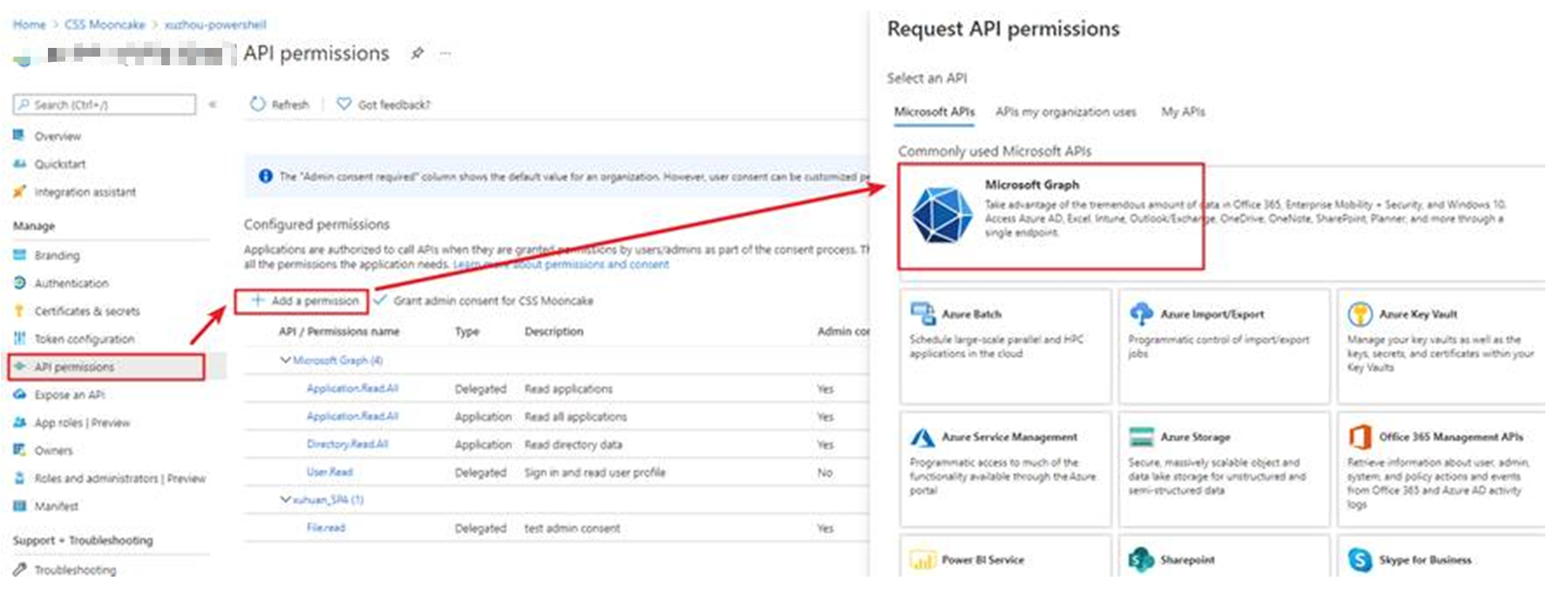
二:遇见 urllib.error.HTTPError: HTTP Error 403: Forbidden时,则要查看当前使用的AAD应用的权限是否足够访问ServicePrincipal资源。检查方法如图:
参考文档
Overview of Microsoft Graph:https://docs.microsoft.com/en-us/graph/overview?view=graph-rest-1.0
使用Postman获取Azure AD中注册应用程序的授权Token,及为Azure REST API设置Authorization:https://www.cnblogs.com/lulight/p/14279338.html
关于application和service principal的区别:https://docs.microsoft.com/en-us/azure/active-directory/develop/app-objects-and-service-principals
Get servicePrincipal:https://docs.microsoft.com/en-us/graph/api/serviceprincipal-get?view=graph-rest-1.0&tabs=http
附录一:在Azure AD中获取应用的Client id,tenant id,client_secret
- 访问AAD应用注册链接:https://portal.azure.cn/?l=zh-hans.zh-cn#blade/Microsoft_AAD_IAM/ActiveDirectoryMenuBlade/RegisteredApps
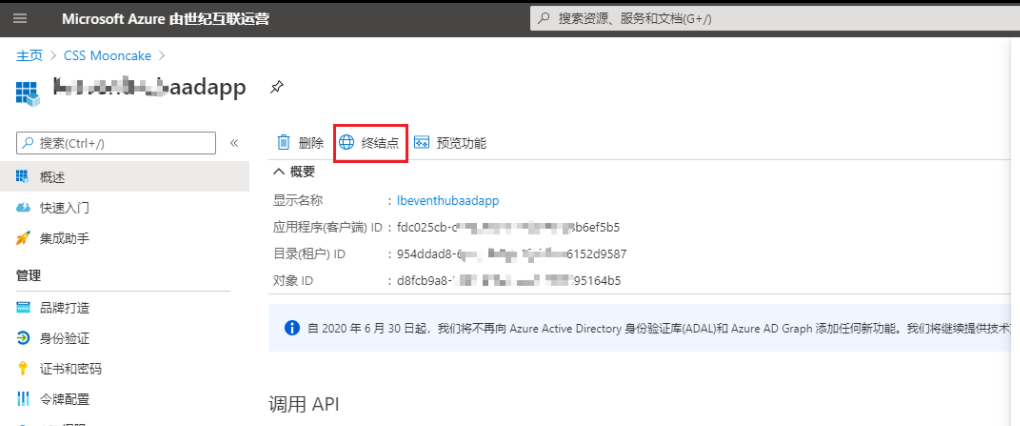
- 选中Application,等页面加载完成,页面中的应用程序(客户端)ID 和目录(租户)ID就是我们的Client ID, Tenant ID.
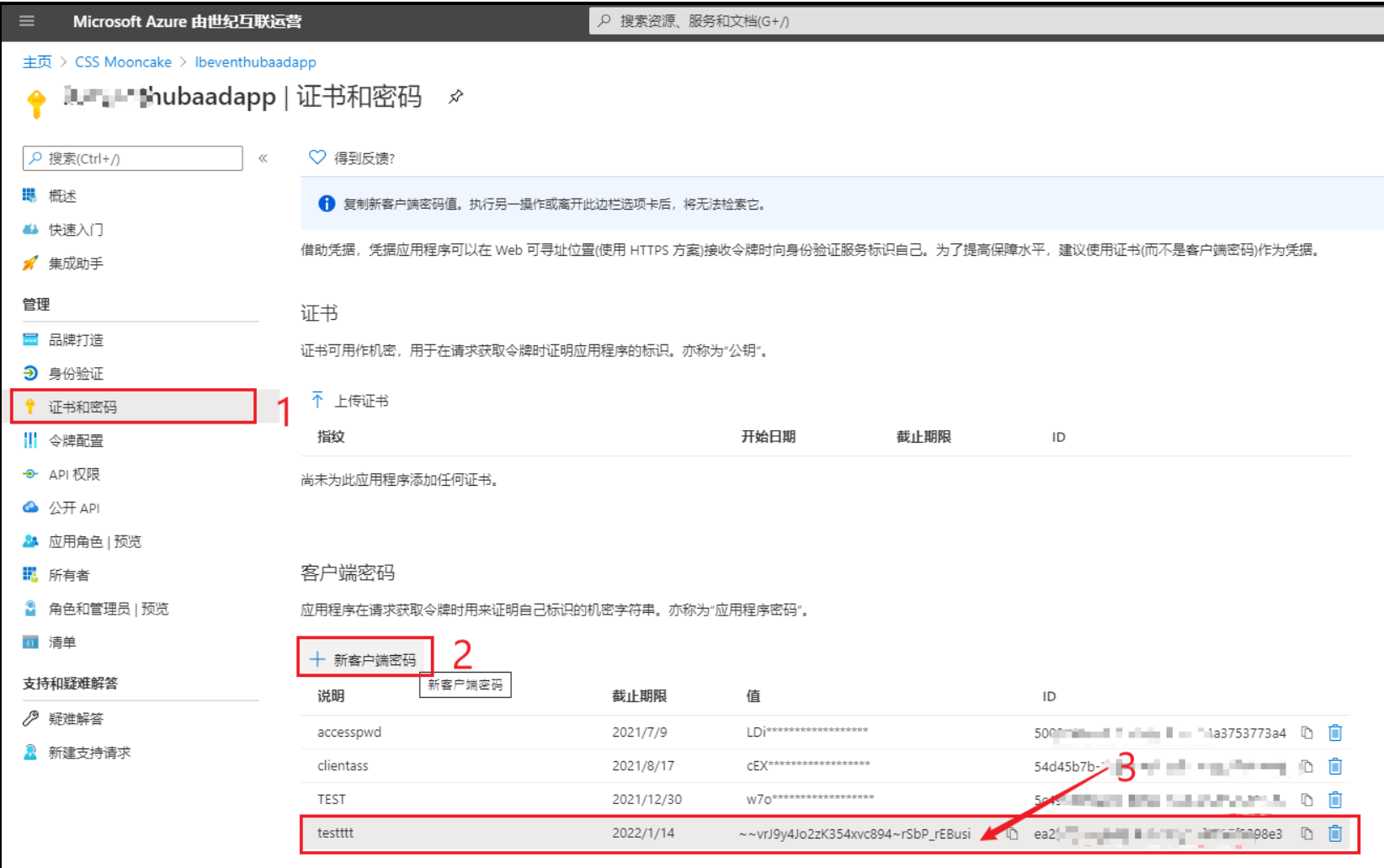
- 获取客户端密码[client_secret]
- 在AAD应用页面,进入“证书和密码”页面,点击“新客户端密码”按钮,添加新的Secret(因密码值只能在最开始创建时可见,所以必须在离开页面前复制它)
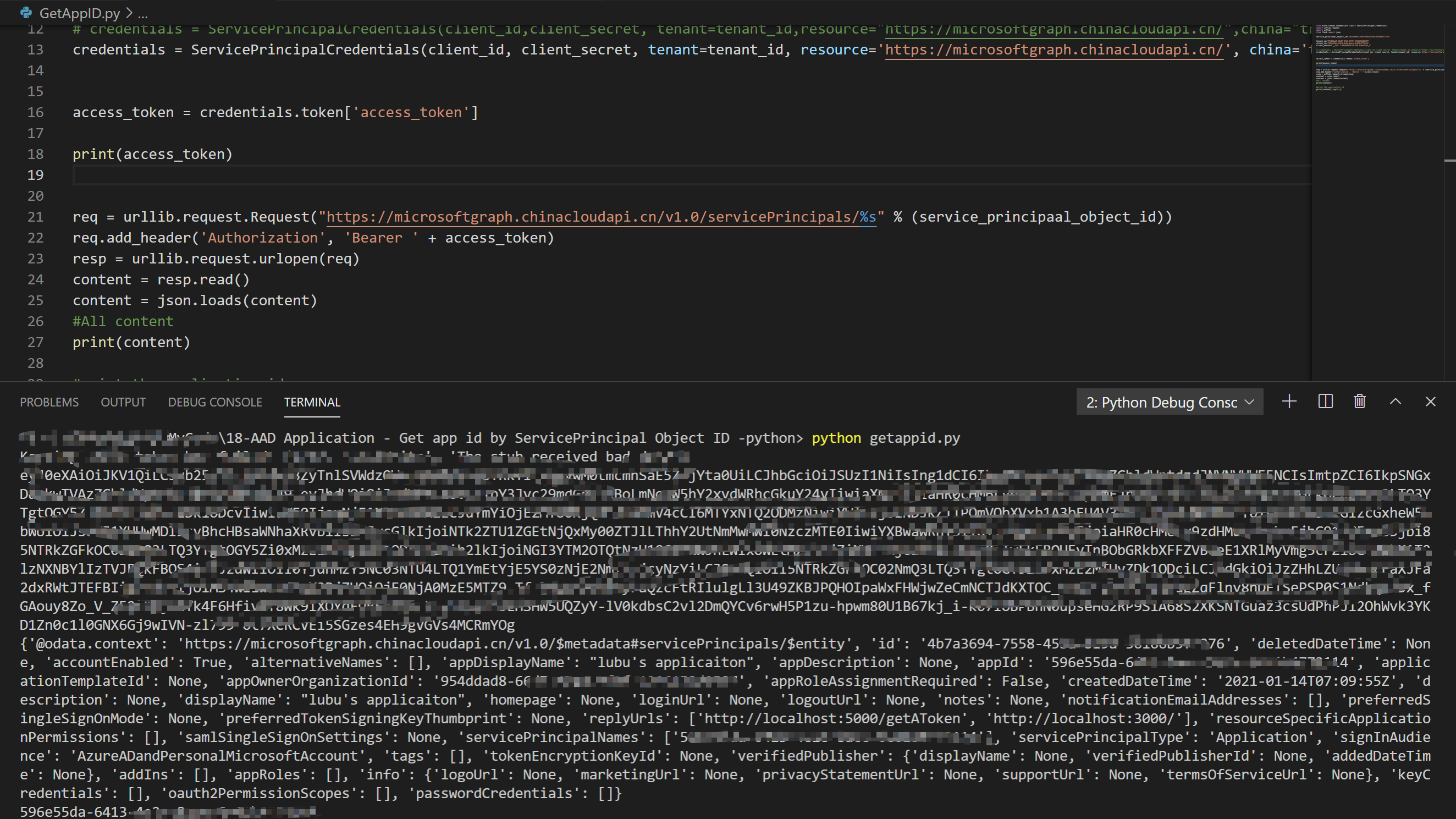
附录二:完整代码及运行结果
from azure.common.credentials import ServicePrincipalCredentials

import urllib.request

import urllib

from flask import json

service_principaal_object_id="954ddad8-xxxx-xxxx-xxxx-xxxxxxxxxxxxxxxx"

tenant_id="954ddad8-xxxx-xxxx-xxxx-xxxxxxxxxxxxxxxx"

client_id="596e55da-xxxx-xxxx-xxxx-xxxxxxxxxxxxxxxx"

client_secret="__Fa5.J.xxxxxxxxxxxxxxxx.xxxxxxxxxxxxxxxx"

credentials = ServicePrincipalCredentials(client_id,client_secret, tenant=tenant_id,

                                             resource="https://microsoftgraph.chinacloudapi.cn/",china="true")

credentials = ServicePrincipalCredentials(client_id, client_secret, tenant=tenant_id,

                                            resource='https://graph.chinacloudapi.cn/', china='true')

access_token = credentials.token['access_token']

print(access_token)

req = urllib.request.Request("https://microsoftgraph.chinacloudapi.cn/v1.0/servicePrincipals/%s" % (service_principaal_object_id))

req.add_header('Authorization', 'Bearer ' + access_token)

resp = urllib.request.urlopen(req)

content = resp.read()

content = json.loads(content)

#All content

print(content)

#print the application id

print(content['appId'])
[完]
【Azure Developer】Python 获取Micrisoft Graph API资源的Access Token, 并调用Microsoft Graph API servicePrincipals接口获取应用ID的更多相关文章
- 使用GraphHttpClient调用Microsoft Graph接口 - PATCH
博客地址:http://blog.csdn.net/FoxDave 通过前两讲的阐述我们应该大致了解了使用GraphHttpClient调用Microsoft Graph接口的模式,并介绍了使用get ...
- 使用GraphHttpClient调用Microsoft Graph接口 - GET
博客地址:http://blog.csdn.net/FoxDave 使用GraphHttpClient类调用Microsoft Graph REST API,你可以使用GET,POST和PATCH请求 ...
- 使用GraphHttpClient调用Microsoft Graph接口 - POST
博客地址:http://blog.csdn.net/FoxDave 本篇接上一讲,我们继续看如何通过GraphHttpClient创建一个Office 365的组,需要使用POST请求. 为结果添加按 ...
- 在无人值守程序(服务)中调用Microsoft Graph
作者:陈希章 发表于 2017年5月31日 什么是无人值守程序(服务) 我在此前用了几篇文章分别介绍了在桌面应用程序(控制台),Web应用程序(ASP.NET MVC),以及PowerSehll脚本中 ...
- View and Data API tips: 缓存Access Token
对于云API服务,常见的方式就是按照API调用次数收费,某些API调用也就有某些限制,比如在特定时间内只允许调用指定的次数以免造成滥用.虽然Autodesk的view and Data API目前还没 ...
- 【转】asp获取【微信公众平台】Access Token的源代码下载
在做微信开发时候,经常要用到Access Token,但是官网提供的都是基于php写的,我用asp写了,有需要可以直接复制去用,模板消息,jdk上传图片,客服消息等全需要这个:'获取 access_t ...
- SharePoint Online 使用 adal js 获取access token
最近在写一些SharePoint 的sample code, 有兴趣的小伙伴可以查看我的GitHub. 今天给大家介绍SharePoint Framework (SPFx )web part 当中怎 ...
- 【Azure Developer】【Python 】使用 azure.identity 和 azure.common.credentials 获取Azure AD的Access Token的两种方式
问题描述 使用Python代码,展示如何从Azure AD 中获取目标资源的 Access Token. 如要了解如何从AAD中获取 client id,client secret,tenant id ...
- 【Azure Developer】使用Microsoft Graph API 批量创建用户,先后遇见的三个错误及解决办法
问题描述 在先前的一篇博文中,介绍了如何使用Microsoft Graph API来创建Azure AD用户(博文参考:[Azure Developer]使用Microsoft Graph API 如 ...
随机推荐
- C# 数据类型(2)
String char的集合 string name = "John Doe"; 双引号,char是单引号string是不可变的,一旦初始化后就不能变了,每次对已存在的string ...
- Linux Centos7发送QQ邮件
一.关闭本机的sendmail服务或者postfix服务 #sendmial service sendmail stop chkconfig sendmail off #postfix service ...
- es6 curry function
es6 curry function // vuex getters export const getAdsFilterConfig = (state) => (spreader) => ...
- CURL (CommandLine Uniform Resource Locator) 简易教程!
1 http://curl.haxx.se/ http://curl.haxx.se/docs/httpscripting.html curl is an open source command li ...
- webpack & webpack-cli
webpack & webpack-cli Error: Cannot find module 'webpack' Google site: stackoverfow UnhandledPro ...
- how to recursively all files in a folder with sudo permissions in macOS
how to recursively all files in a folder with sudo permissions in macOS write bug OK sudo chmod 777 ...
- css & clip-path
css & clip-path https://developer.mozilla.org/en-US/docs/Web/CSS/clip-path https://tongqu.me/ tw ...
- PHP反序列化字符串逃逸
通过CTF比赛了解PHP反序列化,记录自己的学习. 借用哈大佬们的名言 任何具有一定结构的数据,如果经过了某些处理而把结构体本身的结构给打乱了,则有可能会产生漏洞. 0CTF 2016piapiapi ...
- 聊聊CacheLine
本文转载自聊聊CacheLine 导语 文章聊聊缓存一致性协议中我们提到过,缓存里面最小的单位是缓存行/缓存条目,但是缓存中的具体存储结构是什么样的,缓存行中有存放的是什么?在缓存中是如何寻找指定是还 ...
- Java NIO wakeup实现原理
本文转载自Java NIO wakeup实现原理 导语 最近在阅读netty源码时,很好奇Java NIO中Selector的wakeup()方法是如何唤醒selector的,于是决定深扒一下wake ...