
HandyEditor 富文本编辑器整合到python flask项目中
1.下载HandyEditor,地址http://he.catfish-cms.com/
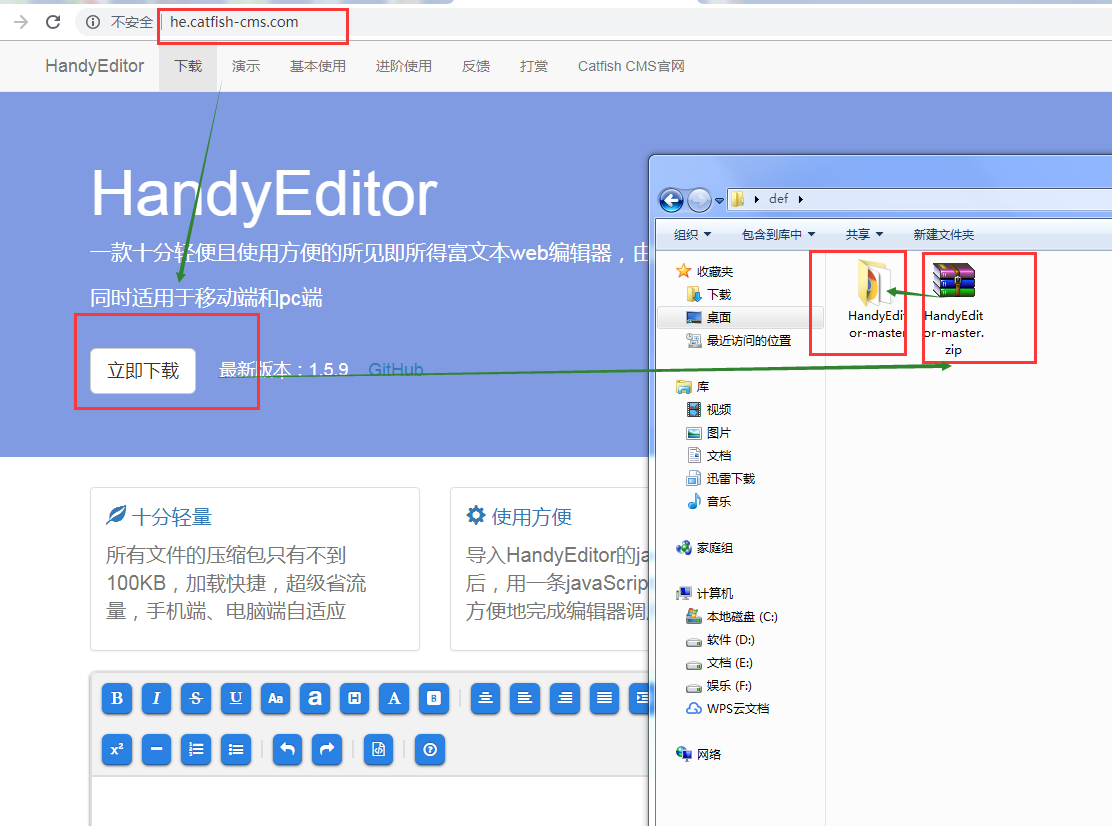
2.解压后的文件名HandyEditor-master改为HandyEditor,文件夹里的文件如下
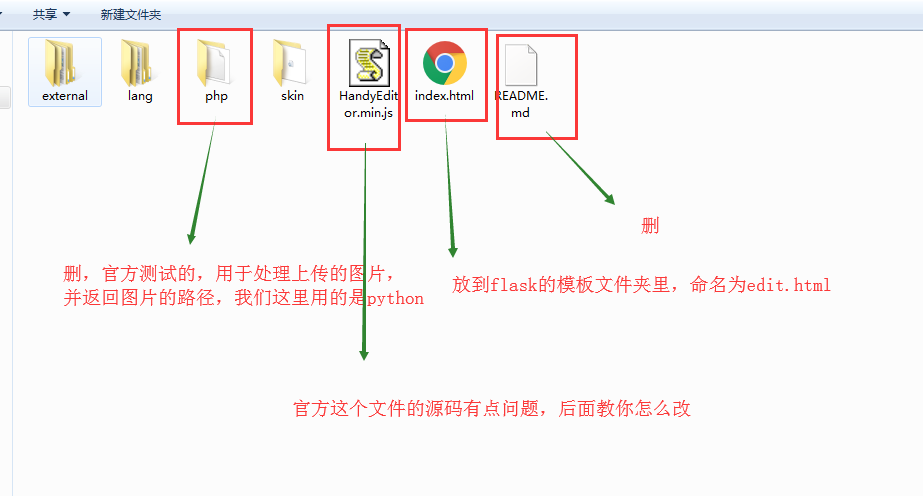
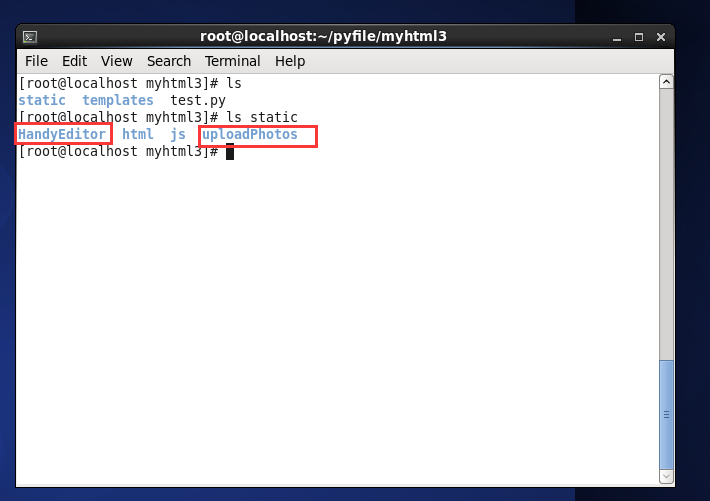
3.将HandyEditor文件夹放到项目的static文件夹里,并在static里新建一个文件夹命名uploadPhotos,用于放上传的图片
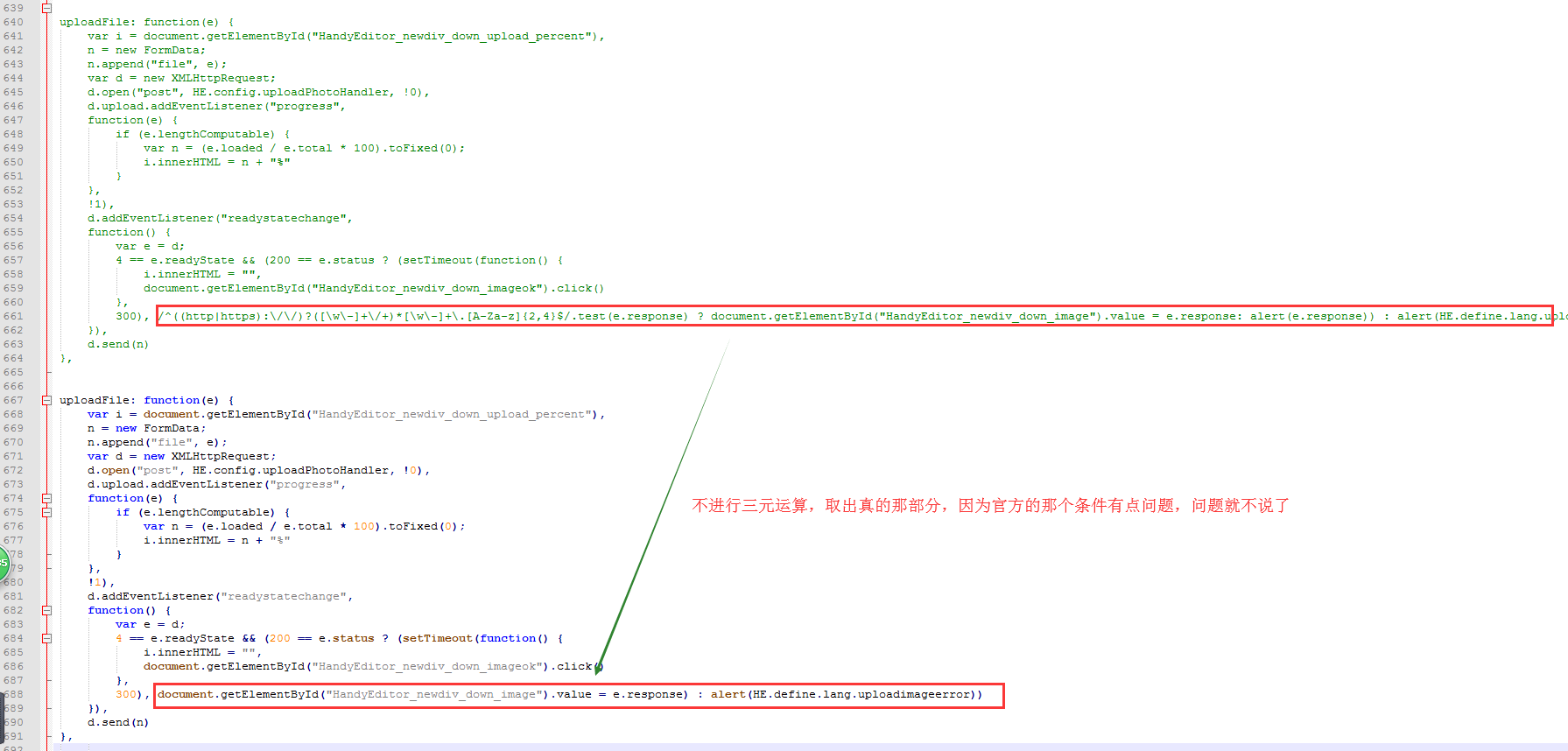
4.修改有问题的HandyEditor.min.js,打开文件可以看到js代码没有格式化,先到http://tool.oschina.net/codeformat/ 进行格式化
5.我的flask入口文件是test.py
 from flask import Flask

 from flask import request

 from flask import render_template

 from werkzeug import secure_filename

 import time

 UPLOAD_FOLDER = '/static/uploadPhotos/'

 ALLOWED_EXTENSIONS = set(['png', 'jpg', 'jpeg', 'gif'])

 app = Flask(__name__)

 def allowed_file(filename):

     return '.' in filename and \

 filename.rsplit('.', 1)[1] in ALLOWED_EXTENSIONS

 @app.route('/')

 def index():

     return 'hello world'

 @app.route('/edit/')

 def edit():

     return render_template('edit.html')

 @app.route('/uploadPhoto/',methods=['POST'])

 def uploadPhoto():

     '''

         the photo which I upload name 'file'

     '''

     if hasattr(request,'files') and 'file' in request.files:

         file = request.files['file']

         if file and allowed_file(file.filename):

             filename = secure_filename(file.filename)

             dotPos = filename.rindex('.')

             filename = str(int(time.time()))+'.'+filename[dotPos+1:]

             file.save(app.root_path+UPLOAD_FOLDER + filename)

             return UPLOAD_FOLDER + filename

         else:

             return 'your file uploaded had ploblem'

     else:

         return 'file which name \'file\' not exists'

 if __name__ == '__main__':

     app.run(host='0.0.0.0',debug=True)
代码解析:
编辑器页面在路由 /edit/
处理post过来的图片在路由 /uploadPhoto/
6.模板文件edit.html
<!DOCTYPE html>
<html lang="zh-CN">
<head>
<meta charset="utf-8">
<meta http-equiv="X-UA-Compatible" content="IE=edge">
<meta name="viewport" content="width=device-width, initial-scale=1">
<title>HandyEditor</title>
<style type="text/css">
small{font-size: 14px;color: #aaa;}
pre{padding: 5px;background-color: #eee;}
.textcenter{text-align: center;}
</style>
</head>
<body>
<h1>HandyEditor <small>一款十分轻便且使用方便的所见即所得富文本web编辑器,由Catfish(鲶鱼) CMS官方开发</small></h1> <textarea id="editor" name="editor" rows="5" style="display: none;"></textarea>
<br>
<button onclick="getHtml()">获取HTML</button>
<button onclick="getText()">获取纯文本</button>
<br><br>
<script src="/static/HandyEditor/HandyEditor.min.js"></script>
<script type="text/javascript">
var he = HE.getEditor('editor',{
width : '1400px',
height : '400px',
autoHeight : true,
autoFloat : false,
topOffset : 0,
uploadPhoto : true,
uploadPhotoHandler : '/uploadPhoto/',
uploadPhotoSize : 0,
uploadPhotoType : 'gif,png,jpg,jpeg',
uploadPhotoSizeError : '不能上传大于××KB的图片',
uploadPhotoTypeError : '只能上传gif,png,jpg,jpeg格式的图片',
lang : 'zh-jian',
skin : 'HandyEditor',
externalSkin : '',
item : ['bold','italic','strike','underline','fontSize','fontName','paragraph','color','backColor','|','center','left','right','full','indent','outdent','|','link','unlink','textBlock','code','selectAll','removeFormat','trash','|','image','expression','subscript','superscript','horizontal','orderedList','unorderedList','|','undo','redo','|','html','|','about'] }); function getHtml(){
alert(he.getHtml());
}
function getText(){
alert(he.getText());
}
</script>
</body>
</html>
注意:上传图片需要uploadPhoto : true,因为在HandyEditor.min.js配置是!1
还有处理上传的图片所在的路由,uploadPhotoHandler : '/uploadPhoto/'
7.进行测试
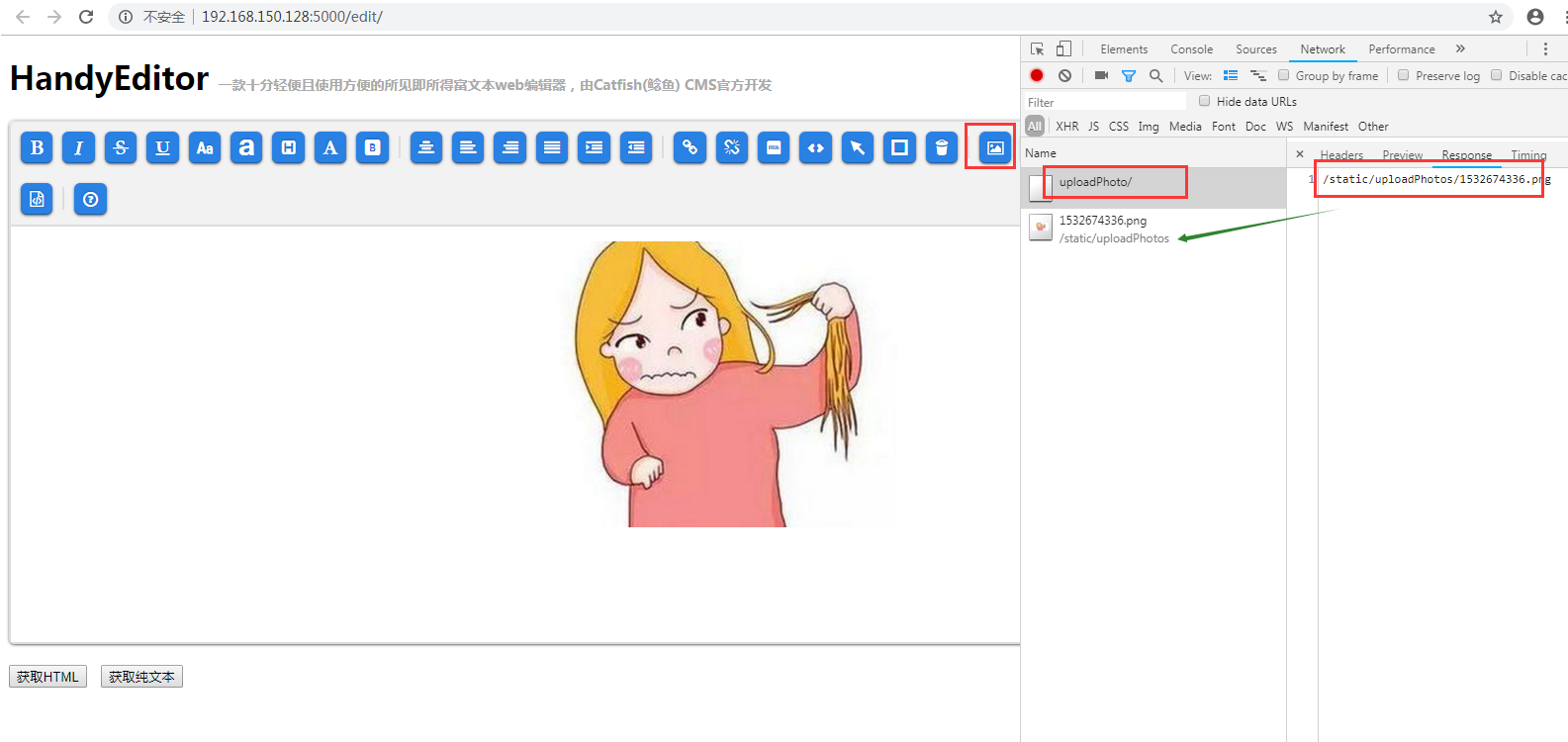
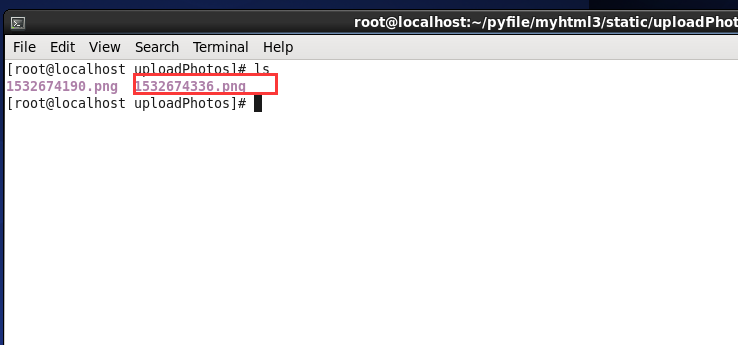
附:
富文本编辑器上传图片用的是ajax文件异步上传,new FormData(),以后有时间再写一篇关于这个的文章
HandyEditor 富文本编辑器整合到python flask项目中的更多相关文章
- Vue CLI 3+tinymce 5富文本编辑器整合
基于Vue CLI 3脚手架搭建的项目整合tinymce 5富文本编辑器,vue cli 2版本及tinymce 4版本参考:https://blog.csdn.net/liub37/article/ ...
- 「newbee-mall新蜂商城开源啦」 页面优化,最新版 wangEditor 富文本编辑器整合案例
大家比较关心的新蜂商城 Vue3 版本目前已经开发了大部分内容,相信很快就能够开源出来让大家尝鲜了,先让大家看看当前的开发进度: 开源仓库地址为 https://github.com/newbee-l ...
- 15、Vue CLI 3+tinymce 5富文本编辑器整合
富文本编辑器里大佬们都说tinymce NB! 插件安装 inymce官方提供了一个vue的组件tinymce-vue 如果有注册或购买过服务的话,直接通过组件配置api-key直接使用,懒的注册或者 ...
- 百度富文本编辑器整合fastdfs文件服务器上传
技术:springboot+maven+ueditor 概述 百度富文本整合fastdfs文件服务器上传 详细 代码下载:http://www.demodashi.com/demo/15008.h ...
- tinymce富文本编辑器整合到django
第一步:定义表存图片路径 models.py class AdminIMG(models.Model): filename = models.CharField(max_length=200, ...
- 一款纯HTML+CSS+JS富文本编辑器-handyeditor
官网:http://he.catfish-cms.com/ 修改版本(修改一些BUG和图片上传服务器 点击下载: handyeditor富文本编辑器.zip): 图片上传接口上传类型: Content ...
- 14flask 渲染富文本编辑器
转载一个flask 渲染富文本编辑器: https://blog.csdn.net/qq_32198277/article/details/53355249 这里会产生一个问题: 通过富文本编辑器的数 ...
- 浅谈layer.open的弹出层中的富文本编辑器为何不起作用!
很多童鞋都喜欢用贤心的layui框架.是的,我也喜欢用,方便,简单.但是呢,有时候项目中的需求会不一样,导致我们用的时候,显示效果可能会不一样,好吧.这样的话,个别遇到的问题总是解决不好,但是呢还是那 ...
- bbs项目富文本编辑器实现上传文件到media目录
media目录是在project的settings中设置的,static目录是django自己使用的静态文件的上传目录,media目录是用户自定义上传文件的目录 # Django用户上传的文件都放在m ...
随机推荐
- sql server 性能调优之 当前用户请求分析 (1)
一. 概述 在生产数据库运行期间,有时我们需要查看当前用户会话状态或者是说数据库当前是否运行良好, 应用的场景比如:当运行的应用系统响应突然变慢时需要分析数据库的.或想分析当前的数据库是否繁忙,是否有 ...
- 项目ITP(二) 二维码 拿起你的手机装一装,扫一扫 【每日一搏】
前言 系列文章:[传送门] 五一,期待的两天假期.我的生日,happy. [吐槽] 学校真恶心,半月前让我给他搞个东西,md,课题不加人.后来又来求,说钱(钱,咱不需要:我猜也不多).到现在,又来了, ...
- MySQL批量插入数据的几种方法
最近公司要求测试数据库的性能,就上网查了一些批量插入数据的代码,发现有好几种不同的用法,插入同样数据的耗时也有区别 别的先不说,先上一段代码与君共享 方法一: package com.bigdata; ...
- logstash快速入门实战指南-Logstash简介
作者其他ELK快速入门系列文章 Elasticsearch从入门到精通 Kibana从入门到精通 Logstash是一个具有实时流水线功能的开源数据收集引擎.Logstash可以动态统一来自不同来源的 ...
- SQL语句方法语法总结(一)
1.distinct:返回不重复.唯一的值. select distinct col_name from tbl_name --表中的col_name 列的值 如果有10条一样的,仅返回一条. 2.w ...
- ES6躬行记(3)——解构
解构(destructuring)是一种赋值语法,可从数组中提取元素或从对象中提取属性,将其值赋给对应的变量或另一个对象的属性.解构地目的是简化提取数据的过程,增强代码的可读性.有两种解构语法,分别是 ...
- 【golang-GUI开发】qt之signal和slot(二)
上一篇文章里我们详细介绍了signal的用法. 今天我们将介绍slot的使用.在qt中slot和signal十分相像,这次我们将实现一个能显示16进制数字的SpinBox,它继承自QSpinbox并重 ...
- CentOS 7.0 上安装和配置 VNC 服务器
作为一个系统管理员,大多数时间是通过网络管理服务器的.在管理服务器的过程中很少会用到图形界面,多数情况下我们只是用 SSH 来完成我们的管理任务.在这篇文章里,我们将配置 VNC 来提供一个连接我们 ...
- cmd Telnet 手工模拟http请求
telnet Windows系统自带的访问页面命令 首先打开控制面板点击卸载程序 打开windows功能 勾选 telnt 客户端 在打开cmd 命令 输入 telnt www.baidu.com 8 ...
- c# 服务
注:服务里的timer System.Timers.Timer time=new System.Timers.Timer(); time.Interval = 3000; //设置计时器事件间隔执 ...