
IdentityServer Resource Owner Password
Resource Owner Password 模式需要自己实现用户名密码的校验
新增ResourceOwnerPasswordValidator实现IResourceOwnerPasswordValidator接口
public class ResourceOwnerPasswordValidator : IResourceOwnerPasswordValidator
    {
        private readonly UserManager<ApplicationUser> _userManager;
        private readonly SignInManager<ApplicationUser> _signInManager;

        public ResourceOwnerPasswordValidator(UserManager<ApplicationUser> userManager, SignInManager<ApplicationUser> signInManager)
        {
            _userManager = userManager;
            _signInManager = signInManager;
        }
        public async Task ValidateAsync(ResourceOwnerPasswordValidationContext context)
        {
            var result = await _signInManager.PasswordSignInAsync(context.UserName, context.Password, false, lockoutOnFailure: false);
            if (result.Succeeded)
            {
                context.Result = new GrantValidationResult(
                                    subject: context.UserName,
                                    authenticationMethod: "custom");
            }
            else
            {
                context.Result = new GrantValidationResult(
                                    TokenRequestErrors.InvalidGrant,
                                    "invalid custom credential");
            }
        }
    }
在Startup中注册
services.AddTransient<IResourceOwnerPasswordValidator, ResourceOwnerPasswordValidator>();
创建Client
public static IEnumerable<Client> GetClients()
{
    return new List<Client>
    {
        // other clients omitted...

        // resource owner password grant client
        new Client
        {
            ClientId = "ro.client",
            AllowedGrantTypes = GrantTypes.ResourceOwnerPassword,

            ClientSecrets =
            {
                new Secret("secret".Sha256())
            },
            AllowedScopes = { "api1" }
        }
    };
}
程序中使用DiscoveryClient调用
var disco = await DiscoveryClient.GetAsync("http://localhost");
            if (disco.IsError)
            {
                Console.WriteLine(disco.Error);
                return;
            }
            var tokenClient = new TokenClient(disco.TokenEndpoint, "ro.client", "secret");
            var tokenResponse = await tokenClient.RequestResourceOwnerPasswordAsync("email", "password", "api1");

            if (tokenResponse.IsError)
            {
                Console.WriteLine(tokenResponse.Error);
                return;
            }

            Console.WriteLine(tokenResponse.Json);
            Console.WriteLine("\n\n");
使用postman调用
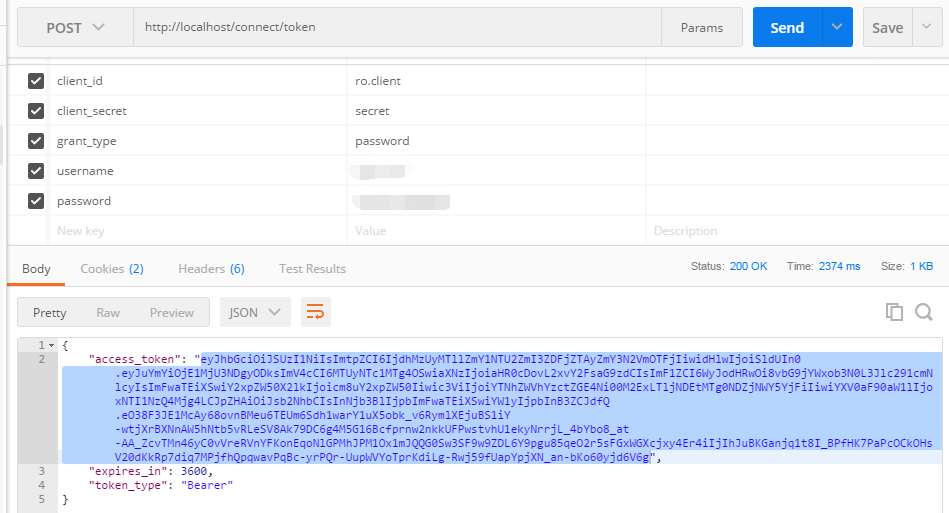
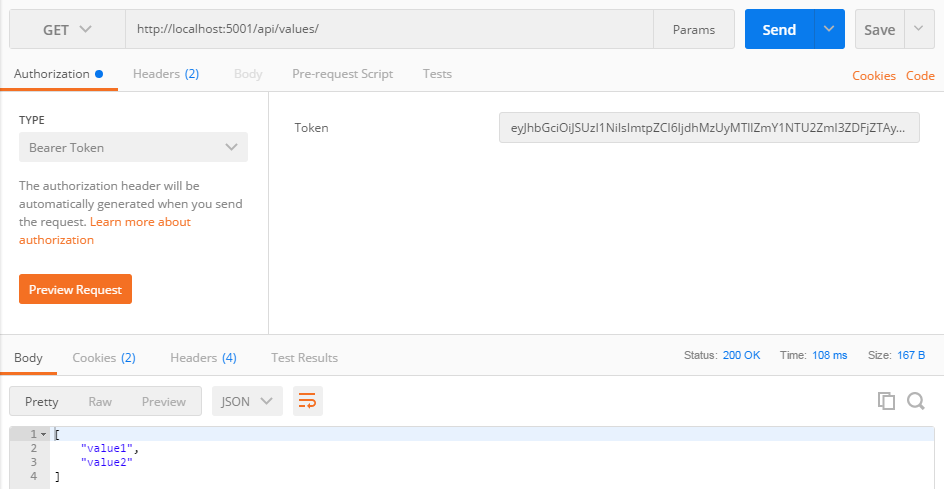
调用API
IdentityServer Resource Owner Password的更多相关文章
- 基于 IdentityServer3 实现 OAuth 2.0 授权服务【密码模式(Resource Owner Password Credentials)】
密码模式(Resource Owner Password Credentials Grant)中,用户向客户端提供自己的用户名和密码.客户端使用这些信息,向"服务商提供商"索要授权 ...
- 基于OWIN WebAPI 使用OAuth授权服务【客户端验证授权(Resource Owner Password Credentials Grant)】
适用范围 前面介绍了Client Credentials Grant ,只适合客户端的模式来使用,不涉及用户相关.而Resource Owner Password Credentials Grant模 ...
- 不要使用Resource Owner Password Credentials
不要使用Resource Owner Password Credentials 文章链接在这里 前言 最近公司项目在做一些重构,因为公司多个业务系统各自实现了一套登录逻辑,比较混乱.所以,现在需要做一 ...
- IdentityServer4 (2) 密码授权(Resource Owner Password)
写在前面 1.源码(.Net Core 2.2) git地址:https://github.com/yizhaoxian/CoreIdentityServer4Demo.git 2.相关章节 2.1. ...
- 使用Resource Owner Password Credentials Grant授权发放Token
对应的应用场景是:为自家的网站开发手机 App(非第三方 App),只需用户在 App 上登录,无需用户对 App 所能访问的数据进行授权. 客户端获取Token: public string Get ...
- asp.net权限认证:OWIN实现OAuth 2.0 之密码模式(Resource Owner Password Credential)
asp.net权限认证系列 asp.net权限认证:Forms认证 asp.net权限认证:HTTP基本认证(http basic) asp.net权限认证:Windows认证 asp.net权限认证 ...
- OAuth2.0学习(1-6)授权方式3-密码模式(Resource Owner Password Credentials Grant)
授权方式3-密码模式(Resource Owner Password Credentials Grant) 密码模式(Resource Owner Password Credentials Grant ...
- IdentityServer4之Resource Owner Password Credentials(资源拥有者密码凭据许可)
IdentityServer4之Resource Owner Password Credentials(资源拥有者密码凭据许可) 参考 官方文档:2_resource_owner_passwords ...
- 第37章 资源所有者密码验证(Resource Owner Password Validation) - Identity Server 4 中文文档(v1.0.0)
如果要使用OAuth 2.0资源所有者密码凭据授权(aka password),则需要实现并注册IResourceOwnerPasswordValidator接口: public interface ...
随机推荐
- bower简明入门教程
什么是bower: Bower是一个客户端技术的软件包管理器,它可用于搜索.安装和卸载如JavaScript.HTML.CSS之类的网络资源.其他一些建立在Bower基础之上的开发工具,如YeoMan ...
- ftp协议 主动和被动两种模式模式
- 冒泡排序——JavaScript实现
解析:1.比较相邻的两个元素,如果前一个比后一个大,则交换位置. 2.第一轮的时候最后一个元素应该是最大的一个. 3.按照步骤一的方法进行相邻两个元素的比较,这个时候由于最后一个元素已经是最大的了,所 ...
- CCS中cmd文件的编写
http://blog.sina.com.cn/s/blog_abe5740601015b3q.html CMD的专业名称叫链接器配置文件,是存放链接器的配置信息的,我们简称为命令文件,其中比较关键的 ...
- MyEclipse has detected that less than 5% of
选择Windows->Preferences; 2 选择MyEclipse->Servers->Integrated Sandbox->MyEclispe Tomcat 6 ...
- Linux 第十四天
6)Bash常用快捷键 快捷键 作用 ctr1+ a 把光标移动到命令行开头.如果我们输入的命令过长,想要把光标移| 动到命令行开头时使用. ctr1+e 把光标移动到命令行结尾. ctr1+c 强制 ...
- Python的基本类型介绍和可变不可变
Python的基本类型介绍 前言 做python有一段时间了,从工作开始就在不断地学习和积累.但是有时候用到一些技术点,甚至是基础知识的时候,总是会遗忘.所以,从今天开始,就在这里记录下来,不仅可以分 ...
- mysql 慢日志分析
mysql 调优首先需要找到那些有问题的SQL语句. 怎么找到这些语句呢? mysql 提供了很方便的功能. 1.慢日志 在my.cnf 文件中,增加如下配置 log-error ...
- Solaris:你好奇的十件事
想想你周围的人,看看他们正在使用的操作系统.绝大部分人的电脑都在用主流操作系统:Windows,MacOS,甚至是Ubuntu.当说到Solaris,Unix和BSD的时候,其他人还以为你说鸟语呢.除 ...
- Jsp处理过程and数据交互
request处理客户端请求 客户端-------------->jsp页面--------------->服务器 常用方法 1.String getParameter(String na ...