
Openvswitch手册(2): OpenFlow Controller
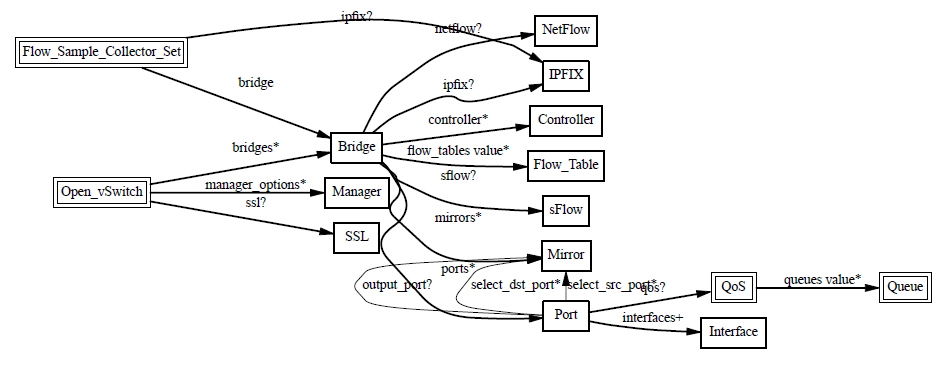
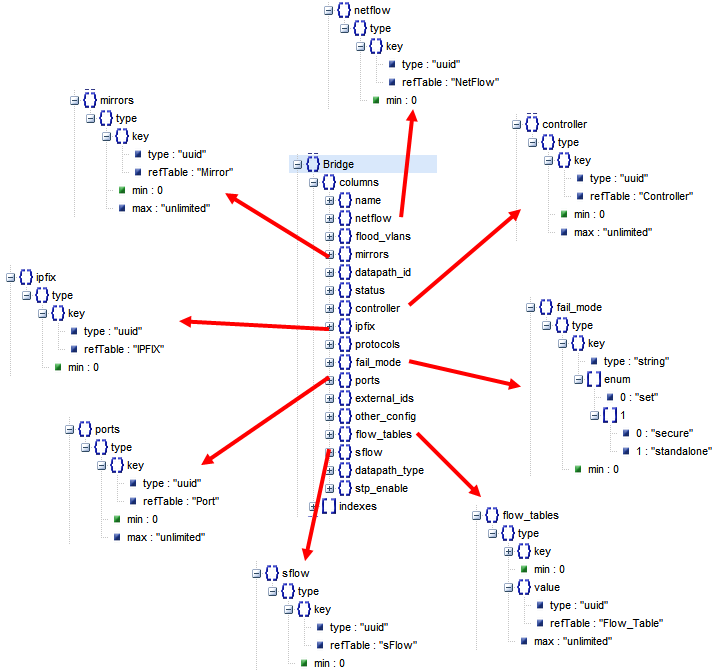
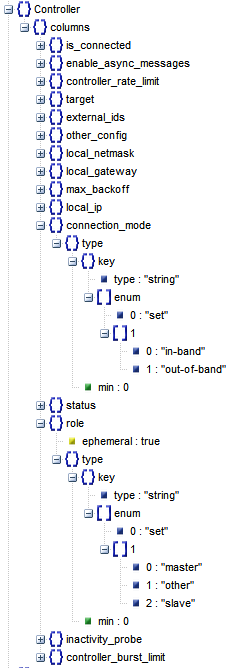
我们这一节主要来看Controller
Controller有两种:
- Primary Controller: 真正控制vswitch的flow table,vswitch会保持和controller的连接,如果失败,取决于bridge的fail mode。一个vswitch可以连接多个Controller,但是这些Controller之间的协作需要Controller自己来做。
- Service Controller:仅仅用于support,偶尔操作,maintain使用,如果connection断掉,bridge的fail mode不起作用。
使用floodlight作为controller

下面按照http://networkstatic.net/openflow-openvswitch-lab/
http://networkstatic.net/openflow-starter-tutorial-lab-1/
http://networkstatic.net/openflow-tutorial-lab-2/
http://networkstatic.net/openflow-tutorial-lab-3/
测试controller
创建一个image, qemu-img create -f qcow2 ./images/ubuntu-14.04.img 5G
按照ubuntu
sudo virt-install --virt-type kvm --name ubuntu-14.04 --ram 2048 --noreboot --disk path=/home/cliu8/images/ubuntu-14.04.img,format=qcow2,bus=virtio,device=disk --cdrom=/home/cliu8/images/ubuntu-14.04-server-amd64.iso --network network=default --graphics vnc,listen=0.0.0.0 –noautoconsole
$ ps aux | grep 0.0.0.0
libvirt+ 16500 0.5 0.4 4095256 319416 ? Sl Jun16 0:14 qemu-system-x86_64 -enable-kvm –name ubuntu-14.04 -S -machine pc-i440fx-trusty,accel=kvm,usb=off -m 2048 -realtime mlock=off -smp 1,sockets=1,cores=1,threads=1 -uuid 0f0806ab-531d-6134-5def-c5b495529285 -no-user-config -nodefaults -chardev socket,id=charmonitor,path=/var/lib/libvirt/qemu/Instance01.monitor,server,nowait -mon chardev=charmonitor,id=monitor,mode=control -rtc base=utc -no-shutdown -boot strict=on -device piix3-usb-uhci,id=usb,bus=pci.0,addr=0x1.0x2 -drive file=/home/cliu8/images/ubuntu-14.04.img,if=none,id=drive-virtio-disk0,format=qcow2 -device virtio-blk-pci,scsi=off,bus=pci.0,addr=0x4,drive=drive-virtio-disk0,id=virtio-disk0,bootindex=1 -netdev tap,fd=29,id=hostnet0,vhost=on,vhostfd=32 -device virtio-net-pci,netdev=hostnet0,id=net0,mac=52:54:00:9b:d5:bc,bus=pci.0,addr=0x3 -chardev pty,id=charserial0 -device isa-serial,chardev=charserial0,id=serial0 -vnc 0.0.0.0:7 -device cirrus-vga,id=video0,bus=pci.0,addr=0x2 -device virtio-balloon-pci,id=balloon0,bus=pci.0,addr=0x5
用VNC Client连接到机器,安装好ubuntu
$ sudo virsh dumpxml ubuntu-14.04
<domain type='kvm'>
<name>ubuntu-14.04</name>
<uuid>0f0806ab-531d-6134-5def-c5b495529284</uuid>
<memory unit='KiB'>2097152</memory>
<currentMemory unit='KiB'>2097152</currentMemory>
<vcpu placement='static'>1</vcpu>
<os>
<type arch='x86_64' machine='pc-i440fx-trusty'>hvm</type>
<boot dev='hd'/>
</os>
<features>
<acpi/>
<apic/>
<pae/>
</features>
<clock offset='utc'/>
<on_poweroff>destroy</on_poweroff>
<on_reboot>restart</on_reboot>
<on_crash>restart</on_crash>
<devices>
<emulator>/usr/bin/kvm-spice</emulator>
<disk type='file' device='disk'>
<driver name='qemu' type='qcow2'/>
<source file='/home/cliu8/images/ubuntu-14.04.img'/>
<target dev='vda' bus='virtio'/>
<address type='pci' domain='0x0000' bus='0x00' slot='0x04' function='0x0'/>
</disk>
<disk type='block' device='cdrom'>
<driver name='qemu' type='raw'/>
<target dev='hdc' bus='ide'/>
<readonly/>
<address type='drive' controller='0' bus='1' target='0' unit='0'/>
</disk>
<controller type='usb' index='0'>
<address type='pci' domain='0x0000' bus='0x00' slot='0x01' function='0x2'/>
</controller>
<controller type='pci' index='0' model='pci-root'/>
<controller type='ide' index='0'>
<address type='pci' domain='0x0000' bus='0x00' slot='0x01' function='0x1'/>
</controller>
<interface type='network'>
<mac address='52:54:00:9b:d5:bb'/>
<source network='default'/>
<model type='rtl8139'/>
<address type='pci' domain='0x0000' bus='0x00' slot='0x03' function='0x0'/>
</interface>
<serial type='pty'>
<target port='0'/>
</serial>
<console type='pty'>
<target type='serial' port='0'/>
</console>
<input type='mouse' bus='ps2'/>
<input type='keyboard' bus='ps2'/>
<graphics type='vnc' port='-1' autoport='yes' listen='0.0.0.0'>
<listen type='address' address='0.0.0.0'/>
</graphics>
<video>
<model type='cirrus' vram='9216' heads='1'/>
<address type='pci' domain='0x0000' bus='0x00' slot='0x02' function='0x0'/>
</video>
<memballoon model='virtio'>
<address type='pci' domain='0x0000' bus='0x00' slot='0x05' function='0x0'/>
</memballoon>
</devices>
</domain>
我们并不在这台机器上直接操作,因为我们要保存一个原生的ubuntu
创建三个instance:
qemu-img create -f qcow2 -o backing_file=./ubuntu-14.04.img ./instance01.img
$ cat images/instance01.xml
<domain type='kvm'>
<name>Instance01</name>
<uuid>0f0806ab-531d-6134-5def-c5b495529285</uuid>
<memory unit='KiB'>2097152</memory>
<currentMemory unit='KiB'>2097152</currentMemory>
<vcpu placement='static'>1</vcpu>
<os>
<type arch='x86_64' machine='pc-i440fx-trusty'>hvm</type>
<boot dev='hd'/>
</os>
<features>
<acpi/>
<apic/>
<pae/>
</features>
<clock offset='utc'/>
<on_poweroff>destroy</on_poweroff>
<on_reboot>restart</on_reboot>
<on_crash>restart</on_crash>
<devices>
<emulator>/usr/bin/kvm-spice</emulator>
<disk type='file' device='disk'>
<driver name='qemu' type='qcow2'/>
<source file='/home/cliu8/images/instance01.img'/>
<target dev='vda' bus='virtio'/>
<address type='pci' domain='0x0000' bus='0x00' slot='0x04' function='0x0'/>
</disk>
<controller type='usb' index='0'>
<address type='pci' domain='0x0000' bus='0x00' slot='0x01' function='0x2'/>
</controller>
<controller type='pci' index='0' model='pci-root'/>
<controller type='ide' index='0'>
<address type='pci' domain='0x0000' bus='0x00' slot='0x01' function='0x1'/>
</controller>
<interface type='bridge'>
<mac address='52:54:00:9b:d5:bc'/>
<source bridge='helloworld'/>
<virtualport type='openvswitch' />
<model type='virtio'/>
</interface>
<serial type='pty'>
<target port='0'/>
</serial>
<console type='pty'>
<target type='serial' port='0'/>
</console>
<input type='mouse' bus='ps2'/>
<input type='keyboard' bus='ps2'/>
<graphics type='vnc' port='-1' autoport='yes' listen='0.0.0.0'>
<listen type='address' address='0.0.0.0'/>
</graphics>
<video>
<model type='cirrus' vram='9216' heads='1'/>
<address type='pci' domain='0x0000' bus='0x00' slot='0x02' function='0x0'/>
</video>
<memballoon model='virtio'>
<address type='pci' domain='0x0000' bus='0x00' slot='0x05' function='0x0'/>
</memballoon>
</devices>
</domain>
创建一个bridge:
sudo ovs-vsctl add-br helloworld
在另外一台机器上16.158.165.102安装floodlight
apt-get install git
git clone git://github.com/floodlight/floodlight.git
如果有proxy
apt-get install socat
$ cat /usr/bin/gitproxy
#!/bin/bash
PROXY=web-proxy.corp.hp.com
PROXYPORT=8080
#PROXYAUTH=username:password
exec socat STDIO PROXY:$PROXY:$1:$2,proxyport=$PROXYPORT
chmod +x /usr/bin/gitproxy
git config --global core.gitproxy gitproxy
然后再git clone git://github.com/floodlight/floodlight.git
cd floodlight/
apt-get install ant
apt-get install openjdk-7-jdk
nohup java -jar target/floodlight.jar > floodlight.log 2>&1 &
将bridge连接到controller
sudo ovs-vsctl set-controller helloworld tcp:16.158.165.102:6633
$ sudo ovs-vsctl show
c24322e6-8453-402a-afaf-64757ef231e9
Bridge helloworld
Controller "tcp:16.158.165.102:6633"
is_connected: true
Port "vnet8"
Interface "vnet8"
Port "vnet10"
Interface "vnet10"
Port helloworld
Interface helloworld
type: internal
Port "vnet9"
Interface "vnet9"
ovs_version: "2.0.1"
登陆http://16.158.165.102:8080/ui/index.html
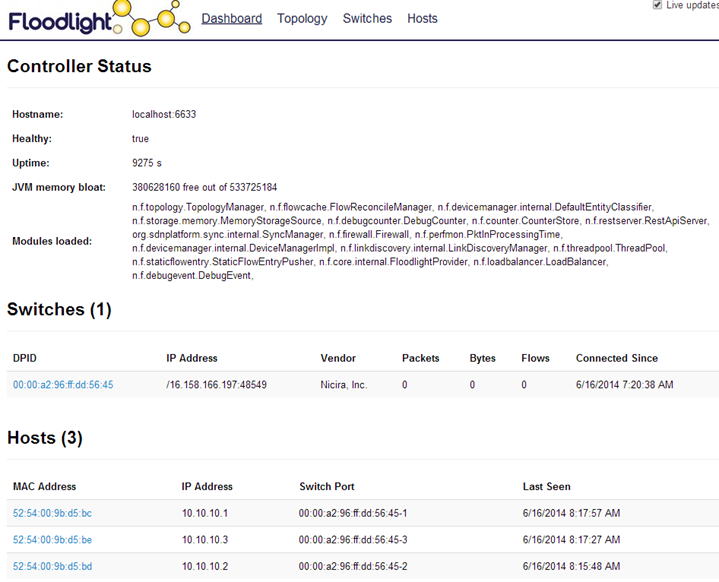
当前的拓扑结构如下:
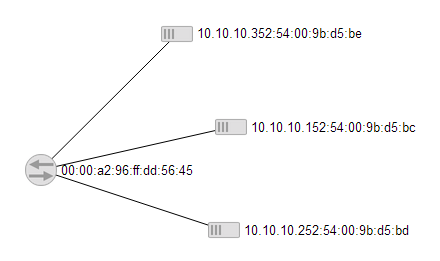
下面我们只允许10.10.10.1和10.10.10.3相互ping
$ curl -d '{"switch": "00:00:a2:96:ff:dd:56:45", "name":"static-flow1", "cookie":"0", "priority":"32768", "src-mac":"52:54:00:9b:d5:bc","active":"true", "actions":"output=3"}' http://16.158.165.102:8080/wm/staticflowentrypusher/json
{"status" : "Entry pushed"}
$ curl -d '{"switch": "00:00:a2:96:ff:dd:56:45", "name":"static-flow2", "cookie":"0", "priority":"32768", "src-mac":"52:54:00:9b:d5:be","active":"true", "actions":"output=1"}' http://16.158.165.102:8080/wm/staticflowentrypusher/json
{"status" : "Entry pushed"}
我们来验证效果
$ sudo ovs-ofctl dump-flows helloworld
NXST_FLOW reply (xid=0x4):
cookie=0xa00000d7014f7f, duration=873.78s, table=0, n_packets=57, n_bytes=10922, idle_age=170, hard_age=778, dl_src=52:54:00:9b:d5:bc actions=output:3
cookie=0xa00000d7014f80, duration=855.454s, table=0, n_packets=78, n_bytes=19004, idle_age=29, dl_src=52:54:00:9b:d5:be actions=output:1
从10.10.10.1 ping其他机器
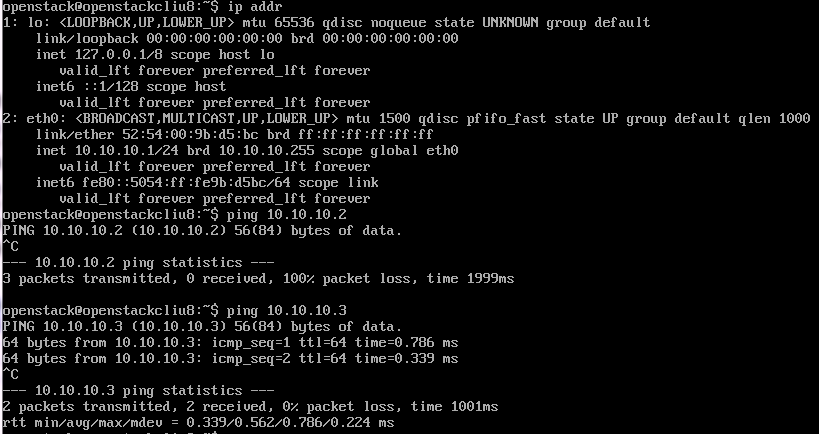
从10.10.10.2 ping其他机器
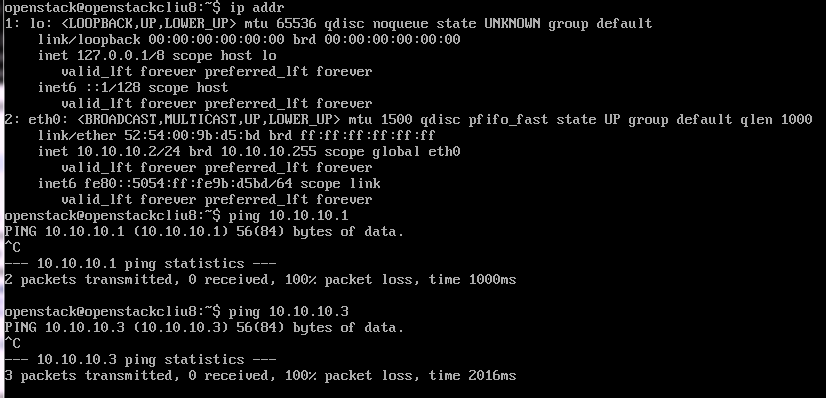
从10.10.10.3 ping其他机器
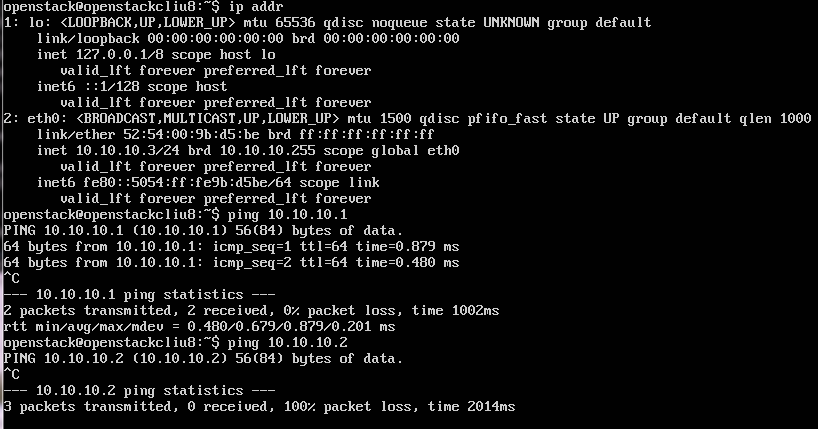
我们进行下一个实验
将flow table clear掉
curl http://16.158.165.102:8080/wm/staticflowentrypusher/clear/00:00:a2:96:ff:dd:56:45/json
然后我们讲正确的mac导向正确的port
curl -d '{"switch": "00:00:a2:96:ff:dd:56:45", "name":"static-flow1", "cookie":"0", "priority":"32768", "dst-mac":"52:54:00:9b:d5:bc","active":"true", "actions":"output=1"}' http://16.158.165.102:8080/wm/staticflowentrypusher/json
curl -d '{"switch": "00:00:a2:96:ff:dd:56:45", "name":"static-flow2", "cookie":"0", "priority":"32768", "dst-mac":"52:54:00:9b:d5:bd","active":"true", "actions":"output=2"}' http://16.158.165.102:8080/wm/staticflowentrypusher/json
curl -d '{"switch": "00:00:a2:96:ff:dd:56:45", "name":"static-flow3", "cookie":"0", "priority":"32768", "dst-mac":"52:54:00:9b:d5:be","active":"true", "actions":"output=3"}' http://16.158.165.102:8080/wm/staticflowentrypusher/json
这个时候互相的ping的通的
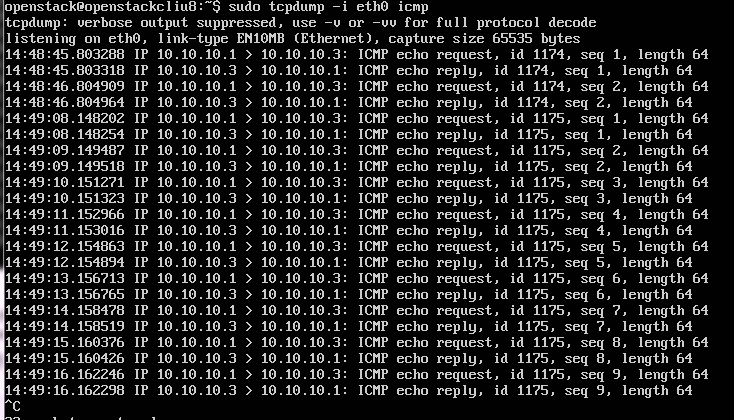
下面我们将导向port3的导向port2,并同时tcpdump在10.10.10.2和10.10.10.3两台机器上。
在机器10.10.10.1上ping 10.10.10.3
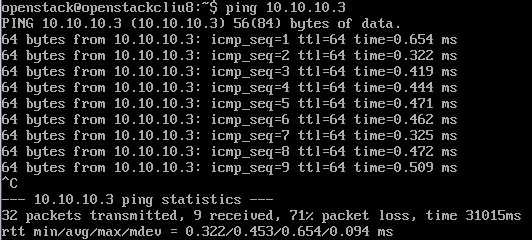
一开始10.10.10.3能收到并且恢复
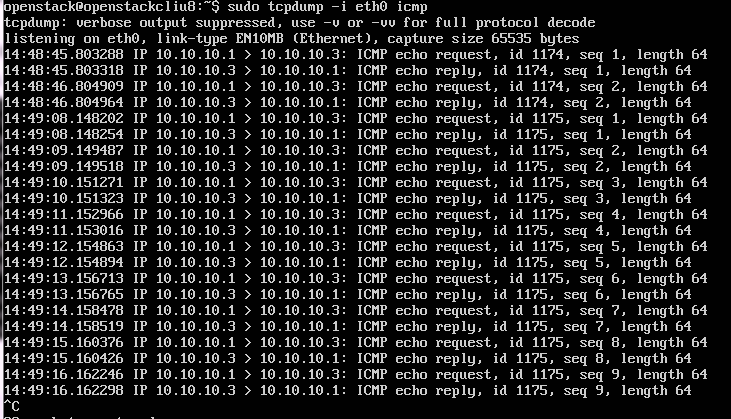
后来我们改变了规则
curl -d '{"switch": "00:00:a2:96:ff:dd:56:45", "name":"static-flow3", "cookie":"0", "priority":"32768", "dst-mac":"52:54:00:9b:d5:be","active":"true", "actions":"output=2"}' http://16.158.165.102:8080/wm/staticflowentrypusher/json
10.10.10.2开始能够收到ping,但是无法恢复
Openvswitch手册(2): OpenFlow Controller的更多相关文章
- Openvswitch手册(1): 架构,SSL, Manager, Bridge
Openvswitch是一个virutal swtich, 支持Open Flow协议,当然也有一些硬件Switch也支持Open Flow协议,他们都可以被统一的Controller管理,从而实现物 ...
- Openvswitch手册(9): Flow
这一节我们将flow table flow table主要由ovs-ofctl命令操作 ovs-ofctl可以走和openflow controller一样的协议: ssl:ip[:port]: Th ...
- Openvswitch手册(4): Mirror
这一节我们来分析Mirror Mirror就是配置一个bridge,将某些包发给指定的mirrored ports 对于包的选择: select_all,所有的包 select_dst_port se ...
- Openvswitch手册(6): QoS
这一节我们看QoS,Qos的设置往往是和flow中的policy一起使用的 Open vSwitch QoS capabilities 1 Interface rate limiting 2 Port ...
- Openvswitch手册(7): Interfaces
我们来看Interfaces ofport: OpenFlow port number for this interface. type: system: An ordinary network de ...
- Openvswitch手册(8): ovs-vsctl的DB的操作
ovs-vsctl的DB的操作 如果你在命令行里面找不到相应的命令创建和删除对象,则可以直接删除数据库 [−−if−exists] [−−columns=column[,column]...] lis ...
- Openvswitch手册(3): sFlow, netFlow
这一节,我们重点看sFlow 采样流sFlow(Sampled Flow)是一种基于报文采样的网络流量监控技术,主要用于对网络流量进行统计分析. sFlow系统包含一个嵌入在设备中的sFlow Age ...
- Openvswitch手册(5): VLAN and Bonding
我们这一节来看Port 一般来说一个Port就是一个Interface,当然也有一个Port对应多个Interface的情况,成为Bond VLAN Configuration Port的一个重要的方 ...
- OpenvSwitch/OpenFlow 架构解析与实践案例
目录 文章目录 目录 前言 软件定义网络(SDN) 虚拟交换机(vSwitch) 为什么说云计算时代的 SDN 非常重要 OpenFlow 简介 Open vSwitch Open vSwitch 的 ...
随机推荐
- Python的range()函数用法
Python的range()函数有三种用法,简单地说就是下图的三种用法: 运行结果如下:
- Python小白自问自答
1. 问:python怎么查看命令的含义和用法? 答:查一些简单命令的含义以及用法,直接help(命令)就行了.例如直接输入help(input),这表示查input的用法. 例子如下: help(p ...
- synchronized 同步函数的竞争关系验证
synchronized是Java中的关键字,是一种同步锁.它修饰的对象有以下几种: 1. 修饰一个代码块,被修饰的代码块称为同步语句块,其作用的范围是大括号{}括起来的代码,作用的对象是调用这个代码 ...
- VS2008打上SP1的补丁后安装了silverlight后出现未将对象引用设置到对象实例的解决办法
新建silverlight项目失败,提示 未将对象设置到实例 的解决办法: 1.打开 visual studio 命令提示 输入一下命令:2.devenv /resetskippkgs ,这条命令会启 ...
- node.js中对 redis 的安装和基本操作
一.win下安装redis https://github.com/MicrosoftArchive/redis/releases 下载Redis-x64-3.2.100.zip,然后解压,放到自定义目 ...
- JavaSE基础知识(5)—面向对象(5.7 final关键字)
一.说明 final属于一种修饰符,可以用于修饰类和属性.方法.局部变量 二.特点 1.修饰类 该类不能被继承,如String.Integer等 2.修饰方法 该方法不能被重写 3.修饰变量(属性和局 ...
- Mysql必知必会 第三章 使用Mysql
第三章 使用Mysql SQL语句和大小写 请注意,SQL语句不区分大小写,因此SELECT与select是相同的.同样,写成Select也没有关系.许多SQL开发人员喜欢对所有SQL关键字使用大写, ...
- 2019新版UI设计面试题汇总(附答案)
问题一.Android手机的常用设计尺寸有_________.怎么适配ios和安卓. 答案:安卓320 X 480是常规模拟器.但现在的开发都是用360x640做一倍率.480 X 800(1.5倍率 ...
- C#事务提交
using (System.Transactions.TransactionScope transcope = new System.Transactions.TransactionScope()) ...
- Js 常用调试的方法
A 使用alert() 和document.write() 方法监视变量值 如果要中断代码的运行,监视变量的值,则使用alert() 方法: 如果需要查看的值很多,则使用document.write ...