
Openvswitch手册(6): QoS
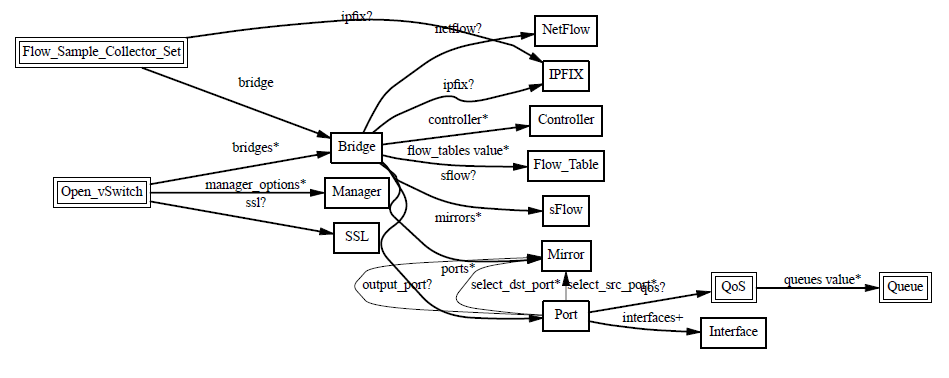
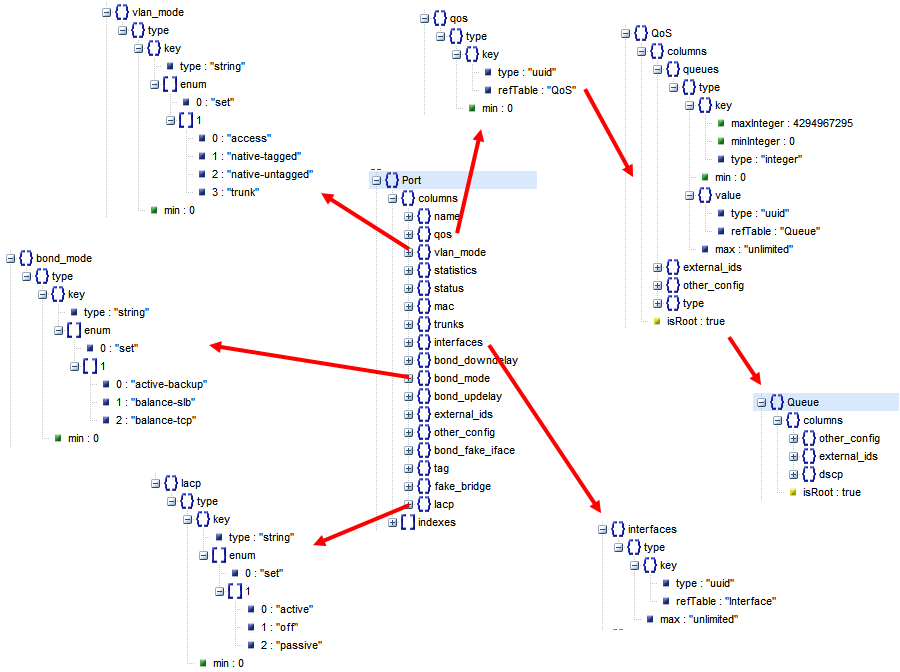
这一节我们看QoS,Qos的设置往往是和flow中的policy一起使用的
Open vSwitch QoS capabilities
- 1 Interface rate limiting
- 2 Port QoS policy
QoS: Interface rate limiting
- A rate and burst can be assigned to an Interface
- Conceptually similar to Xen’s netback credit scheduler
- # ovs-vsctl set Interface tap0 ingress_policing_rate=100000
- # ovs-vsctl set Interface tap0 ingress_policing_burst=10000
- Simple
- Appears to work as expected
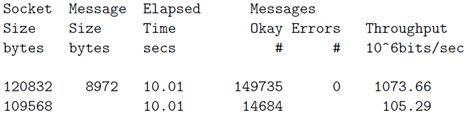
QoS: No interface rate limiting example
# netperf -4 -t UDP_STREAM -H 172.17.50.253 -- -m 8972
UDP UNIDIRECTIONAL SEND TEST from 0.0.0.0 (0.0.0.0) port 0 AF_INET to 172.17.50.253 (172.17.50.253) port 0 AF_INET

# netperf -4 -t UDP_STREAM -H 172.17.50.253
UDP UNIDIRECTIONAL SEND TEST from 0.0.0.0 (0.0.0.0) port 0 AF_INET to 172.17.50.253 (172.17.50.253) port 0 AF_INET
QoS: Port QoS policy
- A port may be assigned one ore more QoS policy
- Each QoS policy consists of a class and a qdisc
- Classes and qdisc use the Linux kernel’s tc implementation
- Only HTB classes are supported at this time
- Each class has a single qdisc associated with it
- The class of a flow is chosen by the controller
- The QoS policy (i.e. class) of a flow is chosen by the controller
Create the QoS Policy
# ovs-vsctl set port eth1 qos=@newqos -- --id=@newqos create qos type=linux-htb other-config:max-rate=200000000 queues=0=@q0,1=@q1 -- --id=@q0 create queue other-config:min-rate=100000000 other-config:max-rate=100000000 -- --id=@q1 create queue other-config:min-rate=50000000 other-config:max-rate=50000000
Add flow for the Queue (enqueue:port:queue)
# ovs-ofctl add-flow br0 "in_port=2 ip nw_dst=172.17.50.253 idle_timeout=0 actions=enqueue:1:0"
# ovs-ofctl add-flow br0 "in_port=3 ip nw_dst=172.17.50.253 idle_timeout=0 actions=enqueue:1:1"
Hierarchical Token Bucket
例子一:
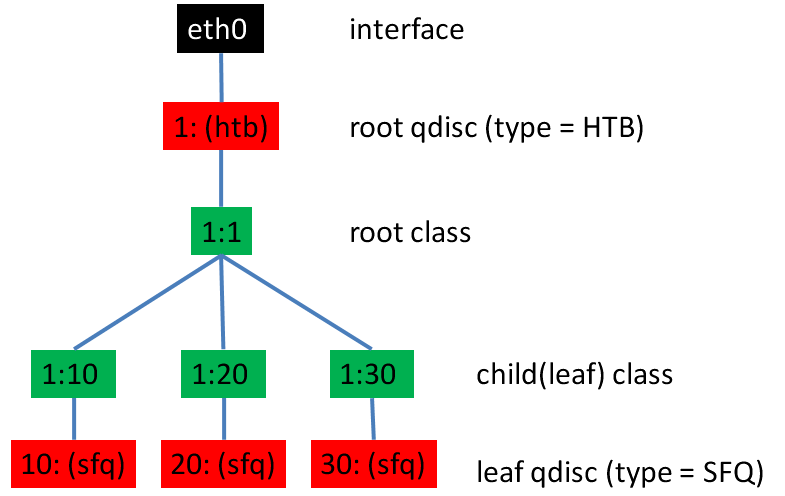
# tc qdisc add dev eth0 root handle 1: htb default 30

# tc class add dev eth0 parent 1: classid 1:1 htb rate 6mbit burst 15k

# tc class add dev eth0 parent 1:1 classid 1:10 htb rate 5mbit burst 15k

# tc class add dev eth0 parent 1:1 classid 1:20 htb rate 3mbit ceil 6mbit burst 15k

# tc class add dev eth0 parent 1:1 classid 1:30 htb rate 1kbit ceil 6mbit burst 15k
The author then recommends SFQ for beneath these classes:
# tc qdisc add dev eth0 parent 1:10 handle 10: sfq perturb 10

# tc qdisc add dev eth0 parent 1:20 handle 20: sfq perturb 10

# tc qdisc add dev eth0 parent 1:30 handle 30: sfq perturb 10
Add the filters which direct traffic to the right classes:
# U32="tc filter add dev eth0 protocol ip parent 1:0 prio 1 u32"

# $U32 match ip dport 80 0xffff flowid 1:10

# $U32 match ip sport 25 0xffff flowid 1:20
同一个root class下的子类可以相互借流量,如果直接不在qdisc下面创建一个root,而是直接创建三个class,他们之间是不能相互借流量的。
例子二:
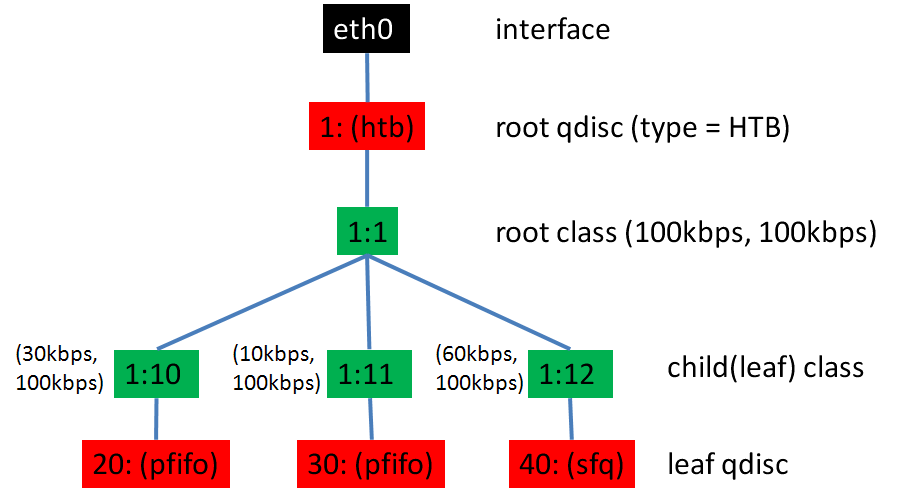
tc qdisc add dev eth0 root handle 1: htb default 12
- This command attaches queue discipline HTB to eth0 and gives it the "handle" 1:.
- This is just a name or identifier with which to refer to it below.
- The default 12 means that any traffic that is not otherwise classified will be assigned to class 1:12.
tc class add dev eth0 parent 1: classid 1:1 htb rate 100kbps ceil 100kbps
tc class add dev eth0 parent 1:1 classid 1:10 htb rate 30kbps ceil 100kbps
tc class add dev eth0 parent 1:1 classid 1:11 htb rate 10kbps ceil 100kbps
tc class add dev eth0 parent 1:1 classid 1:12 htb rate 60kbps ceil 100kbps
The first line creates a "root" class, 1:1 under the qdisc 1:. The definition of a root class is one with the htb qdisc as its parent.
同一个root class下的子类可以相互借流量,如果直接不在qdisc下面创建一个root,而是直接创建三个class,他们之间是不能相互借流量的。
tc qdisc add dev eth0 parent 1:10 handle 20: pfifo limit 5

tc qdisc add dev eth0 parent 1:11 handle 30: pfifo limit 5

tc qdisc add dev eth0 parent 1:12 handle 40: sfq perturb 10
tc filter add dev eth0 protocol ip parent 1:0 prio 1 u32 match ip src 1.2.3.4 match ip dport 80 0xffff flowid 1:10
tc filter add dev eth0 protocol ip parent 1:0 prio 1 u32 match ip src 1.2.3.4 flowid 1:11
实验
sudo iptables -t nat -A POSTROUTING -o eth0 -j MASQUERADE
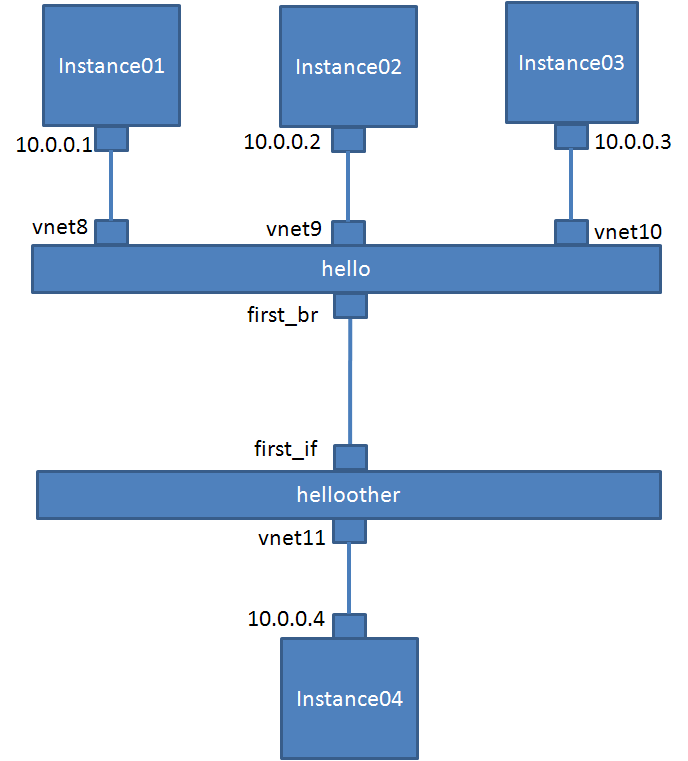
首先我们测试在Instance04上设置ingress speed control
在什么都没有配置的时候,我们测试一下速度
从10.10.10.1到10.10.10.4

我们设置 一下first_if
# ovs-vsctl set Interface first_if ingress_policing_rate=100000
# ovs-vsctl set Interface first_if ingress_policing_burst=10000

下面将ingress speed control删除
$ sudo ovs-vsctl set Interface first_if ingress_policing_burst=0
$ sudo ovs-vsctl set Interface first_if ingress_policing_rate=0
然后我们测试QoS
$ sudo ovs-vsctl set port first_br qos=@newqos -- --id=@newqos create qos type=linux-htb other-config:max-rate=10000000 queues=0=@q0,1=@q1,2=@q2 -- --id=@q0 create queue other-config:min-rate=3000000 other-config:max-rate=10000000 -- --id=@q1 create queue other-config:min-rate=1000000 other-config:max-rate=10000000 -- --id=@q2 create queue other-config:min-rate=6000000 other-config:max-rate=10000000
ce7cfd43-8369-4ce6-a7fd-4e0b79307c10
04e7abdc-406b-422c-82bc-3d229a3eb191
be03dd29-0ec2-40f0-a342-95f118322673
834bd432-3314-4d68-94ab-bb233c82082b
$ sudo ovs-ofctl add-flow hello "in_port=1 nw_src=10.10.10.1 actions=enqueue:4:0"
2014-06-23T12:24:54Z|00001|ofp_util|INFO|normalization changed ofp_match, details:
2014-06-23T12:24:54Z|00002|ofp_util|INFO| pre: in_port=1,nw_src=10.10.10.1
2014-06-23T12:24:54Z|00003|ofp_util|INFO|post: in_port=1
$ sudo ovs-ofctl add-flow hello "in_port=2 nw_src=10.10.10.2 actions=enqueue:4:1"
2014-06-23T12:25:21Z|00001|ofp_util|INFO|normalization changed ofp_match, details:
2014-06-23T12:25:21Z|00002|ofp_util|INFO| pre: in_port=2,nw_src=10.10.10.2
2014-06-23T12:25:21Z|00003|ofp_util|INFO|post: in_port=2
$ sudo ovs-ofctl add-flow hello "in_port=3 nw_src=10.10.10.3 actions=enqueue:4:2"
2014-06-23T12:26:44Z|00001|ofp_util|INFO|normalization changed ofp_match, details:
2014-06-23T12:26:44Z|00002|ofp_util|INFO| pre: in_port=3,nw_src=10.10.10.3
2014-06-23T12:26:44Z|00003|ofp_util|INFO|post: in_port=3
$ sudo ovs-ofctl dump-flows hello
NXST_FLOW reply (xid=0x4):
cookie=0x0, duration=23.641s, table=0, n_packets=0, n_bytes=0, idle_age=23, in_port=3 actions=enqueue:4q2
cookie=0x0, duration=133.215s, table=0, n_packets=0, n_bytes=0, idle_age=133, in_port=1 actions=enqueue:4q0
cookie=0x0, duration=107.042s, table=0, n_packets=0, n_bytes=0, idle_age=107, in_port=2 actions=enqueue:4q1
cookie=0x0, duration=8327.633s, table=0, n_packets=2986900, n_bytes=195019185978, idle_age=1419, priority=0 actions=NORMAL
如果我们单独测试从10.10.10.1,10.10.10.2,10.10.10.3到10.10.10.4
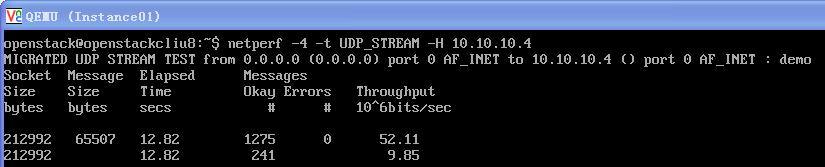

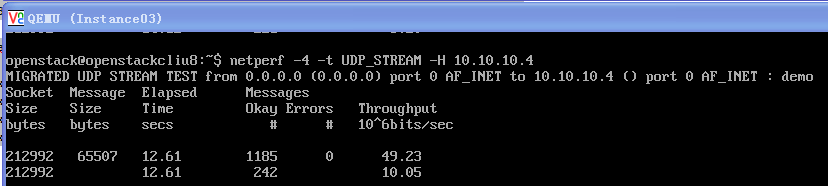
发现他们的速度都能达到最大的10M
如果三个一起测试,我们发现是按照比例3:1:6进行的
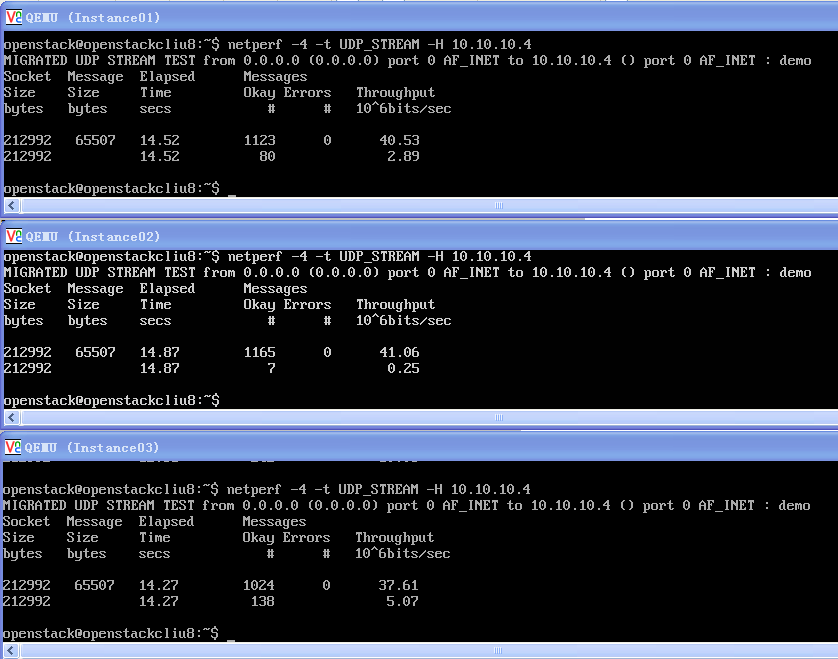
所以QoS中的HTB是实现了borrow的功能的
Openvswitch手册(6): QoS的更多相关文章
- Openvswitch手册(1): 架构,SSL, Manager, Bridge
Openvswitch是一个virutal swtich, 支持Open Flow协议,当然也有一些硬件Switch也支持Open Flow协议,他们都可以被统一的Controller管理,从而实现物 ...
- Openvswitch手册(2): OpenFlow Controller
我们这一节主要来看Controller Controller有两种: Primary Controller: 真正控制vswitch的flow table,vswitch会保持和contro ...
- Openvswitch手册(8): ovs-vsctl的DB的操作
ovs-vsctl的DB的操作 如果你在命令行里面找不到相应的命令创建和删除对象,则可以直接删除数据库 [−−if−exists] [−−columns=column[,column]...] lis ...
- Openvswitch手册(3): sFlow, netFlow
这一节,我们重点看sFlow 采样流sFlow(Sampled Flow)是一种基于报文采样的网络流量监控技术,主要用于对网络流量进行统计分析. sFlow系统包含一个嵌入在设备中的sFlow Age ...
- Openvswitch手册(4): Mirror
这一节我们来分析Mirror Mirror就是配置一个bridge,将某些包发给指定的mirrored ports 对于包的选择: select_all,所有的包 select_dst_port se ...
- Openvswitch手册(5): VLAN and Bonding
我们这一节来看Port 一般来说一个Port就是一个Interface,当然也有一个Port对应多个Interface的情况,成为Bond VLAN Configuration Port的一个重要的方 ...
- Openvswitch手册(7): Interfaces
我们来看Interfaces ofport: OpenFlow port number for this interface. type: system: An ordinary network de ...
- Openvswitch手册(9): Flow
这一节我们将flow table flow table主要由ovs-ofctl命令操作 ovs-ofctl可以走和openflow controller一样的协议: ssl:ip[:port]: Th ...
- Ceph相关博客、网站(256篇OpenStack博客)
官网文档: http://docs.ceph.com/docs/master/cephfs/ http://docs.ceph.com/docs/master/cephfs/createfs/ ( ...
随机推荐
- 移值UCOS2到M4核与M3核的区别
之前移值过ucos2到stm32f2系列的单片机,这个单片机是属于arm的m3内核的.最近在学习永磁同步电机的控制,对于这个电机的控制,有比较多的数学计算,甚至于还有浮点的运算.所以用到了stm32f ...
- Windows Server 2012 正式版/标准版/数据中心版安装序列号密钥
Windows Server 2012(开发代号:Windows Server 8)是微软发布的一款服务器操作系统,也是Windows 8对应的服务器版本,属于是Windows Server 2008 ...
- VUEX报 “was assigned to but it has no setter”
如果有当前的变量(VUEX声名的)会发生改变的(change),刚绑定的值需要在data () 内进行声明 一个新的变量进行处理.
- c++11新标准for循环和lambda表达式
:first-child { margin-top: 0px; } .markdown-preview:not([data-use-github-style]) h1, .markdown-previ ...
- 永久注册Oracle工具PL/SQL
- macOS HomeBrew更换源 brew常用命令说明
homebrew本身就是一个git仓库.使用homebrew安装软件包时,会自动先下载软件包,然后解压安装,但有时候下载会卡住,或者很慢,这个时候有以下几种方法: 1.临时的终止update,先con ...
- 201771010134杨其菊《面向对象程序设计(java)》第十五周学习
第十五周学习总结 第一部分:理论知识 JAR文件: 应用程序首选项存储: Java Web Start JAR文件: 1.Java程序的打包:程序编译完成后,程序员将.class文件压缩打包为.jar ...
- day 2:计算机的基础知识,编程语言分类
本节内容 1,计算机的容量 2,编程语言介绍1,计算机的容量 1位 = 1bit 8bit = 1byte = 1字节 1024bytes = 1k bytes = 1KB 1024个 1024KB ...
- MySQL 导入导出数据
导入数据 1. 使用 MySQl Workbench 界面操作 导入 csv JSON 格式文件 2 使用 load data 命令 load data 命令官网教程 https://dev.mysq ...
- jquery倒计时按钮常用于验证码倒计时
<!doctype html><html><head> <meta charset="utf-8"> <title>jq ...