
DNS_PROBE_FINISHED_NXDOMAIN & MacOS
DNS_PROBE_FINISHED_NXDOMAIN
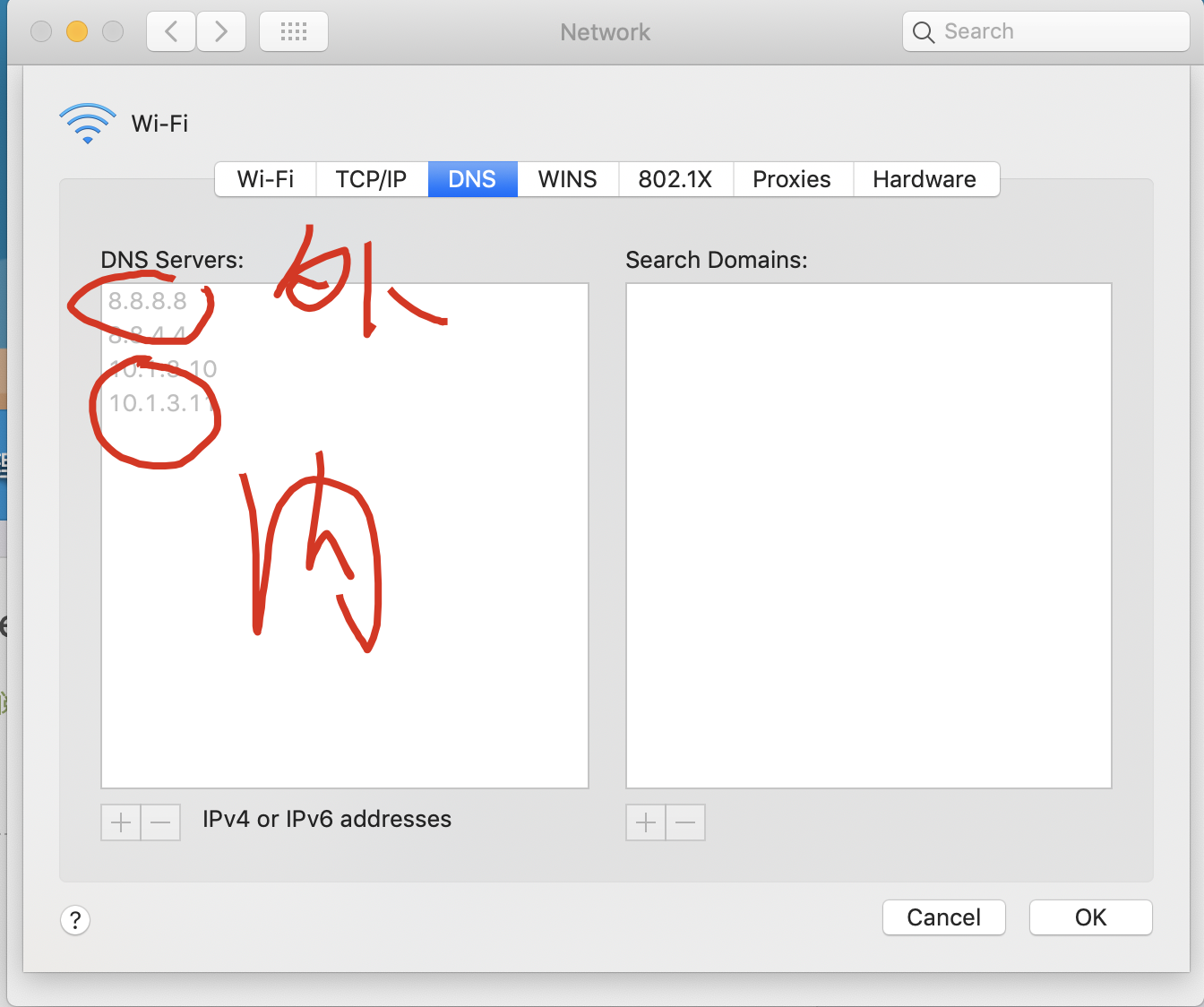
内网 DNS bug


8.8.8.8

8.8.4.4

# new inner Wi-Fi

10.1.3.10

10.1.3.13
Windows
https://www.wiknix.com/how-to-fix-dns_probe_finished_nxdomain-in-chrome/
MacOS
DNS 刷新
https://www.apple.com/cn/search/DNS?src=globalnav
https://www.apple.com/cn/search/DNS-刷新?src=serp

https://blog.csdn.net/u013356066/article/details/52162889
https://blog.csdn.net/zhaoxiaoruiR/article/details/82459788
https://jingyan.baidu.com/article/154b4631aa51bb28ca8f4114.html
https://www.lifewire.com/network-preference-pane-change-macs-dns-settings-2260394
https://beebom.com/dns_probe_finished_nxdomain-error-fix/
刷新 DNS 命令
http://osxdaily.com/2017/03/08/clear-dns-cache-macos-sierra/
$ sudo killall -HUP mDNSResponder; say DNS cache has been flushed

$ sudo killall -HUP mDNSResponder

$ sudo discoveryutil mdnsflushcache

$ sudo discoveryutil udnsflushcache

// DNS

8.8.8.8

8.8.4.4
ns-lookup
NSLOOKUP(1) BIND9 NSLOOKUP(1)
NAME
nslookup - query Internet name servers interactively
SYNOPSIS
nslookup [-option] [name | -] [server]
DESCRIPTION
Nslookup is a program to query Internet domain name servers. Nslookup
has two modes: interactive and non-interactive. Interactive mode allows
the user to query name servers for information about various hosts and
domains or to print a list of hosts in a domain. Non-interactive mode
is used to print just the name and requested information for a host or
domain.
ARGUMENTS
Interactive mode is entered in the following cases:
1. when no arguments are given (the default name server will be used)
2. when the first argument is a hyphen (-) and the second argument is
the host name or Internet address of a name server.
Non-interactive mode is used when the name or Internet address of the
host to be looked up is given as the first argument. The optional
second argument specifies the host name or address of a name server.
Options can also be specified on the command line if they precede the
arguments and are prefixed with a hyphen. For example, to change the
default query type to host information, and the initial timeout to 10
seconds, type:
nslookup -query=hinfo -timeout=10
The -version option causes nslookup to print the version number and
immediately exits.
INTERACTIVE COMMANDS
host [server]
Look up information for host using the current default server or
using server, if specified. If host is an Internet address and the
query type is A or PTR, the name of the host is returned. If host
is a name and does not have a trailing period, the search list is
used to qualify the name.
To look up a host not in the current domain, append a period to the
name.
server domain
lserver domain
Change the default server to domain; lserver uses the initial
server to look up information about domain, while server uses the
current default server. If an authoritative answer can't be found,
the names of servers that might have the answer are returned.
root
not implemented
finger
not implemented
ls
not implemented
view
not implemented
help
not implemented
?
not implemented
exit
Exits the program.
set keyword[=value]
This command is used to change state information that affects the
lookups. Valid keywords are:
all
Prints the current values of the frequently used options to
set. Information about the current default server and host is
also printed.
class=value
Change the query class to one of:
IN
the Internet class
CH
the Chaos class
HS
the Hesiod class
ANY
wildcard
The class specifies the protocol group of the information.
(Default = IN; abbreviation = cl)
[no]debug
Turn on or off the display of the full response packet and any
intermediate response packets when searching.
(Default = nodebug; abbreviation = [no]deb)
[no]d2
Turn debugging mode on or off. This displays more about what
nslookup is doing.
(Default = nod2)
domain=name
Sets the search list to name.
[no]search
If the lookup request contains at least one period but doesn't
end with a trailing period, append the domain names in the
domain search list to the request until an answer is received.
(Default = search)
port=value
Change the default TCP/UDP name server port to value.
(Default = 53; abbreviation = po)
querytype=value
type=value
Change the type of the information query.
(Default = A; abbreviations = q, ty)
[no]recurse
Tell the name server to query other servers if it does not have
the information.
(Default = recurse; abbreviation = [no]rec)
ndots=number
Set the number of dots (label separators) in a domain that will
disable searching. Absolute names always stop searching.
retry=number
Set the number of retries to number.
timeout=number
Change the initial timeout interval for waiting for a reply to
number seconds.
[no]vc
Always use a virtual circuit when sending requests to the
server.
(Default = novc)
[no]fail
Try the next nameserver if a nameserver responds with SERVFAIL
or a referral (nofail) or terminate query (fail) on such a
response.
(Default = nofail)
RETURN VALUES
nslookup returns with an exit status of 1 if any query failed, and 0
otherwise.
macOS NOTICE
The nslookup command does not use the host name and address resolution
or the DNS query routing mechanisms used by other processes running on
macOS. The results of name or address queries printed by nslookup may
differ from those found by other processes that use the macOS native
name and address resolution mechanisms. The results of DNS queries may
also differ from queries that use the macOS DNS routing library.
FILES
/etc/resolv.conf
SEE ALSO
dig(1), host(1), named(8).
AUTHOR
Internet Systems Consortium, Inc.
COPYRIGHT
Copyright (C) 2004-2007, 2010, 2013-2016 Internet Systems Consortium,
Inc. ("ISC")
ISC 2018-05-25 NSLOOKUP(1)
[Process completed]
```·
## 外网 + 内网
DNS_PROBE_FINISHED_NXDOMAIN & MacOS的更多相关文章
- TODO:macOS编译PHP7.1
TODO:macOS编译PHP7.1 本文主要介绍在macOS上编译PHP7.1,有兴趣的朋友可以去尝试一下. 1.下载PHP7.1源码,建议到PHP官网下载纯净到源码包php-7.1.0.tar.g ...
- TODO:macOS上ThinkPHP5和Semantic-UI集成
TODO:macOS上ThinkPHP5和Semantic-UI集成 1. 全局安装 (on OSX via homebrew)Composer 是 homebrew-php 项目的一部分 2. 把X ...
- CoreCRM 开发实录——Travis-CI 实现 .NET Core 程度在 macOS 上的构建和测试 [无水干货]
上一篇文章我提到:为了使用"国货",我把 Linux 上的构建和测试委托给了 DaoCloud,而 Travis-CI 不能放着不用啊.还好,这货支持 macOS 系统.所以就把 ...
- docker4dotnet #3 在macOS上使用Visual Studio Code和Docker开发asp.net core和mysql应用
.net猿遇到了小鲸鱼,觉得越来越兴奋.本来.net猿只是在透过家里那田子窗看外面的世界,但是看着海峡对岸的苹果园越来越茂盛,实在不想再去做一只宅猿了.于是,.net猿决定搭上小鲸鱼的渡轮到苹果园去看 ...
- ASP.NET Core 中文文档 第二章 指南(1)用 Visual Studio Code 在 macOS 上创建首个 ASP.NET Core 应用程序
原文:Your First ASP.NET Core Application on a Mac Using Visual Studio Code 作者:Daniel Roth.Steve Smith ...
- Swift 3 and OpenGL on Linux and macOS with GLFW
https://solarianprogrammer.com/2016/11/19/swift-opengl-linux-macos-glfw/ Swift 3 and OpenGL on Linux ...
- Asp.Net Core 发布和部署( MacOS + Linux + Nginx )
前言 在上篇文章中,主要介绍了 Dotnet Core Run 命令,这篇文章主要是讲解如何在Linux中,对 Asp.Net Core 的程序进行发布和部署. 有关如何在 Jexus 中进行部署,请 ...
- 在MacOS 10.12上安装Tomcat8.5
在MacOS 10.12上安装Tomcat8.5 原文链接:https://wolfpaulus.com/journal/mac/tomcat8/ Context 已安装Java,使用java -ve ...
- MacOS中使用QT开发iOS应用
因为项目合同中规定一部分业务内容要在手机端实现,包括安卓机和苹果机,因此选择了QT作为开发工具.程序在Win10和安卓系统上已经完美运行,这几天开始搭建iOS的编译和发布环境,因为以前没有使用过mac ...
随机推荐
- day14(2)---列表推导式、生成器推导式、字典推导式、三元表达式
一.列表推导式: ls = [元素表达式 for i in 可迭代对象 if 筛选条件] 案例: # -*- coding: utf-8 -*- '''列表生成式练习''' # 练习一(三元表达式): ...
- js截取url参数
举例说明,比如http://localhost:2019/blog/getCommentListInfo?postId=1如何获取postId=1这个参数值呢?很简单通过下面代码即可获取,如: win ...
- c#简单的io
读取路径判断文件是否存在,进行删除或者创建 简单的io using System; using System.Collections; using System.Collections.Generic ...
- [Flume]使用 Flume 来传递web log 到 hdfs 的例子
[Flume]使用 Flume 来传递web log 到 hdfs 的例子: 在 hdfs 上创建存储 log 的目录: $ hdfs dfs -mkdir -p /test001/weblogsfl ...
- Windows系统中内存泄露与检测工具及方法
1.检测需要使用的工具:windbg工具.检测前,需要先安装windbg工具.安装了该工具后,会在安装目录下有一个umdh工具.假设windbg安装在以下目录下:D:\Program Files\De ...
- MyBatis + MySQL返回插入成功后的主键id
这是最近在实现perfect-ssm中的一个功能时碰到的一个小问题,觉得需要记录一下,向MySQL数据库中插入一条记录后,需要获取此条记录的id值,以生成对应的key值存入到redis中,id为自增i ...
- 【开源】小程序、小游戏和Web运动引擎 to2to 发布
简单轻量跨平台的 Javascript 运动引擎 Github → https://github.com/dntzhang/cax/tree/master/packages/to Simple DEM ...
- 追源索骥:透过源码看懂Flink核心框架的执行流程
li,ol.inline>li{display:inline-block;padding-right:5px;padding-left:5px}dl{margin-bottom:20px}dt, ...
- 我去年码了个表(WPF MvvM)
又快个把月没写博客了(最近忙着学JAVA去了,都是被逼的/(ㄒoㄒ)/~~),然后用WPF码了个表,其实想加上那种提醒功能什么的,额,就这样了吧,主要是感受一下数据驱动的思想. 效果如下: 前端XAM ...
- H5 类选择器
10-类选择器 错误的写法: --> 迟到毁一生 早退穷三代 按时上下班 必成高富帅 我是段落 我是段落 <!DOCTYPE html> <html lang="en ...