
18、配置嵌入式servlet容器(2)
使用其他Servlet容器

替换为其他嵌入式Servlet容器
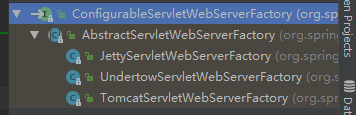
Jetty:
<dependency>

    <groupId>org.springframework.boot</groupId>

    <artifactId>spring-boot-starter-web</artifactId>

    <exclusions>

        <exclusion>

            <artifactId>spring-boot-starter-tomcat</artifactId>

            <groupId>org.springframework.boot</groupId>

        </exclusion>

    </exclusions>

</dependency>

<!--引入其他的Servlet -->

<dependency>

     <artifactId>spring‐boot‐starter‐jetty</artifactId>

     <groupId>org.springframework.boot</groupId>

</dependency>
Undertow:
<dependency>

    <groupId>org.springframework.boot</groupId>

    <artifactId>spring-boot-starter-web</artifactId>

    <exclusions>

        <exclusion>

            <artifactId>spring-boot-starter-tomcat</artifactId>

            <groupId>org.springframework.boot</groupId>

        </exclusion>

    </exclusions>

</dependency>

<!--引入其他的Servlet -->

<dependency>

     <artifactId>spring‐boot‐starter‐undertow<</artifactId>

     <groupId>org.springframework.boot</groupId>

</dependency>
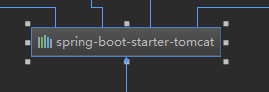
右键排除依赖
嵌入式Servlet配置原理:
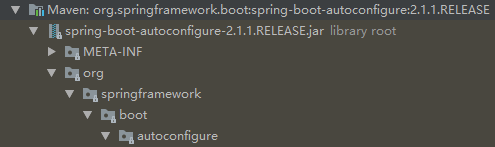
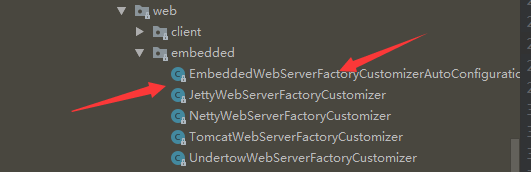
Servelt容器的自动配置类

@Configuration

@ConditionalOnWebApplication

@EnableConfigurationProperties({ServerProperties.class})

public class EmbeddedWebServerFactoryCustomizerAutoConfiguration {

    public EmbeddedWebServerFactoryCustomizerAutoConfiguration() {

    }

    @Configuration

    @ConditionalOnClass({HttpServer.class})

    public static class NettyWebServerFactoryCustomizerConfiguration {

        public NettyWebServerFactoryCustomizerConfiguration() {

        }

        @Bean

        public NettyWebServerFactoryCustomizer nettyWebServerFactoryCustomizer(Environment environment, ServerProperties serverProperties) {

            return new NettyWebServerFactoryCustomizer(environment, serverProperties);

        }

    }

    @Configuration

    @ConditionalOnClass({Undertow.class, SslClientAuthMode.class})

    public static class UndertowWebServerFactoryCustomizerConfiguration {

        public UndertowWebServerFactoryCustomizerConfiguration() {

        }

        @Bean

        public UndertowWebServerFactoryCustomizer undertowWebServerFactoryCustomizer(Environment environment, ServerProperties serverProperties) {

            return new UndertowWebServerFactoryCustomizer(environment, serverProperties);

        }

    }

    @Configuration

    @ConditionalOnClass({Server.class, Loader.class, WebAppContext.class})

    public static class JettyWebServerFactoryCustomizerConfiguration {

        public JettyWebServerFactoryCustomizerConfiguration() {

        }

        @Bean

        public JettyWebServerFactoryCustomizer jettyWebServerFactoryCustomizer(Environment environment, ServerProperties serverProperties) {

            return new JettyWebServerFactoryCustomizer(environment, serverProperties);

        }

    }

    @Configuration

    @ConditionalOnClass({Tomcat.class, UpgradeProtocol.class})

    public static class TomcatWebServerFactoryCustomizerConfiguration {

        public TomcatWebServerFactoryCustomizerConfiguration() {

        }

        @Bean

        public TomcatWebServerFactoryCustomizer tomcatWebServerFactoryCustomizer(Environment environment, ServerProperties serverProperties) {

            return new TomcatWebServerFactoryCustomizer(environment, serverProperties);

        }

    }

}
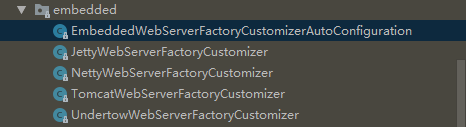
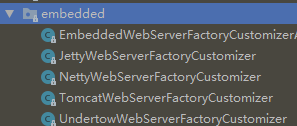
TomcatWebServerFactoryCustomizer.java
public class TomcatWebServerFactoryCustomizer implements WebServerFactoryCustomizer<ConfigurableTomcatWebServerFactory>, Ordered {

    private final Environment environment;

    private final ServerProperties serverProperties;

    public TomcatWebServerFactoryCustomizer(Environment environment, ServerProperties serverProperties) {

        this.environment = environment;

        this.serverProperties = serverProperties;

    }

    public int getOrder() {

        return ;

    }

    public void customize(ConfigurableTomcatWebServerFactory factory) {

        ServerProperties properties = this.serverProperties;

        Tomcat tomcatProperties = properties.getTomcat();

        PropertyMapper propertyMapper = PropertyMapper.get();

        tomcatProperties.getClass();

        propertyMapper.from(tomcatProperties::getBasedir).whenNonNull().to(factory::setBaseDirectory);

        tomcatProperties.getClass();

        propertyMapper.from(tomcatProperties::getBackgroundProcessorDelay).whenNonNull().as(Duration::getSeconds).as(Long::intValue).to(factory::setBackgroundProcessorDelay);

        this.customizeRemoteIpValve(factory);

        tomcatProperties.getClass();

        propertyMapper.from(tomcatProperties::getMaxThreads).when(this::isPositive).to((maxThreads) -> {

            this.customizeMaxThreads(factory, tomcatProperties.getMaxThreads());

        });

        tomcatProperties.getClass();

        propertyMapper.from(tomcatProperties::getMinSpareThreads).when(this::isPositive).to((minSpareThreads) -> {

            this.customizeMinThreads(factory, minSpareThreads);

        });

        propertyMapper.from(this::determineMaxHttpHeaderSize).whenNonNull().asInt(DataSize::toBytes).when(this::isPositive).to((maxHttpHeaderSize) -> {

            this.customizeMaxHttpHeaderSize(factory, maxHttpHeaderSize);

        });

        tomcatProperties.getClass();

        propertyMapper.from(tomcatProperties::getMaxSwallowSize).whenNonNull().asInt(DataSize::toBytes).to((maxSwallowSize) -> {

            this.customizeMaxSwallowSize(factory, maxSwallowSize);

        });

        tomcatProperties.getClass();

        propertyMapper.from(tomcatProperties::getMaxHttpPostSize).asInt(DataSize::toBytes).when((maxHttpPostSize) -> {

            return maxHttpPostSize != ;

        }).to((maxHttpPostSize) -> {

            this.customizeMaxHttpPostSize(factory, maxHttpPostSize);

        });

        tomcatProperties.getClass();

        propertyMapper.from(tomcatProperties::getAccesslog).when(Accesslog::isEnabled).to((enabled) -> {

            this.customizeAccessLog(factory);

        });

        tomcatProperties.getClass();

        propertyMapper.from(tomcatProperties::getUriEncoding).whenNonNull().to(factory::setUriEncoding);

        properties.getClass();

        propertyMapper.from(properties::getConnectionTimeout).whenNonNull().to((connectionTimeout) -> {

            this.customizeConnectionTimeout(factory, connectionTimeout);

        });

        tomcatProperties.getClass();

        propertyMapper.from(tomcatProperties::getMaxConnections).when(this::isPositive).to((maxConnections) -> {

            this.customizeMaxConnections(factory, maxConnections);

        });

        tomcatProperties.getClass();

        propertyMapper.from(tomcatProperties::getAcceptCount).when(this::isPositive).to((acceptCount) -> {

            this.customizeAcceptCount(factory, acceptCount);

        });

        this.customizeStaticResources(factory);

        this.customizeErrorReportValve(properties.getError(), factory);

    }

.......

}
嵌入式Servlet容器启动原理;
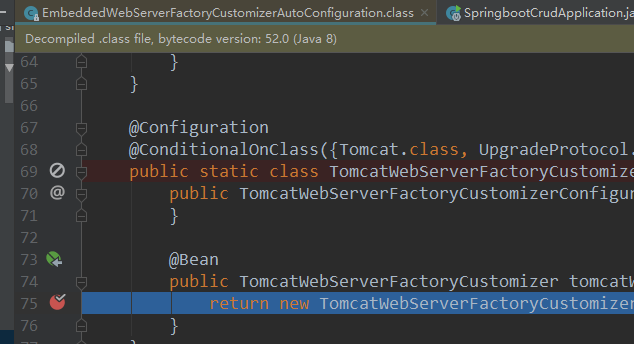
private void refreshContext(ConfigurableApplicationContext context) {

    this.refresh(context);

    if (this.registerShutdownHook) {

        try {

            context.registerShutdownHook();

        } catch (AccessControlException var3) {

            ;

        }

    }

}
18、配置嵌入式servlet容器(2)的更多相关文章
- 17、配置嵌入式servlet容器(1)
SpringBoot默认使用Tomcat作为嵌入式的Servlet容器 1).如何定制和修改Servlet容器的相关配置 1.修改和server有关的配置 (Se ...
- 17. Spring Boot 配置嵌入式Servlet容器
一.如何定制和修改Servlet容器的相关配置 1.配置文件(ServerProperties): 优先级最高 server.port=8081 server.context‐path=/crud s ...
- 配置嵌入式Servlet容器
SpringBoot默认是用的是Tomcat作为嵌入式的Servlet容器:问题?1).如何定制和修改Servlet容器的相关配置:1.修改和server有关的配置(ServerProperties) ...
- 【串线篇】spring boot配置嵌入式servlet容器
SpringBoot默认使用Tomcat作为嵌入式的Servlet容器 问题? 一.如何定制和修改Servlet容器的相关配置 1.方法1修改和server有关的配置(ServerProperties ...
- SpringBoot配置嵌入式Servlet容器
1).如何定制和修改Servlet容器的相关配置: 1.修改和server有关的配置(ServerProperties[也是EmbeddedServletContainerCustomizer]): ...
- 19、配置嵌入式servlet容器(下)
使用外置的Servlet 嵌入式Servlet容器:应用打成可执行的j ar 优点:简单.便携: 缺点:默认不支持JSP.优化定制比较复杂 使用定制器[ServerProperti ...
- Spring boot 配置嵌入式Servlet容器
SpringBoot默认使用Tomcat作为嵌入式的Servlet容器 1.修改和server有关的配置(ServerProperties[也是EmbeddedServletContainerCust ...
- springboot(七) 配置嵌入式Servlet容器
github代码地址:https://github.com/showkawa/springBoot_2017/tree/master/spb-demo/spb-brian-query-service ...
- SpringBoot起飞系列-配置嵌入式Servlet容器(八)
一.前言 springboot中默认使用的是tomcat容器,也叫做嵌入式的servlet容器.因为它和我们平常使用的tomcat容器不一样,这个tomcat直接嵌入到的springboot,平常我们 ...
随机推荐
- log4j.properties 基本配置
log4j.rootLogger=WARN,stdout,D log4j.appender.stdout=org.apache.log4j.ConsoleAppender log4j.appender ...
- [转]浅谈 .NET Framework 与 .NET Core 的区别与联系
本文转自:http://www.cnblogs.com/huchaoheng/p/6295688.html 2017到了,咱们学点啥啊,要想知道学点啥,先弄清.NET Framework 与 .NET ...
- Splunk和ELK深度对比
转自:http://blog.51cto.com/splunkchina/1948105 日志处理两大生态Splunk和ELK深度对比 heijunmasd 0人评论 5312人阅读 2017-07- ...
- Redis - 数据类型常用命令
5种数据类型都离不开key,先列出key的相关命令. KEY相关操作 列出符合规则的KEYS KEYS pattern pattern支持glob风格的通配符格式,即: ? 一个字符 * 任意多个字符 ...
- css常用左右布局方案整理
实际项目开发过程中我们经常会遇到页面div左右布局的需求:左侧 div 固定宽度,右侧 div 自适应宽度,填充满剩余页面,下面整理几种常用的方案 1 左侧 div 设置 float 属性为 le ...
- No.4一步步学习vuejs之表单输入绑定
基础用法 你可以用 v-model 指令在表单控件元素上创建双向数据绑定.它会根据控件类型自动选取正确的方法来更新元素.尽管有些神奇,但 v-model 本质上不过是语法糖,它负责监听用户的输入事件以 ...
- centos7安装java开发环境
一. 安装jdk 1.进入oracle官网下载jdk-8u152-linux-x64.tar.gz,用WinScp将文件上传到/usr/local文件下 2.解压:执行命令 tar –xzvf jdk ...
- Vue-resource和Axios对比以及Vue-axios
vue更新到2.0之后,作者就宣告不再对vue-resource更新,而是推荐的axios. vue-resource特点 vue-resource插件具有以下特点: 1,体积小 vue-resour ...
- Java Struts2 (二)
二.封装请求正文到对象中(非常重要) 1.静态参数封装 在struts.xml配置文件中,给动作类注入值.调用的是setter方法. 原因:是由一个staticParams的拦截器完成注入的. 2.动 ...
- 01_dubbo实例_服务分组
[为什么要服务分组?] 当一个接口有多种实现时,可以用group区分. [ Provider 的配置信息] <?xml version="1.0" encoding=&quo ...