
PostgreSQL On Windows Process Connection Performance
本文主要对PostgreSql在Windows下的连接测试。
测试环境: Win7 x64, PostgreSql 10.1 x64
测试语言: VS2015 C#
因为Pg的数据库连接是开启进程来处理的,不像MySQL一样是线程处理。在Windows下开启进程是比较耗时耗资源,不像Linux开启进程。
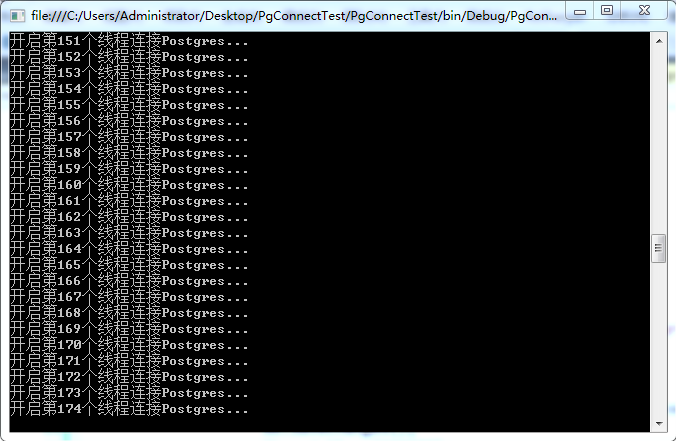
所以,我做了个测试:循环开启200个线程分别去连接Pg,开启连接后不主动关闭;并且让线程等待300秒也不去主动关闭,以确认Pg开启的进程数。
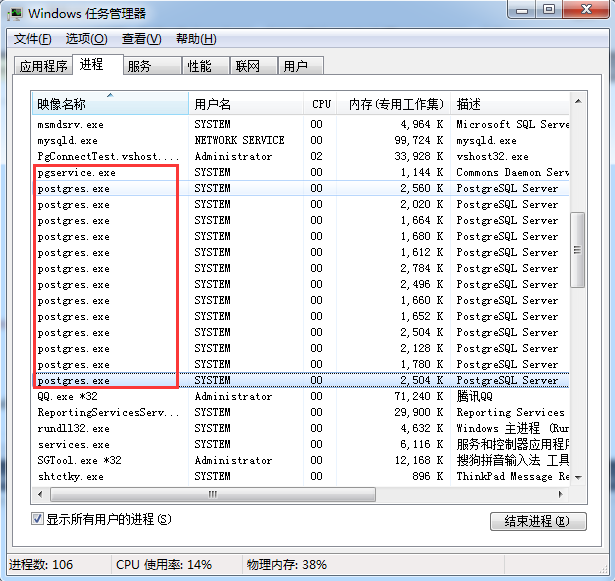
测试结果: Pg进程数并不会随着连接数的增加而增加,而是保持一定数量不变。
而后,又修改代码,去掉多线程连接数据库,只用主线程连接,还是开200个连接,结果: Pg进程只增加了1,并保持不变。
注:正常情况下,什么都不做,系统会保持8个常驻进程。
以下是测试截图和测试代码:
 using System;

 using System.Threading;

 using Pg.Model;

 namespace PgConnectTest

 {

     class Program

     {

         static void Main(string[] args)

         {

             Console.WriteLine("正在测试连接进程...200个进程");

             int proCount = ;

             while (proCount <= )

             {

                 Console.WriteLine($"开启第{proCount}个线程连接Postgres...");

                 ThreadPool.QueueUserWorkItem(state =>

                 {

                     var db = new MesDbContext();

                     db.Users.Add(new User() {Account = "", Passwd = "", Label = "shanghai"});

                     db.SaveChanges();

                     Thread.Sleep();

                 });

                 proCount++;

                 Thread.Sleep();

             }

         }

     }

 }
 using System;

 using System.ComponentModel.DataAnnotations;

 using System.ComponentModel.DataAnnotations.Schema;

 namespace Pg.Model

 {

     public class Model

     {

         [Key]

         [DatabaseGenerated(DatabaseGeneratedOption.Identity)]

         public long Id { get; set; }

         public DateTime CreTime { get; set; } = DateTime.Now;

         public long? CreUid { get; set; }

         public DateTime? UpdTime { get; set; }

         public long? UpdUid { get; set; }

         public string Remark { get; set; }

         public bool IsDel { get; set; } = false;

     }

     [Table("User")]

     public class User : Model

     {

         //[Index(IsUnique = true)]

         public string Account { get; set; }

         public string Passwd { get; set; }

         public string Label { get; set; }

     }

 }
 using System.Data.Entity;

 using System.Data.Entity.Migrations;

 namespace Pg.Model

 {

     public class MesDbContext: DbContext

     {

         public MesDbContext():base("name=mes")

         {

             Database.SetInitializer(new MigrateDatabaseToLatestVersion<MesDbContext, MigrateConfig>());

         }

         public DbSet<User> Users { get; set; }

     }

     public class MigrateConfig : DbMigrationsConfiguration<MesDbContext>

     {

         public MigrateConfig()

         {

             AutomaticMigrationsEnabled = true;

             AutomaticMigrationDataLossAllowed = true;

         }

     }

 }
========= 2017.11.19 以下===============
又经过推敲,其实跟写的代码有关系,
如果是用framework的线程池 ThreadPool.QueueUserWorkItem(state => { }); ,其实不会连续开启很多线程,差不多我测试的结果是开启7个线程。
如果是换作 Task.Run(() => { }); 任务,那么情况差不多,Pg进程开启的数量也是10几个。
但是,如果是直接 new Thread(() => {}) 方式,那么甚至会开启上百个Pg进程。
极端,如果是只使用主线程,那么只会开启一个Pg进程。
PostgreSQL On Windows Process Connection Performance的更多相关文章
- 为应用程序池“XX”提供服务的进程在与 Windows Process Activation Service 通信时出现严重错误
场景 WCF应用程序部署在IIS7中,使用net.tcp协议对外给几百台客户端提供服务,应用程序池不断崩溃重启. 分析过程 在事件查看器中看到的错误信息类似于 为应用程序池“XX”提供服务的进程在与 ...
- IIS启动失败,启动Windows Process Activation Service时,出现错误13:数据无效 ;HTTP 错误 401.2 - Unauthorized 由于身份验证头无效,您无权查看此页
因为修改过管理员账号的密码后重启服务器导致IIS无法启动,出现已下异常 1.解决:"启动Windows Process Activation Service时,出现错误13:数据无效&quo ...
- [转帖]为应用程序池“XXX”提供服务的进程在与 Windows Process Activation Service 通信时出现严重错误。该进程 ID 为“XXXX”。数据字段包含错误号。
[终极解决方案]为应用程序池“XXX”提供服务的进程在与 Windows Process Activation Service 通信时出现严重错误.该进程 ID 为“XXXX”.数据字段包含错误号. ...
- IIS 为应用程序池提供服务的进程在与 Windows Process Activation Service 通信时出现严重错误的解决方法
系统环境:Windows Server 2008 R2 64位, IIS 7.0 错误信息: 为应用程序池提供服务的进程在与 Windows Process Activation Service 通信 ...
- 在启动Windows Process Activation Service时,出现错误13:数据无效
在启动Windows Process Activation Service时,出现错误13:数据无效 1.错误原因: 当Windows Process Activation Service从C:\Wi ...
- Fixed: The Windows Process Activation Service service terminated with the following error: The system cannot find the file specified
I'm not yet clear what I did, but I'm blogging it so it can be found if someone else has this issue. ...
- 【必杀】为应用程序池“XXX”提供服务的进程在与 Windows Process Activation Service 通信时出现严重错误。该进程 ID 为“XXXX”。数据字段包含错误号。
之前写过一篇文章,https://www.cnblogs.com/qidian10/p/6028784.html 解释如何解决此类问题,但现在回过头来想一下,之前的文章还是太过浅显,无法完全有效的彻底 ...
- 通过ctypes获得python windows process的内存使用情况
通过ctypes 类库中的win32方法GetProcessMemoryInfo()获得当前进程的内存使用情况.该函数可以在32或者64位,python2.6+及python3.x之上都能有用. &q ...
- PostgreSQL在windows 10上的下载和安装
一.下载 PostgreSQL Windows版本下载地址: https://www.postgresql.org/download/windows/ 下载地址包含2个版本,根据个人喜好下载即可: 1 ...
随机推荐
- 一行代码搞定Dubbo接口调用
本文来自网易云社区 作者:吕彦峰 在工作中我们经常遇到关于接口测试的问题,无论是对于QA同学还是开发同学都会有远程接口调用的需求.针对这种问题我研发了一个工具包,专门用于远程Dubbo调用,下面就让我 ...
- 从golang的垃圾回收说起(下篇)
文章来自网易云社区 4 Golang垃圾回收的相关参数 4.1 触发GC gc触发的时机:2分钟或者内存占用达到一个阈值(当前堆内存占用是上次gc后对内存占用的两倍,当GOGC=100时) # 表示 ...
- 「HNOI 2014」 画框
题目链接 戳我 \(Solution\) 这一题很像最小乘积生成树.只是把\(kruskal\)变为了\(km\)/费用流 现在来讲一讲最小乘积生成树.首先将\(\sum a_i\)和\(\sum b ...
- 新编辑器Cocos Creator发布:对不起我来晚了!
1月19日,由Cocos创始人王哲亲手撰写的一篇Cocos Creator新品发布稿件在朋友圈被行业人士疯狂转载,短短数小时阅读量突破五位数.Cocos Creator被誉为“注定将揭开Cocos开发 ...
- 16、xtrabackup 增量备份及恢复
备份命令如下 备份命令如下 全量备份 # innobackupex -p123123 /backup # ls /backup 2017-04-08_13-36-11 增量备份或差量备份 # inn ...
- 值得学习的C开源项目
C开源项目学习 原文:戳这里 1. Webbench Webbench 是一个在 linux 下使用的非常简单的网站压测工具.它使用 fork ()模拟多个客户端同时访问我们设定的 URL,测试网站在 ...
- [ActionScript 3.0] 如何获得实例对象的类名及类
package { import flash.display.DisplayObject; import flash.display.MovieClip; import flash.display.S ...
- React Native 一些事
ReactJS 是否准备好 有时候我们常常需要监听 ReactJS 的的加载情况. 比如说,当获取一条推送,应用还没有起来,通过点击推送启动应用后,而推送中包含一些我们感兴趣的字段需要处理,我们如果直 ...
- python 学习(pip工具的安装)
mac 电脑上使用终端命令 curl https://bootstrap.pypa.io/get-pip.py | python3 基于Python 3 pip --version pip3 list ...
- 01Trie树 CF923C Perfect Security
CF923C Perfect Security 上下各n个数,求一种排列p,使上面的数i异或pi成为新的数i,求方案另字典序最小,输出该结果 01Trie树. 记录每个节点经过多少次. 每一次查询的时 ...