
Android中Fragment的Hide和Show
我们都知道,Fragment动态添加的时候我们可以使用FragmentTransaction的add和replace方法,replace方法就等效于对这个Fragment先执行remove(),再执行add()。但是在实际的项目中,有很多时候我们会用到底部是一个RadioGroup包裹的RadioButton,上面用Fragment的情况,因为我们是从网络上获取的数据,这种时候我们不希望点击加载过的页面(也就是加载过的Fragment)的时候,每次都重新加载。也就是使用FragmentTransaction#replace()或者是add()方法行不通了,影响用户体验,这个时候就要用到FragmentTracsaction中的另两个方法了,也就是今天要提到的hide()和show()方法。这两个方法简单地说是会隐藏指定的Fragment,并不会销毁此Fragment,所以也就是可以保存下来之前在此Fragment中加载的数据了~。下面来看一下这个Demo吧:
我们要实现的就是这样一个效果:
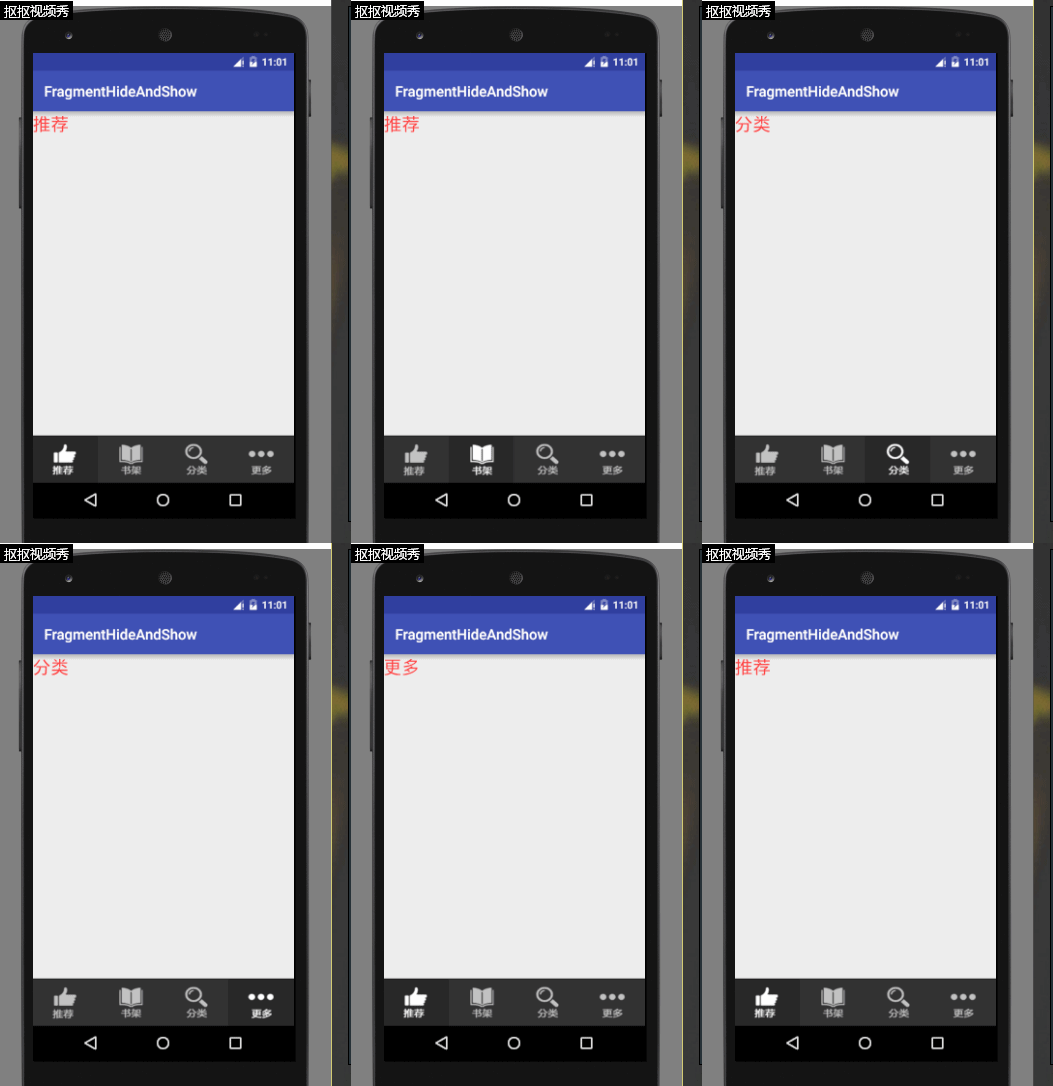
其实不在网络上加载数据的话看不出来什么具体的效果,不过我们还是先看一下代码吧:
主页面的布局如下:
 <?xml version="1.0" encoding="utf-8"?>

 <LinearLayout xmlns:android="http://schemas.android.com/apk/res/android"

     android:layout_width="match_parent"

     android:layout_height="match_parent"

     android:orientation="vertical"

     >

     <LinearLayout

         android:id="@+id/layout_main_fragment"

         android:layout_weight="1"

         android:layout_width="match_parent"

         android:layout_height="0dp"

         android:orientation="vertical">

     </LinearLayout>

     <RadioGroup

         android:id="@+id/rg"

         android:layout_width="match_parent"

         android:layout_height="wrap_content"

         android:gravity="center"

         android:layout_alignParentBottom="true"

         android:orientation="horizontal">

         <RadioButton

             android:id="@+id/rb_tj"

             android:layout_width="0dp"

             android:layout_height="65dp"

             android:layout_weight="1"

             android:background="@drawable/rb_tuijian"

             android:button="@null"

             android:checked="true" />

         <RadioButton

             android:id="@+id/rb_sj"

             android:layout_width="0dp"

             android:layout_height="65dp"

             android:layout_weight="1"

             android:background="@drawable/rb_shujia"

             android:button="@null" />

         <RadioButton

             android:id="@+id/rb_fl"

             android:layout_width="0dp"

             android:layout_height="65dp"

             android:layout_weight="1"

             android:background="@drawable/rb_fenlei"

             android:button="@null" />

         <RadioButton

             android:id="@+id/rb_gd"

             android:layout_width="0dp"

             android:layout_height="65dp"

             android:layout_weight="1"

             android:background="@drawable/rb_gengduo"

             android:button="@null" />

     </RadioGroup>

 </LinearLayout>
这里用到了四个selector选择器作为RadioButton的背景,其他的没有什么,很简单的布局。当然,为了展示,我们还需要一个Fragment以及其对应的布局:
 <?xml version="1.0" encoding="utf-8"?>

 <LinearLayout xmlns:android="http://schemas.android.com/apk/res/android"

     android:layout_width="match_parent"

     android:layout_height="match_parent"

     android:orientation="vertical">

     <TextView

         android:id="@+id/tv"

         android:layout_width="wrap_content"

         android:layout_height="wrap_content"

         android:textSize="25sp"

         android:textColor="@android:color/holo_red_light"

         android:text="哈哈哈"/>

 </LinearLayout>
由于只是一个小Demo,这里就没有写多个Fragment,而是复用了这一个Fragment,通过Fragment#setArgument(Bundle bundle)方法和getArgument()方法来复用该Fragment:
 package ggcomic.rabbit.lx.fragmenthideandshow.fragment;

 import android.os.Bundle;

 import android.support.annotation.Nullable;

 import android.support.v4.app.Fragment;

 import android.view.LayoutInflater;

 import android.view.View;

 import android.view.ViewGroup;

 import android.widget.TextView;

 import ggcomic.rabbit.lx.fragmenthideandshow.R;

 /**

  * Created by Lx on 2016/9/20.

  */

 public class MyFragment extends Fragment {

     private TextView tv;

     @Nullable

     @Override

     public View onCreateView(LayoutInflater inflater, @Nullable ViewGroup container, @Nullable Bundle savedInstanceState) {

         View view = inflater.inflate(R.layout.fragment_page, null);

         tv = (TextView) view.findViewById(R.id.tv);

         Bundle bundle = getArguments();

         int tag = bundle.getInt("tag");

         switch (tag) {

             case 1:

                 tv.setText("推荐");

                 break;

             case 2:

                 tv.setText("书架");

                 break;

             case 3:

                 tv.setText("分类");

                 break;

             case 4:

                 tv.setText("更多");

                 break;

         }

         return view;

     }

 }
最主要的就是在MainActivity中的处理:
 package ggcomic.rabbit.lx.fragmenthideandshow.main;

 import android.support.v4.app.Fragment;

 import android.support.v4.app.FragmentManager;

 import android.support.v4.app.FragmentTransaction;

 import android.support.v7.app.AppCompatActivity;

 import android.os.Bundle;

 import android.view.View;

 import android.widget.LinearLayout;

 import android.widget.RadioButton;

 import ggcomic.rabbit.lx.fragmenthideandshow.R;

 import ggcomic.rabbit.lx.fragmenthideandshow.fragment.MyFragment;

 public class MainActivity extends AppCompatActivity implements View.OnClickListener {

     private Fragment currentFragment=new Fragment();

     private LinearLayout layout;

     private RadioButton rb_tj,rb_sj,rb_fl, rb_gd;

     private Fragment fragment_tj,fragment_sj,fragment_fl, fragment_gd;

     private FragmentManager manager;

     @Override

     protected void onCreate(Bundle savedInstanceState) {

         super.onCreate(savedInstanceState);

         setContentView(R.layout.activity_main);

         initView();

         initFragment();

         initEvent();

         showFragment(fragment_tj);

     }

     /**

      * 初始化监听

      */

     private void initEvent() {

         rb_tj.setOnClickListener(this);

         rb_sj.setOnClickListener(this);

         rb_fl.setOnClickListener(this);

         rb_gd.setOnClickListener(this);

     }

     /**

      * 初始化Fragment

      */

     private void initFragment() {

         manager = getSupportFragmentManager();

         Bundle bundle = new Bundle();

         bundle.putInt("tag", 1);

         fragment_tj = new MyFragment();

         fragment_tj.setArguments(bundle);

         bundle = new Bundle();

         bundle.putInt("tag", 2);

         fragment_sj = new MyFragment();

         fragment_sj.setArguments(bundle);

         bundle = new Bundle();

         bundle.putInt("tag", 3);

         fragment_fl = new MyFragment();

         fragment_fl.setArguments(bundle);

         bundle = new Bundle();

         bundle.putInt("tag", 4);

         fragment_gd = new MyFragment();

         fragment_gd.setArguments(bundle);

     }

     /**

      * 展示Fragment

      */

     private void showFragment(Fragment fragment) {

         if (currentFragment!=fragment) {

             FragmentTransaction transaction = manager.beginTransaction();

             transaction.hide(currentFragment);

             currentFragment = fragment;

             if (!fragment.isAdded()) {

                 transaction.add(R.id.layout_main_fragment, fragment).show(fragment).commit();

             } else {

                 transaction.show(fragment).commit();

             }

         }

     }

     /**

      * 初始化控件

      */

     private void initView() {

         rb_tj = (RadioButton) findViewById(R.id.rb_tj);

         rb_sj = (RadioButton) findViewById(R.id.rb_sj);

         rb_fl = (RadioButton) findViewById(R.id.rb_fl);

         rb_gd = (RadioButton) findViewById(R.id.rb_gd);

     }

     @Override

     public void onClick(View v) {

         switch (v.getId()) {

             case R.id.rb_tj:

                 showFragment(fragment_tj);

                 break;

             case R.id.rb_sj:

                 showFragment(fragment_sj);

                 break;

             case R.id.rb_fl:

                 showFragment(fragment_fl);

                 break;

             case R.id.rb_gd:

                 showFragment(fragment_gd);

                 break;

         }

     }

 }
可以看到,我们定义了一个全局Fragment,currentFragment,用来标示当前是哪一个Fragment。其中initFragment()方法只是为了初始化所有的Fragment,相信大家也看得出来,最主要的方法是showFragment(),下面我就来说一下这个方法:
 /**

  71      * 展示Fragment

  72      */

  73     private void showFragment(Fragment fragment) {

  74         if (currentFragment!=fragment) {

  75             FragmentTransaction transaction = manager.beginTransaction();

  76             transaction.hide(currentFragment);

  77             currentFragment = fragment;

  78             if (!fragment.isAdded()) {

  79                 transaction.add(R.id.layout_main_fragment, fragment).show(fragment).commit();

  80             } else {

  81                 transaction.show(fragment).commit();

  82             }

  83         }

  84     }
这个方法主要完成Fragment的隐藏和展示,也就是完成Fragment的切换功能。可以看到,在方法的开始我们先判断一下传入的Fragment是不是当前currentFragment,如果不是的话,我们就隐藏currentFragment,并且将我们传入的Fragment赋值给currentFragment。然后再调用Fragment#isAdded()方法,判断传入的Fragment是否已经被add()过了,如果已经被add()过了,那么就直接FragmentTransaction#show()并且commit()即可,否则的话先add()当前fragment,然后在show()展示出来。这样我们就成功实现了保存加载过的Fragment中的内容了(其实不算保存,只是不让加载过的内容销毁),是不是很简单呢?快下一个小Demo尝试一下吧~
Android中Fragment的Hide和Show的更多相关文章
- Android中Fragment和ViewPager那点事儿(仿微信APP)
在之前的博文<Android中使用ViewPager实现屏幕页面切换和引导页效果实现>和<Android中Fragment的两种创建方式>以及<Android中Fragm ...
- Android中Fragment与Activity之间的交互(两种实现方式)
(未给Fragment的布局设置BackGound) 之前关于Android中Fragment的概念以及创建方式,我专门写了一篇博文<Android中Fragment的两种创建方式>,就如 ...
- Android 中Fragment使用
Android 中Fragment使用 public class MainActivity extends Activity { public static String[] array = { &q ...
- Android中Fragment的两种创建方式
fragment是Activity中用户界面的一个行为或者是一部分.你可以在一个单独的Activity上把多个Fragment组合成为一个多区域的UI,并且可以在多个Activity中再使用.你可以认 ...
- Android中fragment之间和Activity的传值、切换
功能介绍:通过一个activity下方的三个按钮,分别是发送消息(sendButton).聊天记录(chatButton).常用语(commonButton).当单击按钮是,来切换上方的fragmen ...
- android中Fragment的使用
android中的Fragment跟网页中的iframe很像,用于在界面上嵌入局部动态内容,我的描述可能不准确,只是我的理解吧 创建Fragment很简单,在Android Studio中是这么创建的 ...
- Android中Fragment生命周期和基本用法
1.基本概念 1. Fragment是什么? Fragment是可以让你的app纵享丝滑的设计,如果你的app想在现在基础上性能大幅度提高,并且占用内存降低,同样的界面Activity占用内存比Fra ...
- Android中Fragment+ViewPager的配合使用
官方推荐 ViewPager与Fragment一起使用,可以更加方便的管理每个Page的生命周期,这里有标准的适配器实现用于ViewPager和Fragment,涵盖最常见的用例.FragmentPa ...
- Android中Fragment的简单介绍
Android是在Android 3.0 (API level 11)引入了Fragment的,中文翻译是片段或者成为碎片(个人理解),可以把Fragment当成Activity中的模块,这个模块有自 ...
随机推荐
- InetAddress类和InetSocketAddress的使用
一简介 InetAddress是Java对IP地址的封装,代表互联网协议(IP)地址:InetAddress对象的获取只能通过静态方法,比如根据主机名获取主机的ip地址封装对象: ? 1 InetAd ...
- [LintCode] 二叉树的后序遍历
The recursive solution is trivial and I omit it here. Iterative Solution using Stack (O(n) time and ...
- Handlebars.js,Json+ajax+拼html
英文版:http://handlebarsjs.com./ 原文链接:http://www.cnblogs.com/diligenceday/p/4105229.html, http://segmen ...
- 用RSS订阅微信公众号
现在用RSS的人应该不多了,不过还是写一下吧. 一.付费服务:今天看啥 1.付费原因: 目前,网上几乎没有免费的用RSS订阅微信公号的方法,所以我推荐的是付费方法: 具体使用的服务是今天看啥,服务还是 ...
- 巨蟒python全栈开发-第15天 装饰器
一.今日内容总览 关于函数的装饰器1.装饰器(重点,难点)(要求:反复写,代码不多但是很绕) 开闭原则:(比如,菜单是拆散的,一点点搞的,用友拆散自己的功能,以后就不用开发了) (1)对功能的扩展开放 ...
- 剑指Offer——二维数组中的查找
题目描述: 在一个二维数组中,每一行都按照从左到右递增的顺序排序,每一列都按照从上到下递增的顺序排序.请完成一个函数,输入这样的一个二维数组和一个整数,判断数组中是否含有该整数. 分析: 因为二维数组 ...
- JS改变HTML元素的绝对坐标
<!DOCTYPE html PUBLIC "-//W3C//DTD XHTML 1.1//EN" "http://www.w3.org/TR/xhtml11/DT ...
- 转!java产生不重复随机数
private static void testC(int sz) { long startTime = System.currentTimeMillis(); //开始测试时间 Random rd ...
- 手动拼写出来的sp_who结果集
SELECT SPID = er.session_id ,STATUS = ses.STATUS ,[Login] = ses.login_name ,Host = ses.host_name ...
- Andrew Ng机器学习编程作业:Regularized Linear Regression and Bias/Variance
作业文件: machine-learning-ex5 1. 正则化线性回归 在本次练习的前半部分,我们将会正则化的线性回归模型来利用水库中水位的变化预测流出大坝的水量,后半部分我们对调试的学习算法进行 ...