
android中Fragment的使用
android中的Fragment跟网页中的iframe很像,用于在界面上嵌入局部动态内容,我的描述可能不准确,只是我的理解吧
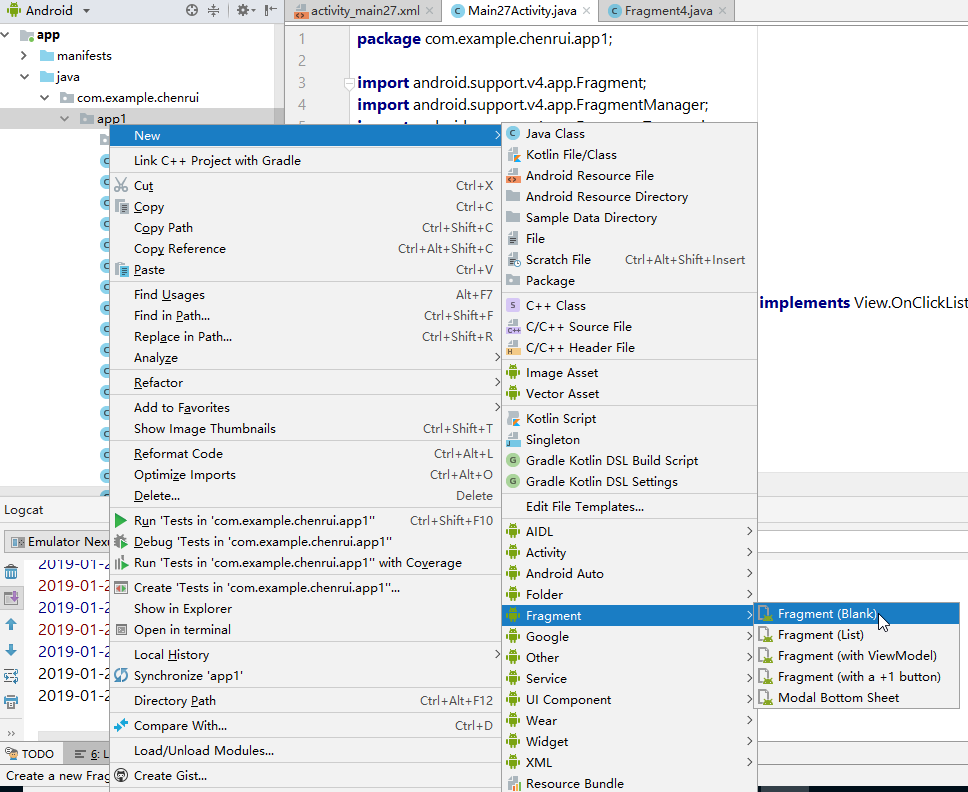
创建Fragment很简单,在Android Studio中是这么创建的:
简单使用的话,下面的两个勾都可以不用勾选:
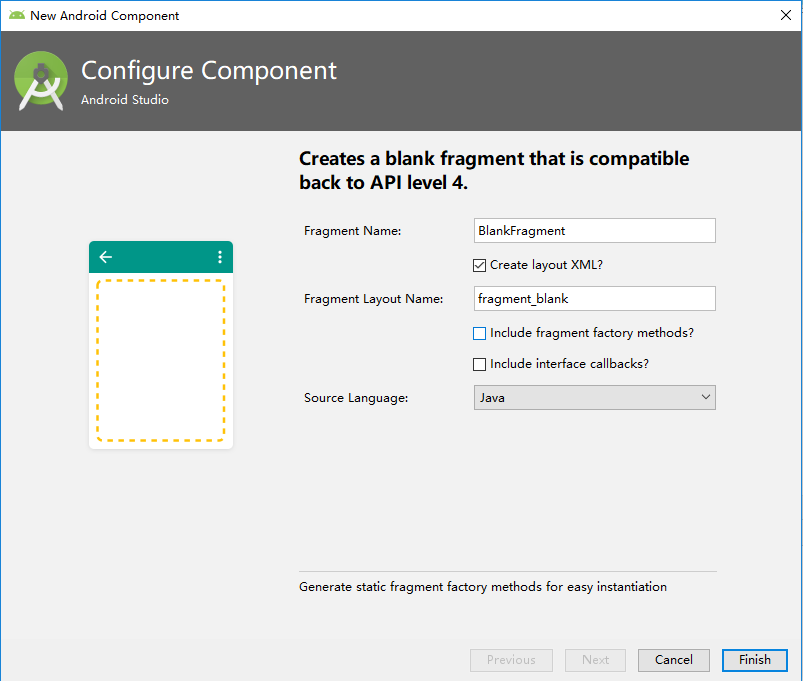
这里我创建了三个最简单的Fragment,代码就不粘了,每个Fragment里面可以放上最简单的TextView,显示一些文字信息等
然后我创建一个主Activity,我在主Activity上放三个按钮,点击对应的按钮,实现动态加载之前创建的Fragment
activity_main.xml:
<?xml version="1.0" encoding="utf-8"?>

<android.support.constraint.ConstraintLayout xmlns:android="http://schemas.android.com/apk/res/android"

    xmlns:app="http://schemas.android.com/apk/res-auto"

    xmlns:tools="http://schemas.android.com/tools"

    android:layout_width="match_parent"

    android:layout_height="match_parent"

    tools:context=".MainActivity">

    <LinearLayout

        android:layout_width="0dp"

        android:layout_height="match_parent"

        android:background="@android:color/holo_orange_light"

        android:gravity="center_vertical"

        android:orientation="vertical"

        app:layout_constraintStart_toStartOf="parent"

        app:layout_constraintWidth_percent="0.5">

        <Button

            android:id="@+id/button1"

            android:layout_width="match_parent"

            android:layout_height="wrap_content"

            android:text="Button1" />

        <Button

            android:id="@+id/button2"

            android:layout_width="match_parent"

            android:layout_height="wrap_content"

            android:text="Button2" />

        <Button

            android:id="@+id/button3"

            android:layout_width="match_parent"

            android:layout_height="wrap_content"

            android:text="Button3" />

        <TextView

            android:id="@+id/textView1"

            android:layout_width="match_parent"

            android:layout_height="wrap_content"

            android:text="TextView"

            android:textSize="30dp" />

    </LinearLayout>

    <FrameLayout

        android:id="@+id/rightFrame"

        android:layout_width="0dp"

        android:layout_height="match_parent"

        android:background="@android:color/holo_blue_light"

        app:layout_constraintEnd_toEndOf="parent"

        app:layout_constraintWidth_percent="0.5">

    </FrameLayout>

</android.support.constraint.ConstraintLayout>
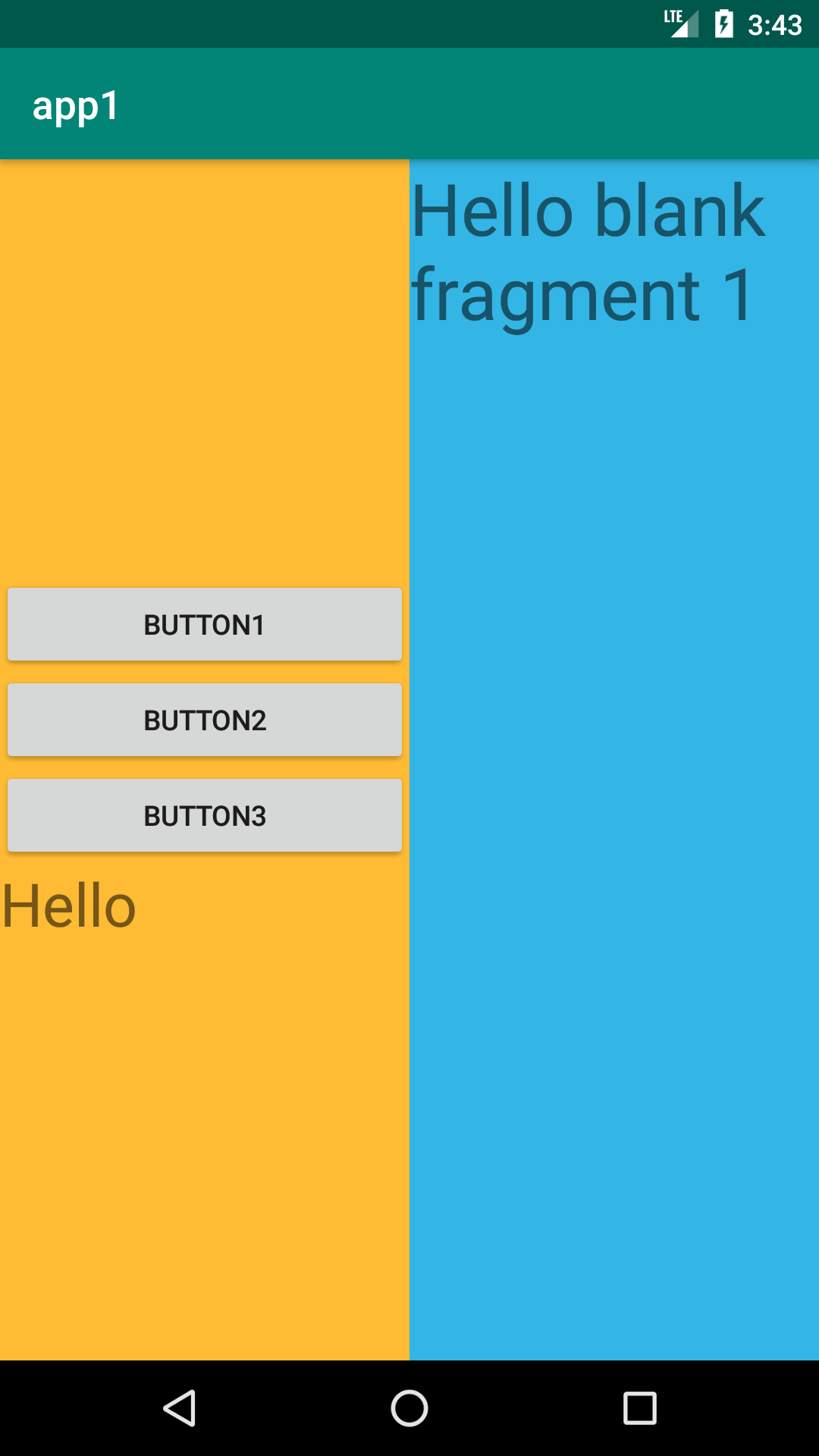
这个界面最外层是一个ConstraintLayout布局,里面放了一个上下结构的LinearLayout用于放按钮,还放了一个FrameLayout,用于动态加载我们之前创建的Fragment。
LinearLayout和FrameLayout我设置成各占屏幕的一半显示
下面是Activity类的代码
MainActivity.java:
 package com.example.chenrui.app1;

 import android.support.v4.app.Fragment;

 import android.support.v4.app.FragmentManager;

 import android.support.v4.app.FragmentTransaction;

 import android.support.v7.app.AppCompatActivity;

 import android.os.Bundle;

 import android.view.View;

 import android.widget.Button;

 import android.widget.TextView;

 import android.widget.Toast;

 public class MainActivity extends AppCompatActivity implements View.OnClickListener {

     @Override

     protected void onCreate(Bundle savedInstanceState) {

         super.onCreate(savedInstanceState);

         setContentView(R.layout.activity_main);

         Button button = findViewById(R.id.button1);

         button.setOnClickListener(this);

         button = findViewById(R.id.button2);

         button.setOnClickListener(this);

         button = findViewById(R.id.button3);

         button.setOnClickListener(this);

     }

     @Override

     public void onClick(View v) {

         switch (v.getId()) {

             case R.id.button24:

                 repalceFragment(new Fragment1());

                 break;

             case R.id.button25:

                 repalceFragment(new Fragment2());

                 break;

             case R.id.button26:

                 repalceFragment(new Fragment3());

                 break;

         }

     }

     public void repalceFragment(Fragment fragment) {

         FragmentManager fragmentManager = getSupportFragmentManager();

         FragmentTransaction transaction = fragmentManager.beginTransaction();

         transaction.replace(R.id.rightFrame,fragment);

         transaction.addToBackStack(null);

         transaction.commit();

     }

 }
上面的代码中,从第45到51行,我们把动态加载Fragment的代码放在一个方法中。点击对应的按钮,加载对应的Fragment。
第49行代码的意思是切换Fragment后会记住历史,按返回键会返回到上一个加载的Fragment
执行的效果:
在主Activity中,怎么操作Fragment中的内容呢,在主Activity中可以这么写:
Fragment fragment = getSupportFragmentManager().findFragmentById(R.id.rightFrame);

TextView textView = fragment.getView().findViewById(R.id.textView2);

textView.setText("大家好");
上面的代码通过getSupportFragmentManager().findFragmentById(R.id.rightFrame)获取到Fragment对象
textView2是Fragment的控件
反过来,在Fragment中怎么操作主Activity中的内容呢,在Fragment中要这么写:
TextView textView = getActivity().findViewById(R.id.textView1);

textView.setText("Hello");
上面的代码通过getActivity()方法获取到主Activity
textView1是主Activity的控件
android中Fragment的使用的更多相关文章
- Android中Fragment和ViewPager那点事儿(仿微信APP)
在之前的博文<Android中使用ViewPager实现屏幕页面切换和引导页效果实现>和<Android中Fragment的两种创建方式>以及<Android中Fragm ...
- Android中Fragment与Activity之间的交互(两种实现方式)
(未给Fragment的布局设置BackGound) 之前关于Android中Fragment的概念以及创建方式,我专门写了一篇博文<Android中Fragment的两种创建方式>,就如 ...
- Android 中Fragment使用
Android 中Fragment使用 public class MainActivity extends Activity { public static String[] array = { &q ...
- Android中Fragment的两种创建方式
fragment是Activity中用户界面的一个行为或者是一部分.你可以在一个单独的Activity上把多个Fragment组合成为一个多区域的UI,并且可以在多个Activity中再使用.你可以认 ...
- Android中fragment之间和Activity的传值、切换
功能介绍:通过一个activity下方的三个按钮,分别是发送消息(sendButton).聊天记录(chatButton).常用语(commonButton).当单击按钮是,来切换上方的fragmen ...
- Android中Fragment生命周期和基本用法
1.基本概念 1. Fragment是什么? Fragment是可以让你的app纵享丝滑的设计,如果你的app想在现在基础上性能大幅度提高,并且占用内存降低,同样的界面Activity占用内存比Fra ...
- Android中Fragment+ViewPager的配合使用
官方推荐 ViewPager与Fragment一起使用,可以更加方便的管理每个Page的生命周期,这里有标准的适配器实现用于ViewPager和Fragment,涵盖最常见的用例.FragmentPa ...
- Android中Fragment的简单介绍
Android是在Android 3.0 (API level 11)引入了Fragment的,中文翻译是片段或者成为碎片(个人理解),可以把Fragment当成Activity中的模块,这个模块有自 ...
- 关于Android中Fragment静态和动态加载的方法
一.静态加载 1.首先创建一个layout布局fragment.xml,里面放要显示和操作的控件 2.创建一个layout布局main1.xml,用来实现页面的跳转(跳转为要实现静态加载的界面) 3. ...
随机推荐
- MyEclipse使用总结——设置MyEclipse使用的Tomcat服务器
一.设置使用的Tomcat服务器 如果不想使用MyEclipse自带的tomcat服务器版本,那么可以在MyEclipse中设置我们自己安装好的tomcat服务器 设置步骤如下: Window→Pre ...
- SQL Server 2000 绿色精简版gsql适用于xp/win7/win8/win10
老的程序员肯定都用过sql2000数据库,我在2006-2010年之间,做的不少网站也都是sql2000数据库的,但是后来随着mysql的兴起,就逐渐不再使用sql数据库了.但是最近有个客户的网站要修 ...
- javascript中的回调函数(callback)
代码如下: app.use(function(req, res, next) { var err = new Error('Not Found'); err.status = 404; ...
- C# CSGL
转.修改自ShareIdeas文章C# 基于CSGL opengl OpenGL是一个功能强大的开放图形库(Open Graphics Library).其前身是SGI公司为其图形工作站开发的IRIS ...
- java使用反射强制给private字段赋值
今天项目中遇到了一个问题,要调用一个类,并获取这个类的属性进行赋值然后将这个类传递到方法中做为参数. 实际操作时才发现,这个类中的字段属性是私有的,不能进行赋值!没有提供公有的方法.而这个类又是打包成 ...
- Java 打包下载服务器上选中的文件或目录(带进度条提示)
http://www.cnblogs.com/interdrp/p/6702482.html 由于此次文件管理系统的升级确实给我们带来了很多方便且在性能上有很大提升,经过这段时间的使用 也发现了些问题 ...
- 完全定制UITabBarViewController
完全定制UITabBarViewController 效果 源码 https://github.com/YouXianMing/iOS-Project-Examples 中的 TotalCusto ...
- 哥谭第一季/全集Gotham迅雷下载
哥谭市 第一季 Gotham (2014)本季看点:<哥谭镇>将由丹尼·加农掌镜,布鲁诺·海勒执笔剧本.电视剧集<哥谭>可以说<蝙蝠侠>的前传,剧集描述的是DC漫画 ...
- ios成长之每日一遍(day 2)
接着下来简单说说Label(相当于android的textview)和button的使用, 由于都是与上篇的AppDelegate一致, 所以这一篇就说说ViewController与xib的使用呗. ...
- vue quill editor输入文字出现首字母的问题
当使用vue quill editor输入中文时,第一个中文的汉语拼音第一个字母会显示如图. 解决的办法就是升级vue quill editor js文件的版本,目前的我升级之后ok的版本是 < ...