
从源码看Android中sqlite是怎么通过cursorwindow读DB的
更多内容在这里查看
https://ahangchen.gitbooks.io/windy-afternoon/content/
执行query
执行SQLiteDatabase类中query系列函数时,只会构造查询信息,不会执行查询。
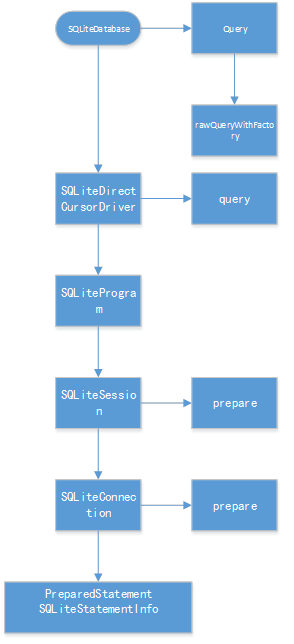
(query的源码追踪路径)
执行move(里面的fillwindow是真正打开文件句柄并分配内存的地方)
当执行Cursor的move系列函数时,第一次执行,会为查询结果集创建一块共享内存,即cursorwindow

moveToPosition源码路径
fillWindow----真正耗时的地方
然后会执行sql语句,向共享内存中填入数据,
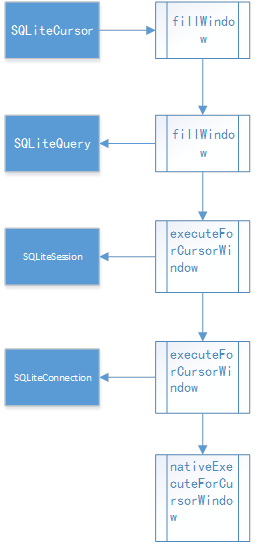
fillWindow源码路径
在SQLiteCursor.java中可以看到
 @Override

 public boolean onMove(int oldPosition, int newPosition) {

     // Make sure the row at newPosition is present in the window

     if (mWindow == null || newPosition < mWindow.getStartPosition() ||

             newPosition >= (mWindow.getStartPosition() + mWindow.getNumRows())) {

         fillWindow(newPosition);

     }

     return true;

 }
如果请求查询的位置在cursorWindow的范围内,不会执行fillWindow,
而超出cursorwindow的范围,会调用fillWindow,
而在nativeExecuteForCursorWindow中,
获取记录时,如果要请求的位置超出窗口范围,会发生CursorWindow的清空:
 CopyRowResult cpr = copyRow(env, window, statement, numColumns, startPos, addedRows);

 if (cpr == CPR_FULL && addedRows && startPos + addedRows < requiredPos) {

 // We filled the window before we got to the one row that we really wanted.

 // Clear the window and start filling it again from here.

 // TODO: Would be nicer if we could progressively replace earlier rows.

 window->clear();

 window->setNumColumns(numColumns);

 startPos += addedRows;

 addedRows = 0;

 cpr = copyRow(env, window, statement, numColumns, startPos, addedRows);

 }
CursorWindow的清空机制会影响到多线程读(通常认为不可以并发读写,sqlite的并发实际上是串行执行的,但可以并发读,这里要强调的是多线程读也可能有问题),具体见稍后一篇文章“listview并发读写数据库”。
上面说的这些直观的感受是什么样的呢?大概是这样,
执行query,读10000条数据,很快就拿到了cursor,这里不会卡,
执行moveToFirst,卡一下(fillwindow(0))
moveToPosition(7500),卡一下,因为已经超了cursorwindow的区域,又去fillwindow(7500),
关于fillwindow还有一些奇特的细节,比如4.0以后,fillwindow会填充position前后各一段数据,防止读旧数据的时候又需要fill,感兴趣的同学可以看看各个版本fillwidow的源码。
这里还可以延伸一下,因为高版本的android sqlite对旧版有许多改进,
所以实际开发里我们有时候会把sqlite的源码带在自己的工程里,使得低版本的android也可以使用高版本的特性,并且避开一部分兼容性问题。
Cursor关闭(显式调用close()的理由)
追踪源码看关闭
  //SQLiteCursor

 super.close();

 synchronized (this) {

     mQuery.close();

     mDriver.cursorClosed();

 }

 //AbstractCursor

 public void close() {

     mClosed = true;

     mContentObservable.unregisterAll();

     onDeactivateOrClose();

 }

 protected void onDeactivateOrClose() {

     if (mSelfObserver != null) {

         mContentResolver.unregisterContentObserver(mSelfObserver);

         mSelfObserverRegistered = false;

     }

     mDataSetObservable.notifyInvalidated();

 }

 //AbstractWindowedCursor

 /** @hide */

 @Override

 protected void onDeactivateOrClose() {

     super.onDeactivateOrClose();

     closeWindow();

 }

 protected void closeWindow() {

     if (mWindow != null) {

         mWindow.close();

         mWindow = null;

     }

 }

 //SQLiteClosable

 public void close() {

     releaseReference();

 }

 public void releaseReference() {

     boolean refCountIsZero = false;

     synchronized(this) {

         refCountIsZero = --mReferenceCount == 0;

     }

     if (refCountIsZero) {

         onAllReferencesReleased();

     }

 }

 //CursorWindow

 @Override

 protected void onAllReferencesReleased() {

     dispose();

 }

 private void dispose() {

     if (mCloseGuard != null) {

         mCloseGuard.close();

     }

     if (mWindowPtr != 0) {

         recordClosingOfWindow(mWindowPtr);

         nativeDispose(mWindowPtr);

         mWindowPtr = 0;

     }

 }
跟CursorWindow有关的路径里,最终调用nativeDispose()清空cursorWindow;
当Cursor被GC回收时,会调用finalize:
 @Override

 protected void finalize() {

     try {

         // if the cursor hasn't been closed yet, close it first

         if (mWindow != null) {

             if (mStackTrace != null) {

                 String sql = mQuery.getSql();

                 int len = sql.length();

                 StrictMode.onSqliteObjectLeaked(

                     "Finalizing a Cursor that has not been deactivated or closed. " +

                     "database = " + mQuery.getDatabase().getLabel() +

                     ", table = " + mEditTable +

                     ", query = " + sql.substring(0, (len > 1000) ? 1000 : len),

                     mStackTrace);

             }

             close();

         }

     } finally {

         super.finalize();

     }

 }
然而finalize()并没有释放CursorWindow,而super.finalize();里也只是解绑了观察者,没有去释放cursorwindow
所以不调用cursor.close(),最终会导致cursorWindow所在的共享内存(1M或2M)泄露。
从源码看Android中sqlite是怎么通过cursorwindow读DB的的更多相关文章
- 从源码看Android中sqlite是怎么读DB的(转)
执行query 执行SQLiteDatabase类中query系列函数时,只会构造查询信息,不会执行查询. (query的源码追踪路径) 执行move(里面的fillwindow是真正打开文件句柄并分 ...
- Android so 文件进阶<二> 从dlsym()源码看android 动态链接过程
0x00 前言 这篇文章其实是我之前学习elf文件关于符号表的学习笔记,网上也有很多关于符号表的文章,怎么说呢,感觉像是在翻译elf文件格式的文档一样,千篇一律,因此把自己的学习笔记分享出来.dls ...
- 源码解析Android中View的measure量算过程
Android中的Veiw从内存中到呈现在UI界面上需要依次经历三个阶段:量算 -> 布局 -> 绘图,关于View的量算.布局.绘图的总体机制可参见博文< Android中View ...
- 从源码看java中Integer的缓存问题
在开始详细的说明问题之前,我们先看一段代码 public static void compare1(){ Integer i1 = 127, i2 = 127, i3 = 128, i4 = 128; ...
- 从源码看 Vue 中的 Mixin
最近在做项目的时候碰到了一个奇怪的问题,通过 Vue.mixin 方法注入到 Vue 实例的一个方法不起作用了,后来经过仔细排查发现这个实例自己实现了一个同名方法,导致了 Vue.mixin 注入方法 ...
- 从 php 源码看 php 中的对象
从一个简单的例子说起: class Person { public $name; public $age; public function __construct($name, $age) { $th ...
- 将Android源码导入eclipse中的方法以及编译Android源码指定模块
本文博客地址:http://blog.csdn.net/qq1084283172/article/details/53365659 将android源码导入eclipse.androidstudio. ...
- 从微信小程序开发者工具源码看实现原理(一)- - 小程序架构设计
使用微信小程序开发已经很长时间了,对小程序开发已经相当熟练了:但是作为一名对技术有追求的前端开发,仅仅熟练掌握小程序的开发感觉还是不够的,我们应该更进一步的去理解其背后实现的原理以及对应的考量,这可能 ...
- 从源码看commit和commitAllowingStateLoss方法区别
Fragment介绍 在很久以前,也就是我刚开始写Android时(大约在2012年的冬天--),那时候如果要实现像下面微信一样的Tab切换页面,需要继承TabActivity,然后使用TabHost ...
随机推荐
- poj3461Oulipo
Description The French author Georges Perec (1936–1982) once wrote a book, La disparition, without t ...
- poj 1450 Gridland
Gridland Time Limit: 2000/1000 MS (Java/Others) Memory Limit: 65536/32768 K (Java/Others)Total Su ...
- 提高php代码质量 36计
1.不要使用相对路径 常常会看到: ? 1 require_once('../../lib/some_class.php'); 该方法有很多缺点: 它首先查找指定的php包含路径, 然后查找当前目录. ...
- C/C++使用Lu脚本协程
欢迎访问Lu程序设计 C/C++使用Lu脚本协程 1 说明 要演示本文的例子,你必须下载Lu32脚本系统.本文的例子需要lu32.dll.lu32.lib.C格式的头文件lu32.h,相信你会找到并正 ...
- Ghost win7 系统安装(虚拟机)
1.将Ghost.iso添加到数据存储iso文件中,启动虚拟机,根据相关提示,文件格式化系统硬盘,完成操作后关机: 2.进入BIOS,设置从CDROM启动系统(否则系统会提示找到引导文件): 3.将系 ...
- 提高mindmanager 8的启动速度
提高mindmanager 8的启动速度一连串 发布于:2010-01-13 18:12不少人抱怨mindmanager 8的启动速度较慢,用以下办法配置一下就能解决:1.进入mindmanager ...
- 为什么国外程序员爱用苹果 Mac 电脑?
Mac 在国外很受欢迎,尤其是在 设计/web开发/IT 人员圈子里.普通用户喜欢 Mac 可以理解,毕竟 Mac 设计美观,简单好用,没有病毒.那么为什么专业人士也对 Mac 情有独钟呢?从个人 ...
- git创建与合并分支
创建与合并分支 在版本回退里,你已经知道,每次提交,Git都把它们串成一条时间线,这条时间线就是一个分支.截止到目前,只有一条时间线,在Git里,这个分支叫主分 支,即master分支.HEAD严格来 ...
- 网易云课堂_C语言程序设计进阶_第8周:图形交互程序
8.2函数指针 8.2函数指针 #include <stdio.h> #include <stdlib.h> void f(int i) { printf("void ...
- Proud Merchants(01背包)
Proud Merchants Time Limit : 2000/1000ms (Java/Other) Memory Limit : 131072/65536K (Java/Other) To ...