
使用ResourceDictionary管理Logical Resources
WPF整理-使用ResourceDictionary管理Logical Resources
“Logical resources may be of various types, such as brushes, geometries, styles, and templates.
Placing all those resources in a single file such as App.xaml hinders maintainability. A better
approach would be to separate resources of different types (or based on some other criteria) to
their own files. Still, they must be referenced somehow from within a common file such as App.
xaml so they are recognized.”
为了增加资源文件的可维护性,我们应该使用ResourceDictionary对资源进行:分类、汇总。
如何实现呢?举个例子
1.新建一个WPF Application,在Application中添加一个New Item,选择ResourceDictionary。

譬如,命名为Brushes.xaml,我们用它来存放一些笔刷。打开,我们添加一个笔刷如下:
Brushes.xaml:

<ResourceDictionary xmlns="http://schemas.microsoft.com/winfx/2006/xaml/presentation"

                    xmlns:x="http://schemas.microsoft.com/winfx/2006/xaml">

    <LinearGradientBrush EndPoint="1,0" x:Key="brush1">

        <GradientStop Color="Violet" Offset="0" />

        <GradientStop Color="Orange" Offset=".7" />

        <GradientStop Color="Brown" Offset="1" />

    </LinearGradientBrush>

</ResourceDictionary>
2.在App.xaml中Merge则个Resource。
“Open App.xaml. We need to merge external resource dictionaries into the main
application dictionary.”
打开App.xaml,添加如下内容:
<Application x:Class="ManagingLogicalResources.App"

             xmlns="http://schemas.microsoft.com/winfx/2006/xaml/presentation"

             xmlns:x="http://schemas.microsoft.com/winfx/2006/xaml"

             StartupUri="MainWindow.xaml">

    <Application.Resources>

        <ResourceDictionary>

            <ResourceDictionary.MergedDictionaries>

                <ResourceDictionary Source="Brushes.xaml"/>

            </ResourceDictionary.MergedDictionaries>

        </ResourceDictionary>

    </Application.Resources>

</Application>
3.这样我们就可以在页面中正常使用了。
<Window x:Class="ManagingLogicalResources.MainWindow"

        xmlns="http://schemas.microsoft.com/winfx/2006/xaml/presentation"

        xmlns:x="http://schemas.microsoft.com/winfx/2006/xaml"

        Title="MainWindow" Height="350" Width="525">

    <Grid>

        <Ellipse Fill="{StaticResource brush1}"/>

    </Grid>

</Window>
效果如下: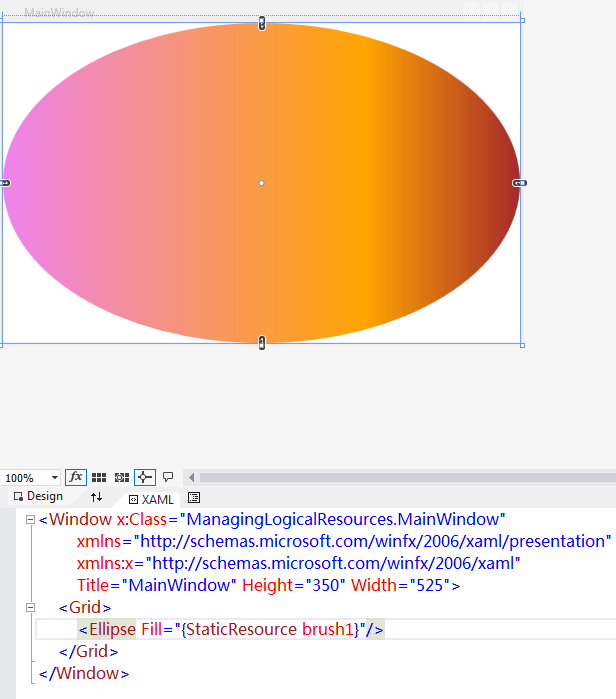

使用ResourceDictionary管理Logical Resources的更多相关文章
- WPF整理-使用ResourceDictionary管理Logical Resources
“Logical resources may be of various types, such as brushes, geometries, styles, and templates.Placi ...
- 学习OpenStack之 (4): Linux 磁盘、分区、挂载、逻辑卷管理 (Logical Volume Manager)
0. 背景: inux用户安装Linux操作系统时遇到的一个常见的难以决定的问题就是如何正确地评估各分区大小,以分配合适的硬盘空间.普通的磁盘分区管理方式在逻辑分区划分好之后就无法改变其大小,当一个逻 ...
- 背水一战 Windows 10 (11) - 资源: CustomResource, ResourceDictionary, 加载外部的 ResourceDictionary 文件
[源码下载] 背水一战 Windows 10 (11) - 资源: CustomResource, ResourceDictionary, 加载外部的 ResourceDictionary 文件 作者 ...
- 资源: CustomResource, ResourceDictionary, 加载外部的 ResourceDictionary 文件
CustomResource ResourceDictionary 加载外部的 ResourceDictionary 文件 示例1.演示“CustomResource”相关知识点Resource/Cu ...
- CentOS 6.7 配置LVM (逻辑卷管理)
LVM 简介 LVM是逻辑盘卷组管理 (Logical Volume Manager) 的简称. LVM是建立在硬盘和分区之上的一个逻辑层,来提高磁盘分区管理的灵活性,在一定程度上解决普通磁盘分区带来 ...
- webmin纯web界面管理linux系统
关键字: 摘要:从Windows环境的管理转到Linux环境的管理时所面临的挑战之一是,您需要去学习利用新的工具.作为一个管理员,您希望理解操作系统的细节以发挥它的最大功效.但是,当您还处在学习阶段时 ...
- WPF学习一:XAML的资源(Resources)结构
一个初学者,把知识做个积累,如果有不对的地方,还请高手指出,谢谢! 先看一段代码:(下面是以Window WPF进行讲解,如果是Web 的话就把<Window改为<Page 而如果是 Us ...
- linux LVM逻辑卷管理
什么是LVM LVM是逻辑卷管理(Logical Volume Manager)的简称,它是建立在物理存储设备之上的一个抽象层,允许你生成逻辑存储卷,与直接使用物理存储在管理上相比,提供了更好灵活性. ...
- WPF整理-使用逻辑资源
"Traditional application resources consist of binary chunks of data, typically representing thi ...
随机推荐
- Mac下一个/usr/include失踪
Mac升级到Yosemite后,突然发现vim的YouCompleteMe代码提示所以空头支票成员,排查了一下,原本/usr/include目录中缺少.所有的C/C++头文件不见了. .. 第一次发现 ...
- 数据结构--画画--最小生成树(Prim算法)
通信网络的最小生成树配置,它是使右侧的生成树值并最小化.经常使用Prim和Kruskal算法.看Prim算法:以防万一N={V,{E}}它是在通信网络,TE它是N设置边的最小生成树.从算法U={u0} ...
- POJ3233(矩阵二分再二分)
题目非常有简单: Description Given a n × n matrix A and a positive integer k, find the sum S = A + A2 + A3 + ...
- MonkeyRunner源码分析之工作原理图-attach
花了点时间整理了下MonkeyRunner的工作原理图: Item Description Warning Author 天地会珠海分舵 转载请注明出处! Blog Address http://bl ...
- SQL Server相似度比较函数
原文:SQL Server相似度比较函数 相似度函数 概述 最近有人问到关于两个字段求相似度的函数,所以就写了一篇关于相似度的函数,分别是“简单的模糊匹配”,“顺序匹配”,“一对一位置匹配”.在 ...
- PhotoShop CC安装抠图插件KnockOut 2
1.KnockOut 2只有32位版本,因此需要给32位的PhotoShop CC安装. 2.下载地址:http://www.cr173.com/soft/28207.html 3.安装KnockOu ...
- 《Shell十三问》笔记(下)
继续开始shell十三问中11-13问和后续补充的笔记,加油! (14)输入重定向与输出重定向 “>”是标准输出重定向,可以把输出结果送入文件 “<”是标准输入重定向,可以重新指定文件的内 ...
- 安装WindowsXP操作系统(安装版) - 初学者系列 - 学习者系列文章
本文主要介绍下Windows XP操作系统的安装. 1. 将光驱装入光驱.启动电脑,在开始界面按下DEL键,进入BIOS设置界面.将光驱设置为第一启动项.下面以虚拟机为例子. ...
- 免费的编程中文书籍索引 from github
免费的编程中文书籍索引 免费的编程中文书籍索引,欢迎投稿. 国外程序员在 stackoverflow 推荐的程序员必读书籍,中文版. stackoverflow 上的程序员应该阅读的非编程类书籍有哪些 ...
- Javascript Array API
JS数组对象提供了很多API方法,由于前段时间要用到某一些方法,但是突然一时又想不起来该怎么用了,上网找有很多资料都不全,所以就自己整理了一篇,完全是自己写的的JS,只是复制到这里来了 ,要用到的朋友 ...