
【Finchley】【升级变更】Spring Cloud 升级到Finchley版本后需要注意的地方
Spring Boot 2.x 已经发布了很久,现在 Spring Cloud 也发布了 基于 Spring Boot 2.x 的 Finchley 版本,现在一起为项目做一次整体框架升级。
升级前 => 升级后
Spring Boot 1.5.4 => Spring Boot 2.0.5
Spring Cloud Dalston SR1 => Spring Cloud Finchley.SR1
Eureka Server(注册中心)
升级前:
<dependency>
    <groupId>org.springframework.cloud</groupId>
    <artifactId>spring-cloud-starter-eureka-server</artifactId>
</dependency>
升级后:
<dependency>
    <groupId>org.springframework.cloud</groupId>
    <artifactId>spring-cloud-starter-netflix-eureka-server</artifactId>
</dependency>
Eureka Client(要连接注册中心的项目)
升级前:
<dependency>
    <groupId>org.springframework.cloud</groupId>
    <artifactId>spring-cloud-starter-eureka</artifactId>
</dependency>
升级后:
<dependency>
    <groupId>org.springframework.cloud</groupId>
    <artifactId>spring-cloud-starter-netflix-eureka-client</artifactId>
</dependency>
Feign
升级前:
<dependency>
    <groupId>org.springframework.cloud</groupId>
    <artifactId>spring-cloud-starter-feign</artifactId>
</dependency>
升级后:
<dependency>
    <groupId>org.springframework.cloud</groupId>
    <artifactId>spring-cloud-starter-openfeign</artifactId>
</dependency>
Ribbon
升级前:
<dependency>
    <groupId>org.springframework.cloud</groupId>
    <artifactId>spring-cloud-starter-ribbon</artifactId>
</dependency>
升级后:
<dependency>
    <groupId>org.springframework.cloud</groupId>
    <artifactId>spring-cloud-starter-netflix-ribbon</artifactId>
</dependency>
Hystrix
升级前:
<dependency>
    <groupId>org.springframework.cloud</groupId>
    <artifactId>spring-cloud-starter-hystrix</artifactId>
</dependency>
升级后:
<dependency>
    <groupId>org.springframework.cloud</groupId>
    <artifactId>spring-cloud-starter-netflix-hystrix</artifactId>
</dependency>
Zuul
升级前:
<dependency>
    <groupId>org.springframework.cloud</groupId>
    <artifactId>spring-cloud-starter-zuul</artifactId>
</dependency>
升级后:
<dependency>
    <groupId>org.springframework.cloud</groupId>
    <artifactId>spring-cloud-starter-netflix-zuul</artifactId>
</dependency>
Spring Cloud
注册中心里面的客户端实例IP显示不正确,因为 Spring Cloud 获取服务客户端 IP 地址配置变更了。
升级前:
${spring.cloud.client.ipAddress}
升级后:
${spring.cloud.client.ip-address}
Spring Security
一般注册中心、配置中心都会使用安全加密,就会依赖 spring-boot-starter-security 组件,升级后有几下两个问题。
1、用户名和密码无法登录
因为 Spring Security 的参数进行了变更。
升级前:
security:
  user:
    name:
    password:
升级后:
spring:
  security:
     user:
       name:
       password:
2、注册中心没有注册实例
如图所示,没有注册实例,两个注册中心无法互相注册。
因为 Spring Security 默认开启了所有 CSRF 攻击防御,需要禁用 /eureka 的防御。
在 Application 入口类增加忽略配置:
@EnableWebSecurity
static class WebSecurityConfig extends WebSecurityConfigurerAdapter {

    @Override
    protected void configure(HttpSecurity http) throws Exception {
        http.csrf().ignoringAntMatchers("/eureka/**");
        super.configure(http);
    }
}
3、配置中心无法加解密
升级后发现访问配置中心无法读取到配置,也无法加解密配置信息,访问配置中心链接直接跳转到了登录页面。

现在想变回之前的 basic auth 认证方式,找源码发现是自动配置跳到了登录页面,现在重写一下。
自动配置源码:
org.springframework.security.config.annotation.web.configuration.WebSecurityConfigurerAdapter#configure(org.springframework.security.config.annotation.web.builders.HttpSecurity)
protected void configure(HttpSecurity http) throws Exception {
    logger.debug("Using default configure(HttpSecurity). If subclassed this will potentially override subclass configure(HttpSecurity).");

    http
        .authorizeRequests()
            .anyRequest().authenticated()
            .and()
        .formLogin().and()
        .httpBasic();
}
重写之后:
@EnableWebSecurity
static class WebSecurityConfig extends WebSecurityConfigurerAdapter {

    @Override
    protected void configure(HttpSecurity http) throws Exception {
        http.csrf().ignoringAntMatchers("/**").and().authorizeRequests().anyRequest()
                .authenticated().and().httpBasic();
    }

}
其实就是把 formLogin() 干掉了,又回到之前的 basic auth 认证方式,如下图所示。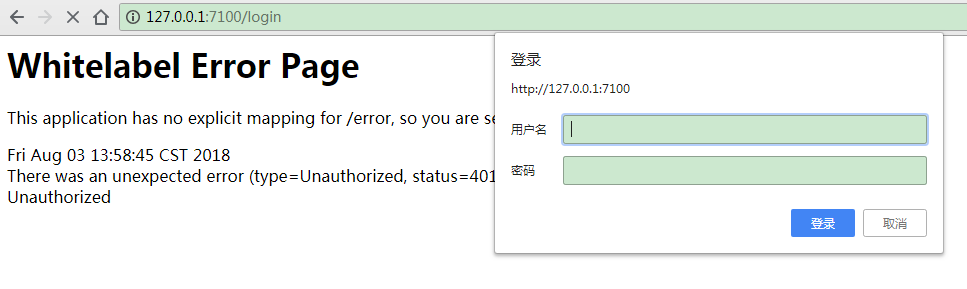
现在我们又可以使用以下命令加解密了。
如解密:
curl http://xx.xx.xx.xx:7100/decrypt -d secret -u user:password
恢复 basic auth 之后,之前的服务需要加密连接配置中心的又正常运行了。
Maven
升级到 Spring Boot 2.x 之后发现 Spring Boot 的 Maven 启动插件不好用了,主要是 Profile 不能自由切换。
升级前:
spring-boot:run -Drun.profiles=profile1
升级后:
spring-boot:run -Dspring-boot.run.profiles=profile1
具体的请参考:
https://docs.spring.io/spring-boot/docs/current/maven-plugin/run-mojo.html
【Finchley】【升级变更】Spring Cloud 升级到Finchley版本后需要注意的地方的更多相关文章
- Spring Cloud 升级最新 Finchley 版本,踩了所有的坑!
Spring Boot 2.x 已经发布了很久,现在 Spring Cloud 也发布了 基于 Spring Boot 2.x 的 Finchley 版本,现在一起为项目做一次整体框架升级. 升级前 ...
- Spring Cloud 升级最新 Finchley 版本,踩坑指南!
https://blog.csdn.net/youanyyou/article/details/81530240 Spring Cloud 升级最新 Finchley 版本,踩了所有的坑! 2018年 ...
- spring cloud: 升级到spring boot 2.x/Finchley.RELEASE遇到的坑
spring boot2.x已经出来好一阵了,而且spring cloud 的最新Release版本Finchley.RELEASE,默认集成的就是spring boot 2.x,这几天将一个旧项目尝 ...
- Spring Cloud 升级最新 Greenwich 版本,舒服了~
去年将 Spring Cloud 升级到了 Finchley 版本: Spring Cloud 升级最新 Finchley 版本,踩了所有的坑! 这个大版本栈长是踩了非常多的坑啊,帮助了不少小伙伴. ...
- Spring Cloud 升级之路 - 2020.0.x - 1. 背景知识、需求描述与公共依赖
1. 背景知识.需求描述与公共依赖 1.1. 背景知识 & 需求描述 Spring Cloud 官方文档说了,它是一个完整的微服务体系,用户可以通过使用 Spring Cloud 快速搭建一个 ...
- 厉害了,Spring Cloud Alibaba 发布 GA 版本!
? 小马哥 & Josh Long ? 喜欢写一首诗一般的代码,更喜欢和你共同 code review,英雄的相惜,犹如时间沉淀下来的对话,历久方弥新. 相见如故,@杭州. 4 月 18 日, ...
- Spring Cloud 升级之路 - 2020.0.x - 4. 使用 Eureka 作为注册中心
Eureka 目前的状态:Eureka 目前 1.x 版本还在更新,但是应该不会更新新的功能了,只是对现有功能进行维护,升级并兼容所需的依赖. Eureka 2.x 已经胎死腹中了.但是,这也不代表 ...
- Spring Cloud 升级之路 - 2020.0.x - 6. 使用 Spring Cloud LoadBalancer (1)
本项目代码地址:https://github.com/HashZhang/spring-cloud-scaffold/tree/master/spring-cloud-iiford 我们使用 Spri ...
- Spring Cloud 升级之路 - 2020.0.x - 3. Undertow 的 accesslog 配置
上一节我们讲述了如何使用 Undertow 作为我们的 Web 服务容器,本小节我们来分析使用 Undertow 的另一个问题,也就是如何配置 accesslog,以及 accesslog 的各种占位 ...
随机推荐
- 取n的第k位
实例二:取n的第k位 方法:a>> k & 1 某值a右移K位后与整数“1”进行与运算.即把需要第几位就右移几位. 例子: 0000 1000 ------8右移3位 0000 0 ...
- 【Hadoop学习之三】Hadoop全分布式安装
环境 虚拟机:VMware 10 Linux版本:CentOS-6.5-x86_64 客户端:Xshell4 FTP:Xftp4 jdk8 hadoop3.1.1 全分布式就是集群,注意配置主机名. ...
- Qt 添加 QtNetwork 库文件
Qt应用程序默认没有加QtNetwork库.如下图: 在开发过程中,因处理业务需要手动添加QtNetwork库.根据常见情况分为以下两种: [1]若使用QTCreator开发程序 在工程的pro文件中 ...
- Java8函数式编程探秘
引子 将行为作为数据传递 怎样在一行代码里同时计算一个列表的和.最大值.最小值.平均值.元素个数.奇偶分组.指数.排序呢? 答案是思维反转!将行为作为数据传递. 文艺青年的代码如下所示: public ...
- 排名函数——ROW_NUMBER()、RANK()、DENSE_RANK()和NTILE(n)
ROW_NUMBER()函数:行号,根据作为参数传递给这个函数的ORDER BY子句的值,返回一个不断递增的整数值.如果ROW_NUMBER的ORDER BY的值和结果集中的顺序相匹配,返回值将是递增 ...
- linux java -version 和 javac -version 不一致
我是在6 的基础上又装了一个 8. 结果java -v 和 javac -v的 一个显示 6 一个显示8 解决方式: 再次source 一下配置文件 如: source ~/.bashrc 或者 ...
- qt 提高图片加载速度
一,将图片在pc上解析,然后将解析文件放到qrc文件中,读取qrc文件. 1,将图片解析后的二进制文件保存,源码如下, 下载地址:https://files.cnblogs.com/files/sen ...
- build docker deivcemapper
1.创建一个虚拟快设备 dd if=/dev/zero of=4G.img bs=1M count=4096 2.创建loop device 可以先用losetup -f 查看空闲的loop设备 lo ...
- mysql命令(三)
创建一个名字为Student库: create database Student; 用以下地命令来查看创建的数据库是否成功: show databases; 进入数据库: use Student; 用 ...
- Java 高级开发必修知识---内部类
摘自:http://www.cnblogs.com/lsy131479/p/8798912.html Java 内部类分为: 1)成员内部类 2)静态嵌套类 3)方法内部类 4)匿名内部类 内部类的共 ...