
GUI界面相应事件
 function varargout = GUI19(varargin)

 % GUI19 MATLAB code for GUI19.fig

 %      GUI19, by itself, creates a new GUI19 or raises the existing

 %      singleton*.

 %

 %      H = GUI19 returns the handle to a new GUI19 or the handle to

 %      the existing singleton*.

 %

 %      GUI19('CALLBACK',hObject,eventData,handles,...) calls the local

 %      function named CALLBACK in GUI19.M with the given input arguments.

 %

 %      GUI19('Property','Value',...) creates a new GUI19 or raises the

 %      existing singleton*.  Starting from the left, property value pairs are

 %      applied to the GUI before GUI19_OpeningFcn gets called.  An

 %      unrecognized property name or invalid value makes property application

 %      stop.  All inputs are passed to GUI19_OpeningFcn via varargin.

 %

 %      *See GUI Options on GUIDE's Tools menu.  Choose "GUI allows only one

 %      instance to run (singleton)".

 %

 % See also: GUIDE, GUIDATA, GUIHANDLES

 % Edit the above text to modify the response to help GUI19

 % Last Modified by GUIDE v2. -Jan- ::

 % Begin initialization code - DO NOT EDIT

 gui_Singleton = ;

 gui_State = struct('gui_Name',       mfilename, ...

                    'gui_Singleton',  gui_Singleton, ...

                    'gui_OpeningFcn', @GUI19_OpeningFcn, ...

                    'gui_OutputFcn',  @GUI19_OutputFcn, ...

                    'gui_LayoutFcn',  [] , ...

                    'gui_Callback',   []);

 if nargin && ischar(varargin{})

     gui_State.gui_Callback = str2func(varargin{});

 end

 if nargout

     [varargout{:nargout}] = gui_mainfcn(gui_State, varargin{:});

 else

     gui_mainfcn(gui_State, varargin{:});

 end

 % End initialization code - DO NOT EDIT

 % --- Executes just before GUI19 is made visible.

 function GUI19_OpeningFcn(hObject, eventdata, handles, varargin)

 % This function has no output args, see OutputFcn.

 % hObject    handle to figure

 % eventdata  reserved - to be defined in a future version of MATLAB

 % handles    structure with handles and user data (see GUIDATA)

 % varargin   command line arguments to GUI19 (see VARARGIN)

 % Choose default command line output for GUI19

 handles.output = hObject;

 % Update handles structure

 guidata(hObject, handles);

 % UIWAIT makes GUI19 wait for user response (see UIRESUME)

 % uiwait(handles.figure1);

 % --- Outputs from this function are returned to the command line.

 function varargout = GUI19_OutputFcn(hObject, eventdata, handles)

 % varargout  cell array for returning output args (see VARARGOUT);

 % hObject    handle to figure

 % eventdata  reserved - to be defined in a future version of MATLAB

 % handles    structure with handles and user data (see GUIDATA)

 % Get default command line output from handles structure

 varargout{} = handles.output;

 % --- Executes on button press in name.

 function name_Callback(hObject, eventdata, handles)

 % hObject    handle to name (see GCBO)

 % eventdata  reserved - to be defined in a future version of MATLAB

 % handles    structure with handles and user data (see GUIDATA)

 % --- Executes during object creation, after setting all properties.

 function name_CreateFcn(hObject, eventdata, handles)

 % hObject    handle to name (see GCBO)

 % eventdata  reserved - to be defined in a future version of MATLAB

 % handles    empty - handles not created until after all CreateFcns called

 function code_Callback(hObject, eventdata, handles)

 % hObject    handle to code (see GCBO)

 % eventdata  reserved - to be defined in a future version of MATLAB

 % handles    structure with handles and user data (see GUIDATA)

 % Hints: get(hObject,'String') returns contents of code as text

 %        str2double(get(hObject,'String')) returns contents of code as a double

 % --- Executes during object creation, after setting all properties.

 function code_CreateFcn(hObject, eventdata, handles)

 % hObject    handle to code (see GCBO)

 % eventdata  reserved - to be defined in a future version of MATLAB

 % handles    empty - handles not created until after all CreateFcns called

 % Hint: edit controls usually have a white background on Windows.

 %       See ISPC and COMPUTER.

 if ispc && isequal(get(hObject,'BackgroundColor'), get(,'defaultUicontrolBackgroundColor'))

     set(hObject,'BackgroundColor','white');

 end

 % --- Executes on button press in load.

 function load_Callback(hObject, eventdata, handles)

 % hObject    handle to load (see GCBO)

 % eventdata  reserved - to be defined in a future version of MATLAB

 % handles    structure with handles and user data (see GUIDATA)

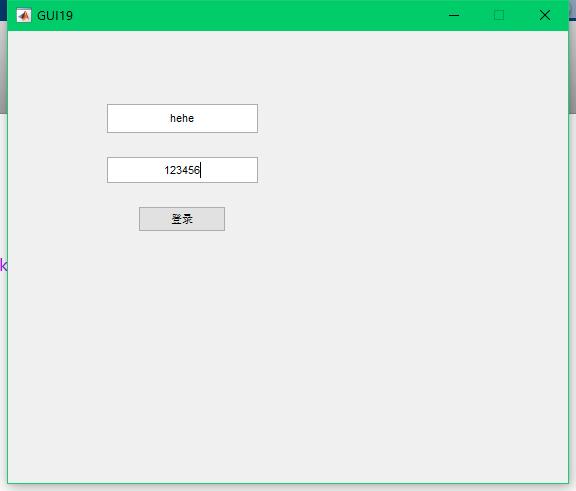
 name = get(handles.name, 'String' );

 code = get(handles.code, 'String' );

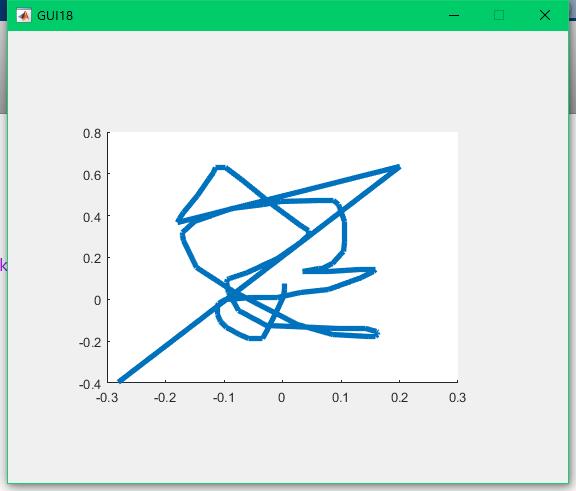
 if strcmp(name, 'hehe') && strcmp(code, '')

     delete(hObject);

     GUI18;

 end
GUI界面相应事件的更多相关文章
- matlab GUI界面编程总结
去年做了一些关于Matlab GUI的程序,现在又要做相关的东西,回想起来,当时很多经验没有记录下来,现在回顾起来始终觉得不爽,所以从现在开始,一定要勤写记录. 从简单的例子说起吧. 创建Matlab ...
- Matlab GUI界面
做SVD的时候,看学姐的demo,用到了matlab的GUI,感兴趣就自己学了一下: 从简单的例子说起吧. 创建Matlab GUI界面通常有两种方式: 1,使用 .m 文件直接动态添加控件 ...
- OpenCV-Python入门教程7-PyQt编写GUI界面
前面一直都是使用命令行运行代码,不够人性化.这篇用Python编写一个GUI界面,使用PyQt5编写图像处理程序.包括:打开.关闭摄像头,捕获图片,读取本地图片,灰度化和Otsu自动阈值分割的功能. ...
- 【PyQt5-Qt Designer】PyQt5+pyecharts 实现GUI界面的数据可视化展示
先用纯Python代码写一个简单的小案例: from PyQt5.QtCore import QUrl from PyQt5.QtWidgets import QApplication,QWidget ...
- [JAVA小项目]GUI界面的局域网聊天室
思路: 1.服务端: 1.1 创建ServerSocket 监听本地端口 1.2 循环接收多个客户端的连接,并且把多个客户端连接的每个管道都为其创建线程. 服务端类的成员:链表--每个成员都是线程类- ...
- Qt多线程和GUI界面假死(run()是线程的入口,就像main()对于应用程序的作用。分析QThread::exec函数的源码,旧的QMutexLocker模式其实很好用,挡住别人进入抢占资源,可照抄)good
QThread的常见特性: run()是线程的入口,就像main()对于应用程序的作用.QThread中对run()的默认实现调用了exec(),从而创建一个QEventLoop对象,由其处理该线程事 ...
- 使用WPF为Powershell程序制作GUI界面
1. 使用Xaml创建应用界面 打开visual studio,创建一个新的项目,在已安装模板中选择Visual C# →Wpf应用. 完成创建后,我们得到如下图所示的应用界面. wpf界面是基于xa ...
- matlab gui界面设计记录
我们要进行的程序是彩色图像处理试验示例,用这个程序来练习我们的gui前台设计. 程序功能介绍:具有彩色图像处理及保存和音乐播放功能效果如下图 2 在MATLAB的命令窗口中输入guide命令,打开gu ...
- 基于第二次数独游戏,添加GUI界面
高级软件工程第三次作业:基于第二次数独游戏,添加GUI界面.GUI界面代码如下: package firstGui; import java.awt.*; import java.awt.event. ...
随机推荐
- 前端 HTML 常用标签 head标签相关内容 title标签 网页的标题信息
title标签 <title>标签:在<title>和</title>标签之间的文字内容是网页的标题信息,它会显示在浏览器标签页的标题栏中. 可以把它看成是一个网页 ...
- centos6.8上yum安装zabbix3.2
centos6.8上yum安装zabbix3.2 zabbix3.2安装文档:https://www.zabbix.com/documentation/3.2/manual/installation/ ...
- 20170907VS中EF模型文件.edmx文件上下级关系丢失问题
状态:A 电脑check in .edmx文件到TFS ,B 电脑vs下载如下文件 vs解决方案中此文件平级显示,原因:ADO.NET 数据模型创建的时候,会在工程文件 .csproj内增加文件层级关 ...
- VS 2017 安装测试
3月7日, VS 出了新的版本2017 安装效果如下: 不过官方说会改变VS 2015附件python 的方式,变成类似C++ 一样集成python语言包到VS中. 目前没有看见,大家如果有兴趣可以安 ...
- 20165236 实验四 Android程序设计
20165236 实验四 Android程序设计 一.实验报告 课程:Java程序设计 班级:1652班 姓名:郭金涛 学号:20165236 指导教师:娄嘉鹏 实验 ...
- HBuilder 自动整理代码格式快捷键设置
工具 ->选项
- 【LNMP】提示Nginx PHP “No input file specified”错误的解决办法
原理: 任何对.php文件的请求,都简单地交给php-cgi去处理,但没有验证该php文件是否存在. PHP文件不存在,没办法返回普通的404错误,它返回 一个404,并带上一句”No input f ...
- git issue 汇总
(1)部分: https://wiki.mahara.org/wiki/Developer_Area/Contributing_Code/Troubleshooting_your_Gerrit_con ...
- selenium及webdriver的原理【转】
selenium与webdriver整合后,形成的新的测试工具叫做selenium2.x.在selenium1时间,selenium使用javascript来达到测试自动化的目标. 1. seleni ...
- max_execution_time with sleep
Under Linux, sleeping time is ignored, but under Windows, it counts as execution time. Note The set_ ...