
java:struts框架3(自定义拦截器,token令牌,文件上传和下载(单/多))
1.自定义拦截器:
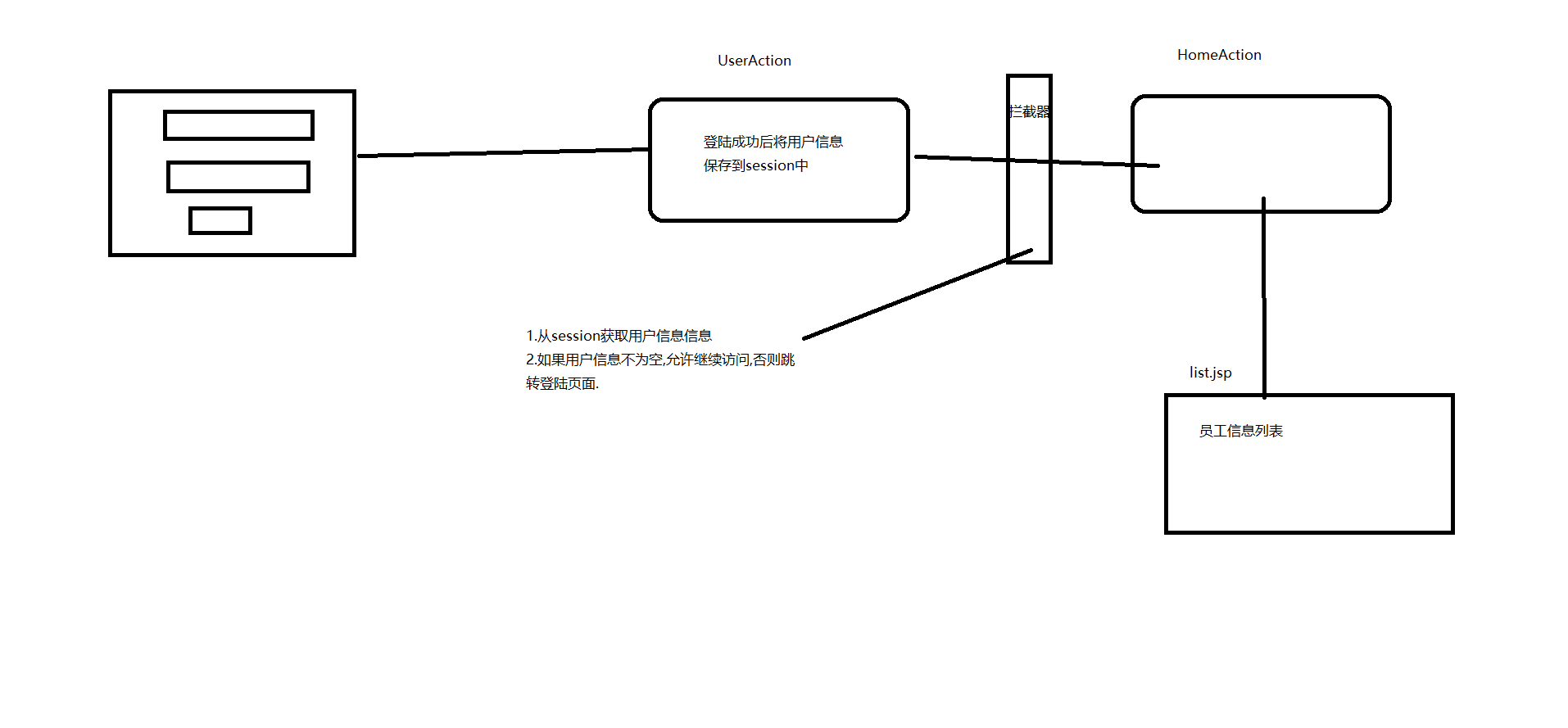

struts.xml:
<?xml version="1.0" encoding="UTF-8"?>

<!DOCTYPE struts PUBLIC

    "-//Apache Software Foundation//DTD Struts Configuration 2.3//EN"

    "http://struts.apache.org/dtds/struts-2.3.dtd">

<struts>

    <package name="inteceptor" extends="struts-default">

        <interceptors>

            <!-- 配置自定义拦截器 -->

            <interceptor name="myInter" class="cn.zzsxt.interceptor.MyInterceptor"></interceptor>

            <interceptor name="permission" class="cn.zzsxt.interceptor.PermissionInterceptor"></interceptor>

            <!-- 自定义拦截器栈 -->

            <interceptor-stack name="myStack">

                <!-- 引入自定义拦截器 -->

                <interceptor-ref name="myInter"></interceptor-ref>

                <!-- 引入timer拦截器 -->

                <interceptor-ref name="timer"></interceptor-ref>

                <!-- 引入默认拦截器栈 -->

                <interceptor-ref name="defaultStack"></interceptor-ref>

            </interceptor-stack>

            <!-- 自定义访问权限的拦截器栈 -->

            <interceptor-stack name="permissionStack">

                <interceptor-ref name="permission"></interceptor-ref>

                <interceptor-ref name="defaultStack"></interceptor-ref>

            </interceptor-stack>

        </interceptors>

        <action name="timerAction" class="cn.zzsxt.action.TimerAction">

            <result name="success">/success.jsp</result>

            <interceptor-ref name="myStack"></interceptor-ref>

            <interceptor-ref name="permissionStack"></interceptor-ref>

        </action>

        <action name="userAction" class="cn.zzsxt.action.UserAction">

            <result name="success" type="redirectAction">homeAction</result>

            <result name="login">/login.jsp</result>

            <interceptor-ref name="permissionStack"></interceptor-ref>

        </action>

        <action name="homeAction" class="cn.zzsxt.action.HomeAction">

            <result name="success">/list.jsp</result>

            <result name="login" type="redirect">/login.jsp</result>

            <!-- 引入拦截器栈 -->

            <interceptor-ref name="permissionStack"></interceptor-ref>

        </action>

    </package>

</struts>
2.token令牌:
struts.xml:
<?xml version="1.0" encoding="UTF-8"?>

<!DOCTYPE struts PUBLIC

    "-//Apache Software Foundation//DTD Struts Configuration 2.3//EN"

    "http://struts.apache.org/dtds/struts-2.3.dtd">

<struts>

    <!-- 上传文件最大大小,默认为2097152字节(2M) -->

    <constant name="struts.multipart.maxSize" value="209715200"></constant>

    <!-- 设置编码集 request.setCharacterEncoding("UTF-8")-->

    <constant name="struts.i18n.encoding" value="UTF-8"></constant>

    <package name="tokenDemo" extends="struts-default">

        <action name="user-*" class="cn.zzsxt.action.UserAction" method="{1}">

            <result name="success">/index.jsp</result>

            <!-- token验证失败后跳转的结果视图 -->

            <result name="invalid.token">/error.jsp</result>

            <!-- 引入token拦截器 -->

            <interceptor-ref name="token"></interceptor-ref>

            <!-- 引入默认拦截器栈 -->

            <interceptor-ref name="defaultStack"></interceptor-ref>

        </action>

    </package>

</struts>
add.jsp:
<%@ page language="java" import="java.util.*" pageEncoding="UTF-8"%>

<%@ taglib uri="/struts-tags" prefix="s"%>

<%

String path = request.getContextPath();

String basePath = request.getScheme()+"://"+request.getServerName()+":"+request.getServerPort()+path+"/";

%>

<!DOCTYPE HTML PUBLIC "-//W3C//DTD HTML 4.01 Transitional//EN">

<html>

  <head>

    <base href="<%=basePath%>">

    <title>My JSP 'index.jsp' starting page</title>

  </head>

  <body>

      <form action="user-doAdd.action" method="post">

          <!-- token令牌 -->

          <s:token></s:token>

          用户编号:<input type="text" name="user.id"><br>

          用户名称:<input type="text" name="user.userName"><br>

          密码:<input type="text" name="user.password"><br>

          <input type="submit" value="新增"/>

      </form>

  </body>

</html>
action:
package cn.zzsxt.action;

import com.opensymphony.xwork2.ActionSupport;

import cn.zzsxt.entity.User;

public class UserAction extends ActionSupport{

    private User user;

    public User getUser() {

        return user;

    }

    public void setUser(User user) {

        this.user = user;

    }

    public String doAdd() throws Exception {

        System.out.println("执行了用户新增,新增了:"+user);

        return this.SUCCESS;

    }

}
3.文件上传和下载(单/多):
struts.xml:
<?xml version="1.0" encoding="UTF-8"?>

<!DOCTYPE struts PUBLIC

    "-//Apache Software Foundation//DTD Struts Configuration 2.3//EN"

    "http://struts.apache.org/dtds/struts-2.3.dtd">

<struts>

    <!-- 上传文件最大大小,默认为2097152字节(2M) -->

    <constant name="struts.multipart.maxSize" value="209715200"></constant>

    <!-- 设置编码集 request.setCharacterEncoding("UTF-8")-->

    <constant name="struts.i18n.encoding" value="UTF-8"></constant>

    <package name="upload" extends="struts-default">

        <action name="singleUpload" class="cn.zzsxt.action.SingleUploadAction">

            <!-- result中name属性缺省(默认)为success -->

            <result>/success.jsp</result>

        </action>

        <action name="mutilUpload" class="cn.zzsxt.action.MutilUploadAction">

            <!-- result中name属性缺省(默认)为success -->

            <result>/success.jsp</result>

        </action>

        <action name="download" class="cn.zzsxt.action.DownloadAction">

            <result type="stream">

                <!-- inputName="输入流的名称",回掉action中getInputStream()方法获取输入流 -->

                <param name="inputName">inputStream</param>

                <!--contentType="文件类型" application/octet-stream代表对下载类型不限制  -->

                <param name="contentType">application/octet-stream</param>

                <!-- attachment:以附件方式保存 filename="保存的文件名称" ${fileName}获取action中fileName属性的值 -->

                <param name="contentDisposition">attachment;filename=${fileName}</param>

            </result>

        </action>

    </package>

</struts>
SingleUploadAction:
package cn.zzsxt.action;

import java.io.File;

import javax.servlet.ServletContext;

import org.apache.commons.io.FileUtils;

import org.apache.struts2.ServletActionContext;

import com.opensymphony.xwork2.ActionSupport;

public class SingleUploadAction extends ActionSupport{

    private File upload;//文件

    private String uploadFileName;//文件名称:属性名+FileName

    private String uploadContentType;//文件类型:属性名+ContentType

    public File getUpload() {

        return upload;

    }

    public void setUpload(File upload) {

        this.upload = upload;

    }

    public String getUploadFileName() {

        return uploadFileName;

    }

    public void setUploadFileName(String uploadFileName) {

        this.uploadFileName = uploadFileName;

    }

    public String getUploadContentType() {

        return uploadContentType;

    }

    public void setUploadContentType(String uploadContentType) {

        this.uploadContentType = uploadContentType;

    }

    /**

     * 执行文件上次

     */

    @Override

    public String execute() throws Exception {

        System.out.println("文件名称:"+uploadFileName);

        System.out.println("文件类型:"+uploadContentType);

        ServletContext servletContext = ServletActionContext.getServletContext();

        String realPath = servletContext.getRealPath("/upload");//获取文件上次的真实目录

        File uploadDir = new File(realPath);

        if(!uploadDir.exists()){

            uploadDir.mkdirs();//创建目录

        }

        //上传

        FileUtils.copyFile(upload, new File(uploadDir,uploadFileName));

        return this.SUCCESS;

    }

}
SingleUpload.jsp:
<%@ page language="java" import="java.util.*" pageEncoding="UTF-8"%>

<%

String path = request.getContextPath();

String basePath = request.getScheme()+"://"+request.getServerName()+":"+request.getServerPort()+path+"/";

%>

<!DOCTYPE HTML PUBLIC "-//W3C//DTD HTML 4.01 Transitional//EN">

<html>

  <head>

    <base href="<%=basePath%>">

    <title>单文件上传</title>

  </head>

  <body>

       <form action="singleUpload.action" method="post" enctype="multipart/form-data">

           文件:<input type="file" name="upload"></br>

           <input type="submit" value="上传"/>

       </form>

  </body>

</html>
MutilUploadAction:
package cn.zzsxt.action;

import java.io.File;

import javax.servlet.ServletContext;

import org.apache.commons.io.FileUtils;

import org.apache.struts2.ServletActionContext;

import com.opensymphony.xwork2.ActionSupport;

public class MutilUploadAction extends ActionSupport{

    private File[] upload;//文件

    private String[] uploadFileName;//文件名称:属性名+FileName

    private String[] uploadContentType;//文件类型:属性名+ContentType

    public File[] getUpload() {

        return upload;

    }

    public void setUpload(File[] upload) {

        this.upload = upload;

    }

    public String[] getUploadFileName() {

        return uploadFileName;

    }

    public void setUploadFileName(String[] uploadFileName) {

        this.uploadFileName = uploadFileName;

    }

    public String[] getUploadContentType() {

        return uploadContentType;

    }

    public void setUploadContentType(String[] uploadContentType) {

        this.uploadContentType = uploadContentType;

    }

    /**

     * 执行文件上次

     */

    @Override

    public String execute() throws Exception {

        System.out.println("文件名称:"+uploadFileName);

        System.out.println("文件类型:"+uploadContentType);

        ServletContext servletContext = ServletActionContext.getServletContext();

        String realPath = servletContext.getRealPath("/upload");//获取文件上次的真实目录

        File uploadDir = new File(realPath);

        if(!uploadDir.exists()){

            uploadDir.mkdirs();//创建目录

        }

        //遍历待上传的文件

        for(int i=0;i<upload.length;i++){

            //上传

            FileUtils.copyFile(upload[i], new File(uploadDir,uploadFileName[i]));

        }

        return this.SUCCESS;

    }

}
MutilUpload.jsp:
<%@ page language="java" import="java.util.*" pageEncoding="UTF-8"%>

<%

String path = request.getContextPath();

String basePath = request.getScheme()+"://"+request.getServerName()+":"+request.getServerPort()+path+"/";

%>

<!DOCTYPE HTML PUBLIC "-//W3C//DTD HTML 4.01 Transitional//EN">

<html>

  <head>

    <base href="<%=basePath%>">

    <title>单文件上传</title>

  </head>

  <body>

       <form action="mutilUpload.action" method="post" enctype="multipart/form-data">

           文件1:<input type="file" name="upload"></br>

           文件2:<input type="file" name="upload"></br>

           文件3:<input type="file" name="upload"></br>

           <input type="submit" value="上传"/>

       </form>

  </body>

</html>
DownloadAction:
package cn.zzsxt.action;

import java.io.File;

import java.io.FileInputStream;

import java.io.InputStream;

import javax.servlet.ServletContext;

import org.apache.struts2.ServletActionContext;

import com.opensymphony.xwork2.ActionSupport;

public class DownloadAction extends ActionSupport{

    private String fileName;//接受要下载的文件名称

    private InputStream inputStream;

    public String getFileName() {

        return fileName;

    }

    public void setFileName(String fileName) {

        this.fileName = fileName;

    }

    public InputStream getInputStream() {

        return inputStream;

    }

    public void setInputStream(InputStream inputStream) {

        this.inputStream = inputStream;

    }

    /**

     * 文件下载

     */

    @Override

    public String execute() throws Exception {

        //获取服务器端保存文件的目录

        ServletContext servletContext = ServletActionContext.getServletContext();

        String realPath = servletContext.getRealPath("/upload");//获取文件上传的真实目录

        File file = new File(realPath,fileName);

        inputStream = new FileInputStream(file); //将文件转为输入流

        //解决下载时中文名称乱码问题

        String str = new String(fileName.getBytes("UTF-8"),"iso-8859-1");

        fileName = str;

        return this.SUCCESS;

    }

}
Download.jsp:
<%@ page language="java" import="java.util.*" pageEncoding="UTF-8"%>

<%

String path = request.getContextPath();

String basePath = request.getScheme()+"://"+request.getServerName()+":"+request.getServerPort()+path+"/";

%>

<!DOCTYPE HTML PUBLIC "-//W3C//DTD HTML 4.01 Transitional//EN">

<html>

  <head>

    <base href="<%=basePath%>">

    <title>文件下载</title>

  </head>

  <body>

      <a href="download.action?fileName=1.txt">1.txt</a><br>

      <a href="download.action?fileName=mystruts.png">mystruts.png</a><br>

      <a href="download.action?fileName=Log4J详解.docx">Log4J详解.docx</a><br>

  </body>

</html>
java:struts框架3(自定义拦截器,token令牌,文件上传和下载(单/多))的更多相关文章
- java使用Jsch实现远程操作linux服务器进行文件上传、下载,删除和显示目录信息
1.java使用Jsch实现远程操作linux服务器进行文件上传.下载,删除和显示目录信息. 参考链接:https://www.cnblogs.com/longyg/archive/2012/06/2 ...
- java框架篇---struts之文件上传和下载
Struts2文件上传 Struts 2框架提供了内置支持处理文件上传使用基于HTML表单的文件上传.上传一个文件时,它通常会被存储在一个临时目录中,他们应该由Action类进行处理或移动到一个永久的 ...
- Java Struts文件上传和下载详解
Struts2文件上传 Struts 2框架提供了内置支持处理文件上传使用基于HTML表单的文件上传.上传一个文件时,它通常会被存储在一个临时目录中,他们应该由Action类进行处理或移动到一个永久的 ...
- java web学习总结(二十四) -------------------Servlet文件上传和下载的实现
在Web应用系统开发中,文件上传和下载功能是非常常用的功能,今天来讲一下JavaWeb中的文件上传和下载功能的实现. 对于文件上传,浏览器在上传的过程中是将文件以流的形式提交到服务器端的,如果直接使用 ...
- java文件上传和下载
简介 文件上传和下载是java web中常见的操作,文件上传主要是将文件通过IO流传放到服务器的某一个特定的文件夹下,而文件下载则是与文件上传相反,将文件从服务器的特定的文件夹下的文件通过IO流下载到 ...
- java的文件上传和下载 抄袭别人的.在底部有说明.
=======后续 这里采用的是输出流的方式,我电脑装的是windows系统,测试没有问题,但是当把项目放到Linux系统上跑时,就会出现保存位置错误的情况, 指定的路径就会被当做文件名的一部分保存了 ...
- common-fileupload组件实现java文件上传和下载
简介:文件上传和下载是java web中常见的操作,文件上传主要是将文件通过IO流传放到服务器的某一个特定的文件夹下,而文件下载则是与文件上传相反,将文件从服务器的特定的文件夹下的文件通过IO流下载到 ...
- 使用.NET框架、Web service实现Android的文件上传(二)
aaarticlea/png;base64,iVBORw0KGgoAAAANSUhEUgAAAYUAAAKpCAIAAADcx6fPAAAgAElEQVR4nOydd1hT5+LHg1attbfr1t ...
- java代码实现ftp服务器的文件上传和下载
java代码实现文件上传到ftp服务器: 1:ftp服务器安装: 2:ftp服务器的配置: 启动成功: 2:客户端:代码实现文件的上传与下载: 1:依赖jar包: 2:sftpTools 工具类: ...
随机推荐
- eclipse查看jsp出现failed to create the part's controls的解决方法
问题描述 最近eclipse出现了一下问题,某个类无法打开,显示Failed to create the part’s controls ,如图: 问题解决 安装的JDK 版本估计有冲突导致IDE出现 ...
- Codeforces Round #344 (Div. 2) 631 C. Report (单调栈)
C. Report time limit per test2 seconds memory limit per test256 megabytes inputstandard input output ...
- 【BZOJ2752】【Luogu P2221】 [HAOI2012]高速公路
不是很难的一个题目.正确思路是统计每一条边被经过的次数,但我最初由于习惯直接先上了一个前缀和再推的式子,导致极其麻烦难以写对而且会爆\(longlong\). 推导过程请看这里. #include & ...
- BZOJ2656 [Zjoi2012]数列(sequence)[模拟]
这个递推式子可以发现$i$是偶数下标可以缩一半,是奇数下标就可以拆成两个下标,$\lfloor \frac{i}{2} \rfloor$以及$\lfloor \frac{i}{2}+1 \rfloor ...
- 入门Leaflet之小Demo
入门Leaflet之小Demo 写在前面 ---- WebGIS开发基础之Leaflet GIS基本概念:GIS.Map.Layer.Feature.Geometry.Symbol.Data(Poin ...
- 交互式数据可视化-D3.js(三)比例尺
线性比例尺 线性比例尺是常用比例尺常用方法有: var linear = d3.scaleLinear() - 创建一个定量的线性比例尺. linear.domain([numbers]) - 定义或 ...
- 提升Java开发效率必看!教你如何在MyEclipse中使用内联搜索
MyEclipse CI 2019.4.0安装包下载 Inline Search取代传统Eclipse查找和替换对话框,提供更搞笑.更具侵略性的搜索体验——一种不会中断开发工作流程的工具. DevSt ...
- orm中的聚合函数,分组,F/Q查询,字段类,事务
目录 一.聚合函数 1. 基础语法 2. Max Min Sum Avg Count用法 (1) Max()/Min() (2)Avg() (3)Count() (4)聚合函数联用 二.分组查询 1. ...
- php环境搭建总结
回顾: 搭建web服务器 Apache:接收浏览器发出的请求以及返回结果(html) php:处理php代码,操作数据库(mysql) mysql:存储和处理数据 Apache配置php 加载:Loa ...
- Acwing-102-最佳牛围栏(二分,实数)
链接: https://www.acwing.com/problem/content/104/ 题意: 农夫约翰的农场由 N 块田地组成,每块地里都有一定数量的牛,其数量不会少于1头,也不会超过200 ...