
pytest文档32-allure描述用例详细讲解
前言
pytest+allure是最完美的结合了,关于allure的使用,本篇做一个总结。
allure报告可以很多详细的信息描述测试用例,包括epic、feature、story、title、issue、testcase、severity等
环境准备
- python 3.6
- pytest 4.5.0
- allure-pytest 2.8.6
allure用例描述
| 使用方法 | 参数值 | 参数说明 |
|---|---|---|
| @allure.epic() | epic描述 | 敏捷里面的概念,定义史诗,往下是feature |
| @allure.feature() | 模块名称 | 功能点的描述,往下是story |
| @allure.story() | 用户故事 | 用户故事,往下是title |
| @allure.title(用例的标题) | 用例的标题 | 重命名html报告名称 |
| @allure.testcase() | 测试用例的链接地址 | 对应功能测试用例系统里面的case |
| @allure.issue() | 缺陷 | 对应缺陷管理系统里面的链接 |
| @allure.description() | 用例描述 | 测试用例的描述 |
| @allure.step() | 操作步骤 | 测试用例的步骤 |
| @allure.severity() | 用例等级 | blocker,critical,normal,minor,trivial |
| @allure.link() | 链接 | 定义一个链接,在测试报告展现 |
| @allure.attachment() | 附件 | 报告添加附件 |
测试案例
pytest结合allure测试用例
import pytest

import allure

# 作者:上海-悠悠 qq交流群:874033608

@pytest.fixture(scope="session")

def login_fixture():

    print("前置条件:登录")

@allure.step("步骤1")

def step_1():

    print("操作步骤---------------1")

@allure.step("步骤2")

def step_2():

    print("操作步骤---------------2")

@allure.step("步骤3")

def step_3():

    print("操作步骤---------------3")

@allure.epic("epic对大Story的一个描述性标签")

@allure.feature("测试模块")

class TestDemoAllure():

    @allure.testcase("http://49.235.x.x:8080/zentao/testcase-view-6-1.html")

    @allure.issue("http://49.235.x.x:8080/zentao/bug-view-1.html")

    @allure.title("用例的标题")

    @allure.story("用户故事:1")

    @allure.severity("critical")

    def test_case_1(self, login_fixture):

        '''case description:作者:上海-悠悠 qq交流群:874033608

        1.点文章分类导航标签 -跳转编辑页面

        2.编辑页面输入,分类名称,如:上海-悠悠-可以输入

        3.点保存按钮保存成功

        '''

        step_1()

        step_2()

    @allure.story("用户故事:2")

    def test_case_2(self, login_fixture):

        print("测试用例1")

        step_1()

        step_3()

@allure.epic("epic对大Story的一个描述性标签")

@allure.feature("模块2")

class TestDemo2():

    @allure.story("用户故事:3")

    def test_case_3(self, login_fixture):

        print("测试用例1")

        step_1()

    @allure.story("用户故事:4")

    def test_case_4(self, login_fixture):

        print("测试用例1")

        step_3()
报告展示
cd到用例目录执行用例生成allure报告
pytest --alluredir ./report/allure
allure serve ./report/allure
报告展示内容
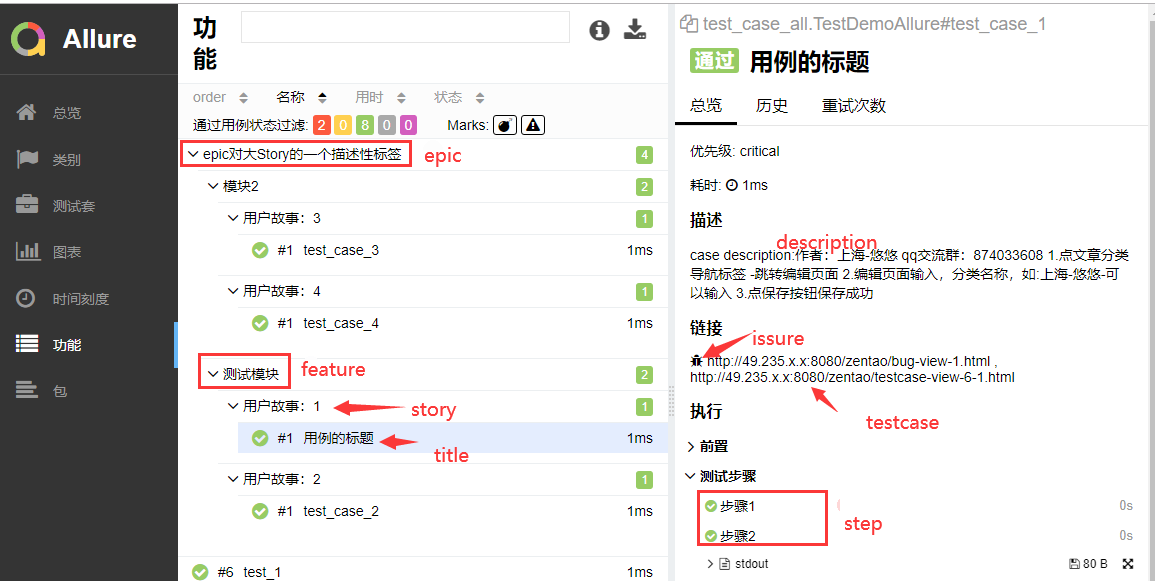
命令行参数
pytest运行用例的时候可以加上allure标记用例的参数
--allure-severities=SEVERITIES_SET

                        Comma-separated list of severity names. Tests only

                        with these severities will be run. Possible values

                        are: blocker, critical, normal, minor, trivial.

--allure-epics=EPICS_SET

                        Comma-separated list of epic names. Run tests that

                        have at least one of the specified feature labels.

--allure-features=FEATURES_SET

                        Comma-separated list of feature names. Run tests that

                        have at least one of the specified feature labels.

--allure-stories=STORIES_SET

                        Comma-separated list of story names. Run tests that

                        have at least one of the specified story labels.

--allure-link-pattern=LINK_TYPE:LINK_PATTERN

                        Url pattern for link type. Allows short links in test,

                        like 'issue-1'. Text will be formatted to full url

                        with python str.format().
选择运行你要执行epic的用例
pytest --alluredir ./report/allure --allure-epics=epic对大Story的一个描述性标签
选择运行你要执行features的用例
pytest --alluredir ./report/allure --allure-features=模块2
选择运行你要执行features的用例
pytest --alluredir ./report/allure --allure-stories="用户故事:1"
关于allure的使用基本上就是这些了
pytest文档32-allure描述用例详细讲解的更多相关文章
- 【自动化基础】allure描述用例详细讲解及实战
前言 allure可以输出非常精美的测试报告,也可以和pytest进行完美结合,不仅可以渲染页面,还可以控制用例的执行.下面就对allure的使用进行一个详细的介绍和总结. 需要准备的环境: pyth ...
- pytest文档3-pytest+Allure+jenkins+邮箱发送
前言: 虽然网上有很多邮件配置的文章,但还是想自己写一下配置的过程,因为在中间也碰到了不同坑.按照这个文档配置的话,99%都可以成功. 一.jenkins 配置邮箱 1.打开jenkins后进入点 ...
- pytest文档40-pytest.ini配置用例查找规则(面试题)
前言 面试题:pytest如何执行不是test开头的用例?如执行 xxx_*.py这种文件的用例. pytest.ini 配置文件可以修改用例的匹配规则. pytest命令行参数 cmd打开输入pyt ...
- pytest文档2-pytest+Allure+jenkins+邮箱发送
前言: 上一章节讲解了tomcat+jenkins的环境搭建,这一章节主要讲一下Allure报告在jenkins上的配置 步骤: 1.新建一个item 2.输入项目的名称,选择自由风格,点击保存 3. ...
- pytest文档28-重复执行用例(pytest-repeat)
前言 平常在做功能测试的时候,经常会遇到某个模块不稳定,偶然会出现一些bug,对于这种问题我们会针对此用例反复执行多次,最终复现出问题来. 自动化运行用例时候,也会出现偶然的bug,可以针对单个用例, ...
- pytest文档47-allure报告添加用例失败截图
前言 使用 selenium 做 web 自动化的时候,很多小伙伴希望用例失败的时候能截图,把异常截图展示到allure报告里面. pytest 有个很好的钩子函数 pytest_runtest_ma ...
- pytest文档33-Hooks函数获取用例执行结果(pytest_runtest_makereport)
前言 pytest提供的很多钩子(Hooks)方法方便我们对测试用例框架进行二次开发,可以根据自己的需求进行改造. 先学习下pytest_runtest_makereport这个钩子方法,可以更清晰的 ...
- pytest文档1-pytest+Allure+jenkins+邮箱发送
前言: 1.pytest+allure是目前很多公司使用较多的一种报告样式,因为它更详细,各种指标更直观(简单的说就是看着更高大上,更能装X). 环境准备: 1.Windows10 2.Allure ...
- pytest文档12-skip跳过用例
前言 pytest.mark.skip可以标记无法在某些平台上运行的测试功能,或者您希望失败的测试功能 skip意味着只有在满足某些条件时才希望测试通过,否则pytest应该跳过运行测试. 常见示例是 ...
随机推荐
- layui数据表格及分页
一.前端部分 html只需要放一个有id的div就行了,方便js获取渲染区域 <div id="data_grid" lay-filter="demo" ...
- Nginx-入门(源码编译安装http://nginx.org/en/download.html)
比较早的时候 web主要经典组合--->LAMP 近几年---->nginx后来居上--->LNMP=LEMP Nginx = Engine x Nginx和Apache 都是 ...
- Docker | Mac 通过 Docker 安装 Oracle
Docker | Mac 通过 Docker 安装 Oracle 前言: Oracle 10g 以后就不支持 Mac 版本,因此 Mac 用户需要安装的话可以通过虚拟机或者 Docker 1.在 do ...
- 手把手教你用C#做疫情传播仿真
手把手教你用C#做疫情传播仿真 在上篇文章中,我介绍了用C#做的疫情传播仿真程序的使用和配置,演示了其运行效果,但没有着重讲其中的代码. 今天我将抽丝剥茧,手把手分析程序的架构,以及妙趣横生的细节. ...
- ROS中的3D机器人建模(二)
一,创建我们的第一个URDF模型 我们设计的第一个机器人模型是pan-and-tilt机械结构,代码如下 pan_tilt.urdf: 1 <?xml version="1.0&quo ...
- 构造UTF8的std::string
在VC++的世界里,MS比较鼓励使用_UNICODE,std::wstring.而在Web, XML则提倡用UTF8.当在C++的程序里要保存/读取XML数据,就存在wstring与string之间的 ...
- 链表基本操作与排序(c语言)
本设计程序用C编写,完成单链表的生成,任意位置的插入.删除,以及确定某一元素在单链表中的位置.实现三种排序算法-冒泡排序.快速排序.合并排序.产生四个长度为100,1000,10000,50000的随 ...
- LeetCode227:基本计算器II
感觉自己的思路还不错,比较简单清晰,代码量也比较少,没有用到记录运算符的变量或栈,就想把这个思路发一下博客. 题目: 实现一个基本的计算器来计算一个简单的字符串表达式的值. 字符串表达式仅包含非负整数 ...
- Codeforces_812
A. 每条人行道有六条车道会撞到. #include<bits/stdc++.h> using namespace std; ],b[],c[],d[]; int main() { ios ...
- num06---代理模式
代理模式,比较好理解,关键点就是,被代理类 和 代理类 实现同一个接口,接口中定义着想要实现的被代理的方法,在代理类中引入 被代理类 对象, 最后直接调用代理类的方法即可实现代理功能.