
Openlayer4 - 最好最强大的开源地图引擎
Openlayer4 - 最好最强大的开源地图引擎
# github
https://github.com/openlayers/openlayers

# 官网
http://openlayers.org/

# API
http://openlayers.org/en/latest/apidoc/index.html

# 中文教程
http://weilin.me/ol3-primer/
坐标可以在这里查询
# 百度接口
http://api.map.baidu.com/lbsapi/getpoint/index.html

# openlayer 实现的deom
http://openlayers.org/en/latest/examples/mouse-position.html
npm install ol --save
https://github.com/openlayers/openlayers/tree/master/package
一些非demo的收集和备注
# 加载地图时的进度条

http://openlayers.org/en/latest/examples/tile-load-events.html
demo 1 :
清注意,这个demo中的大部分API都会在后续频繁使用的
const ol = require('js/ol.js');

require('css/ol.css');

/**

  坐标可以在这里查询 :

  百度地图API : http://api.map.baidu.com/lbsapi/getpoint/index.html

  openlayer官方API : http://openlayers.org/en/latest/examples/mouse-position.html

*/

  var map = new ol.Map({

    layers: [

      new ol.layer.Tile({

        source: new ol.source.OSM()

      })

    ],

    target: 'map',

    view: new ol.View({

      projection: 'EPSG:4326',//'EPSG:3857',

      center: [105.4265, 34.7782],

      zoom: 5,

      minZoom:4,

      maxZoom:6

    })

  });
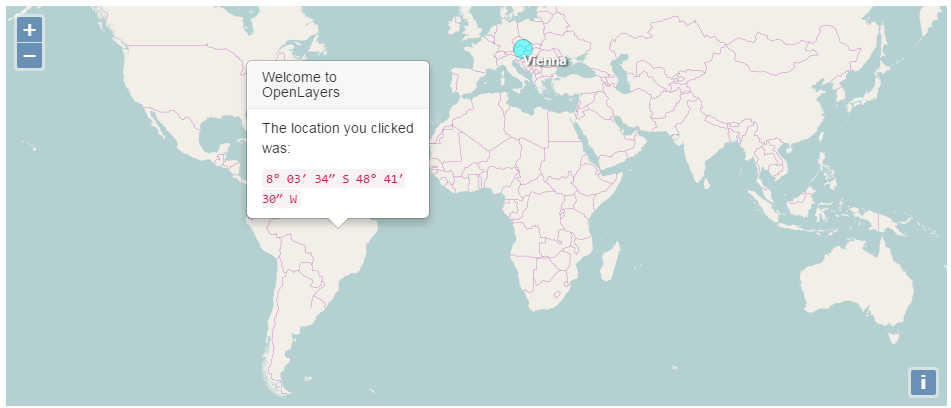
demo2 : 结合jquery + bootstrap实现点击气泡
http://openlayers.org/en/latest/examples/overlay.html
核心知识点:map.on绑定click事件、获取当前地理位置参数。
const ol = require('js/ol.js');

const $ = require("jquery"); if ( typeof window === "object") {window.jQuery = $;};

require("bootstrap");

require('css/ol.css');

require('css/Overlay.css');

var layer = new ol.layer.Tile({

        source: new ol.source.OSM()

});

var map = new ol.Map({

  layers: [layer],

  target: 'map',

  view: new ol.View({

    center: [0, 0],

    zoom: 2

  })

});

var pos = ol.proj.fromLonLat([16.3725, 48.208889]);

// Vienna marker

var marker = new ol.Overlay({

  position: pos,

  positioning: 'center-center',

  element: document.getElementById('marker'),

  stopEvent: false

});

map.addOverlay(marker);

// Vienna label

var vienna = new ol.Overlay({

  position: pos,

  element: document.getElementById('vienna')

});

map.addOverlay(vienna);

// Popup showing the position the user clicked

var popup = new ol.Overlay({

  element: document.getElementById('popup')

});

map.addOverlay(popup);

map.on('click', function(evt) {

  var element = popup.getElement();

  var coordinate = evt.coordinate;

  var hdms = ol.coordinate.toStringHDMS(ol.proj.transform(

      coordinate, 'EPSG:3857', 'EPSG:4326'));

  $(element).popover('destroy');

  popup.setPosition(coordinate);

  // the keys are quoted to prevent renaming in ADVANCED mode.

  $(element).popover({

    'placement': 'top',

    'animation': false,

    'html': true,

    'content': '<p>The location you clicked was:</p><code>' + hdms + '</code>'

  });

  $(element).popover('show');

});
demo3 : 设置边界线
const ol = require('js/ol.js');

require('css/ol.css');

   new ol.Map({

            layers: [

                new ol.layer.Tile({source: new ol.source.OSM()})

            ],

            view: new ol.View({

                // 设置地图中心范围

                extent: [102, 29, 104, 31],

                // 设置成都为地图中心

                center: [104.06, 30.67],

                projection: 'EPSG:4326',

                zoom: 10

            }),

            target: 'map'

      });
demo 4 :绘制线条
<script src="https://api.mapbox.com/mapbox.js/plugins/arc.js/v0.1.0/arc.js"></script>
实现该效果需要第三方插件的支持

html:
<!doctype html>

<html lang="en">

  <head>

    <title>OpenLayers</title>

    <style type="text/css">

      #map {

        width:100%;

        height:100vh;

      }

    </style>

  </head>

  <body>

     <div id="map" class="map"></div>

     <script src="https://api.mapbox.com/mapbox.js/plugins/arc.js/v0.1.0/arc.js"></script>

  </body>

</html>
js:
const ol = require('js/ol.js');

require('css/ol.css');

  var map = new ol.Map({

        layers: [

          new ol.layer.Tile({

            source: new ol.source.Stamen({

              layer: 'toner'

            })

          })

        ],

        target: 'map',

        view: new ol.View({

          center: [0, 0],

          zoom: 2

        })

  });

  var style = new ol.style.Style({

    stroke: new ol.style.Stroke({

      color: '#EAE911',

      width: 2

    })

  });

  var flightsSource;

  var addLater = function(feature, timeout) {

    window.setTimeout(function() {

      feature.set('start', new Date().getTime());

      flightsSource.addFeature(feature);

    }, timeout);

  };

  var pointsPerMs = 0.1;

  var animateFlights = function(event) {

    var vectorContext = event.vectorContext;

    var frameState = event.frameState;

    vectorContext.setStyle(style);

    var features = flightsSource.getFeatures();

    for (var i = 0; i < features.length; i++) {

      var feature = features[i];

      if (!feature.get('finished')) {

        // only draw the lines for which the animation has not finished yet

        var coords = feature.getGeometry().getCoordinates();

        var elapsedTime = frameState.time - feature.get('start');

        var elapsedPoints = elapsedTime * pointsPerMs;

        if (elapsedPoints >= coords.length) {

          feature.set('finished', true);

        }

        var maxIndex = Math.min(elapsedPoints, coords.length);

        var currentLine = new ol.geom.LineString(coords.slice(0, maxIndex));

        // directly draw the line with the vector context

        vectorContext.drawGeometry(currentLine);

      }

    }

    // tell OpenLayers to continue the animation

    map.render();

  };

  flightsSource = new ol.source.Vector({

    wrapX: false,

    attributions: 'Flight data by ' +

          '<a href="http://openflights.org/data.html">OpenFlights</a>,',

    loader: function() {

      var url = 'https://openlayers.org/en/v4.0.1/examples/data/openflights/flights.json';

      fetch(url).then(function(response) {

        return response.json();

      }).then(function(json) {

        var flightsData = json.flights;

        for (var i = 0; i < flightsData.length; i++) {

          var flight = flightsData[i];

          var from = flight[0];

          var to = flight[1];

          // create an arc circle between the two locations

          var arcGenerator = new arc.GreatCircle(

              {x: from[1], y: from[0]},

              {x: to[1], y: to[0]}

          );

          // 绘制的速度

          var arcLine = arcGenerator.Arc(1000, {offset: 10});

          if (arcLine.geometries.length === 1) {

            var line = new ol.geom.LineString(arcLine.geometries[0].coords);

            line.transform(ol.proj.get('EPSG:4326'), ol.proj.get('EPSG:3857'));

            var feature = new ol.Feature({

              geometry: line,

              finished: false

            });

            addLater(feature, i * 50);

          }

        }

        map.on('postcompose', animateFlights);

      });

    }

  });

  var flightsLayer = new ol.layer.Vector({

    source: flightsSource,

    style: function(feature) {

      // if the animation is still active for a feature, do not

      // render the feature with the layer style

      if (feature.get('finished')) {

        return style;

      } else {

        return null;

      }

    }

  });

  map.addLayer(flightsLayer);
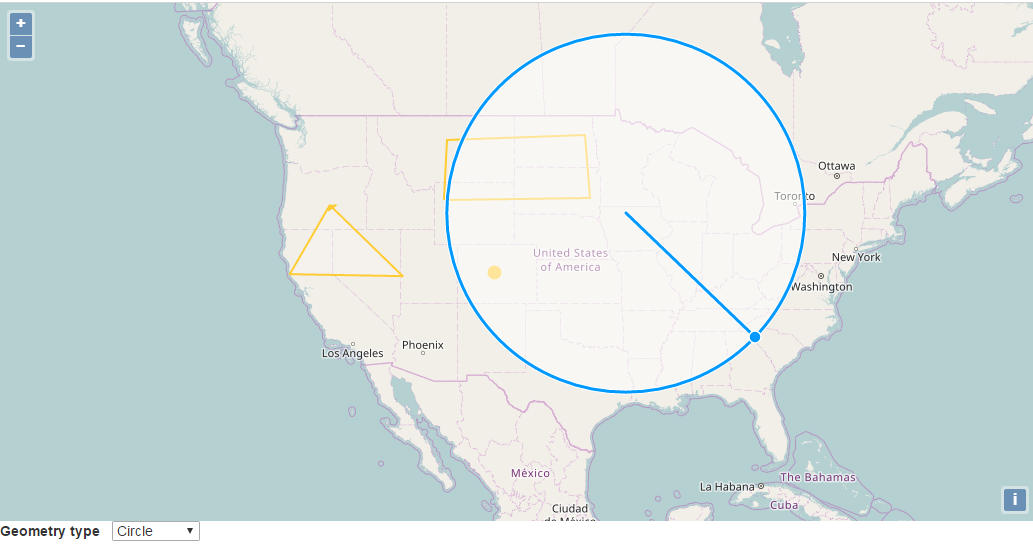
demo5 : 多方式标记地图
http://openlayers.org/en/latest/examples/draw-and-modify-features.html
html:
<!doctype html>
<html lang="en">
<head>
<title>OpenLayers</title>
</head>
<body>
<div id="map" class="map"></div>
<form class="form-inline">
<label>Geometry type </label>
<select id="type">
<option value="Point">Point</option>
<option value="LineString">LineString</option>
<option value="Polygon">Polygon</option>
<option value="Circle">Circle</option>
</select>
</form>
<script src="https://api.mapbox.com/mapbox.js/plugins/arc.js/v0.1.0/arc.js"></script>
</body>
</html>
js:
const ol = require('js/ol.js');

const $ = require("jquery"); if ( typeof window === "object") {window.jQuery = $;};

require("bootstrap");

require('css/ol.css');

require('css/Overlay.css');

 var raster = new ol.layer.Tile({

        source: new ol.source.OSM()

      });

      var map = new ol.Map({

        layers: [raster],

        target: 'map',

        view: new ol.View({

          center: [-11000000, 4600000],

          zoom: 4

        })

      });

      var features = new ol.Collection();

      var featureOverlay = new ol.layer.Vector({

        source: new ol.source.Vector({features: features}),

        style: new ol.style.Style({

          fill: new ol.style.Fill({

            color: 'rgba(255, 255, 255, 0.2)'

          }),

          stroke: new ol.style.Stroke({

            color: '#ffcc33',

            width: 2

          }),

          image: new ol.style.Circle({

            radius: 7,

            fill: new ol.style.Fill({

              color: '#ffcc33'

            })

          })

        })

      });

      featureOverlay.setMap(map);

      var modify = new ol.interaction.Modify({

        features: features,

        // the SHIFT key must be pressed to delete vertices, so

        // that new vertices can be drawn at the same position

        // of existing vertices

        deleteCondition: function(event) {

          return ol.events.condition.shiftKeyOnly(event) &&

              ol.events.condition.singleClick(event);

        }

      });

      map.addInteraction(modify);

      var draw; // global so we can remove it later

      var typeSelect = document.getElementById('type');

      function addInteraction() {

        draw = new ol.interaction.Draw({

          features: features,

          type: /** @type {ol.geom.GeometryType} */ (typeSelect.value)

        });

        map.addInteraction(draw);

      }

      /**

       * Handle change event.

       */

      typeSelect.onchange = function() {

        map.removeInteraction(draw);

        addInteraction();

      };

      addInteraction();
demo6 : 覆盖标记
http://openlayers.org/en/latest/examples/image-vector-layer.html

html:
<!doctype html>
<html lang="en">
<head>
<title>OpenLayers</title>
</head>
<body>
<div id="map" class="map"></div>
<div id="info"> </div>
<script src="https://api.mapbox.com/mapbox.js/plugins/arc.js/v0.1.0/arc.js"></script>
</body>
</html>
js:
const ol = require('js/ol.js');

const $ = require("jquery"); if ( typeof window === "object") {window.jQuery = $;};

require("bootstrap");

require('css/ol.css');

require('css/Overlay.css');

 var map = new ol.Map({

        layers: [

          new ol.layer.Tile({

            source: new ol.source.OSM()

          }),

          new ol.layer.Image({

            source: new ol.source.ImageVector({

              source: new ol.source.Vector({

                url: 'https://openlayers.org/en/v4.0.1/examples/data/geojson/countries.geojson',

                format: new ol.format.GeoJSON()

              }),

              style: new ol.style.Style({

                fill: new ol.style.Fill({

                  color: 'rgba(255, 255, 255, 0.6)'

                }),

                stroke: new ol.style.Stroke({

                  color: '#319FD3',

                  width: 1

                })

              })

            })

          })

        ],

        target: 'map',

        view: new ol.View({

          center: [0, 0],

          zoom: 4

        })

      });

      var featureOverlay = new ol.layer.Vector({

        source: new ol.source.Vector(),

        map: map,

        style: new ol.style.Style({

          stroke: new ol.style.Stroke({

            color: '#f00',

            width: 1

          }),

          fill: new ol.style.Fill({

            color: 'rgba(255,0,0,0.1)'

          })

        })

      });

      var highlight;

      var displayFeatureInfo = function(pixel) {

        var feature = map.forEachFeatureAtPixel(pixel, function(feature) {

          return feature;

        });

        var info = document.getElementById('info');

        if (feature) {

          info.innerHTML = feature.getId() + ': ' + feature.get('name');

        } else {

          info.innerHTML = ' ';

        }

        if (feature !== highlight) {

          if (highlight) {

            featureOverlay.getSource().removeFeature(highlight);

          }

          if (feature) {

            featureOverlay.getSource().addFeature(feature);

          }

          highlight = feature;

        }

      };

      map.on('pointermove', function(evt) {

        if (evt.dragging) {

          return;

        }

        var pixel = map.getEventPixel(evt.originalEvent);

        displayFeatureInfo(pixel);

      });

      map.on('click', function(evt) {

        displayFeatureInfo(evt.pixel);

      });
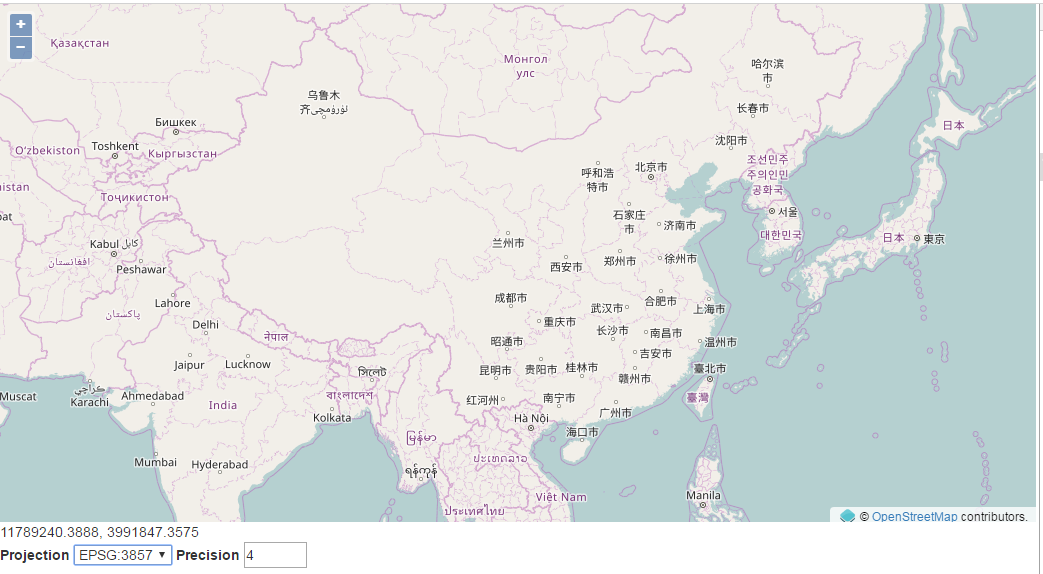
demo 7 : Mouse Position
http://openlayers.org/en/latest/examples/mouse-position.html
清注意,center参数中用到的数组正是 EPSG:3857 的值
html:
<!doctype html>

<html lang="en">

  <head>

    <title>OpenLayers</title>

  </head>

  <body>

     <div id="map" class="map"></div>

      <div id="mouse-position"></div>

    <form>

      <label>Projection </label>

      <select id="projection">

        <option value="EPSG:4326">EPSG:4326</option>

        <option value="EPSG:3857">EPSG:3857</option>

      </select>

      <label>Precision </label>

      <input id="precision" type="number" min="0" max="12" value="4"/>

    </form>

  </body>

</html>
js :
const ol = require('js/ol.js');

const $ = require("jquery"); if ( typeof window === "object") {window.jQuery = $;};

require("bootstrap");

require('css/ol.css');

require('css/Overlay.css');

  var mousePositionControl = new ol.control.MousePosition({

    coordinateFormat: ol.coordinate.createStringXY(4),

    projection: 'EPSG:4326',

    // comment the following two lines to have the mouse position

    // be placed within the map.

    className: 'custom-mouse-position',

    target: document.getElementById('mouse-position'),

    undefinedHTML: ' '

  });

  var map = new ol.Map({

    controls: ol.control.defaults({

      attributionOptions: /** @type {olx.control.AttributionOptions} */ ({

        collapsible: false

      })

    }).extend([mousePositionControl]),

    layers: [

      new ol.layer.Tile({

        source: new ol.source.OSM()

      })

    ],

    target: 'map',

    view: new ol.View({

      center: [0, 0],

      zoom: 2

    })

  });

  var projectionSelect = document.getElementById('projection');

  projectionSelect.addEventListener('change', function(event) {

    mousePositionControl.setProjection(ol.proj.get(event.target.value));

  });

  var precisionInput = document.getElementById('precision');

  precisionInput.addEventListener('change', function(event) {

    var format = ol.coordinate.createStringXY(event.target.valueAsNumber);

    mousePositionControl.setCoordinateFormat(format);

  });
Openlayer4 - 最好最强大的开源地图引擎的更多相关文章
- [GitHub开源]基于HTML5实现的轻量级Google Earth三维地图引擎,带你畅游世界 【转】
http://blog.csdn.net/iispring/article/details/52679185 WebGlobe HTML5基于原生WebGL实现的轻量级Google Earth三维地图 ...
- Fixflow引擎解析(一)(介绍) - Fixflow开源流程引擎介绍
Fixflow引擎解析(四)(模型) - 通过EMF扩展BPMN2.0元素 Fixflow引擎解析(三)(模型) - 创建EMF模型来读写XML文件 Fixflow引擎解析(二)(模型) - BPMN ...
- 从零打造一个Web地图引擎
说到地图,大家一定很熟悉,平时应该都使用过百度地图.高德地图.腾讯地图等,如果涉及到地图相关的开发需求,也有很多选择,比如前面的几个地图都会提供一套js API,此外也有一些开源地图框架可以使用,比如 ...
- 你需要知道的MySQL开源存储引擎TokuDB
在四月份的Percona Live MySQL会议上, TokuDB庆祝自己成为开源存储引擎整一周年.我现在仍能记得一年前它刚创建时的官方声明与对它的期望.当时的情况非常有意思,因为它拥有帮助MySQ ...
- 开源分布式计算引擎 & 开源搜索引擎 Iveely 0.5.0 为大数据而生
Iveely Computing 产生背景 08年的时候,我开始接触搜索引擎,当时遇到的第一个难题就是大数据实时并发处理,当时实验室的机器我们可以随便用,至少二三十台机器,可以,却没有程序可以将这些机 ...
- Java三大主流开源工作流引擎技术分析
首先,这个评论是我从网上,书中,搜索和整理出来的,也许有技术点上的错误点,也许理解没那么深入.但是我是秉着学习的态度加以评论,学习,希望对大家有用,进入正题! 三大主流工作流引擎:Shark,oswo ...
- 《Genesis-3D开源游戏引擎--横版格斗游戏制作教程08:虚拟键盘实现》--本系列完结
8.虚拟键盘实现 概述: 硬键盘就是物理键盘,平时敲的那种.软键盘是虚拟的键盘,不是在键盘上,而是在"屏幕"上.虚拟按键就是虚拟键盘的一部分,根据功能需求,提供部分按键效果的UI可 ...
- 《Genesis-3D开源游戏引擎完整实例教程-2D射击游戏篇:简介及目录》(附上完整工程文件)
G-3D引擎2D射击类游戏制作教程 游戏类型: 打飞机游戏属于射击类游戏中的一种,可以划分为卷轴射击类游戏. 视觉表现类型为:2D 框架简介: Genesis-3D引擎不仅为开发者提供一个3D游戏制作 ...
- 《Genesis-3D开源游戏引擎-FQA常见问题解答》2014年01月10号版本
1.Genesis-3D开源游戏引擎主要面向哪些用户人群?有限制吗? 1.我们的引擎没有限制,只要您想了解和使用我们的引擎,就可以加入Genesis-3D的大家庭.2.我们的主要用户群是各个相关的企业 ...
随机推荐
- Forward与include的区别
Forward与include的区别 <jsp:include>标签用于把另外一个资源的输出内容插入进当前JSP页面的输出内容之中,这种在JSP页面执行时的引入方式称之为动态引入. < ...
- Combination Sum IV -- LeetCode
Given an integer array with all positive numbers and no duplicates, find the number of possible comb ...
- java web(学习笔记)项目路径问题
最近刚接触java web特别是是关于项目路径这一块很晕,就把自己遇到的一些疑惑和理解写下来. 首先贴上路径,这里用的是eclipse. 其中我们要注意看WebContent目录,这是web程序的根目 ...
- [OpenJudge8462][序列DP]大盗阿福
大盗阿福 总时间限制: 1000ms 内存限制: 65536kB [描述] 阿福是一名经验丰富的大盗.趁着月黑风高,阿福打算今晚洗劫一条街上的店铺. 这条街上一共有 N 家店铺,每家店中都有一些现金. ...
- ubuntu下python3及idle3的安装
一.使用以下命令检查自己的系统下是否有python3 python3 --version 如果出现类似“command not found",则说明你需要安装python3.如果能够出现py ...
- iOS 10 资料整理笔记
1.Notification(通知) 自从Notification被引入之后,苹果就不断的更新优化,但这些更新优化只是小打小闹,直至现在iOS 10开始真正的进行大改重构,这让开发者也体会到UserN ...
- 乐观锁-version的使用
出处:http://chenzhou123520.iteye.com/blog/1863407 乐观锁介绍: 乐观锁( Optimistic Locking ) 相对悲观锁而言,乐观锁假设认为数据一般 ...
- YS端对端之间SSL通信安全问题
1.简介: 传统的互联网,SSL通信主要基于客户端和服务器之间,在物联网时代,端和端之间的加密通信将变得很普遍,在YS业务中主要的端和端通信为: (1).客户端(移动APP,YS工作 ...
- delphi执行cmd命令和bat文件
转载地址:http://blog.csdn.net/hutao1101175783/article/details/42807063 cmd:='echo d | Xcopy '+BasePath+' ...
- JS版汉字与拼音互转终极方案,附简单的JS拼音输入法
原文:http://www.cnblogs.com/liuxianan/p/pinyinjs.html 前言 网上关于JS实现汉字和拼音互转的文章很多,但是比较杂乱,都是互相抄来抄去,而且有的不支持多 ...