
Pointer Event Api-整合鼠标事件、触摸和触控笔事件
Pointer Events API 是Hmtl5的事件规范之一,它主要目的是用来将鼠标(Mouse)、触摸(touch)和触控笔(pen)三种事件整合为统一的API。
Pointer Event
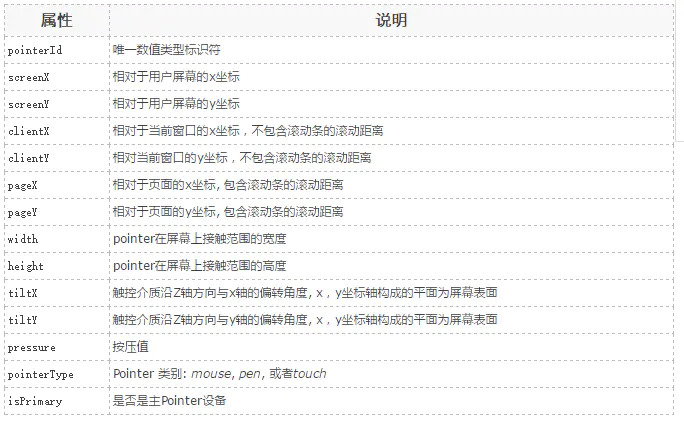
Pointer指可以在屏幕上反馈一个指定坐标的输入设备。Pointer Event事件和Touch Event API对应的触摸事件类似,它继承扩展了Touch Event,因此拥有Touch Event的常用属性。Pointer属性如下图:
说明:
pointerId:代表每一个独立的Pointer。根据id,我们可以很轻松的实现多点触控应用。
width/height:Mouse Event在屏幕上只能覆盖一个点的位置,但是一个Pointer可能覆盖一个更大的区域。
isPrimary:当有多个Pointer被检测到的时候(比如多点触摸),对每一种类型的Pointer会存在一个Primary Poiter。只有Primary Poiter会产生与之对应的Mouse Event。
Pointer Event API核心事件:
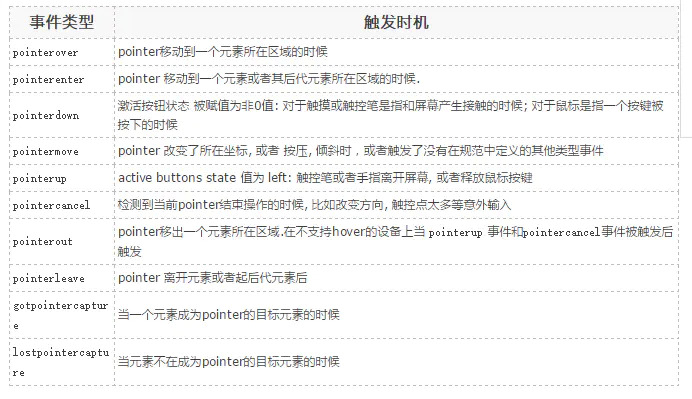
Mouse events, pointer events和touch events 对照表

Pointer API 的好处
Poiter API 整合了鼠标、触摸和触控笔的输入,使得我们无需对各种类型的事件区分对待。
目前不论是web还是本地应用都被设计成跨终端(手机,平板,PC)应用,鼠标多数应用在桌面应用,触摸则出现在各种设备上。过去开发人员必须针对不同的输入设备写不同的代码,或者写一个polyfill 来封装不同的逻辑。Pointer Events 改变了这种状况。
Pointer API实例
使用canvas画布来展示追踪一个pointer移动轨迹:
<canvas id="mycanvas" width="400px" height="500px" style="border: 1px solid #000"></canvas>

<script type="text/javascript">

var DrawFigure = (function(){

    function DrawFigure(canvas,options) {

        var _this = this;

        this.canvas = canvas;

        this._ctx = this.canvas.getContext('2d');

        this.lastPt = null;

        if(options === void 0) {

            options = {};

        }

        this.options = options;

        this._handleMouseDown = function(event) {

            _this._mouseButtonDown = true;

        }

        this._handleMouseMove = function(event) {

            if(_this._mouseButtonDown) {

                var event = window.event || event;

                if(_this.lastPt !== null) {

                    _this._ctx.beginPath();

                    _this._ctx.moveTo(_this.lastPt.x,_this.lastPt.y);

                    _this._ctx.lineTo(event.pageX,event.pageY);

                    _this._ctx.strokeStyle = _this.options.strokeStyle || 'green';

                    _this._ctx.lineWidth = _this.options.lineWidth || 3;

                    _this._ctx.stroke();

                }

                _this.lastPt = {

                    x: event.pageX,

                    y: event.pageY

                }

            }

        }

        this._handleMouseUp = function(event) {

            _this._mouseButtonDown = false;

            _this.canvas.removeEventListener('pointermove',_this.__handleMouseMove,false);

            _this.canvas.removeEventListener('mousemove',_this.__handleMouseMove,false);

            _this.lastPt = null;

            console.log('移除事件');

        }

        DrawFigure.prototype.init = function() {

            this._mouseButtonDown = false;

            if(window.PointerEvent) {

                this.canvas.addEventListener('pointerdown',this._handleMouseDown,false);

                this.canvas.addEventListener('pointermove',this._handleMouseMove,false);

                this.canvas.addEventListener('pointerup',this._handleMouseUp,false);

            } else {

                this.canvas.addEventListener('mousedownn',this._handleMouseDown,false);

                this.canvas.addEventListener('mousemove',this._handleMouseMove,false);

                this.canvas.addEventListener('mouseup',this._handleMouseUp,false);

            }

        }

    }

    return DrawFigure;

}());

window.onload = function() {

    var canvas = document.getElementById('mycanvas');

    var drawFigure = new DrawFigure(canvas);

    drawFigure.init();

}

</script>
结果如图所示:

多点触控实例
首先初始一个多个颜色的数组,用来追踪不同的pointer。
var colours = ['red', 'green', 'blue', 'yellow','black'];
画线的时候通过pointer的id来取色。
 multitouchctx.strokeStyle = colours[id%5];

 multitouchctx.lineWidth = 3;
在这个demo中,我们要追踪每一个pointer,所以需要分别保存每一个pointer的相关坐标点。这里我们使用关联数组来存储数据,每个数据使用pointerId做key,我们使用一个Object对象作为关联数组,用如下方法添加数据:
// This will be our associative array

var multiLastPt=new Object();

...

// Get the id of the pointer associated with the event

var id = e.pointerId;

...

// Store coords

multiLastPt[id] = {x:e.pageX, y:e.pageY};
完整代码:
<!DOCTYPE html>

<html>

<head>

<title>test</title>

<meta charset="utf-8">

<meta name="viewport" content="width=device-width,initial-scale=1.0,minimum-scale=1.0,maximum-scale=1.0,user-scalable=no" />

<style>

    html,body{

        margin:0;

        padding:0;

        width: 100%;

        height: 100%;

        overflow: hidden;

    }

</style>

</head>

<body ontouchstart="return false;">

<canvas id="mycanvas"></canvas>

<script type="text/javascript">

var DrawFigure = (function(){

    function DrawFigure(canvas,options) {

        var _this = this;

        this.canvas = canvas;

        this.canvas.width = document.documentElement.clientWidth;

        this.canvas.height = document.documentElement.clientHeight;

        this._ctx = this.canvas.getContext('2d');

        this.lastPt = {};

        if(options === void 0) {

            options = {};

        }

        this.options = options;

        this.colours = ['red', 'green', 'blue', 'yellow', 'black']; // 初始一个多个颜色的数组,用来追踪不同的pointer

        this._handleMouseDown = function(event) {

            _this._mouseButtonDown = true;

        }

        this._handleMouseMove = function(event) {

            var id = event.pointerId;

            if(_this._mouseButtonDown) {

                var event = window.event || event;

                if(_this.lastPt[id]) {

                    _this._ctx.beginPath();

                    _this._ctx.moveTo(_this.lastPt[id].x,_this.lastPt[id].y);

                    _this._ctx.lineTo(event.pageX,event.pageY);

                    _this._ctx.strokeStyle = _this.colours[id%5]; // 画线的时候通过pointer的id来取色

                    _this._ctx.lineWidth = _this.options.lineWidth || 3;

                    _this._ctx.stroke();

                }

                _this.lastPt[id] = {

                    x: event.pageX,

                    y: event.pageY

                }

            }

        }

        this._handleMouseUp = function(event) {

            var id = event.pointerId;

            _this._mouseButtonDown = false;

            _this.canvas.removeEventListener('pointermove',_this.__handleMouseMove,false);

            _this.canvas.removeEventListener('mousemove',_this.__handleMouseMove,false);

             delete _this.lastPt[id];

        }

        DrawFigure.prototype.init = function() {

            this._mouseButtonDown = false;

            if(window.PointerEvent) {

                this.canvas.addEventListener('pointerdown',this._handleMouseDown,false);

                this.canvas.addEventListener('pointermove',this._handleMouseMove,false);

                this.canvas.addEventListener('pointerup',this._handleMouseUp,false);

            } else {

                this.canvas.addEventListener('mousedownn',this._handleMouseDown,false);

                this.canvas.addEventListener('mousemove',this._handleMouseMove,false);

                this.canvas.addEventListener('mouseup',this._handleMouseUp,false);

            }

        }

    }

    return DrawFigure;

}());

window.onload = function() {

    var canvas = document.getElementById('mycanvas');

    var drawFigure = new DrawFigure(canvas);

    drawFigure.init();

}

</script>

</body>

</html>
手机效果如图所示:

参考地址:
Pointer Event Api-整合鼠标事件、触摸和触控笔事件的更多相关文章
- MSDN 杂志:UI 前沿技术 - WPF 中的多点触控操作事件
原文 MSDN 杂志:UI 前沿技术 - WPF 中的多点触控操作事件 UI 前沿技术 WPF 中的多点触控操作事件 Charles Petzold 下载代码示例 就在过去几年,多点触控还只是科幻电 ...
- 浏览器的统一指针事件:Pointer Event
在早期的浏览器,输入的事件其实相对单纯,只有考虑到鼠标和键盘两种:而当时的鼠标事件,其实就是 click.mousedown.mouseup 等等的事件.但是当手机.平板开始流行时候,再移动装置上的主 ...
- jquery mobile 对手势触控提供了如下几个事件监听:
jquery mobile 对手势触控提供了如下几个事件监听: 复制代码代码如下: tap 当用户点屏幕时触发taphold 当用户点屏幕且保持触摸超过1秒时触发swipe 当页面被垂直或者水平拖动 ...
- windows phone 8.1开发:触控和指针事件1
原文出自:http://www.bcmeng.com/windows-phone-touch/ UIElement类的触控事件: ManipulationStarting:当用户将手指放在 IsMan ...
- Pointer Lock API(2/3):属性、方法、事件
Pointer Lock API 提供了三个属性.两个方法.两个事件 Tabel Of Content 属性 Document.pointerLockElement Document.onpointe ...
- iOS开发系列--触摸事件、手势识别、摇晃事件、耳机线控
-- iOS事件全面解析 概览 iPhone的成功很大一部分得益于它多点触摸的强大功能,乔布斯让人们认识到手机其实是可以不用按键和手写笔直接操作的,这不愧为一项伟大的设计.今天我们就针对iOS的触摸事 ...
- 转发:iOS开发系列--触摸事件、手势识别、摇晃事件、耳机线控
-- iOS事件全面解析 转载来自崔江涛(KenshinCui) 链接:http://www.cnblogs.com/kenshincui/p/3950646.html 概览 iPhone的成功很大一 ...
- Cocos Creator学习五:触摸和重力传感响应事件
1.移动设备上主要涉及触摸响应事件以及重力传感响应事件的处理. 事件主要分两类: 针对节点事件处理的节点响应事件cc.Node.EventType(主要是触摸响应事件和鼠标响应事件): 针对全局系统事 ...
- cocos2d-x 源代码分析 : EventDispatcher、EventListener、Event 源代码分析 (新触摸机制,新的NotificationCenter机制)
源代码版本号来自3.x,转载请注明 cocos2d-x 源代码分析总文件夹 http://blog.csdn.net/u011225840/article/details/31743129 1.继承结 ...
- Pointer Lock API(1/3):Pointer Lock 的总体认识
前言 指针锁定(Pointer Lock),以前也叫鼠标锁定,提供了基于鼠标随时间的移动(如deltaΔ)的输入方法,不仅仅是视窗区域鼠标的绝对位置.指针锁定让你能够访问原始的鼠标移动,将鼠标事件的目 ...
随机推荐
- 教你基于MindSpore用DCGAN生成漫画头像
本文分享自华为云社区<[昇思25天学习打卡营打卡指南-第二十天]DCGAN生成漫画头像>,作者:JeffDing. DCGAN生成漫画头像 在下面的教程中,我们将通过示例代码说明DCGAN ...
- 基于EF Core存储的Serilog持久化服务
前言 Serilog是 .NET 上的一个原生结构化高性能日志库,这个库能实现一些比内置库更高度的定制.日志持久化是其中一个非常重要的功能,生产环境通常很难挂接调试器或者某些bug的触发条件很奇怪.为 ...
- [oeasy]python0050_动态类型_静态类型_编译_运行
动态类型_静态类型 回忆上次内容 上次了解了 帮助文档的 生成 开头的三引号注释 可以生成 帮助文档 文档 可以写成网页 python3 本身 也有 在线的帮助手册 目前的程序 提高了 可读性 ...
- [oeasy]python0040_换行与回车的不同_通用换行符_universal_newlines
换行回车 回忆上次内容 区分概念 terminal终端 主机网络中 最终的 端点 TeleTYpewriter 电传打印机 终端硬件 shell 终端硬件基础上的 软件壳子 Console 控制台 主 ...
- 寒假训练——vj题解
B - B M 算日期 M 是一位数学高手,今天他迎来了 Kita 的挑战.Kita 想让 BM 算出这几年内有多少个闰年. BM 觉得这问题实在太简单了,于是 Kita 加大了难度. 他先给出第一个 ...
- 基础-数组_C语言
C 语言支持数组数据结构,它可以存储一个固定大小的相同类型元素的顺序集合.数组是用来存储一系列数据,但它往往被认为是一系列相同类型的变量. 数组的声明并不是声明一个个单独的变量,比如 runoob0. ...
- 洛谷P10693
洛谷P10693 好奇怪的题目编号 思路提取 input 11 2 13 4 5 3 7 9 9 11 11 12 output 9 以人造数据为例. 首先我们让\(i\)\(\to\)\(a_i\) ...
- ABC347
A link 很简单 遍历,判断模\(k\)是否为\(0\),如果为\(0\),输出\(a_i/k\). 点击查看代码 #include<bits/stdc++.h> using name ...
- 那些血淋淋的教训——math
1. 方程的解要写 x= 2023.12.10 晚上周测填空题第 \(2\) 题,方程的解写成了 \(7\) 而不是 \(x=7\). 2. 分类讨论 选填的最后一题. 3. 去绝对值看清楚符号(某个 ...
- GraphRAG介绍
GraphRAG GraphRAG 是一种基于图的检索增强方法,由微软开发并开源.它通过结合LLM和图机器学习的技术,从非结构化的文本中提取结构化的数据,构建知识图谱,以支持问答.摘要等多种应用场景. ...