
示例:WPF中自定义StoryBoarService在代码中封装StoryBoard、Animation用于简化动画编写
原文:示例:WPF中自定义StoryBoarService在代码中封装StoryBoard、Animation用于简化动画编写
一、目的:通过对StoryBoard和Animation的封装来简化动画的编写
二、示例:
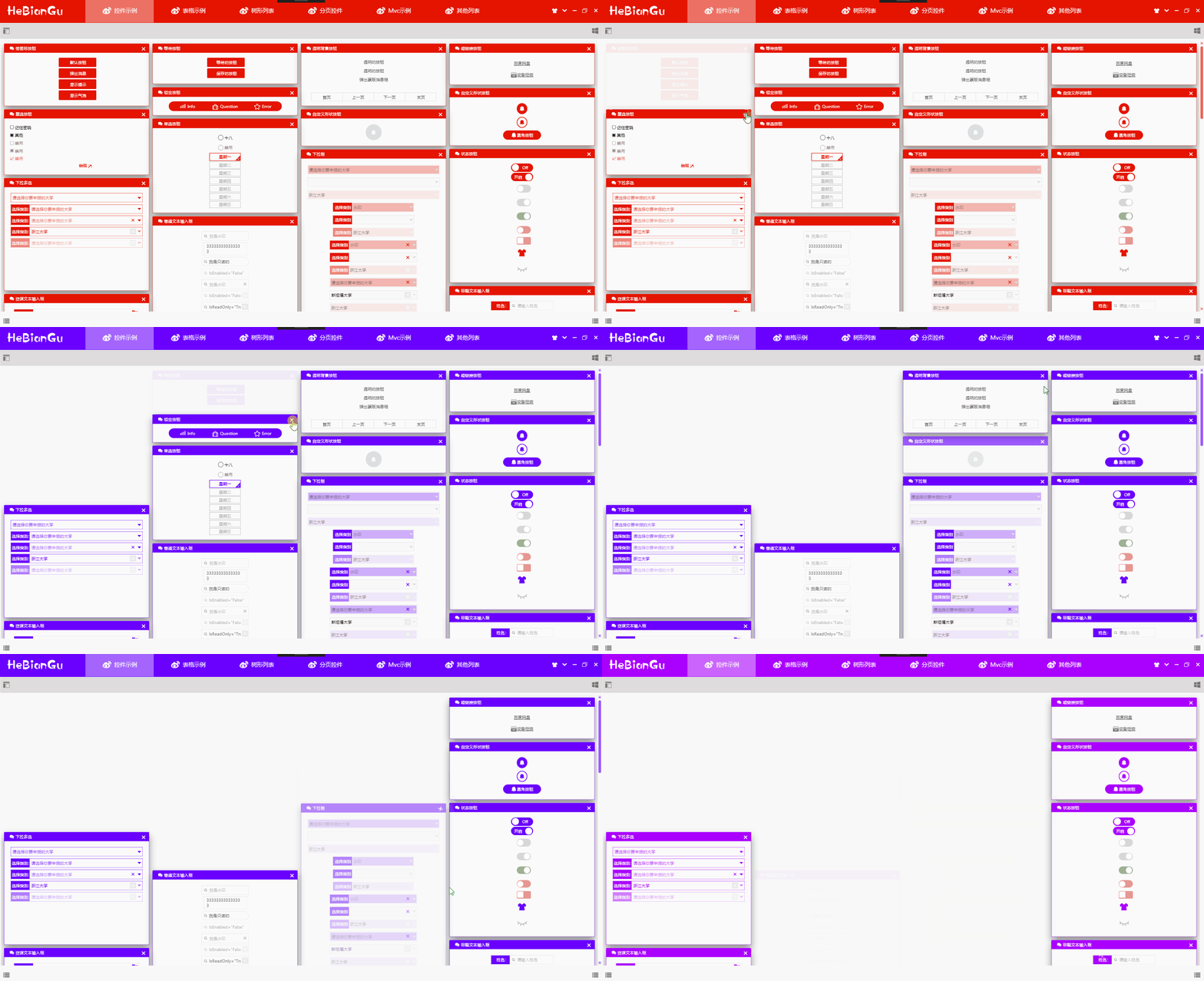
说明:渐隐藏是WPF中比较常用的动画,上图是通过StoryBoarService封装后的效果,在代码中只要执行如下代码即可:
DoubleStoryboardEngine.Create(1, 0, 1, "Opacity").Start(element);
上面的关闭效果可以定义一个命令如下:
-
public class CollapsedOfOpacityCommand : ICommand
-
{
-
-
public bool CanExecute(object parameter) => true;
-
-
public void Execute(object parameter)
-
{
-
if(parameter is UIElement element)
-
{
-
var engine = DoubleStoryboardEngine.Create(1, 0, 1, "Opacity");
-
-
engine.Start(element);
-
}
-
}
-
-
public event EventHandler CanExecuteChanged;
-
}
在Xaml中调用如下命令即可完成关闭渐隐藏的效果
Command="{x:Static base:CommandService.CollapsedOfOpacityCommand}"
CommandParameter="{Binding RelativeSource={RelativeSource AncestorType=GroupBox}}"
传入的CommandParmeter将会在执行命令时渐隐藏
其中动画效果的代码只需一句代码即可,简化了动画在代码中繁琐的编码过程
DoubleStoryboardEngine.Create(1, 0, 1, "Opacity").Start(element);
二、代码:
目前只实现DoubleAnimation的封装,后续将会对其他类型进行封装
1、封闭修改基类
-
/// <summary> 动画引擎基类 </summary>
-
public abstract class StoryboardEngineBase : IDisposable
-
{
-
protected Storyboard storyboard = new Storyboard();
-
-
public EventHandler CompletedEvent { get; set; }
-
-
public EasingFunctionBase Easing { get; set; } = EasingFunctionFactroy.PowerEase;
-
-
public PropertyPath PropertyPath { get; set; }
-
-
public Duration Duration { get; set; }
-
-
public void Dispose()
-
{
-
storyboard.Completed -= CompletedEvent;
-
}
-
-
public abstract StoryboardEngineBase Start(UIElement element);
-
-
public abstract StoryboardEngineBase Stop();
-
-
public StoryboardEngineBase(int second, string property)
-
{
-
this.PropertyPath = new PropertyPath(property);
-
this.Duration = new Duration(TimeSpan.FromSeconds(second));
-
}
-
-
}
-
-
/// <summary> 动画泛型引擎基类 </summary>
-
public abstract class StoryboardEngineBase<T> : StoryboardEngineBase
-
{
-
public StoryboardEngineBase(T from, T to, int second, string property) : base(second, property)
-
{
-
this.FromValue = from;
-
this.ToValue = to;
-
}
-
-
public T FromValue { get; set; }
-
-
public T ToValue { get; set; }
-
-
//public RepeatBehavior RepeatBehavior { get; set; };
-
-
}
2、开放扩展DoubleStoryboardEngine
-
/// <summary> DoubleAnimation动画引擎 </summary>
-
public class DoubleStoryboardEngine : StoryboardEngineBase<double>
-
{
-
public static DoubleStoryboardEngine Create(double from, double to, int second, string property)
-
{
-
return new DoubleStoryboardEngine(from, to, second, property);
-
}
-
-
public DoubleStoryboardEngine(double from, double to, int second, string property) : base(from, to, second, property)
-
{
-
-
}
-
-
public override StoryboardEngineBase Start(UIElement element)
-
{
-
// Do:时间线
-
DoubleAnimation animation = new DoubleAnimation(1, 0, this.Duration);
-
-
if (this.Easing != null)
-
animation.EasingFunction = this.Easing;
-
-
//if (this.RepeatBehavior != default(RepeatBehavior))
-
// animation.RepeatBehavior = (RepeatBehavior);
-
-
// Do:属性动画
-
storyboard.Children.Add(animation);
-
Storyboard.SetTarget(animation, element);
-
Storyboard.SetTargetProperty(animation, this.PropertyPath);
-
-
if (CompletedEvent != null)
-
storyboard.Completed += CompletedEvent;
-
storyboard.Begin();
-
-
return this;
-
}
-
-
public override StoryboardEngineBase Stop()
-
{
-
this.storyboard.Stop();
-
-
return this;
-
}
-
}
3、过度效果工厂
-
/// <summary> 说明:https://docs.microsoft.com/zh-cn/dotnet/framework/wpf/graphics-multimedia/easing-functions </summary>
-
public static class EasingFunctionFactroy
-
{
-
/// <summary> PowerEase:创建加速和/或减速使用的公式的动画f(t) = tp其中 p 等于Power属性。 </summary>
-
public static PowerEase PowerEase { get; set; } = new PowerEase();
-
/// <summary> BackEase:略微收回动画的动作,然后再开始进行动画处理指示的路径中。 </summary>
-
public static BackEase BackEase { get; set; } = new BackEase();
-
/// <summary> ElasticEase:创建类似于弹簧来回直到静止的动画 </summary>
-
public static ElasticEase ElasticEase { get; set; } = new ElasticEase();
-
/// <summary> BounceEase:创建弹跳效果。 </summary>
-
public static BounceEase BounceEase { get; set; } = new BounceEase();
-
/// <summary> CircleEase:创建加速和/或减速使用循环函数的动画。 </summary>
-
public static CircleEase CircleEase { get; set; } = new CircleEase();
-
-
/// <summary> QuadraticEase:创建加速和/或减速使用的公式的动画f(t) = t2。 </summary>
-
public static QuadraticEase QuadraticEase { get; set; } = new QuadraticEase();
-
-
/// <summary> CubicEase:创建加速和/或减速使用的公式的动画f(t) = t3。 </summary>
-
public static CubicEase CubicEase { get; set; } = new CubicEase();
-
/// <summary> QuarticEase:创建加速和/或减速使用的公式的动画f(t) = t4。 </summary>
-
public static QuarticEase QuarticEase { get; set; } = new QuarticEase();
-
/// <summary> QuinticEase:创建加速和/或减速使用的公式的动画f(t) = t5。 </summary>
-
public static QuinticEase QuinticEase { get; set; } = new QuinticEase();
-
-
/// <summary> ExponentialEase:创建加速和/或减速使用指数公式的动画。 </summary>
-
public static ExponentialEase ExponentialEase { get; set; } = new ExponentialEase();
-
-
/// <summary> SineEase:创建加速和/或减速使用正弦公式的动画。 </summary>
-
public static SineEase SineEase { get; set; } = new SineEase();
-
-
}
4、使用方法:
/// <summary> 构造方法 </summary>
/// <param name="from"> 起始值</param>
/// <param name="to"> 结束值 </param>
/// <param name="second"> 间隔时间秒 </param>
/// <param name="property"> 修改属性名称 </param>
///
public static DoubleStoryboardEngine Create(double from, double to, int second, string property)
{
return new DoubleStoryboardEngine(from, to, second, property);
}
下载地址:https://github.com/HeBianGu/WPF-ControlBase.git
示例:WPF中自定义StoryBoarService在代码中封装StoryBoard、Animation用于简化动画编写的更多相关文章
- Salesforce 自定义标签在代码中的应用
自定义标签简介 Salesforce 中自定义标签(Custom Label)的作用是存储一般性的文本,可以用于 Apex.Visualforce 页面.Lightning 组件等地方,用于显示提示信 ...
- SQL语句在查询分析器中可以执行,代码中不能执行
问题:SQL语句在查询分析器中可以执行,代码中不能执行 解答:sql中包含数据库的关键字,将关键字用[]括起来,可以解决. 后记:建数据库的时候尽量避免使用关键字. 例子: sql.Format(&q ...
- JDK中ThreadDump诊断Java代码中的线程死锁问题
多线程的死锁..死锁不是死了而是线程互相等待... 在项目中可能就是在几十万行的代码中存在一个死锁的问题,如何发现这个问题并且解决这个问题. JavaJDK为我们提供了一个诊断工具叫做ThreadDu ...
- .NET/C# 中你可以在代码中写多个 Main 函数,然后按需要随时切换
.NET/C# 程序从 Main 函数开始执行,基本上各种书籍资料都是这么写的.不过,我们可以写多个 Main 函数,然后在项目文件中设置应该选择哪一个 Main 函数. 你可能会觉得这样没有什么用, ...
- VS中批量删除cs代码中的#region和#endregion
Visual Studio中如何批量删除cs代码中的#region和#endregion,不删除它们中间的代码,只删除这两个标记及标记的注解的方法.Vs中提供了很强大的文本查找与替换功能,简单的替换只 ...
- Android中自定义veiw使用Java中的回调方法
//------------------MainActivity----中---------------------------------- import android.os.Bundle;imp ...
- Xpath在选择器中正确,在代码中返回的是空列表问题
一.问题: 在进行爬虫的时候我们会用到xpath解析html文件,但是会有一种情况就是在xpath选择器中可以使用,但是在代码中就无法使用的情况. 二.原因: 1.是元素中有tbody的原因,这个元素 ...
- c代码中调用c++,c++代码中调用c代码
注意这里的c调用c++或者c++调用c的意思是.c文件中调用.cpp文件中的代码,或者相反 集成开发环境如vc++6.0或者vs都是通过文件后缀来区别当前要编译的是C代码还是C++代码,然后采用相应的 ...
- [django]模板中自定义变量&django模板中的变量
django自定义模板变量 context_processors.py def mysetings(request): return { 'NAME': 'maotai' } settings.py ...
随机推荐
- flask Gunicorn和uwsgi并发对比(转载)
转载 结果 吞吐量(要求/秒) 响应时间(毫秒) 失误 吞吐量的标准偏差(要求/秒) 尽管uWSGI的性能在高负载下确实有些不稳定,但它看起来像Python应用服务器.uWSGI不仅速度快得离谱,而且 ...
- 腾讯面试Android高级岗,居然被一个多线程基础面倒了?
前言 一个在深圳从事开发五年的老友一个月前从原公司辞职后,昨天去腾讯总部面试Android高级岗,一面的时候,自我介绍后,陆陆续续问了很多问题,有着五年的从业经验很多项目开发的技术问题都回答的很通顺, ...
- MySQL小测试(2)
2.创建一个stu表,字段有:自增主键id,不为空姓名,默认值性别(枚举类型),无限制身高 create table stu( id int primary key auto_increment, n ...
- .Net反射-基础1-Assembly、Type
Assembly:封装程序集信息,可以动态加载程序集 获取Assembly的几种方式: 1.var ass1 = Assembly.Load("ClassLibrary1");// ...
- 【Mybatis】传入参数 对象+单参
Integer update( @Param(value="bean") TXNJSTXNDetailTBBean bean, @Param(value="table&q ...
- 【pytorch】torch.utils.data.DataLoader
简介 DataLoader是PyTorch中的一种数据类型.用于训练/验证/测试时的数据按批读取. torch.utils.data.DataLoader(dataset, batch_size=1, ...
- ABP 依赖报错
一般是自己写的Service 没有实现IApplicationService,和没有继承ApplicationService
- VQA视觉问答基础知识
本文记录简单了解VQA的过程,目的是以此学习图像和文本的特征预处理.嵌入以及如何设计分类loss等等. 参考资料: https://zhuanlan.zhihu.com/p/40704719 http ...
- python3 修改excel 单元格的值(xlsx)
excel code #coding=utf- import os.path import os from openpyxl.reader.excel import load_workbook # e ...
- Python网络爬虫神器PyQuery的使用方法
#!/usr/bin/env python # -*- coding: utf-8 -*- import requests from pyquery import PyQuery as pq url ...