
Swing-JOptionPane对话框用法-入门
对话框是GUI程序中常见的界面,通常用来反馈提示信息、告警或获取用户输入。比如这种:

JOptionPane是Swing中的一个对话框类,它能够提供常见的绝大多数对话框效果,本文对这个类进行介绍。需要说明的有两点:1.JOptionPane所提供的对话框是模态的,也就是说对话框会阻塞原窗口的显示;如果要创建一个非模态对话框,必须使用JDialog类。2.swing另外提供了JFileChooser类(文件选择器)和JColorChooser(颜色选择器),这些对话框比较特殊,以后专门再讲。
JOptionPane有不同的方法来显示不同效果的对话框。首先是showMessageDialog,效果如下:

JOptionPane对话框基本要素
可以看到,JOptionPane对话框主要包含4个要素,如上图所示。它的构造函数也是以这4个要素为参数进行组织的。icon能够在直观上反映对话框的类型是告警、提示还是其他。它具有以下类型:

JOptionPane图标类型
一般情况下,图标形状由构造函数中的“消息类型”决定的;然而也可以自定义该图标,这时就需要明确指定另一个“icon”参数了。message用于显示提示信息的内容,它是一个object类型的参数,一般我们都传递给它字符串。
第二个方法是showOptionDialog,它与前者的区别在于option区域,效果如下:
 showOptionDialog基本效果
Option区域也会有“确定/取消”等等其他效果,具体由“optionType”参数决定。
第三个方法是showInputDialog,它能够通过下拉菜单、文本域等控件获取String类型的用户输入。效果如下:
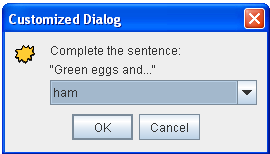
showInputDialog基本效果
另外,有时程序为了强制用户在对话框中做出选择,不得不禁止使用右上角的关闭按钮退出对话框,这就需要程序专门为对话框实现监听器,并确保对话框只能通过用户输入来关闭。
常用方法如下:
static void showMessageDialog(Component, Object)
static void showMessageDialog(Component, Object, String, int)
static void showMessageDialog(Component, Object, String, int, Icon)
static int showOptionDialog(Component, Object, String, int, int, Icon, Object[], Object)
static int showConfirmDialog(Component, Object)
static int showConfirmDialog(Component, Object, String, int)
static int showConfirmDialog(Component, Object, String, int, int)
static int showConfirmDialog(Component, Object, String, int, int, Icon)
static String showInputDialog(Object)
static String showInputDialog(Component, Object)
static String showInputDialog(Component, Object, String, int)
static String showInputDialog(Component, Object, String, int, Icon, Object[], Object)
下面是示例代码:
DialogDemo.java
package DialogDemo; import javax.swing.JOptionPane;
import javax.swing.JDialog;
import javax.swing.JButton;
import javax.swing.JRadioButton;
import javax.swing.ButtonGroup;
import javax.swing.JLabel;
import javax.swing.ImageIcon;
import javax.swing.BoxLayout;
import javax.swing.Box;
import javax.swing.BorderFactory;
import javax.swing.border.Border;
import javax.swing.JTabbedPane;
import javax.swing.JPanel;
import javax.swing.JFrame;
import java.beans.*; //Property change stuff
import java.awt.*;
import java.awt.event.*; /*
* source code from http://docs.oracle.com/javase/tutorial/uiswing/examples/components/DialogDemoProject/src/components/DialogDemo.java
*/ /*
* DialogDemo.java requires these files:
* CustomDialog.java
* images/middle.gif
*/
public class DialogDemo extends JPanel {
JLabel label;
ImageIcon icon = createImageIcon("images/middle.gif");
JFrame frame;
String simpleDialogDesc = "Some simple message dialogs";
String iconDesc = "A JOptionPane has its choice of icons";
String moreDialogDesc = "Some more dialogs";
CustomDialog customDialog; /** Creates the GUI shown inside the frame's content pane. */
public DialogDemo(JFrame frame) {
super(new BorderLayout());
this.frame = frame;
customDialog = new CustomDialog(frame, "geisel", this);
customDialog.pack(); //Create the components.
JPanel frequentPanel = createSimpleDialogBox();
JPanel featurePanel = createFeatureDialogBox();
JPanel iconPanel = createIconDialogBox();
label = new JLabel("Click the \"Show it!\" button"
+ " to bring up the selected dialog.",
JLabel.CENTER); //Lay them out.
Border padding = BorderFactory.createEmptyBorder(20,20,5,20);
frequentPanel.setBorder(padding);
featurePanel.setBorder(padding);
iconPanel.setBorder(padding); JTabbedPane tabbedPane = new JTabbedPane();
tabbedPane.addTab("Simple Modal Dialogs", null,
frequentPanel,
simpleDialogDesc); //tooltip text
tabbedPane.addTab("More Dialogs", null,
featurePanel,
moreDialogDesc); //tooltip text
tabbedPane.addTab("Dialog Icons", null,
iconPanel,
iconDesc); //tooltip text add(tabbedPane, BorderLayout.CENTER);
add(label, BorderLayout.PAGE_END);
label.setBorder(BorderFactory.createEmptyBorder(10,10,10,10));
} /** Sets the text displayed at the bottom of the frame. */
void setLabel(String newText) {
label.setText(newText);
} /** Returns an ImageIcon, or null if the path was invalid. */
protected static ImageIcon createImageIcon(String path) {
java.net.URL imgURL = DialogDemo.class.getResource(path);
if (imgURL != null) {
return new ImageIcon(imgURL);
} else {
System.err.println("Couldn't find file: " + path);
return null;
}
} /** Creates the panel shown by the first tab. */
private JPanel createSimpleDialogBox() {
final int numButtons = 4;
JRadioButton[] radioButtons = new JRadioButton[numButtons];
final ButtonGroup group = new ButtonGroup(); JButton showItButton = null; final String defaultMessageCommand = "default";
final String yesNoCommand = "yesno";
final String yeahNahCommand = "yeahnah";
final String yncCommand = "ync"; radioButtons[0] = new JRadioButton("OK (in the L&F's words)");
radioButtons[0].setActionCommand(defaultMessageCommand); radioButtons[1] = new JRadioButton("Yes/No (in the L&F's words)");
radioButtons[1].setActionCommand(yesNoCommand); radioButtons[2] = new JRadioButton("Yes/No "
+ "(in the programmer's words)");
radioButtons[2].setActionCommand(yeahNahCommand); radioButtons[3] = new JRadioButton("Yes/No/Cancel "
+ "(in the programmer's words)");
radioButtons[3].setActionCommand(yncCommand); for (int i = 0; i < numButtons; i++) {
group.add(radioButtons[i]);
}
radioButtons[0].setSelected(true); showItButton = new JButton("Show it!");
showItButton.addActionListener(new ActionListener() {
public void actionPerformed(ActionEvent e) {
String command = group.getSelection().getActionCommand(); //ok dialog
if (command == defaultMessageCommand) {
JOptionPane.showMessageDialog(frame,
"Eggs aren't supposed to be green."); //yes/no dialog
} else if (command == yesNoCommand) {
int n = JOptionPane.showConfirmDialog(
frame, "Would you like green eggs and ham?",
"An Inane Question",
JOptionPane.YES_NO_OPTION);
if (n == JOptionPane.YES_OPTION) {
setLabel("Ewww!");
} else if (n == JOptionPane.NO_OPTION) {
setLabel("Me neither!");
} else {
setLabel("Come on -- tell me!");
} //yes/no (not in those words)
} else if (command == yeahNahCommand) {
Object[] options = {"Yes, please", "No way!"};
int n = JOptionPane.showOptionDialog(frame,
"Would you like green eggs and ham?",
"A Silly Question",
JOptionPane.YES_NO_OPTION,
JOptionPane.QUESTION_MESSAGE,
null,
options,
options[0]);
if (n == JOptionPane.YES_OPTION) {
setLabel("You're kidding!");
} else if (n == JOptionPane.NO_OPTION) {
setLabel("I don't like them, either.");
} else {
setLabel("Come on -- 'fess up!");
} //yes/no/cancel (not in those words)
} else if (command == yncCommand) {
Object[] options = {"Yes, please",
"No, thanks",
"No eggs, no ham!"};
int n = JOptionPane.showOptionDialog(frame,
"Would you like some green eggs to go "
+ "with that ham?",
"A Silly Question",
JOptionPane.YES_NO_CANCEL_OPTION,
JOptionPane.QUESTION_MESSAGE,
null,
options,
options[2]);
if (n == JOptionPane.YES_OPTION) {
setLabel("Here you go: green eggs and ham!");
} else if (n == JOptionPane.NO_OPTION) {
setLabel("OK, just the ham, then.");
} else if (n == JOptionPane.CANCEL_OPTION) {
setLabel("Well, I'm certainly not going to eat them!");
} else {
setLabel("Please tell me what you want!");
}
}
return;
}
}); return createPane(simpleDialogDesc + ":",
radioButtons,
showItButton);
} /**
* Used by createSimpleDialogBox and createFeatureDialogBox
* to create a pane containing a description, a single column
* of radio buttons, and the Show it! button.
*/
private JPanel createPane(String description,
JRadioButton[] radioButtons,
JButton showButton) { int numChoices = radioButtons.length;
JPanel box = new JPanel();
JLabel label = new JLabel(description); box.setLayout(new BoxLayout(box, BoxLayout.PAGE_AXIS));
box.add(label); for (int i = 0; i < numChoices; i++) {
box.add(radioButtons[i]);
} JPanel pane = new JPanel(new BorderLayout());
pane.add(box, BorderLayout.PAGE_START);
pane.add(showButton, BorderLayout.PAGE_END);
return pane;
} /**
* Like createPane, but creates a pane with 2 columns of radio
* buttons. The number of buttons passed in *must* be even.
*/
private JPanel create2ColPane(String description,
JRadioButton[] radioButtons,
JButton showButton) {
JLabel label = new JLabel(description);
int numPerColumn = radioButtons.length/2; JPanel grid = new JPanel(new GridLayout(0, 2));
for (int i = 0; i < numPerColumn; i++) {
grid.add(radioButtons[i]);
grid.add(radioButtons[i + numPerColumn]);
} JPanel box = new JPanel();
box.setLayout(new BoxLayout(box, BoxLayout.PAGE_AXIS));
box.add(label);
grid.setAlignmentX(0.0f);
box.add(grid); JPanel pane = new JPanel(new BorderLayout());
pane.add(box, BorderLayout.PAGE_START);
pane.add(showButton, BorderLayout.PAGE_END); return pane;
} /*
* Creates the panel shown by the 3rd tab.
* These dialogs are implemented using showMessageDialog, but
* you can specify the icon (using similar code) for any other
* kind of dialog, as well.
*/
private JPanel createIconDialogBox() {
JButton showItButton = null; final int numButtons = 6;
JRadioButton[] radioButtons = new JRadioButton[numButtons];
final ButtonGroup group = new ButtonGroup(); final String plainCommand = "plain";
final String infoCommand = "info";
final String questionCommand = "question";
final String errorCommand = "error";
final String warningCommand = "warning";
final String customCommand = "custom"; radioButtons[0] = new JRadioButton("Plain (no icon)");
radioButtons[0].setActionCommand(plainCommand); radioButtons[1] = new JRadioButton("Information icon");
radioButtons[1].setActionCommand(infoCommand); radioButtons[2] = new JRadioButton("Question icon");
radioButtons[2].setActionCommand(questionCommand); radioButtons[3] = new JRadioButton("Error icon");
radioButtons[3].setActionCommand(errorCommand); radioButtons[4] = new JRadioButton("Warning icon");
radioButtons[4].setActionCommand(warningCommand); radioButtons[5] = new JRadioButton("Custom icon");
radioButtons[5].setActionCommand(customCommand); for (int i = 0; i < numButtons; i++) {
group.add(radioButtons[i]);
}
radioButtons[0].setSelected(true); showItButton = new JButton("Show it!");
showItButton.addActionListener(new ActionListener() {
public void actionPerformed(ActionEvent e) {
String command = group.getSelection().getActionCommand(); //no icon
if (command == plainCommand) {
JOptionPane.showMessageDialog(frame,
"Eggs aren't supposed to be green.",
"A plain message",
JOptionPane.PLAIN_MESSAGE);
//information icon
} else if (command == infoCommand) {
JOptionPane.showMessageDialog(frame,
"Eggs aren't supposed to be green.",
"Inane informational dialog",
JOptionPane.INFORMATION_MESSAGE); //XXX: It doesn't make sense to make a question with
//XXX: only one button.
//XXX: See "Yes/No (but not in those words)" for a better solution.
//question icon
} else if (command == questionCommand) {
JOptionPane.showMessageDialog(frame,
"You shouldn't use a message dialog "
+ "(like this)\n"
+ "for a question, OK?",
"Inane question",
JOptionPane.QUESTION_MESSAGE);
//error icon
} else if (command == errorCommand) {
JOptionPane.showMessageDialog(frame,
"Eggs aren't supposed to be green.",
"Inane error",
JOptionPane.ERROR_MESSAGE);
//warning icon
} else if (command == warningCommand) {
JOptionPane.showMessageDialog(frame,
"Eggs aren't supposed to be green.",
"Inane warning",
JOptionPane.WARNING_MESSAGE);
//custom icon
} else if (command == customCommand) {
JOptionPane.showMessageDialog(frame,
"Eggs aren't supposed to be green.",
"Inane custom dialog",
JOptionPane.INFORMATION_MESSAGE,
icon);
}
}
}); return create2ColPane(iconDesc + ":",
radioButtons,
showItButton);
} /** Creates the panel shown by the second tab. */
private JPanel createFeatureDialogBox() {
final int numButtons = 5;
JRadioButton[] radioButtons = new JRadioButton[numButtons];
final ButtonGroup group = new ButtonGroup(); JButton showItButton = null; final String pickOneCommand = "pickone";
final String textEnteredCommand = "textfield";
final String nonAutoCommand = "nonautooption";
final String customOptionCommand = "customoption";
final String nonModalCommand = "nonmodal"; radioButtons[0] = new JRadioButton("Pick one of several choices");
radioButtons[0].setActionCommand(pickOneCommand); radioButtons[1] = new JRadioButton("Enter some text");
radioButtons[1].setActionCommand(textEnteredCommand); radioButtons[2] = new JRadioButton("Non-auto-closing dialog");
radioButtons[2].setActionCommand(nonAutoCommand); radioButtons[3] = new JRadioButton("Input-validating dialog "
+ "(with custom message area)");
radioButtons[3].setActionCommand(customOptionCommand); radioButtons[4] = new JRadioButton("Non-modal dialog");
radioButtons[4].setActionCommand(nonModalCommand); for (int i = 0; i < numButtons; i++) {
group.add(radioButtons[i]);
}
radioButtons[0].setSelected(true); showItButton = new JButton("Show it!");
showItButton.addActionListener(new ActionListener() {
public void actionPerformed(ActionEvent e) {
String command = group.getSelection().getActionCommand(); //pick one of many
if (command == pickOneCommand) {
Object[] possibilities = {"ham", "spam", "yam"};
String s = (String)JOptionPane.showInputDialog(
frame,
"Complete the sentence:\n"
+ "\"Green eggs and...\"",
"Customized Dialog",
JOptionPane.PLAIN_MESSAGE,
icon,
possibilities,
"ham"); //If a string was returned, say so.
if ((s != null) && (s.length() > 0)) {
setLabel("Green eggs and... " + s + "!");
return;
} //If you're here, the return value was null/empty.
setLabel("Come on, finish the sentence!"); //text input
} else if (command == textEnteredCommand) {
String s = (String)JOptionPane.showInputDialog(
frame,
"Complete the sentence:\n"
+ "\"Green eggs and...\"",
"Customized Dialog",
JOptionPane.PLAIN_MESSAGE,
icon,
null,
"ham"); //If a string was returned, say so.
if ((s != null) && (s.length() > 0)) {
setLabel("Green eggs and... " + s + "!");
return;
} //If you're here, the return value was null/empty.
setLabel("Come on, finish the sentence!"); //non-auto-closing dialog
} else if (command == nonAutoCommand) {
final JOptionPane optionPane = new JOptionPane(
"The only way to close this dialog is by\n"
+ "pressing one of the following buttons.\n"
+ "Do you understand?",
JOptionPane.QUESTION_MESSAGE,
JOptionPane.YES_NO_OPTION); //You can't use pane.createDialog() because that
//method sets up the JDialog with a property change
//listener that automatically closes the window
//when a button is clicked.
final JDialog dialog = new JDialog(frame,
"Click a button",
true);
dialog.setContentPane(optionPane);
dialog.setDefaultCloseOperation(
JDialog.DO_NOTHING_ON_CLOSE);
dialog.addWindowListener(new WindowAdapter() {
public void windowClosing(WindowEvent we) {
setLabel("Thwarted user attempt to close window.");
}
});
optionPane.addPropertyChangeListener(
new PropertyChangeListener() {
public void propertyChange(PropertyChangeEvent e) {
String prop = e.getPropertyName(); if (dialog.isVisible()
&& (e.getSource() == optionPane)
&& (JOptionPane.VALUE_PROPERTY.equals(prop))) {
//If you were going to check something
//before closing the window, you'd do
//it here.
dialog.setVisible(false);
}
}
});
dialog.pack();
dialog.setLocationRelativeTo(frame);
dialog.setVisible(true); int value = ((Integer)optionPane.getValue()).intValue();
if (value == JOptionPane.YES_OPTION) {
setLabel("Good.");
} else if (value == JOptionPane.NO_OPTION) {
setLabel("Try using the window decorations "
+ "to close the non-auto-closing dialog. "
+ "You can't!");
} else {
setLabel("Window unavoidably closed (ESC?).");
} //non-auto-closing dialog with custom message area
//NOTE: if you don't intend to check the input,
//then just use showInputDialog instead.
} else if (command == customOptionCommand) {
customDialog.setLocationRelativeTo(frame);
customDialog.setVisible(true); String s = customDialog.getValidatedText();
if (s != null) {
//The text is valid.
setLabel("Congratulations! "
+ "You entered \""
+ s
+ "\".");
} //non-modal dialog
} else if (command == nonModalCommand) {
//Create the dialog.
final JDialog dialog = new JDialog(frame,
"A Non-Modal Dialog"); //Add contents to it. It must have a close button,
//since some L&Fs (notably Java/Metal) don't provide one
//in the window decorations for dialogs.
JLabel label = new JLabel("<html><p align=center>"
+ "This is a non-modal dialog.<br>"
+ "You can have one or more of these up<br>"
+ "and still use the main window.");
label.setHorizontalAlignment(JLabel.CENTER);
Font font = label.getFont();
label.setFont(label.getFont().deriveFont(font.PLAIN,
14.0f)); JButton closeButton = new JButton("Close");
closeButton.addActionListener(new ActionListener() {
public void actionPerformed(ActionEvent e) {
dialog.setVisible(false);
dialog.dispose();
}
});
JPanel closePanel = new JPanel();
closePanel.setLayout(new BoxLayout(closePanel,
BoxLayout.LINE_AXIS));
closePanel.add(Box.createHorizontalGlue());
closePanel.add(closeButton);
closePanel.setBorder(BorderFactory.
createEmptyBorder(0,0,5,5)); JPanel contentPane = new JPanel(new BorderLayout());
contentPane.add(label, BorderLayout.CENTER);
contentPane.add(closePanel, BorderLayout.PAGE_END);
contentPane.setOpaque(true);
dialog.setContentPane(contentPane); //Show it.
dialog.setSize(new Dimension(300, 150));
dialog.setLocationRelativeTo(frame);
dialog.setVisible(true);
}
}
}); return createPane(moreDialogDesc + ":",
radioButtons,
showItButton);
} /**
* Create the GUI and show it. For thread safety,
* this method should be invoked from the
* event-dispatching thread.
*/
private static void createAndShowGUI() {
//Create and set up the window.
JFrame frame = new JFrame("DialogDemo");
frame.setDefaultCloseOperation(JFrame.EXIT_ON_CLOSE); //Create and set up the content pane.
DialogDemo newContentPane = new DialogDemo(frame);
//newContentPane.setOpaque(true); //content panes must be opaque
frame.setContentPane(newContentPane); //Display the window.
frame.pack();
frame.setVisible(true);
} public static void main(String[] args) {
//Schedule a job for the event-dispatching thread:
//creating and showing this application's GUI.
javax.swing.SwingUtilities.invokeLater(new Runnable() {
public void run() {
createAndShowGUI();
}
});
} }
CustomDialog.java
package DialogDemo; import javax.swing.JOptionPane;
import javax.swing.JDialog;
import javax.swing.JButton;
import javax.swing.JRadioButton;
import javax.swing.ButtonGroup;
import javax.swing.JLabel;
import javax.swing.ImageIcon;
import javax.swing.BoxLayout;
import javax.swing.Box;
import javax.swing.BorderFactory;
import javax.swing.border.Border;
import javax.swing.JTabbedPane;
import javax.swing.JPanel;
import javax.swing.JFrame;
import java.beans.*; //Property change stuff
import java.awt.*;
import java.awt.event.*; /*
* source code from http://docs.oracle.com/javase/tutorial/uiswing/examples/components/DialogDemoProject/src/components/DialogDemo.java
*/ /*
* DialogDemo.java requires these files:
* CustomDialog.java
* images/middle.gif
*/
public class DialogDemo extends JPanel {
JLabel label;
ImageIcon icon = createImageIcon("images/middle.gif");
JFrame frame;
String simpleDialogDesc = "Some simple message dialogs";
String iconDesc = "A JOptionPane has its choice of icons";
String moreDialogDesc = "Some more dialogs";
CustomDialog customDialog; /** Creates the GUI shown inside the frame's content pane. */
public DialogDemo(JFrame frame) {
super(new BorderLayout());
this.frame = frame;
customDialog = new CustomDialog(frame, "geisel", this);
customDialog.pack(); //Create the components.
JPanel frequentPanel = createSimpleDialogBox();
JPanel featurePanel = createFeatureDialogBox();
JPanel iconPanel = createIconDialogBox();
label = new JLabel("Click the \"Show it!\" button"
+ " to bring up the selected dialog.",
JLabel.CENTER); //Lay them out.
Border padding = BorderFactory.createEmptyBorder(20,20,5,20);
frequentPanel.setBorder(padding);
featurePanel.setBorder(padding);
iconPanel.setBorder(padding); JTabbedPane tabbedPane = new JTabbedPane();
tabbedPane.addTab("Simple Modal Dialogs", null,
frequentPanel,
simpleDialogDesc); //tooltip text
tabbedPane.addTab("More Dialogs", null,
featurePanel,
moreDialogDesc); //tooltip text
tabbedPane.addTab("Dialog Icons", null,
iconPanel,
iconDesc); //tooltip text add(tabbedPane, BorderLayout.CENTER);
add(label, BorderLayout.PAGE_END);
label.setBorder(BorderFactory.createEmptyBorder(10,10,10,10));
} /** Sets the text displayed at the bottom of the frame. */
void setLabel(String newText) {
label.setText(newText);
} /** Returns an ImageIcon, or null if the path was invalid. */
protected static ImageIcon createImageIcon(String path) {
java.net.URL imgURL = DialogDemo.class.getResource(path);
if (imgURL != null) {
return new ImageIcon(imgURL);
} else {
System.err.println("Couldn't find file: " + path);
return null;
}
} /** Creates the panel shown by the first tab. */
private JPanel createSimpleDialogBox() {
final int numButtons = 4;
JRadioButton[] radioButtons = new JRadioButton[numButtons];
final ButtonGroup group = new ButtonGroup(); JButton showItButton = null; final String defaultMessageCommand = "default";
final String yesNoCommand = "yesno";
final String yeahNahCommand = "yeahnah";
final String yncCommand = "ync"; radioButtons[0] = new JRadioButton("OK (in the L&F's words)");
radioButtons[0].setActionCommand(defaultMessageCommand); radioButtons[1] = new JRadioButton("Yes/No (in the L&F's words)");
radioButtons[1].setActionCommand(yesNoCommand); radioButtons[2] = new JRadioButton("Yes/No "
+ "(in the programmer's words)");
radioButtons[2].setActionCommand(yeahNahCommand); radioButtons[3] = new JRadioButton("Yes/No/Cancel "
+ "(in the programmer's words)");
radioButtons[3].setActionCommand(yncCommand); for (int i = 0; i < numButtons; i++) {
group.add(radioButtons[i]);
}
radioButtons[0].setSelected(true); showItButton = new JButton("Show it!");
showItButton.addActionListener(new ActionListener() {
public void actionPerformed(ActionEvent e) {
String command = group.getSelection().getActionCommand(); //ok dialog
if (command == defaultMessageCommand) {
JOptionPane.showMessageDialog(frame,
"Eggs aren't supposed to be green."); //yes/no dialog
} else if (command == yesNoCommand) {
int n = JOptionPane.showConfirmDialog(
frame, "Would you like green eggs and ham?",
"An Inane Question",
JOptionPane.YES_NO_OPTION);
if (n == JOptionPane.YES_OPTION) {
setLabel("Ewww!");
} else if (n == JOptionPane.NO_OPTION) {
setLabel("Me neither!");
} else {
setLabel("Come on -- tell me!");
} //yes/no (not in those words)
} else if (command == yeahNahCommand) {
Object[] options = {"Yes, please", "No way!"};
int n = JOptionPane.showOptionDialog(frame,
"Would you like green eggs and ham?",
"A Silly Question",
JOptionPane.YES_NO_OPTION,
JOptionPane.QUESTION_MESSAGE,
null,
options,
options[0]);
if (n == JOptionPane.YES_OPTION) {
setLabel("You're kidding!");
} else if (n == JOptionPane.NO_OPTION) {
setLabel("I don't like them, either.");
} else {
setLabel("Come on -- 'fess up!");
} //yes/no/cancel (not in those words)
} else if (command == yncCommand) {
Object[] options = {"Yes, please",
"No, thanks",
"No eggs, no ham!"};
int n = JOptionPane.showOptionDialog(frame,
"Would you like some green eggs to go "
+ "with that ham?",
"A Silly Question",
JOptionPane.YES_NO_CANCEL_OPTION,
JOptionPane.QUESTION_MESSAGE,
null,
options,
options[2]);
if (n == JOptionPane.YES_OPTION) {
setLabel("Here you go: green eggs and ham!");
} else if (n == JOptionPane.NO_OPTION) {
setLabel("OK, just the ham, then.");
} else if (n == JOptionPane.CANCEL_OPTION) {
setLabel("Well, I'm certainly not going to eat them!");
} else {
setLabel("Please tell me what you want!");
}
}
return;
}
}); return createPane(simpleDialogDesc + ":",
radioButtons,
showItButton);
} /**
* Used by createSimpleDialogBox and createFeatureDialogBox
* to create a pane containing a description, a single column
* of radio buttons, and the Show it! button.
*/
private JPanel createPane(String description,
JRadioButton[] radioButtons,
JButton showButton) { int numChoices = radioButtons.length;
JPanel box = new JPanel();
JLabel label = new JLabel(description); box.setLayout(new BoxLayout(box, BoxLayout.PAGE_AXIS));
box.add(label); for (int i = 0; i < numChoices; i++) {
box.add(radioButtons[i]);
} JPanel pane = new JPanel(new BorderLayout());
pane.add(box, BorderLayout.PAGE_START);
pane.add(showButton, BorderLayout.PAGE_END);
return pane;
} /**
* Like createPane, but creates a pane with 2 columns of radio
* buttons. The number of buttons passed in *must* be even.
*/
private JPanel create2ColPane(String description,
JRadioButton[] radioButtons,
JButton showButton) {
JLabel label = new JLabel(description);
int numPerColumn = radioButtons.length/2; JPanel grid = new JPanel(new GridLayout(0, 2));
for (int i = 0; i < numPerColumn; i++) {
grid.add(radioButtons[i]);
grid.add(radioButtons[i + numPerColumn]);
} JPanel box = new JPanel();
box.setLayout(new BoxLayout(box, BoxLayout.PAGE_AXIS));
box.add(label);
grid.setAlignmentX(0.0f);
box.add(grid); JPanel pane = new JPanel(new BorderLayout());
pane.add(box, BorderLayout.PAGE_START);
pane.add(showButton, BorderLayout.PAGE_END); return pane;
} /*
* Creates the panel shown by the 3rd tab.
* These dialogs are implemented using showMessageDialog, but
* you can specify the icon (using similar code) for any other
* kind of dialog, as well.
*/
private JPanel createIconDialogBox() {
JButton showItButton = null; final int numButtons = 6;
JRadioButton[] radioButtons = new JRadioButton[numButtons];
final ButtonGroup group = new ButtonGroup(); final String plainCommand = "plain";
final String infoCommand = "info";
final String questionCommand = "question";
final String errorCommand = "error";
final String warningCommand = "warning";
final String customCommand = "custom"; radioButtons[0] = new JRadioButton("Plain (no icon)");
radioButtons[0].setActionCommand(plainCommand); radioButtons[1] = new JRadioButton("Information icon");
radioButtons[1].setActionCommand(infoCommand); radioButtons[2] = new JRadioButton("Question icon");
radioButtons[2].setActionCommand(questionCommand); radioButtons[3] = new JRadioButton("Error icon");
radioButtons[3].setActionCommand(errorCommand); radioButtons[4] = new JRadioButton("Warning icon");
radioButtons[4].setActionCommand(warningCommand); radioButtons[5] = new JRadioButton("Custom icon");
radioButtons[5].setActionCommand(customCommand); for (int i = 0; i < numButtons; i++) {
group.add(radioButtons[i]);
}
radioButtons[0].setSelected(true); showItButton = new JButton("Show it!");
showItButton.addActionListener(new ActionListener() {
public void actionPerformed(ActionEvent e) {
String command = group.getSelection().getActionCommand(); //no icon
if (command == plainCommand) {
JOptionPane.showMessageDialog(frame,
"Eggs aren't supposed to be green.",
"A plain message",
JOptionPane.PLAIN_MESSAGE);
//information icon
} else if (command == infoCommand) {
JOptionPane.showMessageDialog(frame,
"Eggs aren't supposed to be green.",
"Inane informational dialog",
JOptionPane.INFORMATION_MESSAGE); //XXX: It doesn't make sense to make a question with
//XXX: only one button.
//XXX: See "Yes/No (but not in those words)" for a better solution.
//question icon
} else if (command == questionCommand) {
JOptionPane.showMessageDialog(frame,
"You shouldn't use a message dialog "
+ "(like this)\n"
+ "for a question, OK?",
"Inane question",
JOptionPane.QUESTION_MESSAGE);
//error icon
} else if (command == errorCommand) {
JOptionPane.showMessageDialog(frame,
"Eggs aren't supposed to be green.",
"Inane error",
JOptionPane.ERROR_MESSAGE);
//warning icon
} else if (command == warningCommand) {
JOptionPane.showMessageDialog(frame,
"Eggs aren't supposed to be green.",
"Inane warning",
JOptionPane.WARNING_MESSAGE);
//custom icon
} else if (command == customCommand) {
JOptionPane.showMessageDialog(frame,
"Eggs aren't supposed to be green.",
"Inane custom dialog",
JOptionPane.INFORMATION_MESSAGE,
icon);
}
}
}); return create2ColPane(iconDesc + ":",
radioButtons,
showItButton);
} /** Creates the panel shown by the second tab. */
private JPanel createFeatureDialogBox() {
final int numButtons = 5;
JRadioButton[] radioButtons = new JRadioButton[numButtons];
final ButtonGroup group = new ButtonGroup(); JButton showItButton = null; final String pickOneCommand = "pickone";
final String textEnteredCommand = "textfield";
final String nonAutoCommand = "nonautooption";
final String customOptionCommand = "customoption";
final String nonModalCommand = "nonmodal"; radioButtons[0] = new JRadioButton("Pick one of several choices");
radioButtons[0].setActionCommand(pickOneCommand); radioButtons[1] = new JRadioButton("Enter some text");
radioButtons[1].setActionCommand(textEnteredCommand); radioButtons[2] = new JRadioButton("Non-auto-closing dialog");
radioButtons[2].setActionCommand(nonAutoCommand); radioButtons[3] = new JRadioButton("Input-validating dialog "
+ "(with custom message area)");
radioButtons[3].setActionCommand(customOptionCommand); radioButtons[4] = new JRadioButton("Non-modal dialog");
radioButtons[4].setActionCommand(nonModalCommand); for (int i = 0; i < numButtons; i++) {
group.add(radioButtons[i]);
}
radioButtons[0].setSelected(true); showItButton = new JButton("Show it!");
showItButton.addActionListener(new ActionListener() {
public void actionPerformed(ActionEvent e) {
String command = group.getSelection().getActionCommand(); //pick one of many
if (command == pickOneCommand) {
Object[] possibilities = {"ham", "spam", "yam"};
String s = (String)JOptionPane.showInputDialog(
frame,
"Complete the sentence:\n"
+ "\"Green eggs and...\"",
"Customized Dialog",
JOptionPane.PLAIN_MESSAGE,
icon,
possibilities,
"ham"); //If a string was returned, say so.
if ((s != null) && (s.length() > 0)) {
setLabel("Green eggs and... " + s + "!");
return;
} //If you're here, the return value was null/empty.
setLabel("Come on, finish the sentence!"); //text input
} else if (command == textEnteredCommand) {
String s = (String)JOptionPane.showInputDialog(
frame,
"Complete the sentence:\n"
+ "\"Green eggs and...\"",
"Customized Dialog",
JOptionPane.PLAIN_MESSAGE,
icon,
null,
"ham"); //If a string was returned, say so.
if ((s != null) && (s.length() > 0)) {
setLabel("Green eggs and... " + s + "!");
return;
} //If you're here, the return value was null/empty.
setLabel("Come on, finish the sentence!"); //non-auto-closing dialog
} else if (command == nonAutoCommand) {
final JOptionPane optionPane = new JOptionPane(
"The only way to close this dialog is by\n"
+ "pressing one of the following buttons.\n"
+ "Do you understand?",
JOptionPane.QUESTION_MESSAGE,
JOptionPane.YES_NO_OPTION); //You can't use pane.createDialog() because that
//method sets up the JDialog with a property change
//listener that automatically closes the window
//when a button is clicked.
final JDialog dialog = new JDialog(frame,
"Click a button",
true);
dialog.setContentPane(optionPane);
dialog.setDefaultCloseOperation(
JDialog.DO_NOTHING_ON_CLOSE);
dialog.addWindowListener(new WindowAdapter() {
public void windowClosing(WindowEvent we) {
setLabel("Thwarted user attempt to close window.");
}
});
optionPane.addPropertyChangeListener(
new PropertyChangeListener() {
public void propertyChange(PropertyChangeEvent e) {
String prop = e.getPropertyName(); if (dialog.isVisible()
&& (e.getSource() == optionPane)
&& (JOptionPane.VALUE_PROPERTY.equals(prop))) {
//If you were going to check something
//before closing the window, you'd do
//it here.
dialog.setVisible(false);
}
}
});
dialog.pack();
dialog.setLocationRelativeTo(frame);
dialog.setVisible(true); int value = ((Integer)optionPane.getValue()).intValue();
if (value == JOptionPane.YES_OPTION) {
setLabel("Good.");
} else if (value == JOptionPane.NO_OPTION) {
setLabel("Try using the window decorations "
+ "to close the non-auto-closing dialog. "
+ "You can't!");
} else {
setLabel("Window unavoidably closed (ESC?).");
} //non-auto-closing dialog with custom message area
//NOTE: if you don't intend to check the input,
//then just use showInputDialog instead.
} else if (command == customOptionCommand) {
customDialog.setLocationRelativeTo(frame);
customDialog.setVisible(true); String s = customDialog.getValidatedText();
if (s != null) {
//The text is valid.
setLabel("Congratulations! "
+ "You entered \""
+ s
+ "\".");
} //non-modal dialog
} else if (command == nonModalCommand) {
//Create the dialog.
final JDialog dialog = new JDialog(frame,
"A Non-Modal Dialog"); //Add contents to it. It must have a close button,
//since some L&Fs (notably Java/Metal) don't provide one
//in the window decorations for dialogs.
JLabel label = new JLabel("<html><p align=center>"
+ "This is a non-modal dialog.<br>"
+ "You can have one or more of these up<br>"
+ "and still use the main window.");
label.setHorizontalAlignment(JLabel.CENTER);
Font font = label.getFont();
label.setFont(label.getFont().deriveFont(font.PLAIN,
14.0f)); JButton closeButton = new JButton("Close");
closeButton.addActionListener(new ActionListener() {
public void actionPerformed(ActionEvent e) {
dialog.setVisible(false);
dialog.dispose();
}
});
JPanel closePanel = new JPanel();
closePanel.setLayout(new BoxLayout(closePanel,
BoxLayout.LINE_AXIS));
closePanel.add(Box.createHorizontalGlue());
closePanel.add(closeButton);
closePanel.setBorder(BorderFactory.
createEmptyBorder(0,0,5,5)); JPanel contentPane = new JPanel(new BorderLayout());
contentPane.add(label, BorderLayout.CENTER);
contentPane.add(closePanel, BorderLayout.PAGE_END);
contentPane.setOpaque(true);
dialog.setContentPane(contentPane); //Show it.
dialog.setSize(new Dimension(300, 150));
dialog.setLocationRelativeTo(frame);
dialog.setVisible(true);
}
}
}); return createPane(moreDialogDesc + ":",
radioButtons,
showItButton);
} /**
* Create the GUI and show it. For thread safety,
* this method should be invoked from the
* event-dispatching thread.
*/
private static void createAndShowGUI() {
//Create and set up the window.
JFrame frame = new JFrame("DialogDemo");
frame.setDefaultCloseOperation(JFrame.EXIT_ON_CLOSE); //Create and set up the content pane.
DialogDemo newContentPane = new DialogDemo(frame);
//newContentPane.setOpaque(true); //content panes must be opaque
frame.setContentPane(newContentPane); //Display the window.
frame.pack();
frame.setVisible(true);
} public static void main(String[] args) {
//Schedule a job for the event-dispatching thread:
//creating and showing this application's GUI.
javax.swing.SwingUtilities.invokeLater(new Runnable() {
public void run() {
createAndShowGUI();
}
});
} }

主窗体效果
为了更加直观地进行展示,下面贴出本程序的所有效果以及关键代码段:

普通对话框
JOptionPane.showMessageDialog(frame,

"Eggs aren't supposed to be green.");

YES/NO对话框
int n = JOptionPane.showConfirmDialog(

                            frame, "Would you like green eggs and ham?",

                            "An Inane Question",

                            JOptionPane.YES_NO_OPTION);

                    if (n == JOptionPane.YES_OPTION) {

                        setLabel("Ewww!");

                    } else if (n == JOptionPane.NO_OPTION) {

                        setLabel("Me neither!");

                    } else {

                        setLabel("Come on -- tell me!");

                    }

自定义选项-YES/NO对话框
Object[] options = {"Yes, please", "No way!"};

                    int n = JOptionPane.showOptionDialog(frame,

                                    "Would you like green eggs and ham?",

                                    "A Silly Question",

                                    JOptionPane.YES_NO_OPTION,

                                    JOptionPane.QUESTION_MESSAGE,

                                    null,

                                    options,

                                    options[0]);

                    if (n == JOptionPane.YES_OPTION) {

                        setLabel("You're kidding!");

                    } else if (n == JOptionPane.NO_OPTION) {

                        setLabel("I don't like them, either.");

                    } else {

                        setLabel("Come on -- 'fess up!");

                    }

自定义选项-YES/NO/CANCEL对话框
Object[] options = {"Yes, please",

                                        "No, thanks",

                                        "No eggs, no ham!"};

                    int n = JOptionPane.showOptionDialog(frame,

                                    "Would you like some green eggs to go "

                                    + "with that ham?",

                                    "A Silly Question",

                                    JOptionPane.YES_NO_CANCEL_OPTION,

                                    JOptionPane.QUESTION_MESSAGE,

                                    null,

                                    options,

                                    options[2]);

                    if (n == JOptionPane.YES_OPTION) {

                        setLabel("Here you go: green eggs and ham!");

                    } else if (n == JOptionPane.NO_OPTION) {

                        setLabel("OK, just the ham, then.");

                    } else if (n == JOptionPane.CANCEL_OPTION) {

                        setLabel("Well, I'm certainly not going to eat them!");

                    } else {

                        setLabel("Please tell me what you want!");

                    }

showInputDialog-下拉菜单
Object[] possibilities = {"ham", "spam", "yam"};

                    String s = (String)JOptionPane.showInputDialog(

                                        frame,

                                        "Complete the sentence:\n"

                                        + "\"Green eggs and...\"",

                                        "Customized Dialog",

                                        JOptionPane.PLAIN_MESSAGE,

                                        icon,

                                        possibilities,

                                        "ham");

                    //If a string was returned, say so.

                    if ((s != null) && (s.length() > 0)) {

                        setLabel("Green eggs and... " + s + "!");

                        return;

                    }

                    //If you're here, the return value was null/empty.

                    setLabel("Come on, finish the sentence!");

showInputDialog-文本域
String s = (String)JOptionPane.showInputDialog(

                                        frame,

                                        "Complete the sentence:\n"

                                        + "\"Green eggs and...\"",

                                        "Customized Dialog",

                                        JOptionPane.PLAIN_MESSAGE,

                                        icon,

                                        null,

                                        "ham");

                    //If a string was returned, say so.

                    if ((s != null) && (s.length() > 0)) {

                        setLabel("Green eggs and... " + s + "!");

                        return;

                    }

                    //If you're here, the return value was null/empty.

                    setLabel("Come on, finish the sentence!");

optionPane-禁止关闭对话框退出
final JOptionPane optionPane = new JOptionPane(

                                    "The only way to close this dialog is by\n"

                                    + "pressing one of the following buttons.\n"

                                    + "Do you understand?",

                                    JOptionPane.QUESTION_MESSAGE,

                                    JOptionPane.YES_NO_OPTION);

                    //You can't use pane.createDialog() because that

                    //method sets up the JDialog with a property change

                    //listener that automatically closes the window

                    //when a button is clicked.

                    final JDialog dialog = new JDialog(frame,

                                                 "Click a button",

                                                 true);

                    dialog.setContentPane(optionPane);

                    dialog.setDefaultCloseOperation(

                        JDialog.DO_NOTHING_ON_CLOSE);

                    dialog.addWindowListener(new WindowAdapter() {

                        public void windowClosing(WindowEvent we) {

                            setLabel("Thwarted user attempt to close window.");

                        }

                    });

                    optionPane.addPropertyChangeListener(

                        new PropertyChangeListener() {

                            public void propertyChange(PropertyChangeEvent e) {

                                String prop = e.getPropertyName();

                                if (dialog.isVisible()

                                 && (e.getSource() == optionPane)

                                 && (JOptionPane.VALUE_PROPERTY.equals(prop))) {

                                    //If you were going to check something

                                    //before closing the window, you'd do

                                    //it here.

                                    dialog.setVisible(false);

                                }

                            }

                        });

                    dialog.pack();

                    dialog.setLocationRelativeTo(frame);

                    dialog.setVisible(true);

                    int value = ((Integer)optionPane.getValue()).intValue();

                    if (value == JOptionPane.YES_OPTION) {

                        setLabel("Good.");

optionPane-校验用户输入
final JOptionPane optionPane = new JOptionPane(

                                    "The only way to close this dialog is by\n"

                                    + "pressing one of the following buttons.\n"

                                    + "Do you understand?",

                                    JOptionPane.QUESTION_MESSAGE,

                                    JOptionPane.YES_NO_OPTION);

                    //You can't use pane.createDialog() because that

                    //method sets up the JDialog with a property change

                    //listener that automatically closes the window

                    //when a button is clicked.

                    final JDialog dialog = new JDialog(frame,

                                                 "Click a button",

                                                 true);

                    dialog.setContentPane(optionPane);

                    dialog.setDefaultCloseOperation(

                        JDialog.DO_NOTHING_ON_CLOSE);

                    dialog.addWindowListener(new WindowAdapter() {

                        public void windowClosing(WindowEvent we) {

                            setLabel("Thwarted user attempt to close window.");

                        }

                    });

                    optionPane.addPropertyChangeListener(

                        new PropertyChangeListener() {

                            public void propertyChange(PropertyChangeEvent e) {

                                String prop = e.getPropertyName();

                                if (dialog.isVisible()

                                 && (e.getSource() == optionPane)

                                 && (JOptionPane.VALUE_PROPERTY.equals(prop))) {

                                    //If you were going to check something

                                    //before closing the window, you'd do

                                    //it here.

                                    dialog.setVisible(false);

                                }

                            }

                        });

                    dialog.pack();

                    dialog.setLocationRelativeTo(frame);

                    dialog.setVisible(true);

                    int value = ((Integer)optionPane.getValue()).intValue();

                    if (value == JOptionPane.YES_OPTION) {

                        setLabel("Good.");

                    } else if (value == JOptionPane.NO_OPTION) {

                        setLabel("Try using the window decorations "

                                 + "to close the non-auto-closing dialog. "

                                 + "You can't!");

                    } else {

                        setLabel("Window unavoidably closed (ESC?).");

                    }
customDialog.setLocationRelativeTo(frame);

                    customDialog.setVisible(true);

                    String s = customDialog.getValidatedText();

                    if (s != null) {

                        //The text is valid.

                        setLabel("Congratulations!  "

                                 + "You entered \""

                                 + s

                                 + "\".");

                    }

optionPane-非模态对话框
final JDialog dialog = new JDialog(frame,

                                                       "A Non-Modal Dialog");

                    //Add contents to it. It must have a close button,

                    //since some L&Fs (notably Java/Metal) don't provide one

                    //in the window decorations for dialogs.

                    JLabel label = new JLabel("<html><p align=center>"

                        + "This is a non-modal dialog.<br>"

                        + "You can have one or more of these up<br>"

                        + "and still use the main window.");

                    label.setHorizontalAlignment(JLabel.CENTER);

                    Font font = label.getFont();

                    label.setFont(label.getFont().deriveFont(font.PLAIN,

                                                             14.0f));

                    JButton closeButton = new JButton("Close");

                    closeButton.addActionListener(new ActionListener() {

                        public void actionPerformed(ActionEvent e) {

                            dialog.setVisible(false);

                            dialog.dispose();

                        }

                    });

                    JPanel closePanel = new JPanel();

                    closePanel.setLayout(new BoxLayout(closePanel,

                                                       BoxLayout.LINE_AXIS));

                    closePanel.add(Box.createHorizontalGlue());

                    closePanel.add(closeButton);

                    closePanel.setBorder(BorderFactory.

                        createEmptyBorder(0,0,5,5));

                    JPanel contentPane = new JPanel(new BorderLayout());

                    contentPane.add(label, BorderLayout.CENTER);

                    contentPane.add(closePanel, BorderLayout.PAGE_END);

                    contentPane.setOpaque(true);

                    dialog.setContentPane(contentPane);

                    //Show it.

                    dialog.setSize(new Dimension(300, 150));

                    dialog.setLocationRelativeTo(frame);

                    dialog.setVisible(true);

showMessageDialog-PLAIN_MESSAGE
JOptionPane.showMessageDialog(frame,

                                    "Eggs aren't supposed to be green.",

                                    "A plain message",

                                    JOptionPane.PLAIN_MESSAGE);

showMessageDialog-INFORMATION_MESSAGE
JOptionPane.showMessageDialog(frame,

                                    "Eggs aren't supposed to be green.",

                                    "Inane informational dialog",

                                    JOptionPane.INFORMATION_MESSAGE);

showMessageDialog-QUESTION_MESSAGE
 JOptionPane.showMessageDialog(frame,

                                    "You shouldn't use a message dialog "

                                    + "(like this)\n"

                                    + "for a question, OK?",

                                    "Inane question",

                                    JOptionPane.QUESTION_MESSAGE);

showMessageDialog-ERROR_MESSAGE
JOptionPane.showMessageDialog(frame,

                                    "Eggs aren't supposed to be green.",

                                    "Inane error",

                                    JOptionPane.ERROR_MESSAGE);

showMessageDialog-WARNING_MESSAGE
JOptionPane.showMessageDialog(frame,

                                    "Eggs aren't supposed to be green.",

                                    "Inane warning",

                                    JOptionPane.WARNING_MESSAGE);

showMessageDialog-自定义icon
ImageIcon icon = createImageIcon("images/middle.gif");
JOptionPane.showMessageDialog(frame,

                                    "Eggs aren't supposed to be green.",

                                    "Inane custom dialog",

                                    JOptionPane.INFORMATION_MESSAGE,

                                    icon);
Swing-JOptionPane对话框用法-入门的更多相关文章
- Java JOptionPane 对话框
如果你对 Java 控制台界面下的输入数据和打印输出结果感到有些乏味和厌倦,希望能够像其他计算机软件一样有一个 GUI 界面(图形用户界面). 那么 JOptionPane 对话框也许会让你眼前一亮, ...
- (转载)Android常用的Dialog对话框用法
Android常用的Dialog对话框用法 Android的版本有很多通常开发的时候对话框大多数使用自定义或是 Google提供的V4, V7 兼容包来开发保持各个版本的对话框样式统一,所以这里使用的 ...
- 精通awk系列(4):awk用法入门
回到: Linux系列文章 Shell系列文章 Awk系列文章 awk用法入门 awk 'awk_program' a.txt awk示例: # 输出a.txt中的每一行 awk '{print $0 ...
- [转帖]PG语法解剖--基本sql语句用法入门
PG语法解剖--基本sql语句用法入门 https://www.toutiao.com/i6710897833953722894/ COPY 命令挺好的 需要学习一下. 原创 波波说运维 2019-0 ...
- Go之Logrus用法入门
Go之Logrus用法入门 Logrus是Go (golang)的结构化日志程序,完全兼容标准库的API日志程序. Logrus is a structured logger for Go (gola ...
- Java-Preferences用法-入门
Properties提供的应用程序解决方案主要存在两个问题: (1)配置文件不能放在主目录中,因为某些OS(如Win9X)没有主目录的概念: (2)没有标准的文件命名规则,存在文件名冲突的可能性. J ...
- Java-Properties用法-入门
对于应用程序的配置,通常的做法是将其保存在独立的配置文件中,程序启动时加载,修改时保存.Java中Properties类就提供了这样一种机制,配置项以Key-Value的数据结构存储在文本文件中,扩展 ...
- JAVA GUI学习 - JOptionPane对话框组件学习
/** * 对话框 - 学习笔记 * @author Wfei * */ public class JoptionPaneKnow extends JFrame { public JoptionPan ...
- AWK用法入门详解
简介 awk是一个强大的文本分析工具,相对于grep的查找,sed的编辑,awk在其对数据分析并生成报告时,显得尤为强大.简单来说awk就是把文件逐行的读入,以空格为默认分隔符将每行切片,切开的部分再 ...
随机推荐
- 【性能测试工具】-SIEGE、HTTP_LOAD、WebBench、Apache-ab
//当使用其它的开源测试工具的时候,也可以参考这一点:进入到bin目录 //如果工具本身不包含bin文件,那么在工具的1级目录执行即可 (1) SIEGE $cd /home/userNa ...
- Python Class System
1.序言 本文旨在说明:在Python里自定义class时,方法的第一个参数必须是该class的instance自身的引用(一般用self命名). 在其他语言里,定义方法的时候,第一个参数不必是类实例 ...
- 切换Ubuntu系统python默认版本的方法
另附切换系统python默认版本的方法: 先使用命令: update-alternatives --list python 查看python命令的各种可能结果, 例如我的结果: /usr/bin/py ...
- C++基本知识点总结(网摘)
原文出处:[Fei Guo] 1. 结构体和共同体的区别. 定义: 结构体struct:把不同类型的数据组合成一个整体,自定义类型. 共同体union:使几个不同类型的变量共同占用一段内存. 地址: ...
- Qt 无边框拖拽实现
Qt 无边框拖拽实现 头文件定义: class TDragProxy:public QObject { Q_OBJECT public: TDragProxy(QWidget* parent); ~T ...
- Linux下C程序的存储空间布局
一个程序本质上都是由 BSS 段.data段.text段三个组成的.可以看到一个可执行程序在存储(没有调入内存)时分为代码段.数据区和未初始化数据区三部分. BSS段(未初始化数据区):在采用段式内存 ...
- SGI STL 内存分配方式及malloc底层实现分析
在STL中考虑到小型区块所可能造成的内存碎片问题,SGI STL设计了双层级配置器,第一级配置器直接使用malloc()和free();第二级配置器则视情况采用不同的策略:当配置区块超过128byte ...
- VRTK实现瞬移需要添加的脚本
进入一个新的公司,boss让实现漫游,但是新公司的Unity版本是5.6,我之前的瞬移插件不好用了,无奈之下找到一个我不熟悉的插件VRTK,但是查了很多资料也没有实现瞬移.经过自己查脚本与实验终于得到 ...
- ASP.NET Core 防止跨站请求伪造(XSRF/CSRF)攻击
什么是反伪造攻击? 跨站点请求伪造(也称为XSRF或CSRF,发音为see-surf)是对Web托管应用程序的攻击,因为恶意网站可能会影响客户端浏览器和浏览器信任网站之间的交互.这种攻击是完全有可能的 ...
- Eclipse常用快捷键和调试方法
原文链接:http://my.oschina.net/u/1054538/blog/741561 常用快捷键 Eclipse最全快捷键,熟悉快捷键可以帮助开发事半功倍,节省更多的时间来用于做有意义的事 ...