
HBASE的读写以及client API
一:读写思想
1.系统表
hbase:namespace
存储hbase中所有的namespace的信息
hbase:meta
rowkey:hbase中所有表的region的名称
column:regioninfo:region的名称,region的范围
server:该region在哪台regionserver上
2.读写流程
tbname,rowkey -> region -> regionserver -> store -> storefile
但是这些都是加载过meta表之后,然后meta表如何寻找?
3.读的流程
-》根据表名和rowkey找到对应的region
-》zookeeper中存储了meta表的region信息
-》从meta表中获取相应的region的信息
-》找到对应的regionserver
-》查找对应的region
-》读memstore
-》storefile
4.写的流程
-》根据表名和rowkey找到对应的region
-》zookeeper中存储了meta表的region信息
-》从meta表中获取相应的region的信息
-》找到对应的regionserver
-》正常情况
-》WAL(write ahead log预写日志),一个regionserver维护一个hlog
-》memstore (达到一定大小,flush到磁盘)
-》当多个storefile达到一定大小以后,会进行compact,合并成一个storefile
-》当单个storefile达到一定大小以后,会进行split操作,等分割region
5.注意点
关于版本的合并和删除是在compact阶段完成的。hbase只负责数据的增加存储
hmaster短暂的不参与实际的读写
二:HBase Client API 的书写
1.添加依赖

2.添加配置文件
core-site.xml
hdfs-site.xml
hbase-site.xml
log4j.properties
regionservers
3.get的书写

4.put的书写

5.delete的书写

注意全部删除:

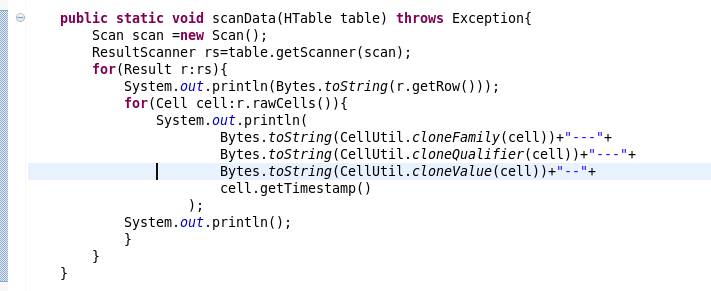
6.scan的书写
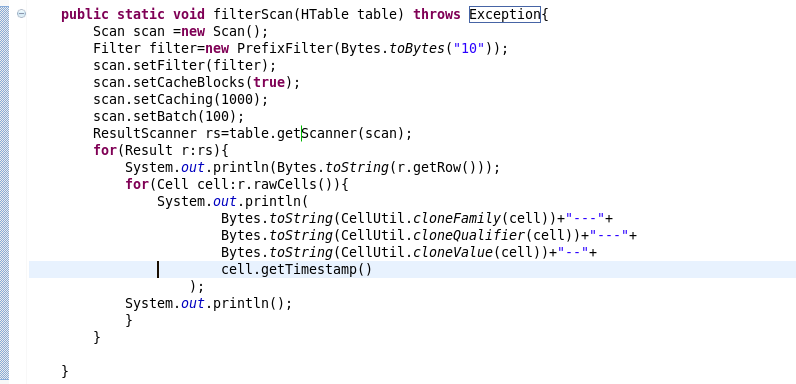
7.过滤条件的scan的书写
三:复制源代码
 package com.beifeng.bigdat;

 import java.io.IOException;

 import org.apache.hadoop.conf.Configuration;

 import org.apache.hadoop.hbase.Cell;

 import org.apache.hadoop.hbase.CellUtil;

 import org.apache.hadoop.hbase.HBaseConfiguration;

 import org.apache.hadoop.hbase.client.Delete;

 import org.apache.hadoop.hbase.client.Get;

 import org.apache.hadoop.hbase.client.HTable;

 import org.apache.hadoop.hbase.client.Put;

 import org.apache.hadoop.hbase.client.Result;

 import org.apache.hadoop.hbase.client.ResultScanner;

 import org.apache.hadoop.hbase.client.Scan;

 import org.apache.hadoop.hbase.filter.Filter;

 import org.apache.hadoop.hbase.filter.PrefixFilter;

 import org.apache.hadoop.hbase.util.Bytes;

 public class HbaseClientTest {

     public static HTable getTable(String name) throws Exception{

         Configuration conf=HBaseConfiguration.create();

         HTable table=new HTable(conf,name);

         return table;

     }

     public static void getData(HTable table) throws Exception{

         Get get=new Get(Bytes.toBytes("103"));

         get.addFamily(Bytes.toBytes("info"));

         Result rs=table.get(get);

         for(Cell cell:rs.rawCells()){

             System.out.println(

                     Bytes.toString(CellUtil.cloneFamily(cell))+"--"+

                     Bytes.toString(CellUtil.cloneQualifier(cell))+"---"+

                     Bytes.toString(CellUtil.cloneValue(cell))+"----"+

                     cell.getTimestamp()

                     );

             System.out.println("----------------------------------------------");

         }

     }

     public static void putData(HTable table) throws Exception{

         Put put=new Put(Bytes.toBytes("103"));

         put.add(Bytes.toBytes("info"),

                 Bytes.toBytes("name"),

                 Bytes.toBytes("zhaoliu"));

         table.put(put);

         getData(table);

     }

     public static void deleteData(HTable table) throws Exception{

         Delete delete =new Delete(Bytes.toBytes("103"));

         delete.deleteColumns(Bytes.toBytes("info"), Bytes.toBytes("name"));

         table.delete(delete);

         getData(table);

     }

     public static void scanData(HTable table) throws Exception{

         Scan scan =new Scan();

         ResultScanner rs=table.getScanner(scan);

         for(Result r:rs){

             System.out.println(Bytes.toString(r.getRow()));

             for(Cell cell:r.rawCells()){

                 System.out.println(

                         Bytes.toString(CellUtil.cloneFamily(cell))+"---"+

                         Bytes.toString(CellUtil.cloneQualifier(cell))+"---"+

                         Bytes.toString(CellUtil.cloneValue(cell))+"--"+

                         cell.getTimestamp()

                     );

             System.out.println();

             }

         }

     }

     public static void filterScan(HTable table) throws Exception{

         Scan scan =new Scan();

         Filter filter=new PrefixFilter(Bytes.toBytes("10"));

         scan.setFilter(filter);

         scan.setCacheBlocks(true);

         scan.setCaching(1000);

         scan.setBatch(100);

         ResultScanner rs=table.getScanner(scan);

         for(Result r:rs){

             System.out.println(Bytes.toString(r.getRow()));

             for(Cell cell:r.rawCells()){

                 System.out.println(

                         Bytes.toString(CellUtil.cloneFamily(cell))+"---"+

                         Bytes.toString(CellUtil.cloneQualifier(cell))+"---"+

                         Bytes.toString(CellUtil.cloneValue(cell))+"--"+

                         cell.getTimestamp()

                     );

             System.out.println();

             }

         }

     }

     public static void main(String[] args) throws Exception {

         HTable table=getTable("nstest1:tb1");

         //getData(table);

         //putData(table);

         //deleteData(table);

         //scanData(table);

         filterScan(table);

     }

 }
HBASE的读写以及client API的更多相关文章
- 073 HBASE的读写以及client API
一:读写思想 1.系统表 hbase:namespace 存储hbase中所有的namespace的信息 hbase:meta rowkey:hbase中所有表的region的名称 column:re ...
- HBase 二次开发 java api和demo
1. 试用thrift python/java以及hbase client api.结论例如以下: 1.1 thrift的安装和公布繁琐.可能会遇到未知的错误,且hbase.thrift的版本 ...
- hbase的读写过程
hbase的读写过程: hbase的架构: Hbase真实数据hbase真实数据存储在hdfs上,通过配置文件的hbase.rootdir属性可知,文件在/user/hbase/下hdfs dfs - ...
- Hbase的读写流程
HBase读写流程 1.HBase读数据流程 HRegionServer保存着meta表以及表数据,要访问表数据,首先Client先去访问zookeeper,从zookeeper里面获取meta表所在 ...
- HBase 数据读写流程
HBase 数据读写流程 2016-10-18 杜亦舒 读数据 HBase的表是按行拆分为一个个 region 块儿,这些块儿被放置在各个 regionserver 中 假设现在想在用户表中获取 ro ...
- ecshop /api/client/api.php、/api/client/includes/lib_api.php SQL Injection Vul
catalog . 漏洞描述 . 漏洞触发条件 . 漏洞影响范围 . 漏洞代码分析 . 防御方法 . 攻防思考 1. 漏洞描述 ECShop存在一个盲注漏洞,问题存在于/api/client/api. ...
- Memcached Java Client API详解
针对Memcached官方网站提供的java_memcached-release_2.0.1版本进行阅读分析,Memcached Java客户端lib库主要提供的调用类是SockIOPool和MemC ...
- Jersey(1.19.1) - Client API, Uniform Interface Constraint
The Jersey client API is a high-level Java based API for interoperating with RESTful Web services. I ...
- Jersey(1.19.1) - Client API, Ease of use and reusing JAX-RS artifacts
Since a resource is represented as a Java type it makes it easy to configure, pass around and inject ...
随机推荐
- ural 1244. Gentlemen
1244. Gentlemen Time limit: 0.5 secondMemory limit: 64 MB Let's remember one old joke: Once a gentle ...
- android 屏幕截取,pull到pc端
1.当需要截取手机屏幕时,进行批命令点击,截取adb pull到电脑端,或者进行接口上传到服务器. GetScreen.bat @ECHO OFF :: read config.cfg SETLOCA ...
- Bestcoder Round# 80
[1003 Sequence] 指数循环节,注意a mod p = 0的情况.此时你的循环节如果返回0,这时你会输出1,而实际上应该是0 #include <algorithm> #inc ...
- lucene 使用注意
1.建立索引时,忘记writer.close(); 结果: 正常结果:
- C#并行库(TaskParallelLibrary)用法小结
今天有空,总结一下.NET 4.5并行库(TaskParallelLibrary)用法. 也许C和C++的程序员刚刚开始写C#还习惯于new Thread来新建一个线程,但新建线程需要内存和CPU上下 ...
- [GE]手动截取当前活动窗口,并且按规则命名(1/2)
Function Take-ScreenShot { <# .SYNOPSIS Used to take a screenshot of the desktop or the active wi ...
- 【液晶模块系列基础视频】4.5.X-GUI图形界面库-进度条等函数简介
[液晶模块系列基础视频]4.5.X-GUI图形界面库-进度条等函数简介 ============================== 技术论坛:http://www.eeschool.org 博客地址 ...
- html5shiv.js-让IE浏览器支持HTML5标准
兼容性IE8及以下IE版本 浏览器IE8及以下IE版本对HTML5标签的支持是有限的,我们可以通过在网页中添加脚本的方式来解决目前IE浏览器对HTML5支持的问题. <!–[if IE]> ...
- FZU 2032 高精度小数加法
题目描写很没意思..就是说给出n个小数 求它们的总和 因为给出的小数点后最多16位而要求保存至12位 而能直接使用的最精确的double只能到12位 于是13的进位可能被忽略 于是不可以用double ...
- PHP 设计模式 笔记与总结(6)基础设计模式:工厂模式、单例模式和注册树模式
三种基础设计模式(所有面向对象设计模式中最常见的三种): ① 工厂模式:使用工厂方法或者类生成对象,而不是在代码中直接new 在 Common 目录下新建 Factory.php: <?php ...