
073 HBASE的读写以及client API
一:读写思想
1.系统表
hbase:namespace
存储hbase中所有的namespace的信息
hbase:meta
rowkey:hbase中所有表的region的名称
column:regioninfo:region的名称,region的范围
server:该region在哪台regionserver上
2.读写流程
tbname,rowkey -> region -> regionserver -> store -> storefile
但是这些都是加载过meta表之后,然后meta表如何寻找?
3.读的流程
-》根据表名和rowkey找到对应的region
-》zookeeper中存储了meta表的region信息
-》从meta表中获取相应的region的信息
-》找到对应的regionserver
-》查找对应的region
-》读memstore
-》storefile
4.写的流程
-》根据表名和rowkey找到对应的region
-》zookeeper中存储了meta表的region信息
-》从meta表中获取相应的region的信息
-》找到对应的regionserver
-》正常情况
-》WAL(write ahead log预写日志),一个regionserver维护一个hlog
-》memstore (达到一定大小,flush到磁盘)
-》当多个storefile达到一定大小以后,会进行compact,合并成一个storefile
-》当单个storefile达到一定大小以后,会进行split操作,等分割region
5.注意点
关于版本的合并和删除是在compact阶段完成的。hbase只负责数据的增加存储
hmaster短暂的不参与实际的读写
二:HBase Client API 的书写
1.添加依赖

2.添加配置文件
core-site.xml
hdfs-site.xml
hbase-site.xml
log4j.properties
regionservers
3.get的书写

4.put的书写

5.delete的书写

注意全部删除:

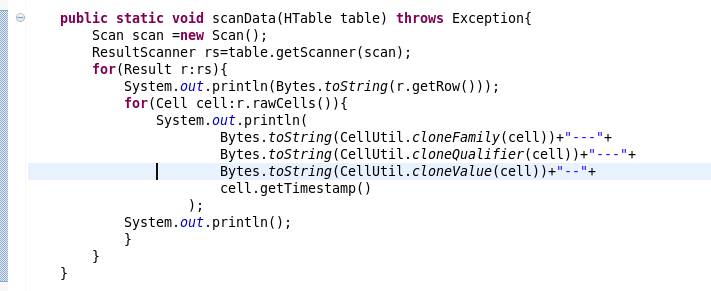
6.scan的书写
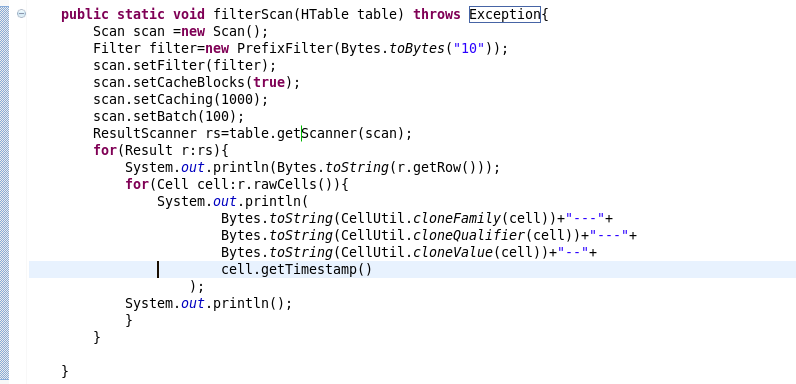
7.过滤条件的scan的书写
三:复制源代码
 package com.beifeng.bigdat;

 import java.io.IOException;

 import org.apache.hadoop.conf.Configuration;

 import org.apache.hadoop.hbase.Cell;

 import org.apache.hadoop.hbase.CellUtil;

 import org.apache.hadoop.hbase.HBaseConfiguration;

 import org.apache.hadoop.hbase.client.Delete;

 import org.apache.hadoop.hbase.client.Get;

 import org.apache.hadoop.hbase.client.HTable;

 import org.apache.hadoop.hbase.client.Put;

 import org.apache.hadoop.hbase.client.Result;

 import org.apache.hadoop.hbase.client.ResultScanner;

 import org.apache.hadoop.hbase.client.Scan;

 import org.apache.hadoop.hbase.filter.Filter;

 import org.apache.hadoop.hbase.filter.PrefixFilter;

 import org.apache.hadoop.hbase.util.Bytes;

 public class HbaseClientTest {

     public static HTable getTable(String name) throws Exception{

         Configuration conf=HBaseConfiguration.create();

         HTable table=new HTable(conf,name);

         return table;

     }

     public static void getData(HTable table) throws Exception{

         Get get=new Get(Bytes.toBytes("103"));

         get.addFamily(Bytes.toBytes("info"));

         Result rs=table.get(get);

         for(Cell cell:rs.rawCells()){

             System.out.println(

                     Bytes.toString(CellUtil.cloneFamily(cell))+"--"+

                     Bytes.toString(CellUtil.cloneQualifier(cell))+"---"+

                     Bytes.toString(CellUtil.cloneValue(cell))+"----"+

                     cell.getTimestamp()

                     );

             System.out.println("----------------------------------------------");

         }

     }

     public static void putData(HTable table) throws Exception{

         Put put=new Put(Bytes.toBytes("103"));

         put.add(Bytes.toBytes("info"),

                 Bytes.toBytes("name"),

                 Bytes.toBytes("zhaoliu"));

         table.put(put);

         getData(table);

     }

     public static void deleteData(HTable table) throws Exception{

         Delete delete =new Delete(Bytes.toBytes("103"));

         delete.deleteColumns(Bytes.toBytes("info"), Bytes.toBytes("name"));

         table.delete(delete);

         getData(table);

     }

     public static void scanData(HTable table) throws Exception{

         Scan scan =new Scan();

         ResultScanner rs=table.getScanner(scan);

         for(Result r:rs){

             System.out.println(Bytes.toString(r.getRow()));

             for(Cell cell:r.rawCells()){

                 System.out.println(

                         Bytes.toString(CellUtil.cloneFamily(cell))+"---"+

                         Bytes.toString(CellUtil.cloneQualifier(cell))+"---"+

                         Bytes.toString(CellUtil.cloneValue(cell))+"--"+

                         cell.getTimestamp()

                     );

             System.out.println();

             }

         }

     }

     public static void filterScan(HTable table) throws Exception{

         Scan scan =new Scan();

         Filter filter=new PrefixFilter(Bytes.toBytes("10"));

         scan.setFilter(filter);

         scan.setCacheBlocks(true);

         scan.setCaching(1000);

         scan.setBatch(100);

         ResultScanner rs=table.getScanner(scan);

         for(Result r:rs){

             System.out.println(Bytes.toString(r.getRow()));

             for(Cell cell:r.rawCells()){

                 System.out.println(

                         Bytes.toString(CellUtil.cloneFamily(cell))+"---"+

                         Bytes.toString(CellUtil.cloneQualifier(cell))+"---"+

                         Bytes.toString(CellUtil.cloneValue(cell))+"--"+

                         cell.getTimestamp()

                     );

             System.out.println();

             }

         }

     }

     public static void main(String[] args) throws Exception {

         HTable table=getTable("nstest1:tb1");

         //getData(table);

         //putData(table);

         //deleteData(table);

         //scanData(table);

         filterScan(table);

     }

 }
073 HBASE的读写以及client API的更多相关文章
- HBASE的读写以及client API
一:读写思想 1.系统表 hbase:namespace 存储hbase中所有的namespace的信息 hbase:meta rowkey:hbase中所有表的region的名称 column:re ...
- HBase 二次开发 java api和demo
1. 试用thrift python/java以及hbase client api.结论例如以下: 1.1 thrift的安装和公布繁琐.可能会遇到未知的错误,且hbase.thrift的版本 ...
- hbase的读写过程
hbase的读写过程: hbase的架构: Hbase真实数据hbase真实数据存储在hdfs上,通过配置文件的hbase.rootdir属性可知,文件在/user/hbase/下hdfs dfs - ...
- Hbase的读写流程
HBase读写流程 1.HBase读数据流程 HRegionServer保存着meta表以及表数据,要访问表数据,首先Client先去访问zookeeper,从zookeeper里面获取meta表所在 ...
- HBase 数据读写流程
HBase 数据读写流程 2016-10-18 杜亦舒 读数据 HBase的表是按行拆分为一个个 region 块儿,这些块儿被放置在各个 regionserver 中 假设现在想在用户表中获取 ro ...
- ecshop /api/client/api.php、/api/client/includes/lib_api.php SQL Injection Vul
catalog . 漏洞描述 . 漏洞触发条件 . 漏洞影响范围 . 漏洞代码分析 . 防御方法 . 攻防思考 1. 漏洞描述 ECShop存在一个盲注漏洞,问题存在于/api/client/api. ...
- Memcached Java Client API详解
针对Memcached官方网站提供的java_memcached-release_2.0.1版本进行阅读分析,Memcached Java客户端lib库主要提供的调用类是SockIOPool和MemC ...
- Jersey(1.19.1) - Client API, Uniform Interface Constraint
The Jersey client API is a high-level Java based API for interoperating with RESTful Web services. I ...
- Jersey(1.19.1) - Client API, Ease of use and reusing JAX-RS artifacts
Since a resource is represented as a Java type it makes it easy to configure, pass around and inject ...
随机推荐
- Redis 主从模式
系统:Centos6.6x64安装目录:/usr/local/主:192.168.100.103从:192.168.100.104 ,下载安装: 安装依赖: # yum install gcc tcl ...
- luogu P1943 LocalMaxima_NOI导刊2009提高(1)
又是有关于\(1-n\)排列的题,考虑从大到小依次插入构造排列 对于第\(i\)个数(也就是\(n-i+1\)),只有当它插在当前排列最前面时才会使那个什么数的个数+1,而在最前面的概率为\(\fra ...
- HKE和他的小朋友(矩乘快速幂)
题面: 题目背景: HKE带着\(n\)个小朋友做游戏 题目描述: 现在有n个座位编号为\(1\)至\(n\),这些小朋友也编号\(1\)至\(n\).一开始所有小朋友都坐在相应的座位上.HKE的游戏 ...
- pygame(class类)调用视图的方法
以下将介绍pygame精灵动画的基础知识,希望对大家有帮助:1.在此,精灵类必须继承pygame.sprite.Sprite并初始化pygame.sprite.Sprite.__init__(self ...
- 【TensorFlow】tf.nn.softmax_cross_entropy_with_logits的用法
在计算loss的时候,最常见的一句话就是 tf.nn.softmax_cross_entropy_with_logits ,那么它到底是怎么做的呢? 首先明确一点,loss是代价值,也就是我们要最小化 ...
- python中argparse模块用法实例详解
python中argparse模块用法实例详解 这篇文章主要介绍了python中argparse模块用法,以实例形式较为详细的分析了argparse模块解析命令行参数的使用技巧,需要的朋友可以参考下 ...
- 巧用CASE WHEN 验证用户登录信息
最近逛博客园的时候偶然看到一个很巧妙的SQL,巧妙利用CASE WHEN 实现一个简单的 SQL 同时验证用户帐号是否存在.密码是否正确.晓菜鸟之前的做法都是根据用户名和密码一起验证,如果验证失败直接 ...
- C/C++杂记:深入虚表结构
1. 虚表与“虚函数表” 在“C/C++杂记:虚函数的实现的基本原理”一文中曾提到“虚函数表”的概念,只是为了便于理解,事实是:虚函数表并不真的独立存在,它只是虚表(virtual table)中的一 ...
- 通过htaccess文件配置多个一级域名指向根目录的子文件夹
创建.htaccess文件,在Windows系统创建时要写成“.htaccess.”,不带双引号,否则不会创建成功. <IfModule mod_rewrite.c> Options +F ...
- 将本地光盘做成yum源
环境:vmware 1.将centos6.5光盘挂载在虚拟机上 2.将光盘挂载在/mnt/cdrom目录下 root# mkdir /mnt/cdrom root # mount /mnt/cdro ...