
使用VS2017遇到的一些小问题
一、去掉预编译头
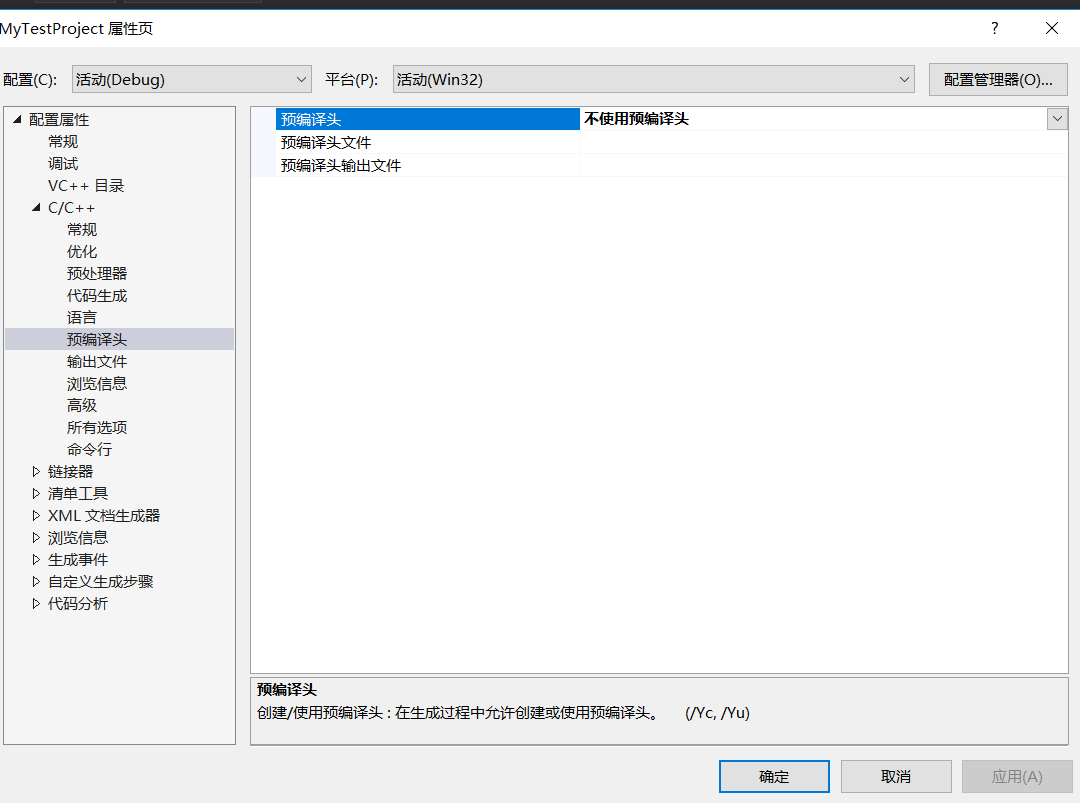
使用VS2017的时候,发现总是会有“pch.h”,“stdafx.h”这类预编译头,去掉还会报错。作为新手的我,暂时用不到这些预编译头,于是想去掉它们。
右键项目->属性->C/C++->预编译头,如下图所示,然后选择不使用预编译头即可。
二、设置C++标准
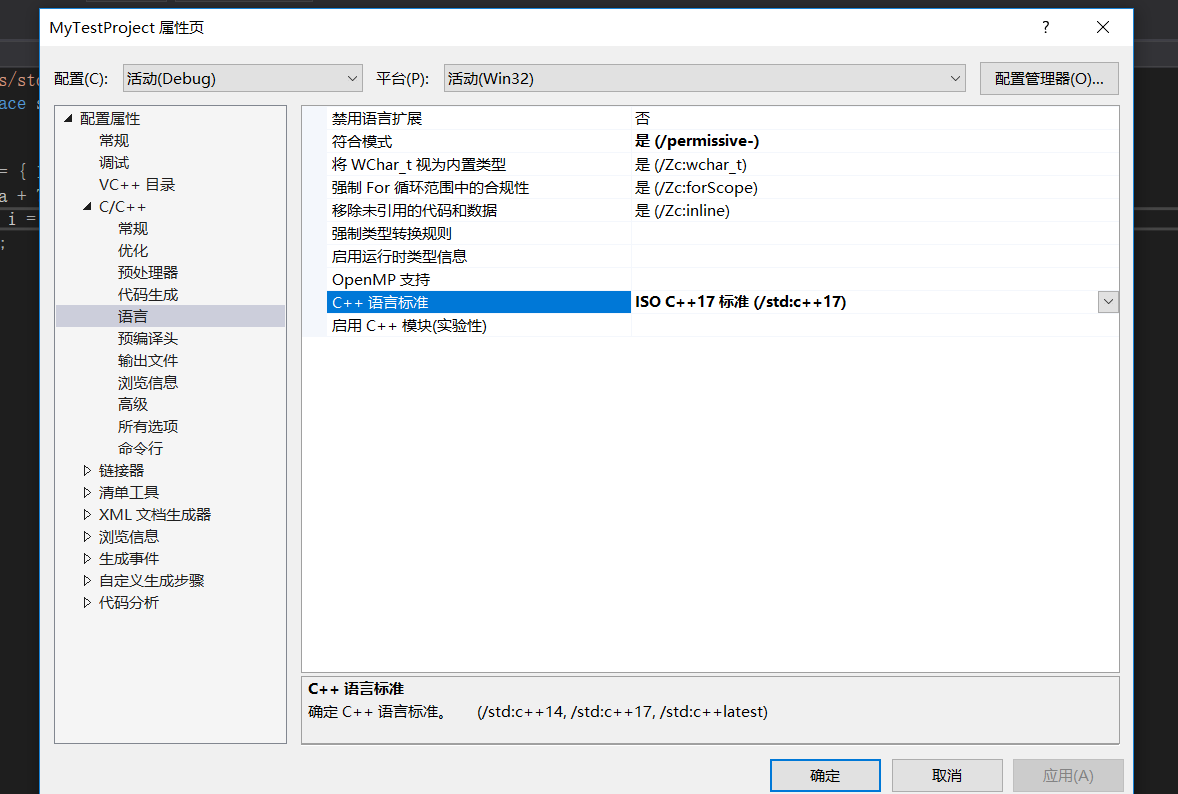
用VS2017写C++的时候想设置一下C++标准,设置成C++14或C++17。
右键项目->属性->C/C++->语言,如下图所示,在C++语言标准选择想要的C++版本即可。
三、使用<bits/stdc++.h>头文件
因为直前用别的编译器都习惯用#include<bits/stdc++.h>都懒得打头文件了。然后,发现VS2017使用这个头文件会报错提示找不到,于是上网找了一下办法。
既然VS2017没有,我们就自己加上去,找到VS2017安装目录,然后找到include文件,我的文件路径是这个:
C:\Program Files (x86)\Microsoft Visual Studio\2017\Community\VC\Tools\MSVC\14.16.27023\include
然后自己创一个bits文件夹,然后进入bits文件夹,创建stdc++.h文件,添加下面的内容:
// 17.4.1.2 Headers

// C

#ifndef _GLIBCXX_NO_ASSERT

#include <cassert>

#endif

#include <cctype>

#include <cerrno>

#include <cfloat>

#include <ciso646>

#include <climits>

#include <clocale>

#include <cmath>

#include <csetjmp>

#include <csignal>

#include <cstdarg>

#include <cstddef>

#include <cstdio>

#include <cstdlib>

#include <cstring>

#include <ctime>

#if __cplusplus >= 201103L

#include <ccomplex>

#include <cfenv>

#include <cinttypes>

#include <cstdalign>

#include <cstdbool>

#include <cstdint>

#include <ctgmath>

#include <cwchar>

#include <cwctype>

#endif

// C++

#include <algorithm>

#include <bitset>

#include <complex>

#include <deque>

#include <exception>

#include <fstream>

#include <functional>

#include <iomanip>

#include <ios>

#include <iosfwd>

#include <iostream>

#include <istream>

#include <iterator>

#include <limits>

#include <list>

#include <locale>

#include <map>

#include <memory>

#include <new>

#include <numeric>

#include <ostream>

#include <queue>

#include <set>

#include <sstream>

#include <stack>

#include <stdexcept>

#include <streambuf>

#include <string>

#include <typeinfo>

#include <utility>

#include <valarray>

#include <vector>

#if __cplusplus >= 201103L

#include <array>

#include <atomic>

#include <chrono>

#include <condition_variable>

#include <forward_list>

#include <future>

#include <initializer_list>

#include <mutex>

#include <random>

#include <ratio>

#include <regex>

#include <scoped_allocator>

#include <system_error>

#include <thread>

#include <tuple>

#include <typeindex>

#include <type_traits>

#include <unordered_map>

#include <unordered_set>

#endif

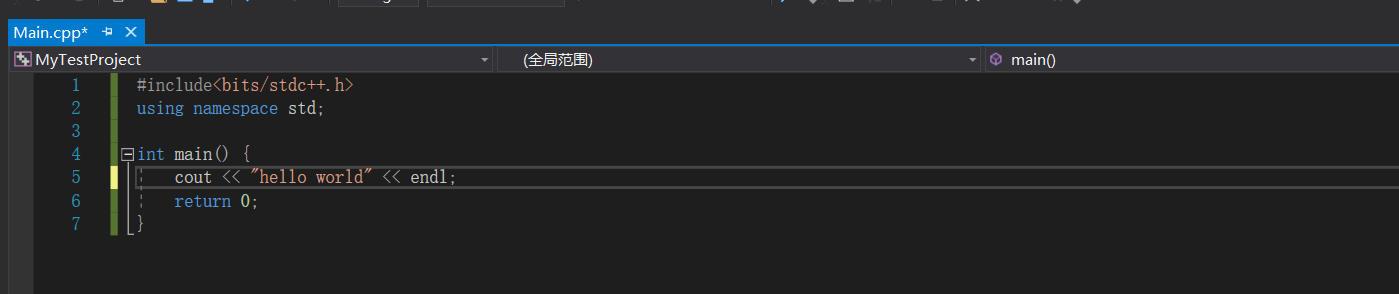
添加完成之后,我们就能正常地使用#include<bits/stdc++.h>了。
使用VS2017遇到的一些小问题的更多相关文章
- 【VS工具】vs2017中的一些小功能
一.json转为类 1.打开一个json文件,复制 2.打开一个.cs文件,将json粘贴为类 3.got it 二.C#交互窗口 1.视图->其他窗口->C#交互窗口 2.打开了一个窗 ...
- VS2017 - Winform 简单托盘小程序
界面比较简单,主要两个button 一个NotifyIcon 和 右键菜单 控件, NotifyIcon 属性,如下: 并为NotifyIcon指定了DoubleClick事件: 主窗体增加两个事件: ...
- Asp.NetCore1.1版本没了project.json,这样来生成跨平台包
本章将要和大家分享的是Asp.NetCore1.1版本去掉了project.json后如何打包生成跨平台包, 为了更好跟进AspNetCore的发展,把之前用来做netcore开发的vs2015卸载后 ...
- Visual studio 编辑combobox程序卡死的问题
问题描述:使用vs2017开发一个winform小程序,一用combobox就卡死. 问题解决:关闭有道词典的取词功能. 软件开多了,就容易有冲突啊!
- 【asp.net core】Publish to a Linux-Ubuntu 14.04 Server Production Environment
Submary 又升级了,目录结构有变化了 . project.json and Visual Studio 2015 with .NET Core On March 7, 2017, the .NE ...
- Vs2017 typescript 开发小问题
最近想写点ts的东西,以前用vs2015很方便,直接创建一个ts app项目就折腾了. Vs2017打开,居然发现这个项目模板不见了. 于是研究了一下,由于原来的ts app项目就是一个asp.n ...
- windows10 vs2017编译opencv_contrib3.4.7的小坑及编译好的资源
1.注意要用正斜杠 / 不要用 \ https://github.com/opencv/opencv/issues/11655 CMake Error at cmake/OpenCVModu ...
- vs2017 .net core WebApp 去掉ApplicationInsights
vs2017新建的 .net core WebApp都内置了这个遥测中间件进去,嗯,用AZURE的话是不错能无缝支持.但不用AZURE就没什么用了. 为了不占地方和提高一点点初始启动的速度,对新建的项 ...
- [干货来袭]C#7.0新特性(VS2017可用)
前言 微软昨天发布了新的VS 2017 ..随之而来的还有很多很多东西... .NET新版本 ASP.NET新版本...等等..太多..实在没消化.. 分享一下其实2016年12月就已经公布了的C#7 ...
随机推荐
- Spring中扩展点汇总 ------------- 框架图
原文链接:https://my.oschina.net/dachengxi/blog/3014156 转载于:https://my.oschina.net/dachengxi/blog/30141 ...
- .NET Core MD5加密 32位和16位
public class MD5Help { //此代码示例通过创建哈希字符串适用于任何 MD5 哈希函数 (在任何平台) 上创建 32 个字符的十六进制格式哈希字符串官网案例改编 /// <s ...
- datax分析与思考(一)
Datax 总体流程图 先看执行的第一个步骤: 在最上层抽象类,这个里面相当于获取全局公共信息,java入口部分就是这个Engine的main方法直接启动 Engine 启动 com.alibaba. ...
- 前端1-----CSS层叠样式表了解,css的引入方式,三大选择器(标签,类,id),高级选择器
前端1-----CSS层叠样式表了解,css的引入方式,三大选择器(标签,类,id),高级选择器 一丶CSS简介 叠样式表(英文全称:Cascading Style Sheets)是一种用来表现 ...
- 突破Java面试-Redis集群模式的原理
1 面试题 Redis集群模式的工作原理说一下?在集群模式下,key是如何寻址的?寻址都有哪些算法?了解一致性hash吗? 2 考点分析 Redis不断在发展-Redis cluster集群模式,可以 ...
- 4.Javascript中实现继承的几种方法及其优缺点
要搞懂JS继承,我们首先要理解原型链:每一个实例对象都有一个__proto__属性(隐式原型),在js内部用来查找原型链:每一个构造函数都有prototype属性(显示原型),用来显示修改对象的原型, ...
- 19、localStorage.getItem得到的是[object Object] 的解决方案
实现本地存储,避免刷新页面数据丢失: localStorage.setItem 只能存储字符串, 所以在储存的时候先将对象转换为字符串 localStorage.setItem("local ...
- Mac安装Java的JDK并进行环境配置
一.下载JDK 1.直接进入oracle官网下载页: https://www.oracle.com/technetwork/java/javase/downloads/index.html 2.选择版 ...
- Linux centos关机和重启命令
Linux centos重启命令: 1.reboot 普通重启 2.shutdown -r now 立刻重启(root用户使用) 3.shutdown -r 10 过10分钟自动重启(root用户 ...
- kuangbin专题专题四 Currency Exchange POJ - 1860
题目链接:https://vjudge.net/problem/POJ-1860 大致题意:有不同的货币,有很多货币交换点,每个货币交换点只能两种货币相互交换,有佣金C,汇率R. 每次交换算一次操作, ...