
python mysql模块
多次使用python操作mysql数据库,先与大家分享一下,关于如何使用python操作mysql数据库。mysql并不是python自带的模块,因此需要下载安装。(在windows平台下介绍该使用过程)
1、下载/安装python-mysql
下载地址:https://pypi.python.org/pypi/MySQL-python/1.2.5
双击下载的文件,一直选择next就可以安装好(前提是必须已经安装了python),注意python-mysql与python对应的版本,否则在使用过程中会出现意想不到的错误。
2、检查是否安装成功
打开python交互界面,输入import MySQLdb,没有报错表示成功安装。
如图:

3、使用方式
测试数据库为:
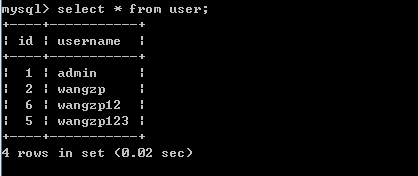
3.1 与数据库建立连接
|
1
2
3
4
5
6
7
8
9
|
# 使用MySQLdb.connect()方法connection = MySQLdb.connect(host="127.0.0.1", port=3306, user="root", passwd="root", db="test")# host : 主机名(IP)# port : 端口号,mysql默认为3306# user : 用户名# passwd : 密码# db : 数据库(默认连接的数据库)【可选】# charset : 编码方式【可选】# 如果未指定db属性,那么可以使用connection.select_db("数据库名称")选择指定数据库 |
3.2 获取游标对象
|
1
2
3
|
# 具体的sql执行,都是通过游标对象完成的;通过连接对象的cursor方法获取游标对象# 初始状态游标执行第一个元素cursor = connection.cursor() |
3.3 执行SQL语句
|
1
2
3
4
5
6
7
8
9
10
11
12
13
14
15
16
17
18
19
20
21
22
23
24
25
26
27
28
29
30
31
32
33
|
# 分为单个SQL执行和批量SQL执行,以及是否参数化(可以防止SQL注入)# query: sql字符串# args :如果sql字符串为%s占位符那么args是元组或者列表,如果sql字符串占位符是%(key)s形式## ,那么是字典类型。否则为None(默认)# 语法1:cursor.execute(query, args)# 语法2:cursor.executemany(query, args) # 范例1:使用语法1查询数据import MySQLdbif __name__ == "__main__": # create mysql connection connection = MySQLdb.connect(host="127.0.0.1", port=3306, user="root", passwd="root", db="test") # get cursor cursor = connection.cursor() # 返回执行结果数 # nums = cursor.execute("select * from user where id=%s", [1]) # 使用%s占位符 nums = cursor.execute("select * from user where id = %(id)s", {"id" : 1}) # 使用%(key)s占位符 print(nums) print(cursor.fetchone()) # 范例2:使用语法2查询一条数据import MySQLdbif __name__ == "__main__": # create mysql connection connection = MySQLdb.connect(host="127.0.0.1", port=3306, user="root", passwd="root", db="test") # get cursor cursor = connection.cursor() # 返回执行结果数; nums = cursor.executemany("select * from user where id=%s", [[1], [2]]) print(nums) print(cursor.fetchone()) print(cursor.fetchmany()) print(cursor.fetchall())# 结果是:nums = 2, 但是查询结果却是id=2的结果;那是因为nums表示执行了多少个execute方法,# 而执行查询结果,却是覆盖了上一个结果,因此当使用语法2查询时,执行返回最后一个条件的结果 |
对上述两种语法,这里做一些阐述:
1、execute:执行单条sql语句,并返回sql语句执行的结果数量
2、executemany:执行多条sql语句,内部实际是多次调用execute,但是比显示这样调用效率要高一些,返回execute执行成功的数量(实际就是sql语句的sql执行的结果数量。
当执行更新(插入、修改、删除)操作时,需要通过connection.commit()显示执行提交,才会将execute或者executemany执行的结果,映射到数据库中。
当执行查询操作时,需要使用cursor.fetchone()、cursor.fetchmany(size), cursor.fetchall(),获取一个、多个、全部sql执行查询的结果。如果使用cursor.frtchmany()默认会获取一个,如果想获取指定个数,那么可以使用cursor.fetchmany(size=2)方式。
3.4 查询时游标的理解
3.4.1 游标规则
如果使用同一个cursor.execute()执行查询结果,初始状态游标执行首个元素,当使用cursor.fetch*时,游标会向下移动;
cursor.fetchone : 向下移动一个位置
cursor.fetchmany(size=num) : 向下移动size指定数值位置
cursor.fetchall() :游标移动到末尾
例如:
|
1
2
3
4
5
6
7
8
9
10
11
12
|
import MySQLdbif __name__ == "__main__": # create mysql connection connection = MySQLdb.connect(host="127.0.0.1", port=3306, user="root", passwd="root", db="test") # get cursor cursor = connection.cursor() # 返回执行结果数 nums = cursor.execute("select * from user") print(cursor.fetchone()) print(cursor.fetchmany(size=1)) print(cursor.fetchall()) |
执行结果:
(1L, 'admin')
((2L, 'wangzp'),)
((6L, 'wangzp12'), (5L, 'wangzp123'))
根据结果可以发现,游标会移动,按照上述描述的规则。
3.4.2 设置游标位置
可以通过cursor.scroll(position, mode="relative | absolute")方法,来设置相对位置游标和绝对位置游标。
方法参数描述:
position : 游标位置
mode : 游标位置的模式,relative:默认模式,相对当前位置;absolute:绝对位置
例如:
mode=relative, position=1;表示的是设置游标为当前位置+1的位置,即向下移动一个位置
mode=absolute, position=2;将游标移动到索引为2的位置
代码示例:
|
1
2
3
4
5
6
7
8
9
10
11
12
13
14
|
import MySQLdbif __name__ == "__main__": # create mysql connection connection = MySQLdb.connect(host="127.0.0.1", port=3306, user="root", passwd="root", db="test") # get cursor cursor = connection.cursor() # 返回执行结果数 nums = cursor.execute("select * from user") print(cursor.fetchone()) # 执行后,游标移动到索引位置为1 cursor.scroll(1) # 相对游标移动模式,当前索引+1,即游标位置为2 print(cursor.fetchmany(size=1)) # 因此获取第3个元素 cursor.scroll(0, mode="absolute") # 绝对索引模式,将游标重置为0 print(cursor.fetchall()) # 因此获取所有数据 |
运行结果:
(1L, 'admin')
((6L, 'wangzp12'),)
((1L, 'admin'), (2L, 'wangzp'), (6L, 'wangzp12'), (5L, 'wangzp123'))
3.5 事务管理
使用connection.commit()提交,connection.rollback()回滚。
总结:
除了上述一些用法外,还有一些注入执行存储过程等方法,这里不做介绍,详情可以参考相关文档。其实用法相对还是比较简单的。一般开发可以分为如下步骤:
1、建立数据库连接
2、获取游标
3、执行SQL
4、如果sql是查询,那么使用fetch系列函数查询,但是需要注意的是游标的移动方式。
如下列一个简单的封装代码(部分):
|
1
2
3
4
5
6
7
8
9
10
11
12
13
14
15
16
17
18
19
20
21
22
23
24
25
26
27
28
29
30
31
32
33
34
35
36
37
38
39
40
41
42
43
44
45
46
47
48
49
50
|
import MySQLdbclass DBUtil(object): @staticmethod def getConnection(host, port, user, password, db): "get mysql connection" connection = None try: connection = MySQLdb.connect(host=host, port=port, user=user, passwd=password, db=db) except MySQLdb.Error, e: print(e) return connection @staticmethod def getCursor(connection): "get cursor" cursor = None try: cursor = connection.cursor() except MySQLdb.Error, e: print(e) return cursor @staticmethod def update(cursor, sql, args): return cursor.execute(sql, args) @staticmethod def updateAndCommit(connection, cursor, sql, args): nums = cursor.execute(sql, args) connection.commit() return nums @staticmethod def updateBatch(cursor, sql, args): return cursor.executemany(sql, args) @staticmethod def updateBatchAndCommit(connection, cursor, sql, args): nums = cursor.executemany(sql, args) connection.commit() return nums if __name__ == "__main__": connection = DBUtil.getConnection("127.0.0.1", 3306, "root", "root", "test") cursor = DBUtil.getCursor(connection) nums = cursor.execute("select * from user") print(cursor.fetchall())
|
python mysql模块的更多相关文章
- ubuntu 安装python mysql模块
Installation Starting with a vanilla Lucid install , install pip and upgrade to the latest version: ...
- Python Paramiko模块与MySQL数据库操作
Paramiko模块批量管理:通过调用ssh协议进行远程机器的批量命令执行. 要使用paramiko模块那就必须先安装这个第三方模块,仅需要在本地上安装相应的软件(python以及PyCrypto), ...
- yum安装memcache,mongo扩展以及python的mysql模块安装
//启动memcached/usr/local/memcached/bin/memcached -d -c 10240 -m 1024 -p 11211 -u root/usr/local/memca ...
- Python MySQLdb模块连接操作mysql数据库实例_python
mysql是一个优秀的开源数据库,它现在的应用非常的广泛,因此很有必要简单的介绍一下用python操作mysql数据库的方法.python操作数据库需要安装一个第三方的模块,在http://mysql ...
- Python 操作 Mysql 模块
一.Python 操作 Mysql 模块的安装 linux: yum install MySQL-python window: http://files.cnblogs.com/files/wupei ...
- python自动化--模块操作之re、MySQL、Excel
一.python自有模块正则 import re # re.match只匹配字符串的开始,如果字符串开始不符合正则表达式,则匹配失败,函数返回None print(re.match("www ...
- python mysql
mysql Linux 安装mysql: apt-get install mysql-server 安装python-mysql模块:apt-get install python-mysqldb Wi ...
- Python Mysql 篇
Python 操作 Mysql 模块的安装 linux: yum install MySQL-python window: http://files.cnblogs.com/files/wupeiqi ...
- python 常用模块(转载)
转载地址:http://codeweblog.com/python-%e5%b8%b8%e7%94%a8%e6%a8%a1%e5%9d%97/ adodb:我们领导推荐的数据库连接组件bsddb3:B ...
随机推荐
- ssh 指定ssh端口号
ssh -p higgs@192.168.43.1
- 使用 while 循环
与 for 循环不同,while 循环会一直运行,直到给定条件不满足为止.例如,下面的 while 循环从 x=0 开始.每次循环都会检查 x<=10 是否成立.如果成立,就执行循环内部的表达式 ...
- java set初始化问题
set在执行add方法时,多次报空指针异常,后来发现Set初始化时,如果是 Set<Type> set = null; 这样的话,在执行 set.add(element)的时候会报空指针异 ...
- Python yield 用法
一.环境 python 3.6 二.yield 说明 yield 是一个生成器,可以用于迭代.也是一个类似 return 的关键字,迭代一次遇到yield时就返回yield后面(右边)的值. 重点是: ...
- Android之Fresco(facebook的强大Android图片加载的框架)
Fresco是Facebook最新推出的一款用于Android应用中展示图片的强大图片库,可以从网络.本地存储和本地资源中加载图片.其中的Drawees可以显示占位符,直到图片加载完成.而当图片从屏幕 ...
- supervisor进程管理工具
Supervisor 一个python写的进程管理工具,用来启动.关闭.重启进程,可以同时控制多个进程. 安装: pip install supervisor 配置: 通过配置文件来满足自己的需求 配 ...
- poj3281网络流之最大流
加一个源点和汇点,把每头牛拆成两个点,不拆点的话可能会出现多对食物与饮料被一个牛享用的情况,拆点后流量为1,不能同时通过了 然后用最大流处理,每个链接边都是1 #include<map> ...
- vue.js 源代码学习笔记 ----- text-parse.js
/* @flow */ import { cached } from 'shared/util' import { parseFilters } from './filter-parser' //找到 ...
- 在pixi中使用你的自定义着色器
通过几天的学习,对openGL.shader有了一个大致的了解. 回到学习的初衷吧,在基于pixi.js重构D3项目的时候,因为精灵层级的问题,我得按照一定的先后顺序将不同类别的精灵添加到场景中去. ...
- kubernetes1.7新特:kubectl支撑中文字符集
背景介绍 在Kubernetes架构图中可以看到,节点(Node)是一个由管理节点委托运行任务的worker. 它能运行一个或多个Pods,节点(Node)提供了运行容器环境所需要的所有必要条件,在K ...