
.net core 2.0部署到CentOS7系统
1、Nginx的安装(重启Nginx命令: systemctl restart nginx)
输入命令( 根据提示输入Y 即可):
sudo yum install epel-release
sudo yum install nginx
sudo systemctl start nginx
还需要输入关闭防火墙命令:
sudo firewall-cmd --permanent --zone=public --add-service=http
sudo firewall-cmd --permanent --zone=public --add-service=https
sudo firewall-cmd --reload
配置防火墙
命令:firewall-cmd --zone=public --add-port=80/tcp --permanent(开放80端口)
命令:systemctl restart firewalld(重启防火墙以使配置即时生效)
完成之后可以在Windows的浏览器中输入上面的IP访问了
2、如果输入dotnet CoreDemo.dll出现报错,运行命令: sudo yum install dotnet-sdk-2.1.3切换版本
在CentOS中使用命令: curl http://localhost:5000没有出现错误则成功
3、修改Nginx配置来实现局域网访问
进入/etc/nginx/ 修改其中的nginx.conf文件
将其中的server段替换成下面的配置
server {
listen 80;
location / {
proxy_pass http://localhost:5000;
proxy_http_version 1.1;
proxy_set_header Upgrade $http_upgrade;
proxy_set_header Connection keep-alive;
proxy_set_header Host $host;
proxy_cache_bypass $http_upgrade;
}
}
最后使用命令: systemctl restart nginx 重启Nginx
输入之后发现出现502 Bad GateWay.....
这个问题发现是因为Linux保护机制所导致,我们需要将nginx添加至Linux的白名单
输入以下命令:
yum install policycoreutils-python
sudo cat /var/log/audit/audit.log | grep nginx | grep denied | audit2allow -M mynginx
sudo semodule -i mynginx.pp
再尝试访问
4、配置将Nginx改为自启动:
使用命令: systemctl enable nginx.service 或者 systemctl enable nginx
使用命令: systemctl is-enabled nginx 来确认是否设置成功
5、配置守护服务(Supervisor)
我们需要有一个程序来监听ASP.NET Core 应用程序的状况。在应用程序停止运行的时候立即重新启动。这边我们用到了Supervisor这个工具,Supervisor使用Python开发的。
安装Supervisor
yum install python-setuptools
easy_install supervisor
配置Supervisor
mkdir /etc/supervisor
echo_supervisord_conf > /etc/supervisor/supervisord.conf
修改supervisord.conf文件,将文件尾部的配置

修改为
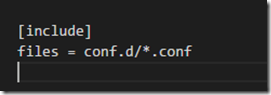
修改配置文件可用“supervisorctl reload”命令来使其生效
遇到的错误
* Starting Supervisor daemon manager...
Error: Another program is already listening on a port that one of our HTTP servers is configured to use. Shut this program down first before starting supervisord.
For help, use /usr/bin/supervisord -h
...fail!
解决办法
find / -name supervisor.sock
unlink /***/supervisor.sock
6、配置对ASP.NET Core应用的守护
创建一个 Core.Web.conf文件,内容大致如下
[program:Core.Web]
command=dotnet Core.Web.dll ;
directory=/home/netcore/ ; #发布目录 ;
autorestart=true ;
autostart=true ;
stderr_logfile=/var/log/core.web.err.log ;
stdout_logfile=/var/log/core.web.out.log ;
environment=ASPNETCORE_ENVIRONMENT=Production ;
user=root ;
stopsignal=INT ;
startsecs=1 ;
将文件拷贝至:“/etc/supervisor/conf.d/Core.Web.conf”下
运行supervisord,查看是否生效
[root@bogon ~]# supervisord -c /etc/supervisor/supervisord.conf
Error: Another program is already listening on a port that one of our HTTP servers is configured to use. Shut this program down first before starting supervisord.
For help, use /usr/bin/supervisord -h
[root@bogon ~]# find / -name supervisor.sock
/tmp/supervisor.sock
[root@bogon ~]# unlink /***/supervisor.sock
[root@bogon ~]# supervisord -c /etc/supervisor/supervisord.conf
[root@bogon ~]# ps -ef | grep Core.Web
root 24817 1296 0 11:07 pts/0 00:00:02 dotnet Core.Web.dll
root 35113 24513 0 11:40 pts/1 00:00:00 grep --color=auto Core.Web
7、配置Supervisor开机启动
新建一个“supervisord.service”文件
# dservice for systemd (CentOS 7.0+)
# by ET-CS (https://github.com/ET-CS)
[Unit]
Description=Supervisor daemon
[Service]
Type=forking
ExecStart=/usr/bin/supervisord -c /etc/supervisor/supervisord.conf
ExecStop=/usr/bin/supervisorctl shutdown
ExecReload=/usr/bin/supervisorctl reload
KillMode=process
Restart=on-failure
RestartSec=42s
[Install]
WantedBy=multi-user.target
将文件拷贝至:“/usr/lib/systemd/system/supervisord.service”
执行命令:systemctl enable supervisord
[root@bogon ~]# systemctl enable supervisord
Created symlink from /etc/systemd/system/multi-user.target.wants/supervisord.service to /usr/lib/systemd/system/supervisord.service.
执行命令:systemctl is-enabled supervisord #来验证是否为开机启动
[root@bogon ~]# systemctl is-enabled supervisord
enabled
附件:点击下载
参考:
https://www.cnblogs.com/Leo_wl/p/5734988.html
https://www.cnblogs.com/zuqing/p/8231957.html
https://www.cnblogs.com/firesnow/archive/2013/03/19/2969734.html
https://www.cnblogs.com/Hai--D/p/5820718.html
supervisord
[root@izj6cc2th4yjgg36bu9203z supervisor]# supervisorctl reload
error: <class 'socket.error'>, [Errno 2] No such file or directory: file: /usr/lib64/python2.7/socket.py line: 224
[root@izj6cc2th4yjgg36bu9203z supervisor]# supervisord
/usr/lib/python2.7/site-packages/supervisor-3.3.4-py2.7.egg/supervisor/options.py:461: UserWarning: Supervisord is running as root and it is searching for its configuration file in default locations (including its current working directory); you probably want to specify a "-c" argument specifying an absolute path to a configuration file for improved security.
'Supervisord is running as root and it is searching '
[root@izj6cc2th4yjgg36bu9203z supervisor]# supervisorctl reload
Restarted supervisord
.net core 2.0部署到CentOS7系统的更多相关文章
- ASP.NET Core 1.0 部署 HTTPS (.NET Framework 4.5.1)
var appInsights=window.appInsights||function(config){ function r(config){t[config]=function(){var i= ...
- ASP.NET Core 1.0 部署 HTTPS
ASP.NET Core 1.0 部署 HTTPS ASP.NET Core 1.0 部署 HTTPS (.NET Framework 4.5.1) 提示 更新时间:2016年01月23日. 在目前介 ...
- .NET Core 3.0 部署在docker上运行
自从.NET Core3.0发布之后,写了几篇关于.NET Core 3.0的文章,有助于你快速入门.NET Core3.0. 本篇文章主要讲解如何一步步创建一个mvc项目,然后发布并部署在Docke ...
- 把Asp.Net Core 2.0部署在Linux上,使用Nginx代理服务器,并且用Systemctl命令以服务的方式监听项目
在Linux上部署.net core 2.0程序: 第一步:配置Nginx代理 在/etc/nginx/sites-available/default 中添加 server { listen ; lo ...
- win10下ASP.NET Core 2.0部署环境搭建(转)
此文用于记录在win10环境下,新建的Asp.net Core 2.0 Web应用项目如何运行在IIS上 一.运行环境 操作系统: Window10 家庭中文版 版本 10.0.15063 版本 15 ...
- .net core 2.0 jwt身份认证系统
经历了很久,.net core 2.0 终于发布了! 之前一直用的core 1.1,升级了2.0后发现认证的机制(Auth)发生了比较大的变化,在1.1中认证配置是在Configure中完成,而在2. ...
- Net Core 5.0 部署IIS错误-500.31-Failed to load ASP.NET Core runtime
Windows Server 2008 R2不支持.net core 3.0版本及以后更新的各个版本. 面对如上图提示,第一想到的就是服务器安装的SDK或者hosting版本有问题,第一时间检查了安装 ...
- asp.net core 应用docke部署到centos7
前言 前期准备 win10 (不要安装hyper-V) VMware-Workstation-Pro/15.0 Xshell6 (非必需) VS2019 以上环境请自行安装 都是默认安装没什么可说的 ...
- DotNet Core 2.0部署后外网IP访问
将DotNet Core2.0项目部署在Ubuntu上并且运行后,可以用localhost:5000来访问. 但是如果这时候用外网来访问就不行了. 这时候就有两种解决方案,第一种是用Nginx做代理实 ...
随机推荐
- Spark internal - 多样化的运行模式(上)
Spark的运行模式多种多样,在单机上既可以以本地模式运行,也可以以伪分布式模式运行.而当以分布式的方式运行在Cluster集群中时,底层的资源调度可以使用Mesos 或者是Hadoop Yarn , ...
- IDEA04 工具窗口管理、各种跳转、高效定位、行操作、列操作、live template、postfix、alt enter、重构、git使用
1 工具窗口管理 所有的窗口都是在view -> tools windows 下面的,这些窗口可以放在IDEA的上下左右各个位置:右键某个窗口后选择move to 即可进行位置调整 2 跳转 2 ...
- spring4-5-事务管理
1.简单介绍 事务管理是企业级应用程序开发中必不可少的技术, 用来确保数据的完整性和一致性. 事务就是一系列的动作, 它们被当做一个单独的工作单元. 这些动作要么全部完成, 要么全部不起作用 事务的 ...
- mybaties 一对多关系映射
背景: 数据库格式如下图所示 现在要统计出在一段时间内dimension_type为op即所有运营商的pv.uv.vv等指标的数组,以便页面显示出每个运营商在该事件段内历史指标曲线图. 分析: 返回的 ...
- Openssl oscp命令
一.简介 ocsp,在线证书状态命,能够执行很多OCSP的任务,可以被用于打印请求文件和响应文件, 二.语法 openssl ocsp [-out file] [-issuer file] [-cer ...
- 数字图像处理实验(总计23个)汇总 标签: 图像处理MATLAB 2017-05-31 10:30 175人阅读 评论(0)
以下这些实验中的代码全部是我自己编写调试通过的,到此,最后进行一下汇总. 数字图像处理实验(1):PROJECT 02-01, Image Printing Program Based on Half ...
- Luogu 4245 【模板】任意模数NTT
这个题还有一些其他的做法,以后再补,先记一下三模数$NTT$的方法. 发现这个题不取模最大的答案不会超过$10^5 \times 10^9 \times 10^9 = 10^{23}$,也就是说我们可 ...
- 白盒测试实践-任务进度-Day05
所使用静态代码检查工具 阿里巴巴Java开发代码检测IDE插件 小组成员 华同学.郭同学.覃同学.刘同学.穆同学.沈同学 任务进度 任务已经进入收官阶段,为了对大家各自任务完成情况进行确认,保证任务能 ...
- eclipse 按装lombok与注解说明
原文:http://www.cnblogs.com/ywqbj/p/5711691.html 一.安装lombok 1.下载 lombok-1.16.16.jar 包 我的下载完后放到:/root ...
- CodeForces 690C2 Brain Network (medium)(树上DP)
题意:给定一棵树中,让你计算它的直径,也就是两点间的最大距离. 析:就是一个树上DP,用两次BFS或都一次DFS就可以搞定.但两次的时间是一样的. 代码如下: #include<bits/std ...