
Calculating and saving space in PostgreSQL
CREATE TABLE t (

    a BIGSERIAL NOT NULL,               -- 8 b

    b SMALLINT,                         -- 2 b

    c SMALLINT,                         -- 2 b

    d REAL,                             -- 4 b

    e REAL,                             -- 4 b

    f REAL,                             -- 4 b

    g INTEGER,                          -- 4 b

    h REAL,                             -- 4 b

    i REAL,                             -- 4 b

    j SMALLINT,                         -- 2 b

    k INTEGER,                          -- 4 b

    l INTEGER,                          -- 4 b

    m REAL,                             -- 4 b

    CONSTRAINT a_pkey PRIMARY KEY (a)

);
The above adds up to 50 bytes per row. My experience is that I need another 40% to 50% for system overhead, without even any user-created indexes to the above. So, about 75 bytes per row. I will have many, many rows in the table, potentially upward of 145 billion rows, so the table is going to be pushing 13-14 terabytes. What tricks, if any, could I use to compact this table? My possible ideas below ...
Convert the real values to integer. If they can stored as smallint, that is a saving of 2 bytes per field.
Convert the columns b .. m into an array. I don't need to search on those columns, but I do need to be able to return one column's value at a time. So, if I need column g, I could do something like
SELECT a, arr[] FROM t;
Would I save space with the array option? Would there be a speed penalty?
Any other ideas?
A:
"Column Tetris"
Actually, you can do something, but this needs deeper understanding. The keyword is alignment padding. Every data type has specific alignment requirements.
You can minimize space lost to padding between columns by ordering them favorably. The following (extreme) example would waste a lot of physical disk space:
CREATE TABLE t (

    e int2    -- 6 bytes of padding after int2

  , a int8

  , f int2    -- 6 bytes of padding after int2

  , b int8

  , g int2    -- 6 bytes of padding after int2

  , c int8

  , h int2    -- 6 bytes of padding after int2

  , d int8)
To save 24 bytes per row, use instead:
CREATE TABLE t (

    a int8

  , b int8

  , c int8

  , d int8

  , e int2

  , f int2

  , g int2

  , h int2)   -- 4 int2 occupy 8 byte (MAXALIGN), no padding at the end
As a rule of thumb, if you put 8-byte columns first, then 4-bytes, 2-bytes and 1-byte columns last you can't go wrong. text or boolean do not have alignment restrictions like that, some other types do. Some types can be compressed or "toasted" (stored out of line).(注:在pg9.6版本中,text是有对齐限制的,对齐要求是4 bytes,boolean仍不无对齐要求)。
Normally, you may save a couple of bytes per row at best playing "column tetris". None of this is necessary in most cases. But with billions of rows it can mean a couple of gigabytes easily.
You can test the actual column / row size with the function pg_column_size().
Be aware that some data types can use more space in RAM than on disk (compressed format). So you can get bigger results for constants (RAM format) than for table columns (disk format) when testing the same value (or row of values vs. table row) with pg_column_size().
For example:
CREATE TABLE t1 (

    e int2    -- 6 bytes of padding after int2

  , a int8

  , f int2    -- 6 bytes of padding after int2

  , b int8

  , g int2    -- 6 bytes of padding after int2

  , c int8

  , h int2    -- 6 bytes of padding after int2

  , d int8);

INSERT INTO t1 VALUES (1,1,1,1,1,1,1,1);

CREATE TABLE t2 (

    a int8

  , b int8

  , c int8

  , d int8

  , e int2

  , f int2

  , g int2

  , h int2);

INSERT INTO t2 VALUES (1,1,1,1,1,1,1,1);
swrd=# SELECT pg_column_size(t1) AS not_optimized FROM t1 LIMIT 1;

 not_optimized

---------------

            88

(1 row)

swrd=#

swrd=# SELECT pg_column_size(t2) AS optimized FROM t2 LIMIT 1;

 optimized

-----------

        64

(1 row)

swrd=#

swrd=# SELECT pg_column_size('{1}'::int[]) AS int_plus_array_overhead;

 int_plus_array_overhead

-------------------------

                      28

(1 row)
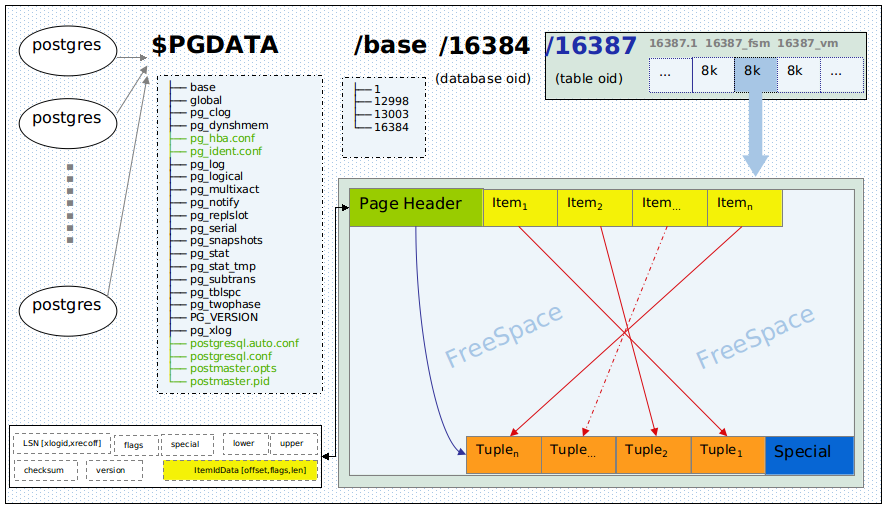
Overhead per tuple (row)
4 bytes per row for the item pointer - not subject to above considerations.
And at least 24 bytes (23 + padding) for the tuple header. The manual on Database Page Layout:
There is a fixed-size header (occupying 23 bytes on most machines), followed by an optional null bitmap, an optional object ID field, and the user data.
For the padding between header and user data, you need to know MAXALIGN on your server - typically 8 bytes on a 64-bit OS (or 4 bytes on a 32-bit OS). If you are not sure, check out pg_controldata.
The actual user data (columns of the row) begins at the offset indicated by t_hoff, which must always be a multiple of the MAXALIGN distance for the platform.
So you typically get the storage optimum by packing data in multiples of 8 bytes.
There is nothing to gain in the example you posted. It's already packed tightly. 2 bytes of padding after the last int2, 4 bytes at the end. You could consolidate the padding to 6 bytes at the end, which wouldn't change anything.
Overhead per data page
Some overhead per data page (typically 8 KB): Remainders not big enough to fit another tuple, and more importantly dead rows or a percentage reserved with the FILLFACTOR setting.
There are a couple of other factors for size on disk to take into account:
- How many records can I store in 5 MB of PostgreSQL on Heroku?
- Does not using NULL in PostgreSQL still use a NULL bitmap in the header?
- Configuring PostgreSQL for read performance
Array types?
With array like you were evaluating, you would add 24 bytes of overhead for the array type alone. Plus, elements of an array occupy space as usual. Nothing to gain there.
注:
1、pg在存储层,特别是行的存储层面,存储字段时,对一些字段要求对齐填充,不同的类型要求不同。下面是常用类型的对齐填充要求(typalign)、类型长度(typlen)、存储类型(typstorage)
swrd=# select typname,typlen,typalign,typstorage from pg_type where typname in ('int4','int8','varchar','text','timestamp','numeric','bool');

  typname  | typlen | typalign | typstorage

-----------+--------+----------+------------

 bool      |      1 | c        | p

 int8      |      8 | d        | p

 int4      |      4 | i        | p

 text      |     -1 | i        | x

 varchar   |     -1 | i        | x

 timestamp |      8 | d        | p

 numeric   |     -1 | i        | m

(7 rows)
对齐类型的官方说明:
c = char alignment, i.e., no alignment needed.

s = short alignment (2 bytes on most machines).

i = int alignment (4 bytes on most machines).

d = double alignment (8 bytes on many machines, but by no means all).
关于类型存储的官方说明:
p: Value must always be stored plain.

e: Value can be stored in a “secondary” relation (if relation has one, see pg_class.reltoastrelid).

m: Value can be stored compressed inline.

x: Value can be stored compressed inline or stored in “secondary” storage.
postgres@db-> pg_controldata |grep align

Maximum data alignment:               8


Calculating and saving space in PostgreSQL的更多相关文章
- How to get the free disk space in PostgreSQL (PostgreSQL获取磁盘空间)
Get the current free disk space in PostgreSQL PostgreSQL获取磁盘空间 from eshizhan Here has a simple way t ...
- Measure the size of a PostgreSQL table row
Q: I have a PostgreSQL table. select * is very slow whereas select id is nice and quick. I think i ...
- PostgreSQL源码安装文档
This document describes the installation of PostgreSQL using the source code distribution. (If yo ...
- 记一次CUDA编程任务
这个月6号开始,着手解决一个具有实际意义的计算任务.任务数据有9879896条,每条包含30个整数,任务是计算每两条数据之间的斯皮尔相关系数及其P值.原始数据只有500+MB,因此我并不认为这是个多么 ...
- Level shifting a +/- 2.5V signal to 0 - 5V
Google : Op-Amp Level Shifter Level shifting a +/- 2.5V signal to 0 - 5V I have a front end module t ...
- L364 Should Your Resume Be One Page or Two?
Should Your Resume Be One Page or Two? Conventional wisdom suggests that you should keep it short: A ...
- what are stop words
what are stop words 一.总结 一句话总结:就是在seo的关键词中不要有stop words,不然的话搜索引擎会直接忽略 stop words most common words ...
- python学习1 ---range()函数
奇怪的现象 在paython3中 print(range(10)) 得出的结果是 range(0,10) ,而不是[0,1,2,3,4,5,6,7,8,9] ,为什么呢? 官网原话: In many ...
- Non-Inverting Level Shifter : +/-5V signal into a 0 to 3.3V
http://electronicdesign.com/boards/non-inverting-level-shifter-requires-only-one-op-amp-one-supply-v ...
随机推荐
- Unity编辑器扩展 Chapter3--Create Custom Inspector
一.Create Custom Inspector 重绘inspector面板一方面是我们的挂在脚本的窗口变得友好,另一方面可以让其变得更强大,比如添加一些有效性验证. 二.重要说明 1.Editor ...
- POJ-2018(二分)
//意是在一个数组里,寻找一段连续和,使其平均和最大,但是长度不能小于F, //首先可以看出是满足单调性的,但是怎么二分呢, //我们先枚举一个可能的数. //然后数组里的值全部减去这个值(结果会有正 ...
- Android错误:can not get file data of lua/start_v2.op [LUA ERROR] [string "require "lua/start_v2””] 已解决
错误: can not get file data of lua/start_v2.op [LUA ERROR] [string "require "lua/start_v2””] ...
- JavaScript学习笔记(五)——类型、转换、相等、字符串
第六章 类型 相等 转换等 一.类型 1 typeof(); typeof是一个内置的JavaScript运算符,可用于探测其操作数的类型. 例: <script language=" ...
- R-CNN学习总结
R-CNN是一个比较早期的用于目标检测方法,但却十分经典,在此结合论文对这一方法做一个总结. (写给小白:通过下图简单理解图像分类,图像定位,目标检测和实例分割) R-CNN方法提出的背景: 1.近1 ...
- PytorchZerotoAll学习笔记(三)--自动求导
Pytorch给我们提供了自动求导的函数,不用再自己再推导计算梯度的公式了 虽然有了自动求导的函数,但是这里我想给大家浅析一下:深度学习中的一个很重要的反向传播 references:https:// ...
- Linux下文件的打包、解压缩指令——tar,gzip,bzip2
本文是对 鸟叔的Linux私房菜(基础学习篇) 第三版 的学习笔记,原文可参考原书中文网站 鸟叔的Linux私房菜.更多详细信息可直接参考对应Linux命令的 man 帮助( 如 man tar). ...
- 20162328蔡文琛 Java课程总结
20162328 2016-2017-2<程序设计与数据结构>课程总结 一.每周作业.结对编程博客的链接汇总 预备作业01 20162328:表达对专业的期许.浅谈师生关系.对未来学习任务 ...
- Java多线程 -yield用法
前几天复习了一下多线程,发现有许多网上讲的都很抽象,所以,自己把网上的一些案例总结了一下! 一. Thread.yield( )方法: 使当前线程从执行状态(运行状态)变为可执行态(就绪状态).cpu ...
- 知识点总结:Linq和Lambda
基本语法: Linq:var result=from t in table order by sort ascending/descending select t: Lambda:var result ...