
Spark进阶之路-Standalone模式搭建
Spark进阶之路-Standalone模式搭建
作者:尹正杰
版权声明:原创作品,谢绝转载!否则将追究法律责任。
一.Spark的集群的准备环境
1>.master节点信息(s101)
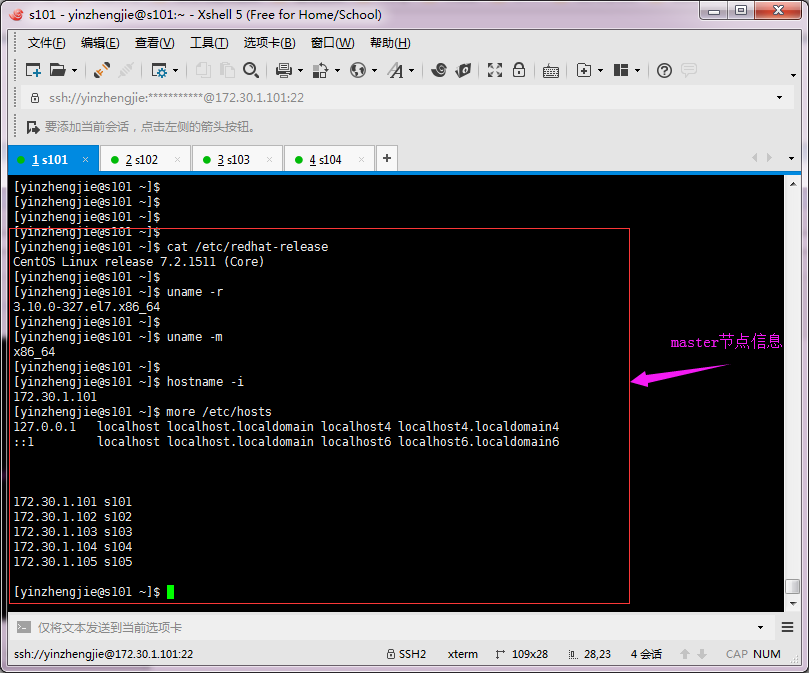
2>.worker节点信息(s102)

3>.worker节点信息(s103)

4>.worker节点信息(s104)

二.Spark的Standalone模式搭建
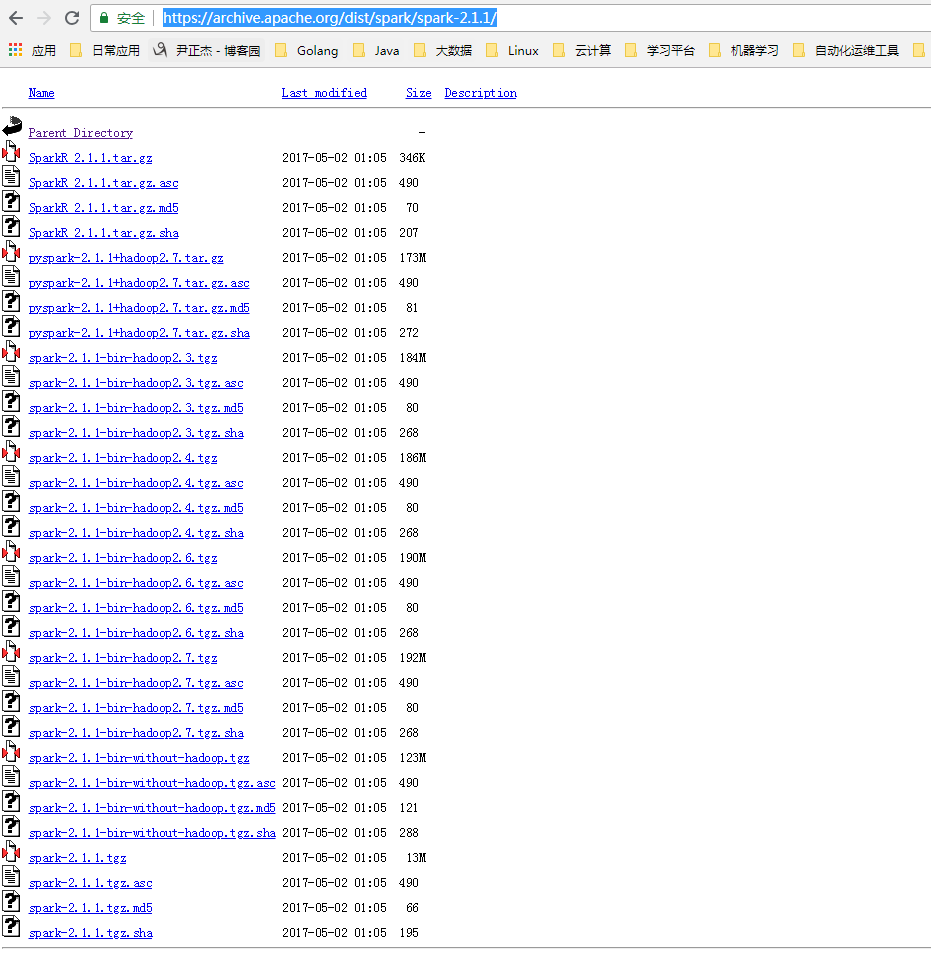
1>.下载Spark安装包
Spark下载地址:https://archive.apache.org/dist/spark/
[yinzhengjie@s101 download]$ sudo yum -y install wget

[sudo] password for yinzhengjie:

Loaded plugins: fastestmirror

Loading mirror speeds from cached hostfile

 * base: mirrors.aliyun.com

 * extras: mirrors.aliyun.com

 * updates: mirrors.aliyun.com

Resolving Dependencies

--> Running transaction check

---> Package wget.x86_64 :1.14-.el7_4. will be installed

--> Finished Dependency Resolution

Dependencies Resolved

=====================================================================================================================================================================

 Package                             Arch                                  Version                                         Repository                           Size

=====================================================================================================================================================================

Installing:

 wget                                x86_64                                1.14-.el7_4.                                 base                                 k

Transaction Summary

=====================================================================================================================================================================

Install   Package

Total download size:  k

Installed size: 2.0 M

Downloading packages:

wget-1.14-.el7_4..x86_64.rpm                                                                                                               |  kB  ::

Running transaction check

Running transaction test

Transaction test succeeded

Running transaction

  Installing : wget-1.14-.el7_4..x86_64                                                                                                                       /

  Verifying  : wget-1.14-.el7_4..x86_64                                                                                                                       /

Installed:

  wget.x86_64 :1.14-.el7_4.

Complete!

[yinzhengjie@s101 download]$
安装wget软件包([yinzhengjie@s101 download]$ sudo yum -y install wget)
[yinzhengjie@s101 download]$ wget https://archive.apache.org/dist/spark/spark-2.1.1/spark-2.1.1-bin-hadoop2.7.tgz #下载你想要下载的版本
2>.解压配置文件
[yinzhengjie@s101 download]$ ll

total

-rw-r--r--.  yinzhengjie yinzhengjie  Aug    hadoop-2.7..tar.gz

-rw-r--r--.  yinzhengjie yinzhengjie  May    jdk-8u131-linux-x64.tar.gz

-rw-r--r--.  yinzhengjie yinzhengjie  Jul    spark-2.1.-bin-hadoop2..tgz

-rw-r--r--.  yinzhengjie yinzhengjie   Jun  : zookeeper-3.4..tar.gz

[yinzhengjie@s101 download]$

[yinzhengjie@s101 download]$ tar -xf spark-2.1.-bin-hadoop2..tgz -C /soft/              #加压Spark安装包到指定目录

[yinzhengjie@s101 download]$ ll /soft/

total

lrwxrwxrwx.   yinzhengjie yinzhengjie    Aug  : hadoop -> /soft/hadoop-2.7./

drwxr-xr-x.  yinzhengjie yinzhengjie  Aug  : hadoop-2.7.

lrwxrwxrwx.   yinzhengjie yinzhengjie    Aug  : jdk -> /soft/jdk1..0_131/

drwxr-xr-x.   yinzhengjie yinzhengjie  Mar    jdk1..0_131

drwxr-xr-x.  yinzhengjie yinzhengjie  Apr    spark-2.1.-bin-hadoop2.

lrwxrwxrwx.   yinzhengjie yinzhengjie    Aug  : zk -> /soft/zookeeper-3.4./

drwxr-xr-x.  yinzhengjie yinzhengjie  Mar  : zookeeper-3.4.

[yinzhengjie@s101 download]$ ll /soft/spark-2.1.-bin-hadoop2./                    #查看目录结构

total

drwxr-xr-x.  yinzhengjie yinzhengjie   Apr    bin

drwxr-xr-x.  yinzhengjie yinzhengjie   Apr    conf

drwxr-xr-x.  yinzhengjie yinzhengjie     Apr    data

drwxr-xr-x.  yinzhengjie yinzhengjie     Apr    examples

drwxr-xr-x.  yinzhengjie yinzhengjie   Apr    jars

-rw-r--r--.  yinzhengjie yinzhengjie  Apr    LICENSE

drwxr-xr-x.  yinzhengjie yinzhengjie   Apr    licenses

-rw-r--r--.  yinzhengjie yinzhengjie  Apr    NOTICE

drwxr-xr-x.  yinzhengjie yinzhengjie   Apr    python

drwxr-xr-x.  yinzhengjie yinzhengjie     Apr    R

-rw-r--r--.  yinzhengjie yinzhengjie   Apr    README.md

-rw-r--r--.  yinzhengjie yinzhengjie    Apr    RELEASE

drwxr-xr-x.  yinzhengjie yinzhengjie   Apr    sbin

drwxr-xr-x.  yinzhengjie yinzhengjie     Apr    yarn

[yinzhengjie@s101 download]$
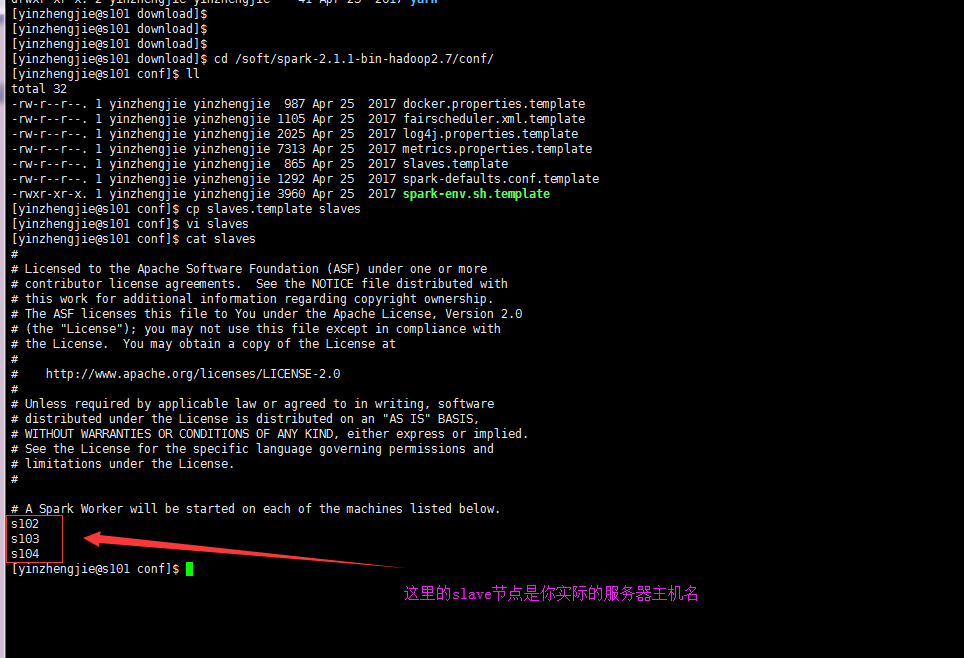
3>.编辑slaves配置文件,将worker的节点主机名输入,默认是localhost
[yinzhengjie@s101 download]$ cd /soft/spark-2.1.-bin-hadoop2./conf/

[yinzhengjie@s101 conf]$ ll

total

-rw-r--r--.  yinzhengjie yinzhengjie   Apr    docker.properties.template

-rw-r--r--.  yinzhengjie yinzhengjie  Apr    fairscheduler.xml.template

-rw-r--r--.  yinzhengjie yinzhengjie  Apr    log4j.properties.template

-rw-r--r--.  yinzhengjie yinzhengjie  Apr    metrics.properties.template

-rw-r--r--.  yinzhengjie yinzhengjie   Apr    slaves.template

-rw-r--r--.  yinzhengjie yinzhengjie  Apr    spark-defaults.conf.template

-rwxr-xr-x.  yinzhengjie yinzhengjie  Apr    spark-env.sh.template

[yinzhengjie@s101 conf]$ cp slaves.template slaves

[yinzhengjie@s101 conf]$ vi slaves

[yinzhengjie@s101 conf]$ cat slaves

#

# Licensed to the Apache Software Foundation (ASF) under one or more

# contributor license agreements.  See the NOTICE file distributed with

# this work for additional information regarding copyright ownership.

# The ASF licenses this file to You under the Apache License, Version 2.0

# (the "License"); you may not use this file except in compliance with

# the License.  You may obtain a copy of the License at

#

#    http://www.apache.org/licenses/LICENSE-2.0

#

# Unless required by applicable law or agreed to in writing, software

# distributed under the License is distributed on an "AS IS" BASIS,

# WITHOUT WARRANTIES OR CONDITIONS OF ANY KIND, either express or implied.

# See the License for the specific language governing permissions and

# limitations under the License.

#

# A Spark Worker will be started on each of the machines listed below.

s102

s103

s104

[yinzhengjie@s101 conf]$
4>.编辑spark-env.sh文件,指定master节点和端口号
[yinzhengjie@s101 ~]$ cp /soft/spark/conf/spark-env.sh.template /soft/spark/conf/spark-env.sh

[yinzhengjie@s101 ~]$

[yinzhengjie@s101 ~]$ echo export JAVA_HOME=/soft/jdk >> /soft/spark/conf/spark-env.sh

[yinzhengjie@s101 ~]$ echo SPARK_MASTER_HOST=s101 >> /soft/spark/conf/spark-env.sh

[yinzhengjie@s101 ~]$ echo SPARK_MASTER_PORT= >> /soft/spark/conf/spark-env.sh

[yinzhengjie@s101 ~]$

[yinzhengjie@s101 ~]$ grep -v ^# /soft/spark/conf/spark-env.sh | grep -v ^$

export JAVA_HOME=/soft/jdk

SPARK_MASTER_HOST=s101

SPARK_MASTER_PORT=

[yinzhengjie@s101 ~]$
5>.将s101的spark配置信息分发到worker节点
[yinzhengjie@s101 ~]$ more `which xrsync.sh`

#!/bin/bash

#@author :yinzhengjie

#blog:http://www.cnblogs.com/yinzhengjie

#EMAIL:y1053419035@qq.com

#判断用户是否传参

if [ $# -lt  ];then

        echo "请输入参数";

        exit

fi

#获取文件路径

file=$@

#获取子路径

filename=`basename $file`

#获取父路径

dirpath=`dirname $file`

#获取完整路径

cd $dirpath

fullpath=`pwd -P`

#同步文件到DataNode

for (( i=;i<=;i++ ))

do

        #使终端变绿色

        tput setaf

        echo =========== s$i %file ===========

        #使终端变回原来的颜色,即白灰色

        tput setaf

        #远程执行命令

        rsync -lr $filename `whoami`@s$i:$fullpath

        #判断命令是否执行成功

        if [ $? ==  ];then

                echo "命令执行成功"

        fi

done

[yinzhengjie@s101 ~]$
需要配置无秘钥登录,之后执行启动脚本进行同步([yinzhengjie@s101 ~]$ more `which xrsync.sh`)
关于配置无秘钥登录请参考我之间的笔记:https://www.cnblogs.com/yinzhengjie/p/9065191.html。配置好无秘钥登录后,直接执行上面的脚本进行同步数据。
[yinzhengjie@s101 ~]$ xrsync.sh /soft/spark-2.1.-bin-hadoop2./

=========== s102 %file ===========

命令执行成功

=========== s103 %file ===========

命令执行成功

=========== s104 %file ===========

命令执行成功

[yinzhengjie@s101 ~]$
6>.修改配置文件,将spark运行脚本添加至系统环境变量
[yinzhengjie@s101 ~]$ ln -s /soft/spark-2.1.-bin-hadoop2./ /soft/spark      #这里做一个软连接,方便简写目录名称

[yinzhengjie@s101 ~]$

[yinzhengjie@s101 ~]$ sudo vi /etc/profile                      #修改系统环境变量的配置文件

[sudo] password for yinzhengjie:

[yinzhengjie@s101 ~]$

[yinzhengjie@s101 ~]$ tail - /etc/profile

#ADD SPARK_PATH by yinzhengjie

export SPARK_HOME=/soft/spark

export PATH=$PATH:$SPARK_HOME/bin:$SPARK_HOME/sbin

[yinzhengjie@s101 ~]$

[yinzhengjie@s101 ~]$ source /etc/profile                      #重写加载系统配置文件,使其变量在当前shell生效。

[yinzhengjie@s101 ~]$
7>.启动spark集群
[yinzhengjie@s101 ~]$ more `which xcall.sh`

#!/bin/bash

#@author :yinzhengjie

#blog:http://www.cnblogs.com/yinzhengjie

#EMAIL:y1053419035@qq.com

#判断用户是否传参

if [ $# -lt  ];then

        echo "请输入参数"

        exit

fi

#获取用户输入的命令

cmd=$@

for (( i=;i<=;i++ ))

do

        #使终端变绿色

        tput setaf

        echo ============= s$i $cmd ============

        #使终端变回原来的颜色,即白灰色

        tput setaf

        #远程执行命令

        ssh s$i $cmd

        #判断命令是否执行成功

        if [ $? ==  ];then

                echo "命令执行成功"

        fi

done

[yinzhengjie@s101 ~]$
[yinzhengjie@s101 ~]$ more `which xcall.sh`
[yinzhengjie@s101 ~]$ /soft/spark/sbin/start-all.sh       #启动spark集群

starting org.apache.spark.deploy.master.Master, logging to /soft/spark/logs/spark-yinzhengjie-org.apache.spark.deploy.master.Master--s101.out

s102: starting org.apache.spark.deploy.worker.Worker, logging to /soft/spark/logs/spark-yinzhengjie-org.apache.spark.deploy.worker.Worker--s102.out

s103: starting org.apache.spark.deploy.worker.Worker, logging to /soft/spark/logs/spark-yinzhengjie-org.apache.spark.deploy.worker.Worker--s103.out

s104: starting org.apache.spark.deploy.worker.Worker, logging to /soft/spark/logs/spark-yinzhengjie-org.apache.spark.deploy.worker.Worker--s104.out

[yinzhengjie@s101 ~]$

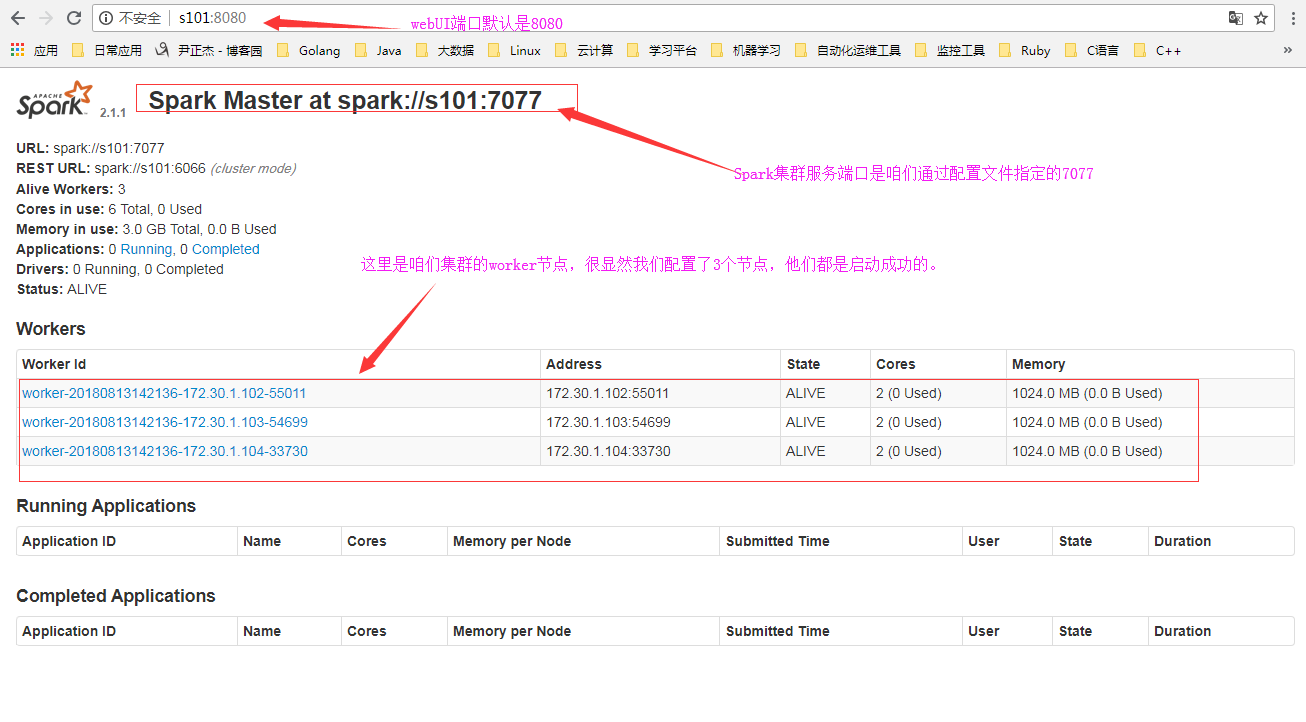
[yinzhengjie@s101 ~]$ xcall.sh jps              #查看进程master和slave节点是否起来了

============= s101 jps ============

 Jps

 Master

命令执行成功

============= s102 jps ============

 Jps

 Worker

命令执行成功

============= s103 jps ============

 Jps

 Worker

命令执行成功

============= s104 jps ============

 Jps

 Worker

命令执行成功

[yinzhengjie@s101 ~]$
8>.检查Spark的webUI界面
9>.启动spark-shell

三.在Spark集群中执行Wordcount
1>.链接到master集群([yinzhengjie@s101 ~]$ spark-shell --master spark://s101:7077)

2>.登录webUI,查看正在运行的APP

3>.查看应用细节

4>.查看job的信息
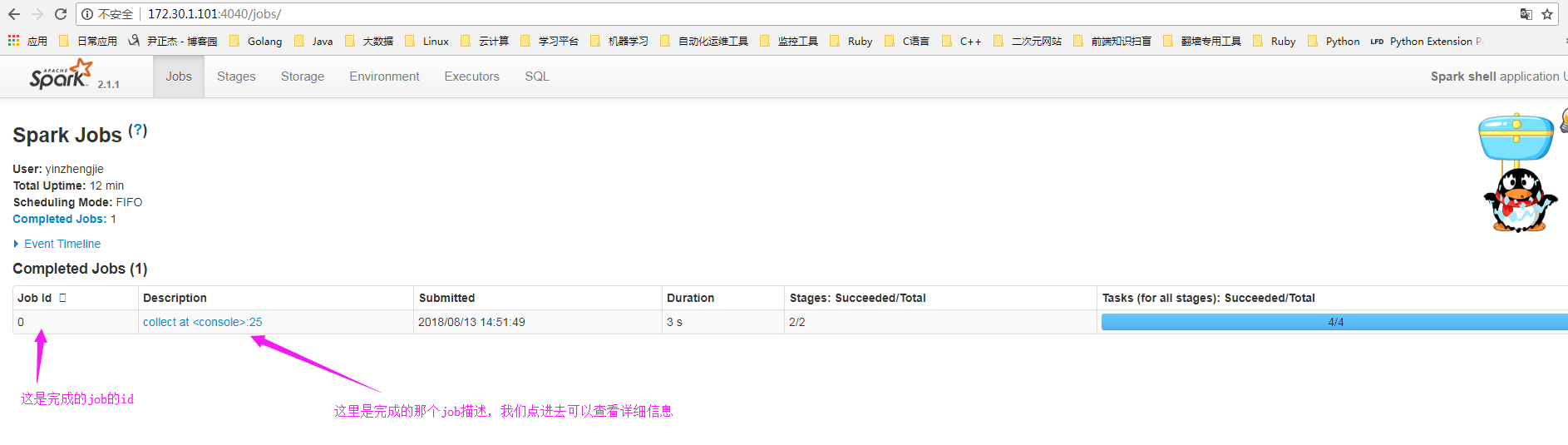
5>.查看stage

6>.查看具体的详细信息

7>.退出spark-shell

8>.查看spark的完成应用,发现日志没了?

那么问题来了。如果看日志呢?详情请参考:https://www.cnblogs.com/yinzhengjie/p/9410989.html。
Spark进阶之路-Standalone模式搭建的更多相关文章
- Spark进阶之路-Spark HA配置
Spark进阶之路-Spark HA配置 作者:尹正杰 版权声明:原创作品,谢绝转载!否则将追究法律责任. 集群部署完了,但是有一个很大的问题,那就是Master节点存在单点故障,要解决此问题,就要借 ...
- Spark进阶之路-日志服务器的配置
Spark进阶之路-日志服务器的配置 作者:尹正杰 版权声明:原创作品,谢绝转载!否则将追究法律责任. 如果你还在纠结如果配置Spark独立模式(Standalone)集群,可以参考我之前分享的笔记: ...
- Redis进阶:Redis的哨兵模式搭建
Redis进阶:Redis的哨兵模式搭建 哨兵机制介绍 单机版的Redis存在性能瓶颈,Redis通过提高主从复制实现读写分离,提高了了Redis的可用性,另一方便也能实现数据在多个Redis直接的备 ...
- 【SSH进阶之路】Hibernate搭建开发环境+简单实例(二)
Hibernate是很典型的持久层框架,持久化的思想是很值得我们学习和研究的.这篇博文,我们主要以实例的形式学习Hibernate,不深究Hibernate的思想和原理,否则,一味追求,苦学思想和原理 ...
- spark 源码编译 standalone 模式部署
本文介绍如何编译 spark 的源码,并且用 standalone 的方式在单机上部署 spark. 步骤如下: 1. 下载 spark 并且解压 本文选择 spark 的最新版本 2.2.0 (20 ...
- 【Spark】Spark-shell案例——standAlone模式下读取HDFS上存放的文件
目录 可以先用local模式读取一下 步骤 一.先将做测试的数据上传到HDFS 二.开发scala代码 standAlone模式查看HDFS上的文件 步骤 一.退出local模式,重新进入Spark- ...
- Spark环境搭建(七)-----------spark的Local和standalone模式启动
spark的启动方式有两种,一种单机模式(Local),另一种是多机器的集群模式(Standalone) Standalone 搭建: 准备:hadoop001,hadoop002两台安装spark的 ...
- Spark进阶之路-Spark提交Jar包执行
Spark进阶之路-Spark提交Jar包执行 作者:尹正杰 版权声明:原创作品,谢绝转载!否则将追究法律责任. 在实际开发中,使用spark-submit提交jar包是很常见的方式,因为用spark ...
- Spark3.0.1各种集群模式搭建
对于spark前来围观的小伙伴应该都有所了解,也是现在比较流行的计算框架,基本上是有点规模的公司标配,所以如果有时间也可以补一下短板. 简单来说Spark作为准实时大数据计算引擎,Spark的运行需要 ...
随机推荐
- 第三个spring冲刺第1天
在第二阶段,我们的要实现的基本功能都已经基本是实现了,现在在第三阶段,我们会完善算法的改进.容错问题的兼容还有附加的其他功能,例如计时等
- redis的优缺点
优点: 1 读写性能优异 2 支持数据持久化,支持AOF和RDB两种持久化方式 3 支持主从复制,主机会自动将数据同步到从机,可以进行读写分离. 4 数据结构丰富:除了支持string类型的value ...
- View.requestLayout
参考:安卓高手之路之图形系统(6)requestLayout的流程 一.invalidate和postInvalidate 这两个方法都是在重绘当前控件的时候调用的.invalidate在UI线程中调 ...
- python 深入浅出装饰器(decorator)--举的例子关于星级争霸2(starcraft2)
其实早就想写一篇深入浅出装饰器的文章,苦于一直没有找到很好的例子描述,自己除了在写api参数检测和日志打印的时候用到以外,其他地方也没有什么重度使用所以一直没有写. 我不会讲解装饰器的理论,还有各种基 ...
- 线性代数的本质与几何意义 01. 向量是什么?(3blue1brown 咪博士 图文注解版)
向量是线性代数最基础.最基本的概念之一,要深入理解线性代数的本质,首先就要搞清楚向量到底是什么? 向量之所以让人迷糊,是因为我们在物理.数学,以及计算机等许多地方都见过它,但又没有彻底弄懂,以至于似是 ...
- fopen
转自http://blog.sina.com.cn/s/blog_4b986f1a0101349k.html matlab中fopen函数在指定文件打开的实例如下: *1)“fopen”打开文件,赋予 ...
- Hadoop源码分析之FileSystem抽象文件系统
Hadopo提供了一个抽象的文件系统模型FileSystem,HDFS是其中的一个实现. FileSystem是Hadoop中所有文件系统的抽象父类,它定义了文件系统所具有的基本特征和基本操作. Fi ...
- bzoj 3295 动态逆序对 (三维偏序,CDQ+树状数组)
链接:https://www.lydsy.com/JudgeOnline/problem.php?id=3295 思路: 可以将这道题看成倒着插入,这样就可以转化成求逆序对数,用CDQ分治降维,正反用 ...
- MT【30】椭圆的第二定义解题
问题:上式表示的区域是怎样的? 解答:利用椭圆第二定义易知当取等号时为椭圆,又令$y$趋向于$+\infty$时不等号不成立,故可以判断为椭圆内部区域. 评:利用mathmatics软件容易得到
- MT【7】伯努利不等式
评:伯努利不等式: 若$r\le0$或者$r\ge1$,$(1+x)^r\ge1+rx$, 若$0\le r\le1$,$(1+x)^r\le1+rx$