
Ubuntu+docker+gitlab安装和使用
以前自己写的代码都是在本地,因为都是自己一个人维护,现在交给团队维护了,所以想着搭建一个gitlab
1,拉镜像
安装非常简单
docker search gitlab 搜索镜像
docker pull gitlab/gitlab-ce 拉取镜像
docker images 查询镜像
2,创建本地映射文件
test-team-server:~$ mkdir gitlab
test-team-server:~$ cd gitlab/
test-team-server:~/gitlab$ mkdir config logs data
3,安装
docker run --detach -p 8843:443 -p 8090:80 -p 2222:22 --name gitlab --restart always -v /home/dapeng/gitlab/config:/etc/gitlab -v /home/dapeng/gitlab/logs:/var/log/gitlab -v /home/dapeng/gitlab/data:/var/opt/gitlab gitlab/gitlab-ce
docker ps -a | grep gitlab
docker logs -f gitlab
4,配置
访问gitlab http://192.168.1.119:8090
(1)设置密码,初始账户为root,设置密码之后就可以登录了
(2)重启、启动、停止、状态
gitlab-ctl restart // 重启
gitlab-ctl stop // 停止
gitlab-ctl start // 启动
gitlab-ctl status //状态
(3)修改hostname
gitlab项目默认是以容器id作为hostname,ssh访问的时候会提示hostname找不到,所以我们需要修改一下配置文件
/home/dapeng/gitlab/config/gitlab.rb 主要修改以下几个值
external_url 'http://192.168.1.119' #修改为http访问的外部映射的主机ip和port
gitlab_rails['gitlab_ssh_host'] = '192.168.1.119' #修改为ssh访问的外部映射的主机ip或者hostname
gitlab_rails['gitlab_shell_ssh_port'] = 2222 #ssh默认是22端口,改成映射到外部的2222端口
然后执行一下docker restart gitlab
这样在项目中显示的访问gitlab仓库的地址是
ssh://git@192.168.1.119:8090:2222/automation/apitest.git
http://192.168.1.119/automation/apitest.git
(4)下载git.exe 到本地windows
- Git-2.8.1-64-bit.exe 安装,默认选项即可
- 打开git bash, 生成密钥,有关密钥的说明可以参考 http://192.168.1.119:8090/help/ssh/README#generating-a-new-ssh-key-pair
ssh-keygen -o -t rsa -b 4096 -C "xxxxxxxxx@xxxxx.com" 然后一直回车
- 复制~/.ssh/id_rsa.pub内容,
~表示用户目录,比如windows就是C:\Users\Administrator
Administrator@ERIC MINGW64 ~/.ssh
$ cat id_rsa.pub
ssh-rsa AAAAB3NzaC1yc2EAAAADAQABAAACAQCrPgBRiWV7d6yRTdkLkP0ae+6P571uMDtxAL1x2fsNGWvmzFZTHUrHS49UJgPpaGu0ZtOv4X7bX4mmEHlmSXo5v6lZ5YC+oEAWXgg2c+ES9jf4llfOggCYEIrek//xF6OTOrZxpvzrTkAroiTdeRtivnFnIMgaNz3rO53ryH0M5L9vzWFKm7ufuKyqY/910X73+9pP9Rf1txWgY8cd3iVGSjooKPND0rY34sVm7JQ16llx49MjIKTX79e2V3p+wy6LOuSawwH9XtQrakj01aXmhQHKIRIqTn0M0FYtEitEQxuagBdzeyMF46rMWrk8k87FnJaPsIm/WNRMVimiL4UlSjp3iSg4p/+GebzdBr8S3oXT6lWglQBVXLEYHZgXRQXNhTCOoeOWEdW1wtKYPpGY+LtMkSEGbt0/v68Fj3oDXllVle3SjlI4i9KF86snfQPd3jDvBu7padvDmwtl3bLWKA38/DLe+cTUSHgymTTmfW6fDT5VpcAlKkyh6Dvcyb0hlUGdNVzasQ4nqtQtODpGhb5pfdtJlhZN2P0QlI7n0KAEPkuQUnpNMKf94fmUxiH6QQLOeVrWuZw4CW/B+bnYHoe85vySNhUI+H2qat5+3/p09AD+mxffKbSgmR6QWE9DXFTIGjtJ01dMFy699Qi8YOVsXwViOiu9Lab9ymxqLQ== hailiangyou@dingtalk.com
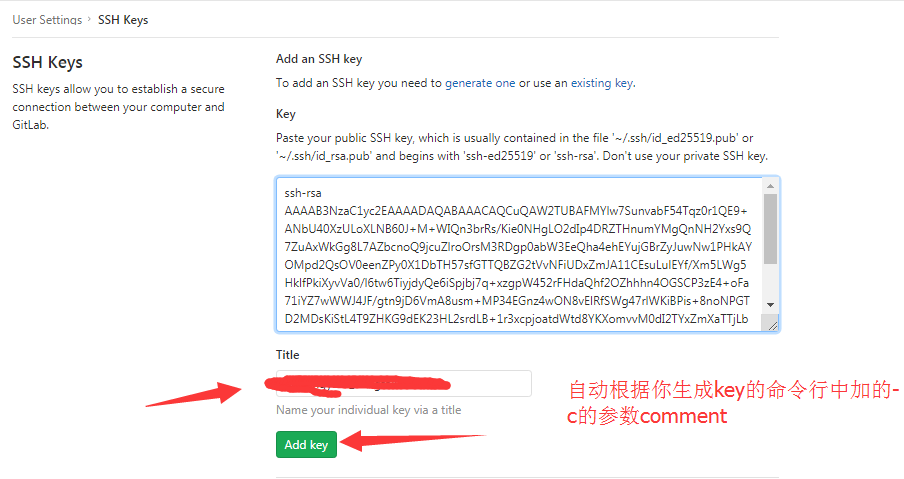
(4)网页上配置ssh-key
http://192.168.1.119:8090/profile/keys
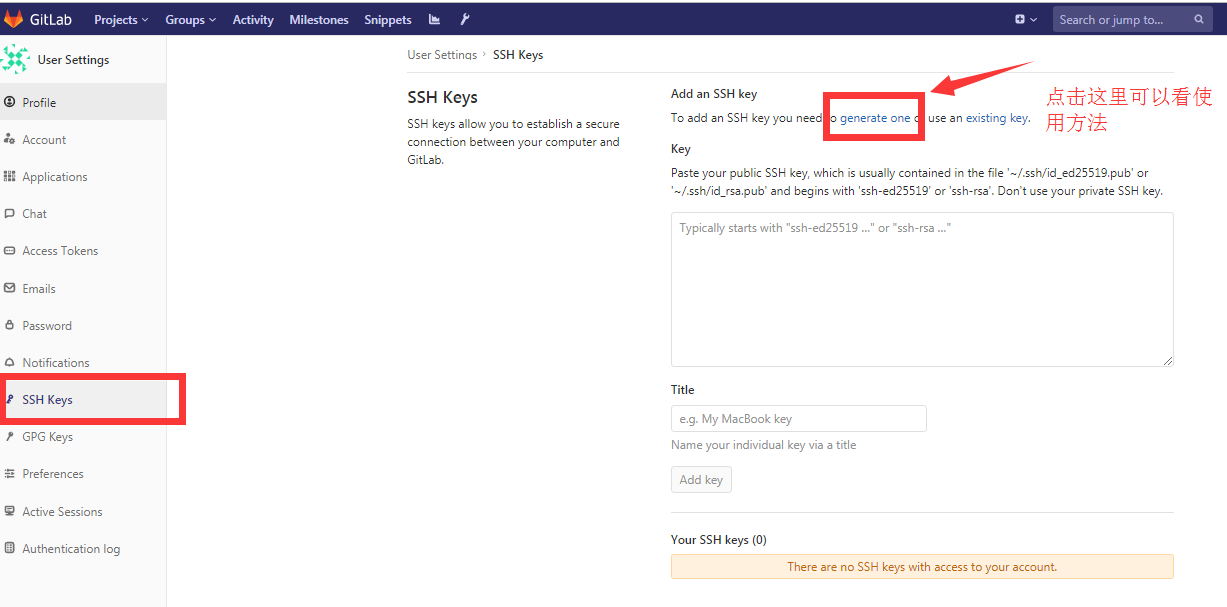
把上面cat出来的内容复制到gitlab页面上
5,拉取项目,git常规使用
1,创建一个文件夹作为仓库repo D盘下的repo文件夹
打开git bash, cd /d/repo
2,设置用户名和邮箱
git config --global user.name "eric"
git config --global user.email "xxxx@xxx.com"
3,克隆项目,默认拉取的是master分支
git clone ssh://git@192.168.1.119:2222/automation/apitest.git
Administrator@ERIC MINGW64 /d/repo
$ git clone ssh://git@192.168.1.119:2222/automation/apitest.git
Cloning into 'apitest-framework'...
The authenticity of host '[192.168.1.119]:2222 ([192.168.1.119]:2222)' can't be established.
ECDSA key fingerprint is SHA256:IoMGBM4jlCN20ynwVKKrvwUFb8pKP5BjfZy5QG0/A2c.
Are you sure you want to continue connecting (yes/no)? yes
Warning: Permanently added '[192.168.1.119]:2222' (ECDSA) to the list of known hosts.
remote: Enumerating objects: 3, done.
remote: Counting objects: 100% (3/3), done.
remote: Compressing objects: 100% (2/2), done.
remote: Total 3 (delta 0), reused 0 (delta 0)
Receiving objects: 100% (3/3), done.
Checking connectivity... done.
4,git使用
在本地创建一个待push的测试文件,test.md
touch test,md
git status #可以看到红色提示该分支有需要更新的文档 test.md

git add test.md #添加文件到待上传的缓冲区里
git commit -m "test push test.md" #提交并解释

git push origin master #提交到仓库主分支
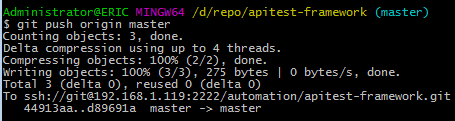
然后就可以在gitlab网页上看到刚刚提交的文件
关于更详细的git使用教程,可以查看https://www.runoob.com/git/git-tutorial.html
Ubuntu+docker+gitlab安装和使用的更多相关文章
- Ubuntu bitnami gitlab 安装
/************************************************************************************** * Ubuntu bit ...
- Centos + docker,Ubuntu + docker介绍安装及详细使用
docker笔记 常用命令 设置docker开机自启:sudo chkconfig docker on 查所有镜像: docker images 删除某个镜像:docker rmi CONTAINER ...
- ubuntu docker inflxudb(安装 使用 备份 还原 以及python编码) telegraf Grafana
inflxudb1.7.7 1.拉取最新的镜像 docker pull influxdb 2.运行实例: docker run -d --restart=always -p 8086:8086 -p ...
- ubuntu docker的安装和使用
Docker CE for Ubuntu Docker CE for Ubuntu is the best way to install the Docker platform on Ubuntu L ...
- Ubuntu Docker 简单安装 GitLab
相关博文: Ubuntu 简单安装 Docker Ubuntu 简单安装和配置 GitLab 服务器版本 Ubuntu 16.04 LTS. 1. 安装和配置 安装命令: sudo docker ru ...
- docker gitlab安装
mkdir -p /data/docker/volumes/gitlab chmod 777 /data/docker/volumes/gitlab cd /data/docker/volumes/g ...
- Ubuntu+docker+jenkins安装详细指南
最近项目上开始实行自动化测试,避免不了与jenkins等持续集成工具打交道,今天就给大家分享一下有关jenkins的简单安装和使用 1,准备环境 (1)ubuntu系统 (2)docker (3)je ...
- ubuntu docker 环境安装
转载:https://www.cnblogs.com/blog-rui/p/9946382.html 1. 在Ubuntu中安装Docker 更新ubuntu的apt源索引 sudo apt-get ...
- Ubuntu Docker 安装和配置 GitLab CI 持续集成
相关文章: Ubuntu Docker 简单安装 GitLab 劈荆斩棘:Gitlab 部署 CI 持续集成 目的:在 Ubuntu 服务器上,使用 Docker 安装和配置 GitLab Runne ...
随机推荐
- 分享各大CMS采集资源站网址合集
分享各大CMS采集资源站网址合集 http://www.172zy.xyz/ 172云资源 http://www.dbzyz.com/ 豆瓣云资源 http://www.gaoqingzy.com/ ...
- DES加解密工具类
这两天在跟友商对接接口,在对外暴露接口的时候,因为友商不需要登录即可访问对于系统来说存在安全隐患,所以需要友商在调用接口的时候需要将数据加密,系统解密验证后才执行业务.所有的加密方式并不是万能的,只是 ...
- Leetcode之深度优先搜索(DFS)专题-130. 被围绕的区域(Surrounded Regions)
Leetcode之深度优先搜索(DFS)专题-130. 被围绕的区域(Surrounded Regions) 深度优先搜索的解题详细介绍,点击 给定一个二维的矩阵,包含 'X' 和 'O'(字母 O) ...
- (数据科学学习手札68)pandas中的categorical类型及应用
一.简介 categorical是pandas中对应分类变量的一种数据类型,与R中的因子型变量比较相似,例如性别.血型等等用于表征类别的变量都可以用其来表示,本文就将针对categorical的相关内 ...
- 基于Docker搭建Jumpserver堡垒机操作实践
一.背景 笔者最近想起此前公司使用过的堡垒机系统,觉得用的很方便,而现在的公司并没有搭建此类系统,想着以后说不定可以用上:而且最近也有点时间,因此来了搭建堡垒机系统的兴趣,在搭建过程中参考了比较多的文 ...
- CentOS 源码安装MySQL5.7
一.安装方式源码安装,源码包名称mysql-boost-5.7.27.tar.gz,此版本包含boost库,在解压后的boost路径下.安装时,可以-DDOWNLOAD_BOOST=1 -DWITH_ ...
- 在IIS下部署PHP
没有.net ramework 4.0 的要先安装 dotNetFx40_Full_x86_x64.exe PHP压缩包 推荐用5.6.29版 IIS下PHP压缩包下载地址:"http:// ...
- SCRUM的五个价值观
转自:http://www.scrumcn.com/agile/scrum-knowledge-library/scrum.html#tab-id-8 承诺 – 愿意对目标做出承诺 专注– 把你的心思 ...
- luogu -P1095 守望者的逃离 - 分别DP
P1095 守望者的逃离: https://www.luogu.org/problemnew/show/P1095 题意: 有一个人要在S长度的直线上跑过去,初始有M的魔法值,用10点魔法值可以在一秒 ...
- hdu 1028 Ignatius and the Princess III 母函数
Ignatius and the Princess III Time Limit: 2000/1000 MS (Java/Others) Memory Limit: 65536/32768 K ...