
Webpack Loaders
【Webpack Loaders】

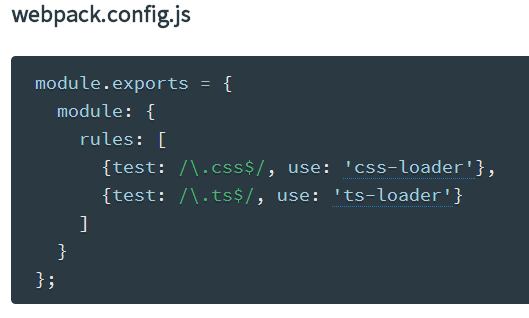
1、Query parameters
Loader can be passed query parameters via a query string (just like in the web). The query string is appended to the loader with ?. i.e. url-loader?mimetype=image/png.
Note: The format of the query string is up to the loader. See format in the loader documentation. Most loaders accept parameters in the normal query format (?key=value&key2=value2) and as JSON object (?{"key":"value","key2":"value2"}).
1)in require

2)in configuration


2、webpack analyzes all the node-style require() calls in your app and builds a bundle that you can serve up to the browser using a <script> tag.

3、A loader is a node module exporting a function.
the loader is called with one parameter: the content of the resource file as string.
The loader is expected to give back one or two values. The first value is a resulting JavaScript code as string or buffer. The second optional value is a SourceMap as JavaScript object.
when multiple loaders are chained, only the last loader gets the resource file and only the first loader is expected to give back one or two values (JavaScript and SourceMap). Values that any other loader give back are passed to the previous loader.
4、Loaders can be also be chained together by separating loaders with the !. This is helpful for applying multiple transformations to a file in a pipeline.

When chaining loaders, they are applied right to left (from the file, back). In the above example,my-styles.less will be transformed first by the less-loaderconverting it to css, and then passed to the css-loader where urls, fonts, and other resources are processed, and then finally passed to style-loader to be transformed into a <style> tag.
5、webpack treats every file (.css, .html, .scss, .jpg, etc.) as a module. However, webpack only understands JavaScript.
Loaders in webpack transform these files into modules as they are added to your dependency graph.
参考:
1、http://webpack.github.io/docs/using-loaders.html
Webpack Loaders的更多相关文章
- [Javascript] Webpack Loaders, Source Maps, and ES6
Using ES6 To use ES6, we need loader. Modify webpack.config.js file: module.exports = { entry: './in ...
- Webpack 常见静态资源处理 - 模块加载器(Loaders)+ExtractTextPlugin插件
Webpack 常见静态资源处理 - 模块加载器(Loaders)+ExtractTextPlugin插件 webpack系列目录 webpack 系列 一:模块系统的演进 webpack 系列 二: ...
- webpack学习总结
前言 在还未接触webpack,就有几个疑问: 1. webpack本质上是什么? 2. 跟异步模块加载有关系吗? 3. 可否生成多个文件,一定是一个? 4. 被引用的文件有其他异步加载模块怎么办? ...
- 解决初次使用webpack+antd-mobile时css不生效的问题
前端这块,最火的是angular.react.vue.根据你具体的业务场景,选择合适的框架或者类库.以react为例,新建一个项目时, css组件按钮,图片轮播等组件,最好不要重复造轮子,选择业内规范 ...
- webpack 介绍 & 安装 & 常用命令
webpack 介绍 & 安装 & 常用命令 webpack系列目录 webpack 系列 一:模块系统的演进 webpack 系列 二:webpack 介绍&安装 webpa ...
- Webpack 4 Tutorial: from 0 Conf to Production Mode
webpack 4 is out! The popular module bundler gets a massive update. webpack 4, what's new? A massive ...
- SystemJS to Webpack – Before You Begin
http://angularfirst.com/systemjs-to-webpack-before-you-begin/ This is a primer discussing why to mov ...
- git+webpack项目初始化<一>
目录结构 src + page view image service util git初始化 linux常用命令 rm -rf mmall-fe/ 删除 mkdir mmall-fe 创建文件夹 ls ...
- webpack 集成 jQuery 和 Avalon
webpack 系列 三:webpack 如何集成第三方js库 webpack系列目录 webpack 系列 一:模块系统的演进 webpack 系列 二:webpack 介绍&安装 webp ...
随机推荐
- 通俗理解 MVC , MVVM
MVC 也就是Model-View-Controller 的缩写,就是 模型-视图-控制器 : Model :管理数据 View :视图展示 Controller :响应用户操作,并将 Model 更 ...
- iOS跳转洁面时隐藏tabBar的方法
//1.设置self.tabBarController.tabBar.hidden=YES; self.tabBarController.tabBar.hidden=YES; //2. ...
- 数据持久化—真机上的Plist写入
其实写入不到真机里面主要是你写入时,当前那文件夹里你要写入的plist根本不存在 所以你怎么写都写不进去,所以你必须先创建你要写入的plist; 你用这样初始化程序就能自己创建: NSMutableA ...
- pychram 2018-01 安装pyQT5报错
pychram 2018-01 安装pyQT5报错
- 关于ioncube扩展的安装和使用
ioncube 是一个专业级的PHP加密解密工具 这里是按照此扩展的教程,安装以后就可以运行用ioncube加密的文件 引导安装说明:一.下载loader-wizard.php ioncube提供了一 ...
- jquery小效果:新浪游戏右侧导航菜单 (页面效果)
偷盗:新浪游戏右侧导航菜单 http://games.sina.com.cn 效果: 随着页面的滚动,左侧页面的内容,和右侧的导航菜单的按钮文字对应: 点击右侧的导航按钮,左侧页面滚动到相应的内容 2 ...
- python大法好——变量、常量、input()、数据类型、字符串、格式化输出、运算符、流程控制语句、进制、字符编码
python基础知识 1.变量 变量:把程序运算的中间结果临时存到内存里,以备后面的代码可以继续调用. 作用:A.存储数据. B.标记数据. 变量的声明规则: A:变量名只能是字母,数字或下划线任意组 ...
- 上下两个div, 一个固定高度, 另一个铺满屏幕
<div class="box"> <div class="el1"></div> <div class=" ...
- Crontab 删除N天前日志
linux是一个很能自动产生文件的系统,日志.邮件.备份等.虽然现在硬盘廉价,我们可以有很多硬盘空间供这些文件浪费,让系统定时清理一些不需要的文件很有一种爽快的事情.不用你去每天惦记着是否需要清理日志 ...
- block原理
block原理 block的本质是一个结构体,包含引用的外部变量及一个需要执行的函数的函数指针,在内存中可以有三个位置,即堆上.栈上和全局区(静态区).当block中没有引用外部变量时,block的位 ...