
Webpack Loaders
【Webpack Loaders】

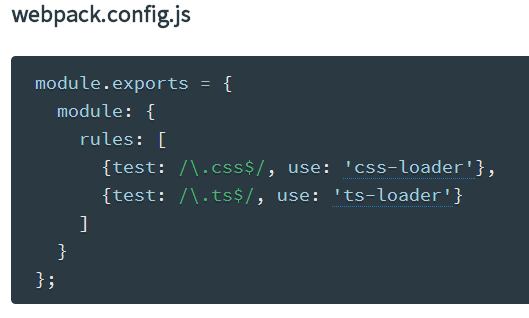
1、Query parameters
Loader can be passed query parameters via a query string (just like in the web). The query string is appended to the loader with ?. i.e. url-loader?mimetype=image/png.
Note: The format of the query string is up to the loader. See format in the loader documentation. Most loaders accept parameters in the normal query format (?key=value&key2=value2) and as JSON object (?{"key":"value","key2":"value2"}).
1)in require

2)in configuration


2、webpack analyzes all the node-style require() calls in your app and builds a bundle that you can serve up to the browser using a <script> tag.

3、A loader is a node module exporting a function.
the loader is called with one parameter: the content of the resource file as string.
The loader is expected to give back one or two values. The first value is a resulting JavaScript code as string or buffer. The second optional value is a SourceMap as JavaScript object.
when multiple loaders are chained, only the last loader gets the resource file and only the first loader is expected to give back one or two values (JavaScript and SourceMap). Values that any other loader give back are passed to the previous loader.
4、Loaders can be also be chained together by separating loaders with the !. This is helpful for applying multiple transformations to a file in a pipeline.

When chaining loaders, they are applied right to left (from the file, back). In the above example,my-styles.less will be transformed first by the less-loaderconverting it to css, and then passed to the css-loader where urls, fonts, and other resources are processed, and then finally passed to style-loader to be transformed into a <style> tag.
5、webpack treats every file (.css, .html, .scss, .jpg, etc.) as a module. However, webpack only understands JavaScript.
Loaders in webpack transform these files into modules as they are added to your dependency graph.
参考:
1、http://webpack.github.io/docs/using-loaders.html
Webpack Loaders的更多相关文章
- [Javascript] Webpack Loaders, Source Maps, and ES6
Using ES6 To use ES6, we need loader. Modify webpack.config.js file: module.exports = { entry: './in ...
- Webpack 常见静态资源处理 - 模块加载器(Loaders)+ExtractTextPlugin插件
Webpack 常见静态资源处理 - 模块加载器(Loaders)+ExtractTextPlugin插件 webpack系列目录 webpack 系列 一:模块系统的演进 webpack 系列 二: ...
- webpack学习总结
前言 在还未接触webpack,就有几个疑问: 1. webpack本质上是什么? 2. 跟异步模块加载有关系吗? 3. 可否生成多个文件,一定是一个? 4. 被引用的文件有其他异步加载模块怎么办? ...
- 解决初次使用webpack+antd-mobile时css不生效的问题
前端这块,最火的是angular.react.vue.根据你具体的业务场景,选择合适的框架或者类库.以react为例,新建一个项目时, css组件按钮,图片轮播等组件,最好不要重复造轮子,选择业内规范 ...
- webpack 介绍 & 安装 & 常用命令
webpack 介绍 & 安装 & 常用命令 webpack系列目录 webpack 系列 一:模块系统的演进 webpack 系列 二:webpack 介绍&安装 webpa ...
- Webpack 4 Tutorial: from 0 Conf to Production Mode
webpack 4 is out! The popular module bundler gets a massive update. webpack 4, what's new? A massive ...
- SystemJS to Webpack – Before You Begin
http://angularfirst.com/systemjs-to-webpack-before-you-begin/ This is a primer discussing why to mov ...
- git+webpack项目初始化<一>
目录结构 src + page view image service util git初始化 linux常用命令 rm -rf mmall-fe/ 删除 mkdir mmall-fe 创建文件夹 ls ...
- webpack 集成 jQuery 和 Avalon
webpack 系列 三:webpack 如何集成第三方js库 webpack系列目录 webpack 系列 一:模块系统的演进 webpack 系列 二:webpack 介绍&安装 webp ...
随机推荐
- fabric Node SDK进行连接
yum install gcc-c++ npm install --unsafe-perm --registry=https://registry.npm.taobao.org chmod -R
- 文件查重工具 ultraCompare 和 UltraFinder 用法
UltraCompare 是一款文件内容比较工具,它可以对于文本.文件夹.二进制进行比较.可进行文本模式,文件夹模式以及二进制模式的比较,可对比较的文件.文件夹等进行合并,同步等操作.是进行比较操作的 ...
- HPUX and AIX SSH 互信
HPUX side: su - orasid check file AIX side: su - sidadm double check
- .Net MVC 身份验证
.Net身份验证主要是分为三种 Windows | Forms | Passport ,其中Froms在项目中用的最多. Windows 身份验证 Forms 验证 Passport 验证 1.Win ...
- ADO.net之综合演练
using ConsoleApplication4.App_Code; using System; using System.Collections.Generic; using System.Lin ...
- RDD中的cache() persist() checkpoint()
cache只有一个默认的缓存级别MEMORY_ONLY ,而persist可以根据StorageLevel设置其它的缓存级别. cache以及persist都不是action. 被重复使用的(但是)不 ...
- 自定义界面上绘制Text,可通过拖动控制文字大小及其位置
项目地址 最近项目上有个需求,需要在一块区域中显示文字,这块区域可以拖动,也可以通过拖拽右下角来改变大小,里面的文字大小要根据区域的大小进行自适应.刚开始觉得这个需求不难,只需要一个TextView就 ...
- [bcc32 Error] typeinfo.h(154): E2367 Can't inherit RTTI class from non-RTTI base 'exception'
[bcc32 Error] typeinfo.h(154): E2367 Can't inherit RTTI class from non-RTTI base 'exception' Full p ...
- EmEditor
姓 名:ttrar.com 序 列 号:DKAZQ-R9TYP-5SM2A-9Z8KD-3E2RK 免费版地址:https://zh-cn.emeditor.com/#download
- window(win7)下安装ubuntu14.04lts (desktop)系统
一.前期准备 1.大于2G的U盘一个(我的系统盘制作完成后大约占1个多G的容量) 2.已下载好的Ubuntu安装文件(选择在官网下载,有32和64位选择) 3.已安装好UltraISO软件的电脑(Ul ...