
APP-9-文字识别-车牌识别
1.获取Access Token
2.代码部分
<!DOCTYPE html>
<html> <head>
<meta charset="utf-8">
<meta name="viewport" content="width=device-width, initial-scale=1,maximum-scale=1,user-scalable=no" Content-type="application/x-www-form-urlencoded">
<meta name="apple-mobile-web-app-capable" content="yes">
<meta name="apple-mobile-web-app-status-bar-style" Content-type="application/x-www-form-urlencoded" content="black">
<link rel="stylesheet" href="../../css/mui.min.css">
<title>车牌识别测试</title>
</head> <body>
<header class="mui-bar mui-bar-nav">
<a class="mui-action-back mui-icon mui-icon-left-nav mui-pull-left"></a>
<h1 class="mui-title">车牌设别</h1>
</header> <div class="mui-content">
<div class="mui-content-padded">
<h5 class="mui-content-padded">车牌号</h5>
<div class="mui-row">
<input id='cph' type="text" class="mui-text-left mui-btn-block" style="width:85%;float: left;%" placeholder="拍照获取车牌"></input>
<button id="head" type="button" class="mui-icon mui-icon-camera mui-btn-primary" style="width:15%;float: right;background-color: "></button>
</div>
<h5 class="mui-content-padded">详情</h5>
<div class="mui-input-row" style="height: 120px;">
<textarea id="bkrst" class="form" rows="5" placeholder="返回详情"></textarea>
</div>
<div class="mui-content">
<h5 class="mui-content-padded">拍照图片</h5>
<img style="width:100%;height: 20%;" class="mui-media-object mui-pull-left head-img" id="cphpic"></img>
</div>
</div>
</div> <!--//跨域问题:调用JS文件-->
<script src="../../js/tts/baidu_tts_cors.js"></script>
<script src="../../js/mui.min.js"></script>
<script src="../../js/jquery.js"></script>
<script type="text/javascript">
document.getElementById('head').addEventListener('tap', function() {
console.log("start test");
if(mui.os.plus) {
var a = [{
title: "拍照"
}, {
title: "从手机相册选择"
}]; plus.nativeUI.actionSheet({
title: "车牌设别",
cancel: "取消",
buttons: a
}, function(b) { /*actionSheet 按钮点击事件*/
switch(b.index) {
case 0:
break;
case 1:
getImage(); /*拍照*/
break;
case 2:
galleryImg(); /*打开相册*/
break;
default:
break;
}
})
}
}, false);
//拍照
function getImage() {
var cmr = plus.camera.getCamera();
var res = cmr.supportedImageResolutions[0];
var fmt = cmr.supportedImageFormats[0];
cmr.captureImage(function(path) {
//plus.io.resolveLocalFileSystemURL(path, function(entry) {
plus.io.resolveLocalFileSystemURL(path, function(entry) {
var localUrl = entry.toLocalURL();
document.getElementById("cphpic").src = localUrl;
uploadHead(localUrl + "?version=" + new Date().getTime());
}, function(err) {
console.error("拍照失败:" + err.message);
}, {
index: 1
});
});
}
//本地相册选择
function galleryImg() {
plus.gallery.pick(function(a) {
plus.io.resolveLocalFileSystemURL(a, function(entry) {
plus.io.resolveLocalFileSystemURL("_doc/", function(root) {
root.getFile("head.png", {}, function(file) {
//文件已存在
file.remove(function() {
console.log("file remove success");
entry.copyTo(root, 'head.png', function(e) {
var e = e.fullPath + "?version=" + new Date().getTime();
console.log(entry.toLocalURL());
document.getElementById("cphpic").src = entry.toLocalURL();
uploadHead(e); /*上传图片*/
//变更大图预览的src
//目前仅有一张图片,暂时如此处理,后续需要通过标准组件实现
}, function(e) {
console.log('copy image fail:' + e.message);
});
}, function() {
console.log("delete image fail:" + e.message);
});
}, function() {
//文件不存在
entry.copyTo(root, 'head.png', function(e) {
var path = e.fullPath + "?version=" + new Date().getTime();
console.log(entry.toLocalURL());
document.getElementById("cphpic").src = entry.toLocalURL();
uploadHead(path); /*上传图片*/
}, function(e) {
console.log('copy image fail:' + e.message);
});
});
}, function(e) {
console.log("get _www folder fail");
})
}, function(e) {
console.log("读取拍照文件错误:" + e.message);
});
}, function(a) {}, {
filter: "image"
})
}; //上传头像图片 B5教程网 www.bcty365.com
function uploadHead(imgPath) {
var image = new Image();
image.src = imgPath;
image.onload = function() {
var imgData = getBase64Image(image);
var imgcode = encodeURI(imgData);
console.log(imgData);
var data = "image=" + imgcode + "&multi_detect=false" var requrl = "https://aip.baidubce.com/rest/2.0/ocr/v1/license_plate?";
var access_token = "24.fd0f63529528e77f5c13c1bcee4629a7.2592000.1552721942.282335-15558877";
var accurl = requrl + "access_token=" + access_token; mui.ajax(accurl, {
data: {
'image': imgData,
'multi_detect': "false"
},
dataType: 'json',
type: 'post',
timeout: 10000,
success: function(data) {
if(data.words_result==null){
console.log("E");
$("#cph").val("");
$("#bkrst").val("");
}else{
console.log("S");
console.log(data.words_result.number);
document.getElementById('cph').value = data.words_result.number;
var str = data.words_result.number + '\r\n' + data.words_result.color;
//document.getElementById('bkrst'). = data.words_result.number;
$("#bkrst").val(str);
}
},
error: function(xhr, type, errorThrown) {
console.log("32323");
mui.toast('网络异常,请稍后再试!');
}
}); }
} // function ajax(url, fnSucc, fnFaild) {
// //1.创建对象
// var oAjax = null;
// if(window.XMLHttpRequest) {
// oAjax = new XMLHttpRequest();
// } else {
// oAjax = new ActiveXObject("Microsoft.XMLHTTP");
// }
//
// //2.连接服务器
// oAjax.open('GET', url, true); //open(方法, url, 是否异步)
//
// //3.发送请求
// oAjax.send();
//
// //4.接收返回
// oAjax.onreadystatechange = function() { //OnReadyStateChange事件
// if(oAjax.readyState == 4) { //4为完成
// if(oAjax.status == 200) { //200为成功
// fnSucc(oAjax.responseText)
// } else {
// if(fnFaild) {
// fnFaild();
// }
// }
// }
// };
// } //将图片压缩转成base64
function getBase64Image(img) {
var canvas = document.createElement("canvas");
var width = img.width;
var height = img.height;
// calculate the width and height, constraining the proportions
if(width > height) {
if(width > 100) {
height = Math.round(height *= 100 / width);
width = 100;
}
} else {
if(height > 100) {
width = Math.round(width *= 100 / height);
height = 100;
}
}
canvas.width = width; /*设置新的图片的宽度*/
canvas.height = height; /*设置新的图片的长度*/
var ctx = canvas.getContext("2d");
ctx.drawImage(img, 0, 0, width, height); /*绘图*/
var dataURL = canvas.toDataURL("image/png", 0.8);
return dataURL.replace("data:image/png;base64,", "");
} // var url="https://aip.baidubce.com/rest/2.0/image-classify/v2/advanced_general";
// var access_token="24.161aadc20db180b6f7246a9bde7cca09.2592000.1538896023.282335-11785013";
// var setupurl = url + "access_token=" + access_token;
// var base64=canvas.toDataURL("../../images/pic.png",0.1);
// var imgdata=null;
// function $(id) {
// return document.getElementById(id);
// };
//
// $("#cph").change(function () {
// var cph = document.getElementById("cph").files;
// cph = validateUp(cph);
// var url = window.URL.createObjectURL(cph[0]);
// //转base64
// var canvas = document.createElement('CANVAS'),
// ctx = canvas.getContext('2d'),
// img2 = new Image;
// img2.crossOrigin = 'Anonymous';
// img2.onload = function () {
// var height = img2.height;
// //console.log("========原始高========" + height);
// var width = img2.width;
// //console.log("========原始宽========" + width);
// if (height > width) {
// height = img2.width;
// width = img2.height;
// //console.log("====" + width + "====转换height========" + height + "===" + height + "==转换width======" + width);
// }
// var scale = width / height;
// //console.log("--比例--" + scale);
// // 图片宽度压缩
// var width1 = img2.width;
// if (width < 500) {
// width1 = width;
// } else if (width < 1000) {
// width1 = width / 2;
// } else if (width < 2000) {
// width1 = width / 4;
// } else if (width < 3000) {
// width1 = width / 6;
// } else if (width < 4000) {
// width1 = width / 8;
// } else if (width < 5000) {
// width1 = width / 10;
// }
// //console.log("========调整后宽========" + width1);
// //console.log("========调整后高========" + parseInt(width1 / scale));
// // 创建属性节点
// var anw = document.createAttribute("width");
// anw.nodeValue = width1;
// var anh = document.createAttribute("height");
// anh.nodeValue = parseInt(width1 / scale);
// canvas.setAttributeNode(anw);
// canvas.setAttributeNode(anh);
// ctx.drawImage(img2, 0, 0, width1, parseInt(width1 / scale));
// var base64 = canvas.toDataURL('image/jpeg', 0.1);
// if (base64 != null && base64 != "" && base64 != "undefined") {
// var imgData = base64.replace("data:image/jpeg;base64,", "");
// //imgData = encodeURI(imgData);
// getLicense(imgData);
// //console.info("========images========" + JSON.stringify(imgData));
// }
// canvas = null;
// };
// img2.src = url;
// });
</script> </body> </html>
注意代码144行,替换access_token值
3.测试

点击拍照
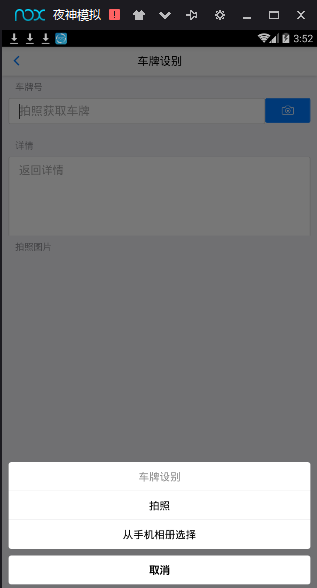
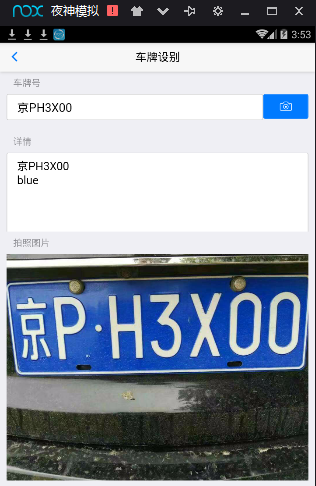
自动识别车牌号及颜色
APP-9-文字识别-车牌识别的更多相关文章
- VIN码识别/车牌识别:是入口,是门面
汽车后市场高速发展下,汽车用品.零配件及售后服务已经从实体店延伸至线上,无论是整车厂.4S店.传统的汽修店,还是汽配商,都渴望用更合理的.高效的方式,实现运营管理上的突破. 广州云实信息科技有限公司( ...
- 移动端车牌识别、行驶证识别OCR为共享汽车APP增添技术色彩
本文主题:移动端车牌识别.行驶证识别OCR为共享汽车APP增添技术色彩 本文关键词:车牌识别,证件识别,移动端车牌识别,行驶证识别,手机车牌识别,驾驶证识别 近两年,随着共享单车以及共享电车的兴起,有 ...
- 手持式停车收费管理系统全套案例,支持车牌识别,包含了android版app,微信小程序查询,响应式管理后台,云端大数据存储
先展示几个app效果图片吧,使用起来非常方便,关联了机器的快捷键操作,操作速度提高了不少,摄像头车牌自动识别,车牌识别无网络情况下离线也可以使用 再来一张后台截图,停车场信息完整显示,今日数据实时 ...
- Delphi百度文字识别【支持通用文字识别、身份证识别、银行卡识别、驾驶证识别、行驶证识别、车牌识别等功能】
作者QQ:(648437169) 点击下载➨Delphi百度文字识别 百度api文档 [Delphi百度文字识别]支持 通用文字识别.通用文字识别(高精度版).通用文字识别(含位置信 ...
- 交警也觉得妙——Python 识别车牌
车牌识别在高速公路中有着广泛的应用,比如我们常见的电子收费(ETC)系统和交通违章车辆的检测,除此之外像小区或地下 车库门禁也会用到,基本上凡是需要对车辆进行身份检测的地方都会用到. 一些背景: 车牌 ...
- 移动端车牌识别——可以嵌入智能手机系统里的新OCR识别技术
移动端车牌识别技术,是在OCR光学字符识别技术的基础上研发的用来识别汽车号牌特征信息的图像识别技术.在国内,该项技术由北京易泊时代携手清华大学成功地将"国家863计划"项目成果-- ...
- javacpp-opencv图像处理系列:国内车辆牌照检测识别系统(万份测试车牌识别准确率99.7%以上,单次平均耗时39ms)
javaCV图像处理系列: 一.javaCV图像处理之1:实时视频添加文字水印并截取视频图像保存成图片,实现文字水印的字体.位置.大小.粗度.翻转.平滑等操作 二.javaCV图像处理之2:实时视频添 ...
- 车牌识别OCR—易泊时代智慧城市解决方案模块
牌识别(License Plate Recognition,LPR) 是视频图像识别技术在智能交通领域中的一个模块.车牌识别运用OCR技术,将视频流或图片中的汽车牌照从复杂的应用场景中提取并识别出来, ...
- 基于百度AI实现 车牌识别
前言 目前百度的AI接口相对完善,对于文字识别类的操作还需要开发者一一去尝试,去评估这效果到底是怎么的. 文字识别的接口相对简单,官方提供的SDK也集成很好,笔者只是在这上面做了一些前期性的功能数据校 ...
随机推荐
- Springboot配置使用ssl,使用https
SSL(Secure Sockets Layer 安全套接层)是为网络通信提供安全及数据完整性的一种安全协议,SSL在网络传输层对网络连接进行加密,SSL协议位于TCP/IP协议与各种应用层协议之间, ...
- Python——字符串(python programming)
p ython——字符串 ①加法 连接两个字符串 ②乘法 复制字符串 python——转义字符 \n 换行 \' 单引号 \'' 双引号 \\ 反斜杠 raw字符串:无视转义字符 转义: 字符串 ...
- mybatis 报错Result Maps collection does not contain value for java.lang.Integer
重点:报错的方法和xml文件不一定是错误的位置,如果有多个xml文件,必须检查所有的文件 搜索 resultMap="java.lang.Integer" 找到对应的文件,改为 ...
- jQuery 闪动的文字提示
原文地址:http://www.cnblogs.com/kiter/archive/2013/02/22/2922242.html 声明,本文转自网络. jQuery 闪动的文字提示,仿QQ头像闪烁闪 ...
- 协议无关组播--稀疏模式 PIM-SM
一. 1)PIM-SM 1.PIM-SM转发.加入 PIM-SM适合于接收成员较少的环境.它与DM有何显著的区别?先看PIM-SM转发机制. 转发: 当组播数据到达路由器时,路由器也会去创建转发项.转 ...
- fragment--的生命周期
官网帮助文档链接: http://developer.Android.com/guide/components/fragments.html 主要看两张图,和跑代码 1,Fragment的生命周: 2 ...
- beautifulSoup基本用法及find选择器
总结来源于官方文档:https://www.crummy.com/software/BeautifulSoup/bs4/doc/index.zh.html#find-all 示例代码段 html_do ...
- Jsp九大内置对象和4大作用域
一.在java开发中,jsp提供了9个内置的对象,这些内置对象将由容器为用户进行实例化,用户直接使用. 这9个内置对象分别为:pageContext,request,response,session, ...
- 第5章 IP地址和子网划分(1)_IP格式和子网掩码
1. 二进制和十进制 (1)二进制与十进制的对应关系 ①128为数轴的中点,最高位为1.其后的数,二进制最高位均为1.其前面的数二进制最高位均为0. ②192为128-255中间的数,最高两位为1.2 ...
- hbase启动后子节点的regionserver不能启动
启动hbase后,主节点的进程正常,但是子节点的regionserver进程会自动挂掉 然后我们看看子节点的情况 可以看到挂掉了 我们这样解决问题,先把hadoop目录下的这个两个文件放到hbase的 ...