
Azure AD, Endpoint Manger(Intune), SharePoint access token 的获取
本章全是干货,干货,干货,重要的事情说三遍。
最近在研究Azure, Cloud相关的东西,项目中用的是Graph API(这个在下一章会相信介绍),可能是Graph API推出的时间比较晚,部分API还在开发中,所以难免出现部分功能支持不完善,issue之类的,当然Microsoft也在不断更新完善中,期待Graph API时代的到来。
针对以上的问题,有时在项目中不得不采取一些非常规的手段,调用Microsoft backend API,什么是backend API呢,就是我们用Fiddle监控或者页面F12 Network 看到Microsoft调用的底层Rest API。
例如:Azure AD的Company Branding功能,Graph V 1.0版本没有API支持,但项目需要,怎么办?
1)、是查找是否有Beta版本,如果有,项目组决定是否可以使用Beta API ,因为Microsoft 官网是不建议Beta API应用于生产环境的。
https://docs.microsoft.com/en-us/graph/api/resources/organizationalbrandingproperties?view=graph-rest-beta
2)、就是我们今天说的重点,调用Microsoft backend API
首先说明一下啊,所有获取token的token endpoint都是统一地址:
private string _tokenEndpoint = "https://login.microsoftonline.com/common/oauth2/token";
1、 Backend API Access Token
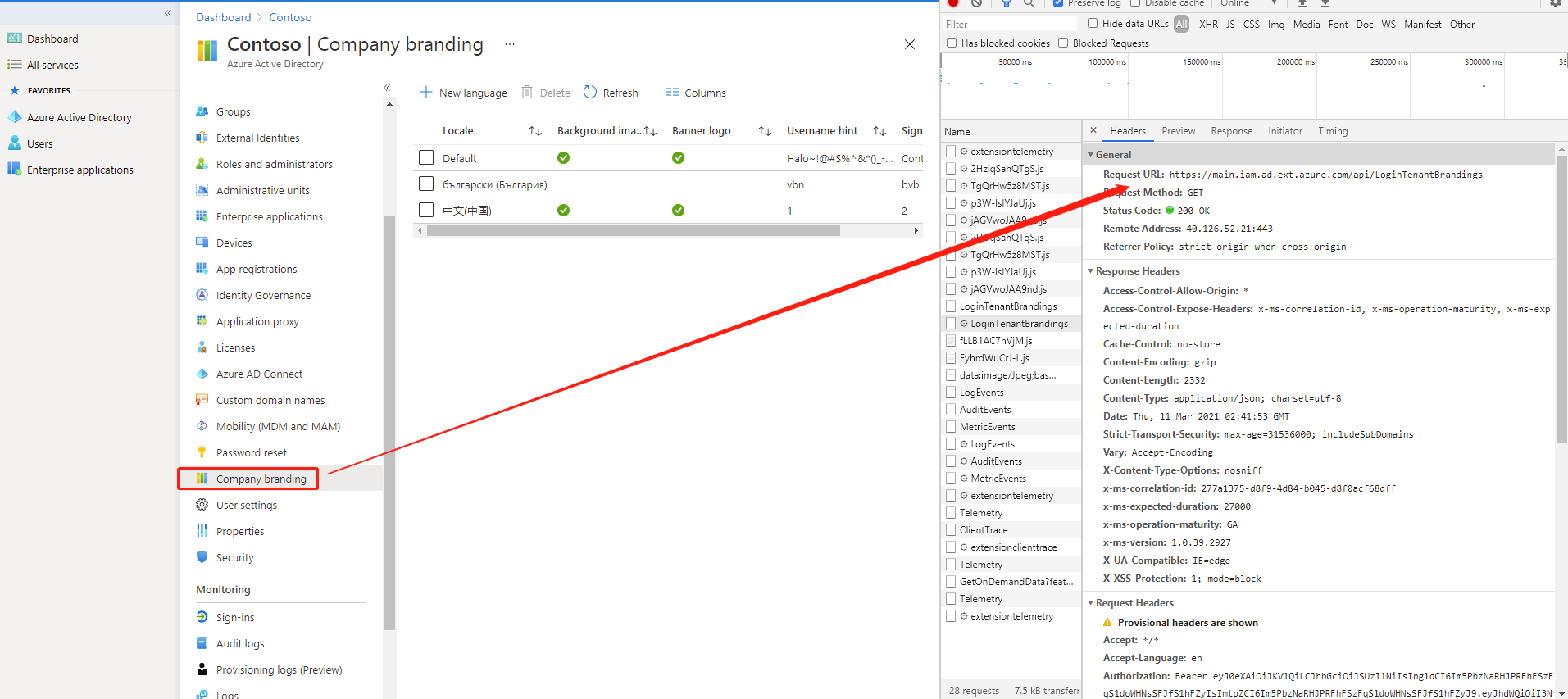
调用backend api,重点是获取access token,这里是impersonate user login(模拟用户登录的方式)。
private async Task<string> GetAADAccessToken(string username, string password)

{

     var resource = $"resource=74658136-14ec-4630-ad9b-26e160ff0fc6&client_id=1950a258-227b-4e31-a9cf-717495945fc2&grant_type=password&username={username}&password={password}";

     return await GetAccessToken(resource);

}

private async Task<string> GetAccessToken(string resource)

{

     var httpClient = new HttpClient();

     using (var stringContent = new StringContent(resource, Encoding.UTF8, "application/x-www-form-urlencoded"))

     {

                try

                {

                    var result = await httpClient.PostAsync(_tokenEndpoint, stringContent).ContinueWith((response) =>

                    {

                        return response.Result.Content.ReadAsStringAsync().Result;

                    }).ConfigureAwait(false);

                    var tokenResult = JsonSerializer.Deserialize<JsonElement>(result);

                    var token = tokenResult.GetProperty("access_token").GetString();

                    return token;

                }

                catch (Exception ex)

                {

                    throw new TokenException(ErrorCode.BadRequest, ex.Message);

                }

     }

}
解释一下哈:
“1950a258-227b-4e31-a9cf-717495945fc2” 是Microsoft build-in的application Id,
“74658136-14ec-4630-ad9b-26e160ff0fc6” 是token的颁发地址
以上两个ID是固定值,直接使用就可以。
获取到了access token,接下需要构建HTTP Client:
private HttpClient BuildHttpClient(string accessToken)

{

            var httpClient = new HttpClient();

            httpClient.DefaultRequestHeaders.Authorization = new AuthenticationHeaderValue("Bearer", accessToken);

            httpClient.DefaultRequestHeaders.Add("X-Requested-With", "XMLHttpRequest");

            httpClient.DefaultRequestHeaders.Add("x-ms-client-request-id", $"{new Guid()}");

            httpClient.DefaultRequestHeaders.Add("x-ms-correlation-id", $"{new Guid()}");

            return httpClient;

}
最后发送HTTP请求,获取数据信息:
private static IEnumerable<CompanyBrandingModel> GetCompanyBrandings()

{

            var services = new ServiceCollection();

            var provider = services.ConfigureServices().BuildServiceProvider();

            var httpClientService = provider.GetService<IHttpClientService>();

            var httpClient = httpClientService?.GetHttpClient(_username, _password, TokenType.AzureAD, _clientId).GetAwaiter().GetResult();

            var requestUrl = "https://main.iam.ad.ext.azure.com/api/LoginTenantBrandings";

            var response = httpClient?.GetAsync(requestUrl).GetAwaiter().GetResult();

            var content = response?.Content.ReadAsStringAsync().Result;

            var brandings = JsonConvert.DeserializeObject<List<CompanyBrandingModel>>(content)

                .Where(b => b.isConfigured.HasValue && b.isConfigured.Value);

            return brandings;

}
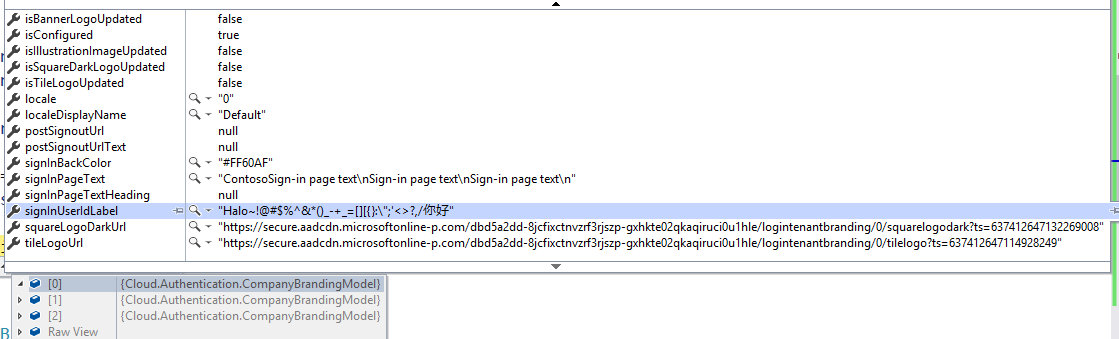
获取的结果和页面一致,证明backend API还是可行的,哈哈。
2、Graph Token
Graph API官网为我们提供了多种方式使用Graph API:
1、通过Nuget 安装Graph SDK,调用Graph SDK

构建GraphServiceClient对象,这里提供了2种方式,Delegated 和 Application,Application又分Secret 和 Certification,我们这里只介绍Application Secret。
 public GraphServiceClient GetGraphServiceClientByApp(string tenantId, string clientId, string clientSecret)

 {

            var confidentialClientApplication = ConfidentialClientApplicationBuilder

                .Create(clientId)

                .WithTenantId(tenantId)

                .WithClientSecret(clientSecret)

                .Build();

            var credentialProvider = new ClientCredentialProvider(confidentialClientApplication);

            var graphClient = new GraphServiceClient(credentialProvider);

            return graphClient;

}
2、调用Graph Rest API,首先需要获取Graph access token,示例代码如下:
public async Task<string> GetAppAccessToken(string clientId, string clientSecret)
{
if (string.IsNullOrEmpty(clientId) || string.IsNullOrEmpty(clientSecret))
{
throw new TokenException(ErrorCode.InvalidArguments, ExceptionConstants.NullOrEmpty);
}
var resource = $"scope=https://graph.microsoft.com/.default&grant_type=client_credentials&client_id={clientId}&client_secret={clientSecret}";
return await GetAccessToken(resource);
}
有了access token之后,就可以构建http client,发送http请求了,同上,这里就不在累述了,说多了都是废话,标题就是干货,干货,干货。

3、SharePoint access token
操作SharePoint的API有好多种,这里咱们只说Asp.NET Core CSOM, .NET Framework比较简单,这里就不多说了,想了解的下方留言吧。
首先获取SharePoint access token,直接干代码:
private async Task<string> GetSPAccessToken(string username, string password, string clientId)

{

            var spAdminUrl = $"https://{username.Substring(username.IndexOf("@") + 1, username.IndexOf(".") - username.IndexOf("@") - 1)}-admin.sharepoint.com/";

            try

            {

                var uri = new Uri(spAdminUrl);

                string _resource = $"{uri.Scheme}://{uri.DnsSafeHost}";

                var resource = $"resource={_resource}&client_id={clientId}&grant_type=password&username={HttpUtility.UrlEncode(username)}&password={HttpUtility.UrlEncode(password)}";

                return await GetAccessToken(resource);

            }

            catch (System.UriFormatException e)

            {

                throw new UriFormatException(e.Message, e);

            }

}
拿到token之后,通过Nuget安装package,构建ClientContext对象:

public class SPClientContextService

{

        private readonly ITokenCacheService _tokenCacheService;

        public SPClientContextService(ITokenCacheService tokenCacheService)

        {

            this._tokenCacheService = tokenCacheService;

        }

        public async Task<ClientContext> GetSPClientContextInstance(string username, string password, string clientId)

        {

            var accessToken = await _tokenCacheService.TryGetValue(username, password, TokenType.SharePoint, clientId);

            var spAdminUrl = $"https://{username.Substring(username.IndexOf("@") + 1, username.IndexOf(".") - username.IndexOf("@") - 1)}-admin.sharepoint.com/";

            var context = new ClientContext(new Uri(spAdminUrl));

            context.ExecutingWebRequest += (sender, e) =>

            {

                e.WebRequestExecutor.RequestHeaders["Authorization"] = "Bearer " + accessToken;

            };

            return context;

        }

 }
OK,篇幅已经比较长了,如需了解更多,请在下方留言,源码请参见Github。
Azure AD, Endpoint Manger(Intune), SharePoint access token 的获取的更多相关文章
- IdentityServer4专题之四:Authorization Endpoint、Token Endpoint、scope、Access Token和Refresh Token、授权服务器发生错误
1.Authorization Endpoint 它是与用户交互的端点,用户在此进行为客户端应用授权的操作,即authorization grant 2.Token Endpoint 端点,就是一个w ...
- 微信公众平台开发视频教程-03-获取Access Token和获取微信服务器IP,添加微信菜单
1 获取access token 此token是以后每次调用微信接口都会带上的票据,token是公众号全局唯一票据,在调用其他接口之前都需要先得到token,taoken长度至少512个字符,通常用s ...
- 【Azure Developer】如何验证 Azure AD的JWT Token (JSON Web 令牌)?
问题描述 使用微软Azure AD,对授权进行管理.通过所注册应用的OAuth API(https://login.chinacloudapi.cn/{TENANT ID}/oauth2/v2.0/t ...
- Laravel Cache 缓存钉钉微应用的 Access Token
钉钉微应用的 Access token 如何获取? Access_Token 是企业访问钉钉开放平台全局接口的唯一凭证,即调用接口时需携带Access_Token.从接口列表看,所有接口都需要携带 a ...
- Access Token 机制详解
我们在访问很多大公司的开放 api 的时候,都会发现这些 api 要求传递一个 access token 参数.这个参数是什么呢?需要去哪里获取这个 access token 呢? access to ...
- 【Azure Developer】【Python 】使用 azure.identity 和 azure.common.credentials 获取Azure AD的Access Token的两种方式
问题描述 使用Python代码,展示如何从Azure AD 中获取目标资源的 Access Token. 如要了解如何从AAD中获取 client id,client secret,tenant id ...
- SharePoint Online 使用 adal js 获取access token
最近在写一些SharePoint 的sample code, 有兴趣的小伙伴可以查看我的GitHub. 今天给大家介绍SharePoint Framework (SPFx )web part 当中怎 ...
- 【Azure Developer】使用Postman获取Azure AD中注册应用程序的授权Token,及为Azure REST API设置Authorization
Azure Active Directory (Azure AD) is Microsoft's cloud-based identity and access management service, ...
- 【Azure Developer】Python 获取Micrisoft Graph API资源的Access Token, 并调用Microsoft Graph API servicePrincipals接口获取应用ID
问题描述 在Azure开发中,我们时常面临获取Authorization问题,需要使用代码获取到Access Token后,在调用对应的API,如servicePrincipals接口. 如果是直接调 ...
随机推荐
- 实战交付一套dubbo微服务到k8s集群(1)之Zookeeper部署
基础架构 主机名 角色 IP地址 mfyxw10.mfyxw.com K8S代理节点1,zk1 192.168.80.10 mfyxw20.mfyxw.com K8S代理节点2,zk2 192.168 ...
- 网络安全-WEB基础,burpsuite,WEB漏洞
1. web基础 HTTP: GET POST REQUEST RESPONSE... JDK robots.txt 网页源代码/注释 目录扫描--御剑,dirmap 端口信息--nmap 备份文件- ...
- 操作系统:Linux进程与线程
这里是一部分内容,还会做修改. 一:目的及内容 学习fork(),exec,pthread库函数的使用,阅读源码,分析fork,exec,pthread_create函数的机理 代码实现: 进程A创建 ...
- python阿里云api查询域名是否可以注册(CheckDomain)
import requests from fun import * from urllib import parse url ='http://domain.aliyuncs.com/?' acces ...
- webpack 5 new features All In One
webpack 5 new features All In One Webpack 5 release (2020-10-10) https://webpack.js.org/blog/2020-10 ...
- VirtualBox All in One
VirtualBox All in One 虚拟机 / VM / Virtual Machine x86 and AMD64/Intel64 VirtualBox is a powerful x86 ...
- js function call hacker
js function call hacker you don't know javascript function https://developer.mozilla.org/en-US/docs/ ...
- Flutter 学习路径
Flutter 学习路径 docs https://flutter.dev/docs https://flutter.dev/community/china https://flutter-io.cn ...
- Taro Next
Taro Next Taro 2.0 https://aotu.io/notes/2020/02/03/taro-next-alpha/index.html Taro Next 的迁移指南 https ...
- how to change sketch language to chinese
how to change sketch language to Chinese https://www.sketch.com/support/troubleshooting/chinese-loca ...