
JS -- 异步加载进度条
今天在博客园问答里面看到博友问道怎么实现Ajax异步加载产生进度条. 很好奇就自己写了一个.
展现效果:
1) 当点击Load的时候,模拟执行异步加载. 浏览器被遮挡. 进度条出现.
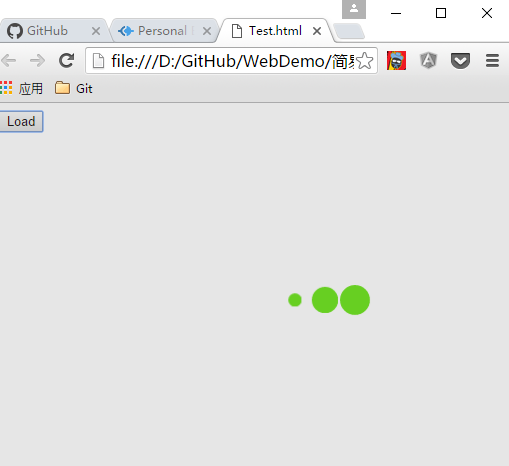
实现思路:
1.当用户点击load button执行异步请求. 调用方法 出现加载条
2.怎么实现进度条呢?
1) 在document.body 新增一个div.覆盖浏览器. 设置背景会灰色. z-index = 999. 加载的时候让用户无法修改界面值
2) 在document.body 新增一个动态的div.
代码实现:
Main.html:
<!DOCTYPE html>

<html>

  <head>

    <meta charset="utf-8">

    <title></title>

    <script src="Loading.js" charset="utf-8"></script>

    <link rel="stylesheet" href="Loading.css" media="screen" title="no title" charset="utf-8">

  </head>

  <body>

      <button onclick="showLoading()">Load</button>

  </body>

</html>
Loading.js:
function showLoading()

{

  var overDiv = document.createElement("div");

  var loadingDiv = document.createElement("div");

  var childDiv1 = document.createElement("div");

  var childDiv2 = document.createElement("div");

  var childDiv3 = document.createElement("div");

  overDiv.classList.add('over');

  loadingDiv.classList.add('spinner');

  childDiv1.classList.add('bounce1')

  childDiv2.classList.add('bounce2')

  childDiv3.classList.add('bounce3')

  loadingDiv.appendChild(childDiv1);

  loadingDiv.appendChild(childDiv2);

  loadingDiv.appendChild(childDiv3);

  document.body.appendChild(overDiv);

  document.body.appendChild(loadingDiv)

  setTimeout(function()

  {

    document.body.removeChild(overDiv);

    document.body.removeChild(loadingDiv)

  }, 5000);

}
Loading.css
.spinner {

  width: 150px;

  text-align: center;

  left: 50%;

  top: 50%;

  position: absolute;

  z-index: 1000;

}

.over {

  width: 100%;

  height: 100%;

  z-index: 998;

  background-color: gray;

  position:absolute;

  top: 0px ;

  left : 0px;

  opacity: 0.2;

}

.spinner > div {

  width: 30px;

  height: 30px;

  background-color: #67CF22;

  border-radius: 100%;

  display: inline-block;

  -webkit-animation: bouncedelay 1.4s infinite ease-in-out;

  animation: bouncedelay 1.4s infinite ease-in-out;

  /* Prevent first frame from flickering when animation starts */

  -webkit-animation-fill-mode: both;

  animation-fill-mode: both;

}

.spinner .bounce1 {

  -webkit-animation-delay: -0.32s;

  animation-delay: -0.32s;

}

.spinner .bounce2 {

  -webkit-animation-delay: -0.16s;

  animation-delay: -0.16s;

}

@-webkit-keyframes bouncedelay {

  0%, 80%, 100% { -webkit-transform: scale(0.0) }

  40% { -webkit-transform: scale(1.0) }

}

@keyframes bouncedelay {

  0%, 80%, 100% {

    transform: scale(0.0);

    -webkit-transform: scale(0.0);

  } 40% {

    transform: scale(1.0);

    -webkit-transform: scale(1.0);

  }

}
总结:
1.可以将方法提出来. 对Ajax请求重新封装一次. 实现调用Ajax请求的时候自动条用进度条方法.
2.如果是Angular的话. Angular提供了方法监控$http调用. 监控http执行请求的时候调用进度条方法就行了. 无需在每次执行$http的时候都去自己调用出现进度条的方法.
AKRWEGT.png)
JS -- 异步加载进度条的更多相关文章
- js页面加载进度条
<!DOCTYPE html PUBLIC "-//W3C//DTD XHTML 1.0 Transitional//EN" "http://www.w3.org/ ...
- Unity 异步加载进度条
public class View_LoadingScene : MonoBehaviour { //场景加载进度条对象 public GameObject loadingProgressBar; / ...
- Unity 异步加载 进度条
当我们进行游戏开发时,时常会进行场景切换,如果下个场景较大,切换时就会出现卡顿现象,甚至看起来像是"死机",非常影响用户体验,我们这时就可以运用异步加载,在界面上显示加载的进度条以 ...
- js页面加载进度条(这个就比较正式了,改改时间就完事儿)
不废话,直接上代码 思路不难,就是一个animate方法配合随机数 duration内个三秒钟,是自定义的,可以改成页面加载时间,这样就完美了 <!doctype html> <ht ...
- JS网页加载进度条
参考:http://www.cnblogs.com/timy/archive/2011/12/07/2279200.html
- Unity异步加载进度条
先上代码: using System.Collections; using System.Collections.Generic; using UnityEngine; using UnityEngi ...
- pace.js – 加载进度条插件
这儿只是简单介绍一下这个插件pace.js. 在页面中引入Pace.js,页面就会自动监测你的请求(包括Ajax请求),在事件循环滞后,会在页面记录加载的状态以及进度情况.此插件的兼容性很好,可以兼容 ...
- pace.js – 网页自动加载进度条插件
网站顶部的页面加载进度条是怎么实现的,页面的加载进度百分比,有时候获取是比较麻烦的,当然也可以利用一些优秀的JavaScript插件来实现,今天就为大家介绍这样子的一款插件:pace.js. [官方网 ...
- 网站顶部显示预加载进度条preload.js
网站加载的速度快的话,不会显示进度条加载时候的样式. 支持性主流浏览器都支持,ie浏览器需要9以上9也支持. 使用方法 <script src="http://code.jquery. ...
随机推荐
- Asp.Net 上传图片并生成高清晰缩略图
在asp.net中,上传图片功能或者是常用的,生成缩略图也是常用的.baidu或者google,c#的方法也是很多的,但是一用却发现缩略图不清晰啊,缩略图片太大之类的事情,下面是我在处理图片上的代码, ...
- c#中字段和属性的区别
在我看来(本人是C#初学者)字段实际上类似一个变量,或者就直接说字段就是一个变量.相应的属性也可以看做是一个变量,只不过多了一些限制而已. using System;using System.Coll ...
- jquery.uploadify上传文件配置详解(asp.net mvc)
页面源码: <!DOCTYPE html> <html> <head> <meta http-equiv="Content-Type" c ...
- jquery easyui菜单树显示
目前做了一个easyui项目需要显示多级菜单,菜单配置到数据库中,因此每级菜单都需要到数据库中取,用了jQuery EasyUI方便多了. 效果体验:http://hovertree.com/texi ...
- 初识Mybatis框架,实现增删改查等操作(动态拼接和动态修改)
此第一次接触Mybatis框架确实是有点不适应,特别是刚从Hibernate框架转转型过来,那么为什么要使用Mybatis框架,Mybatis框架和Hibernate框架又有什么异同呢? 这个问题在我 ...
- CSS3与页面布局学习笔记(八)——浏览器兼容性问题与前端性能优化方案
一.浏览器兼容 1.1.概要 世界上没有任何一个浏览器是一样的,同样的代码在不一样的浏览器上运行就存在兼容性问题.不同浏览器其内核亦不尽相同,相同内核的版本不同,相同版本的内核浏览器品牌不一样,各种运 ...
- 如何使用github搭建个人博客
1.去github官网注册个人帐号:没有的:猛戳这里去注册,比如我的账户名:wjf444128852,我的已经汉化(可在github里搜索github如何汉化有插件) 2.点击仓库-新建,仓库名字必须 ...
- AMD and CMD are dead之KMDjs内核之分号
在老版本的kmdjs中,强制了分号的要求.但是总感觉不爽,因为在开发Ket - Kmdjs Extension Tools的时候,总需要导入一些开源的库,然后痛苦就来了,总是报错,一查,就是缺少分号! ...
- 【转】visio中关于shape属性的修改和读取
PS: 本文转自: http://blog.sina.com.cn/s/blog_6bcfb9420100wzxf.html visio中都是shape,shape就是一个对象,要想实现对shape ...
- JavaScript小细节点罗列
共勉! 属性访问表达式 众所周知,JavaScript为属性的访问定义了两种语法方式: 表达式.标识符 // 表达式(指定对象) 标识符(指定需要访问的属性的名称) 表达式[表达式] //表达式1(指 ...