
Unity异步加载进度条
先上代码:
using System.Collections;

using System.Collections.Generic;

using UnityEngine;

using UnityEngine.SceneManagement;

using UnityEngine.UI;

#region 佛祖保佑

/*

                   _ooOoo_

                  o8888888o

                  88" . "88

                  (| -_- |)

                  O\  =  /O

               ____/`---'\____

             .'  \\|     |//  `.

            /  \\|||  :  |||//  \

           /  _||||| -:- |||||-  \

           |   | \\\  -  /// |   |

           | \_|  ''\---/''  |   |

           \  .-\__  `-`  ___/-. /

         ___`. .'  /--.--\  `. . __

      ."" '<  `.___\_<|>_/___.'  >'"".

     | | :  `- \`.;`\ _ /`;.`/ - ` : | |

     \  \ `-.   \_ __\ /__ _/   .-` /  /

======`-.____`-.___\_____/___.-`____.-'======

                   `=---='

^^^^^^^^^^^^^^^^^^^^^^^^^^^^^^^^^^^^^^^^^^^^^

            佛祖保佑       永无BUG

*/

#endregion

public class AsyncLoadScene : MonoBehaviour

{

    public static string NEXTSCENENAME = "ChooseLevelScene";

    private Text text_loadProgress;

    private RectTransform rectTransform_progressBar;

    private AsyncOperation asyncLoadScene;

    private float progressValue;

    private void Start()

    {

        text_loadProgress = transform.Find("Text").GetComponent<Text>();

        rectTransform_progressBar = transform.Find("Image").GetComponent<RectTransform>();

        asyncLoadScene = SceneManager.LoadSceneAsync(NEXTSCENENAME);

        asyncLoadScene.allowSceneActivation = false;

    }

    private void Update()

    {

        if(text_loadProgress && rectTransform_progressBar)

        {

            progressValue = Mathf.Lerp(progressValue, asyncLoadScene.progress / 0.9F, Time.deltaTime);

            text_loadProgress.text = (progressValue * 100F).ToString("F0") + "%";

            rectTransform_progressBar.sizeDelta = new Vector2(progressValue * 1280F, 85F);

            if(rectTransform_progressBar.sizeDelta.x > 1275F) asyncLoadScene.allowSceneActivation = true;

        }

    }

}
接着如果你感到迷惑,请看如下游戏对象层级:
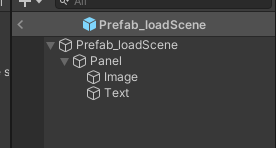
脚本挂在Panel对象上
那如何使用她呢?
public GameObject Prefab_loadScene;

private void Click_play(){

	Instantiate(Prefab_loadScene);

}

//--------------或者请看如下----------------

public GameObject Prefab_loadScene;

private void Click_play(){
  AsyncLoadScene.NEXTSCENENAME = "MainScene";
GameObject loadScener = Instantiate(Prefab_loadScene);}Unity异步加载进度条的更多相关文章
- Unity 异步加载进度条
public class View_LoadingScene : MonoBehaviour { //场景加载进度条对象 public GameObject loadingProgressBar; / ...
- Unity 异步加载 进度条
当我们进行游戏开发时,时常会进行场景切换,如果下个场景较大,切换时就会出现卡顿现象,甚至看起来像是"死机",非常影响用户体验,我们这时就可以运用异步加载,在界面上显示加载的进度条以 ...
- JS -- 异步加载进度条
今天在博客园问答里面看到博友问道怎么实现Ajax异步加载产生进度条. 很好奇就自己写了一个. 展现效果: 1) 当点击Load的时候,模拟执行异步加载. 浏览器被遮挡. 进度条出现. 实现思路: 1. ...
- unity WWW加载进度条
using UnityEngine; using System.Collections; public class testProgress : MonoBehaviour { void Start ...
- css3 linear-gradient实现页面加载进度条效果
最终效果图: html结构: <div> <p class="p1"> <span></span> < ...
- ajax页面加载进度条插件
下面两个都是youtube视频的加载进度条效果的ajax插件 一.官网:http://ricostacruz.com/nprogress/官网 github:https://github.com/rs ...
- pace.js – 加载进度条插件
这儿只是简单介绍一下这个插件pace.js. 在页面中引入Pace.js,页面就会自动监测你的请求(包括Ajax请求),在事件循环滞后,会在页面记录加载的状态以及进度情况.此插件的兼容性很好,可以兼容 ...
- 仿UC浏览器图片加载进度条
前几天用UC浏览器看新闻(无意中给UC打了广告),看到它的图片加载进度条,正好最近有时间,所以就自己写了一个. 效果图如下 进度条的底色和填充颜色都可以调整. 首先中间的笑脸作为一个整体,其实现代码如 ...
- 【Web前沿技术】纯 CSS3 打造的10个精美加载进度条动画
之前向大家介绍8款优秀的 jQuery 加载动画和进度条插件,今天这篇文章向大家推荐10个纯 CSS3 代码实现精美加载进度条动画效果的方案.加载动画和进度条在网站和 Web 应用中的使用非常流行,特 ...
随机推荐
- [面向对象之继承应用(在子类派生重用父类功能(super),继承实现原理(继承顺序、菱形问题、继承原理、Mixins机制),组合]
[面向对象之继承应用(在子类派生重用父类功能(super),继承实现原理(继承顺序.菱形问题.继承原理.Mixins机制),组合] 继承应用 类与类之间的继承指的是什么'是'什么的关系(比如人类,猪类 ...
- Java集合详解(三):HashMap原理解析
概述 本文是基于jdk8_271版本进行分析的. HashMap是Map集合中使用最多的.底层是基于数组+链表实现的,jdk8开始底层是基于数组+链表/红黑树实现的.HashMap也会动态扩容,与Ar ...
- [设计模式] 设计模式课程(二十)--命令模式(Command)
概述 "行为变化"模式:组件构建过程中,组件行为的变化经常会导致组件本身剧烈的变化."行为变化"模式将组件的行为和组件本身进行解耦,从而支持组件行为的变化,实现 ...
- QT相关书籍
文章转载自:http://www.cctry.com/thread-290005-1-1.html 最近一段时间,陆陆续续给大家更新了不少基于Qt开发的不错的书籍,可以说每本都不错.不过放在这一堆大家 ...
- unrar命令解压rar unrar e XXX.rar (验证通过20200511)
unrar命令解压rar 一个从入门到放弃再到改行的工程师 2018-05-02 17:53:04 3916 收藏展开压缩tar -cvf jpg.tar *.jpg //将目录里所有jpg文件打包成 ...
- who -b
~]# who -b 系统引导 2020-05-03 19:57[root@localhost ~]# who -r 运行级别 5 2020-05-03 19:58
- Docker Swarm(二)常用命令
# 管理配置文件 docker config # 查看已创建配置文件 - docker config ls # 将已有配置文件添加到docker配置文件中 - dock ...
- keepalived的脑裂问题与解决
Keepalived的作用是检测服务器的状态,如果有一台web服务器宕机,或工作出现故障,Keepalived将检测到,并将有故障的服务器从系统中剔除,同时使用其他服务器代替该服务器的工作,当服务器工 ...
- 分布式存储ceph---ceph常用命令(3)
1.查看ceph集群配置信息 ceph daemon /var/run/ceph/ceph-mon.$(hostname -s).asok config show 2.在部署节点修改了ceph.con ...
- Linux系统编程【5】——stty的学习
从文件的角度看设备 之前几篇文章介绍的编程是基于文件的.数据可以保存在文件中,也可以从文件中取出来做处理,再存回去.不仅如此,Linux操作系统还专门为这个东西建立了一套规则,就是前期介绍的" ...