
ansible部署 lnmp+wordpress

如上,是项目的目录结构。
common: 获取阿里云的yum源
mysql: 二进制安装mysql
nginx: 编译安装nginx
php-fpm:编译安装php-fpm
wordpress: 获取wordpress源码,更改部分值。
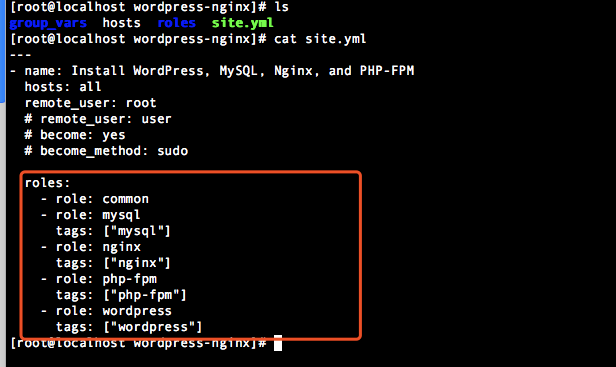
1,首先查看入口文件。
---

- name: Install WordPress, MySQL, Nginx, and PHP-FPM

  hosts: all

  remote_user: root

  # remote_user: user

  # become: yes

  # become_method: sudo

  roles:

    - role: common

    - role: mysql

      tags: ["mysql"]

    - role: nginx

      tags: ["nginx"]

    - role: php-fpm

      tags: ["php-fpm"]

    - role: wordpress

      tags: ["wordpress"]
2,查看hosts
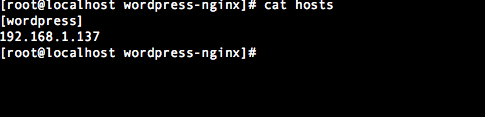
[wordpress]

192.168.1.137
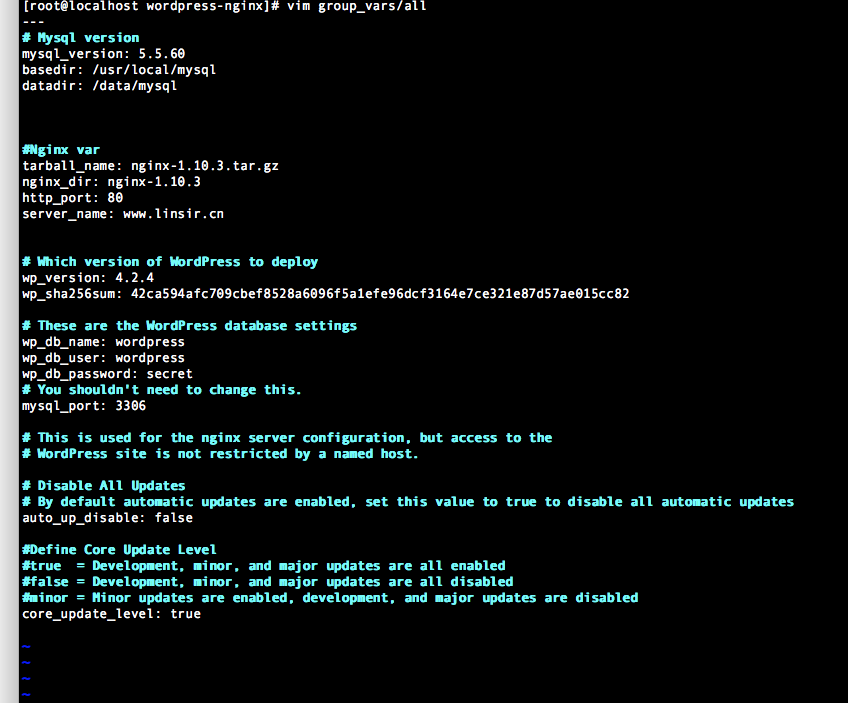
3, 查看group_vars下的变量
---

# Mysql version

mysql_version: 5.5.60

basedir: /usr/local/mysql

datadir: /data/mysql

#Nginx var

tarball_name: nginx-1.10.3.tar.gz

nginx_dir: nginx-1.10.3

http_port: 80

server_name: www.linsir.cn

# Which version of WordPress to deploy

wp_version: 4.2.4

wp_sha256sum: 42ca594afc709cbef8528a6096f5a1efe96dcf3164e7ce321e87d57ae015cc82

# These are the WordPress database settings

wp_db_name: wordpress

wp_db_user: wordpress

wp_db_password: secret

# You shouldn't need to change this.

mysql_port: 3306

# This is used for the nginx server configuration, but access to the

# WordPress site is not restricted by a named host.

# Disable All Updates

# By default automatic updates are enabled, set this value to true to disable all automatic updates

auto_up_disable: false

#Define Core Update Level

#true  = Development, minor, and major updates are all enabled

#false = Development, minor, and major updates are all disabled

#minor = Minor updates are enabled, development, and major updates are disabled

core_update_level: true
4,查看roles下的各个角色,根据site.yml文件中的顺序展开
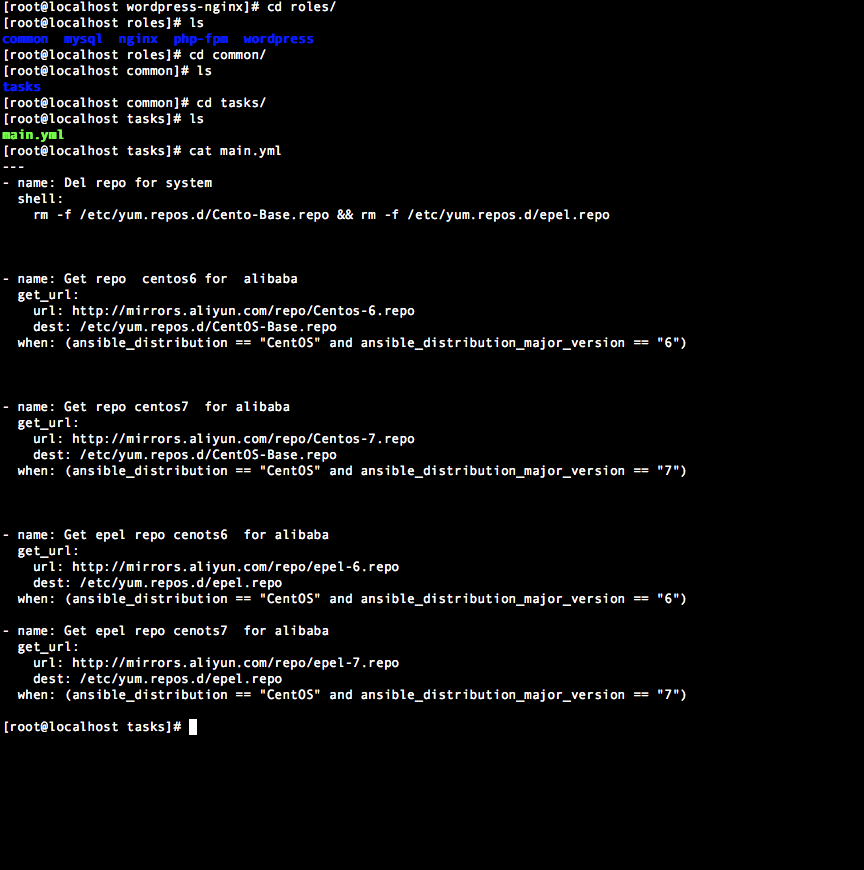
1, common 主要是获取repo源用的
---

- name: Del repo for system

  shell:

    rm -f /etc/yum.repos.d/Cento-Base.repo && rm -f /etc/yum.repos.d/epel.repo

- name: Get repo  centos6 for  alibaba

  get_url:

    url: http://mirrors.aliyun.com/repo/Centos-6.repo

    dest: /etc/yum.repos.d/CentOS-Base.repo

  when: (ansible_distribution == "CentOS" and ansible_distribution_major_version == "6")

- name: Get repo centos7  for alibaba

  get_url:

    url: http://mirrors.aliyun.com/repo/Centos-7.repo

    dest: /etc/yum.repos.d/CentOS-Base.repo

  when: (ansible_distribution == "CentOS" and ansible_distribution_major_version == "7")

- name: Get epel repo cenots6  for alibaba

  get_url:

    url: http://mirrors.aliyun.com/repo/epel-6.repo

    dest: /etc/yum.repos.d/epel.repo

  when: (ansible_distribution == "CentOS" and ansible_distribution_major_version == "6")

- name: Get epel repo cenots7  for alibaba

  get_url:

    url: http://mirrors.aliyun.com/repo/epel-7.repo

    dest: /etc/yum.repos.d/epel.repo

  when: (ansible_distribution == "CentOS" and ansible_distribution_major_version == "7")
2,查看mysql角色
---

- name: Create mysql user

  user:

    name: mysql

- name: Download mysql

  get_url:

    url: http://mirrors.163.com/mysql/Downloads/MySQL-5.5/mysql-{{mysql_version}}-linux-glibc2.12-x86_64.tar.gz

    dest: /usr/local/src

- name: Unzip mysql

  unarchive:

    src: /usr/local/src/mysql-{{mysql_version}}-linux-glibc2.12-x86_64.tar.gz

    dest: /usr/local/src/

    copy: no

- name: Rename mysql

  shell:

    mv /usr/local/src/mysql-{{mysql_version}}-linux-glibc2.12-x86_64 /usr/local/mysql && chown -R mysql:mysql {{basedir}}

- name: Create data storage

  file:

    path: /data/mysql

    state: directory

    owner: mysql

    group: mysql

- name: Init mysql

  shell:

    ./scripts/mysql_install_db --user=mysql --basedir={{basedir}} --datadir={{datadir}}

  args:

    chdir: "{{basedir}}"

- name: Create mysql script for centos6

  shell:

    cp "{{basedir}}/support-files/mysql.server"  /etc/init.d/mysqld && chmod 755 /etc/init.d/mysqld

  when: (ansible_distribution == "CentOS" and ansible_distribution_major_version == "6")

- name: Create mysql script for centos7

  copy:

    src: mysqld.service

    dest: /usr/lib/systemd/system/mysqld.service

  when: (ansible_distribution == "CentOS" and ansible_distribution_major_version == "7")

  notify:

    - Reload service

- meta: flush_handlers

- name: Copy mysql config

  template:

    src: my.cnf.j2

    dest: /etc/my.cnf

- name: Restart mysqld

  service:

    name: mysqld

    state: restarted

  register: result

#根据服务器配置不同,mysql启动速度有所区别。

- name: sleep 10s

  shell:

    sleep 20

- name: Copy root password file

  shell:

    /usr/local/mysql/bin/mysqladmin -uroot password linlin
ansible部署 lnmp+wordpress的更多相关文章
- 使用 Docker 部署 LNMP 并搭建 wordpress
准备 系统版本:CentOS Linux release 7.4.1708 (Core) 内核版本:3.10.0-693.el7.x86_64 IP:192.168.31.43 可访问 ...
- Docker swarm 使用服务编排部署lnmp
一.简介 目的:在Docker Swarm集群中,使用stack服务编排搭建lnmp来部署WordPress 使用私有仓库的nginx和php镜像 mysql使用dockerhup最新镜像 使用nfs ...
- CentOS下搭建LNMP+WordPress+http2.0教程
此文是本人CentOS下搭建WordPress的一些笔记,环境搭建时间::将看过的几篇文章总结下来,形成一条龙长文.不用大家再找来找去. 本文大概分为此几部分: 一.基础命令更新: 二.服务器加速(非 ...
- 【超详细】vultr(CentOS7)+LNMP+WordPress 搭建个人博客
心血来潮想搭建个人博客,我的vps只用来搭ss未免太过浪费 在这里记录一下搭建个人博客的历程 0x00 写在前面 why vultr: 优点:便宜. 性能优良.按时间计费(不用包年 学生党的福音).稳 ...
- Docker Compose编排工具部署lnmp实践及理论(详细)
目录 一.理论概述 编排 部署 Compose原理 二.使用docker compose 部署lnmp 三.测试 四.总结 一.理论概述 Docker Compose是一个定义及运行多个Docker容 ...
- Docker部署lnmp 实战 (多注意配置文件,不管访问试试换个浏览器)
Docker部署LNMP环境 关闭防火墙,设置自定义网络 systemctl stop firewalld systemctl disable firewalld setenforce 0 docke ...
- 在ConoHa上Centos7环境下源码安装部署LNMP
本文记录了从源码,在Centos 7上手动部署LNMP环境的过程,为了方便以后对nginx和mariadb进行升级,这里采用yum的方式进行安装. 1.建立运行网站和数据库的用户和组 groupadd ...
- 001.Ansible部署RHCS存储集群
一 前期准备 1.1 前置条件 至少有三个不同的主机运行monitor (MON)节点: 至少三个直接存储(非外部SAN硬件)的OSD节点主: 至少两个不同的manager (MGR)节点: 如果使用 ...
- 【转载】Centos系统快速部署LNMP环境
PHP语言在Linux系统上运行的时候,需要在Linux系统上部署相应的Nginx.MySQL.PHP等环境,只有将这些环境参数都设置好,PHP相关应用程序才可正常运行,部署环境的方法有很多种,可手动 ...
随机推荐
- Hibernate实体类注解中如何忽略某些字段的映射
使用注解 @Transient在该字段上 例如: @Transient private int name: 这样在映射数据表和对象关系时候就不会报在表中不存在该字段的问题:
- python scrapy 爬取西刺代理ip(一基础篇)(ubuntu环境下) -赖大大
第一步:环境搭建 1.python2 或 python3 2.用pip安装下载scrapy框架 具体就自行百度了,主要内容不是在这. 第二步:创建scrapy(简单介绍) 1.Creating a p ...
- Git介绍及常用操作演示(一)--技术流ken
Git介绍 Git(读音为/gɪt/.)是一个开源的分布式版本控制系统,可以有效.高速的处理从很小到非常大的项目版本管理. Git 是 Linus Torvalds 为了帮助管理 Linux 内核开发 ...
- 前端(二)之 CSS
前端之 CSS 前言 昨天学习了标记式语言,也就是无逻辑语言.了解了网页的骨架是什么构成的,了解了常用标签,两个指令以及转义字符:其中标签可以分为两大类: 一类是根据标签内容可以分类单双标签,单标签指 ...
- 利用aiohttp制作异步爬虫
asyncio可以实现单线程并发IO操作,是Python中常用的异步处理模块.关于asyncio模块的介绍,笔者会在后续的文章中加以介绍,本文将会讲述一个基于asyncio实现的HTTP框架--a ...
- NET(C#)接入Dubbo服务,Zookeeper作为Dubbo服务的注册中心,实现thrift协议访问接口(3)
如何引用Zookeeper.dll 下载最新版本的Zookeeper 地址:http://mirrors.cnnic.cn/apache/zookeeper/ 没有.NET代码 dotnet代码下载 ...
- spring_04bean的生命周期
一.前言 spring框架中的bean对象生命周期是面试时常考的问题 往往笔试,面试总喜欢问生命周期的问题 二.spring_bean应用上下文生命周期图: 三.生命周期流程(bean应用上下文): ...
- Java_Comparable,Comparator两接口区别
Comparable和Comparator的区别 根本区别 1.Comparable是一个内比较器,Comparator是一个外比较器 封装的包不同 java.util.Comparator java ...
- Tri Tiling(hdu1143)
Tri Tiling Time Limit: 2000/1000 MS (Java/Others) Memory Limit: 65536/32768 K (Java/Others)Total ...
- GitHub:我们是这样弃用jQuery的
摘要: 技术债清理流程指南. 原文:Removing jQuery from GitHub.com frontend 译文:GitHub:我们为什么会弃用jQuery? 作者:GitHub 前端工程团 ...