
TestNg 12. extentReport测试报告
直接上代码:以下是我的目录结构,首先新建一个包名字叫 com.tester.extent.demo,直接新建两个类就可以,名字叫 ExtentTestNGIReporterListener 和 TestMethodsDemo。在resource里面新建一个testng.xml文件
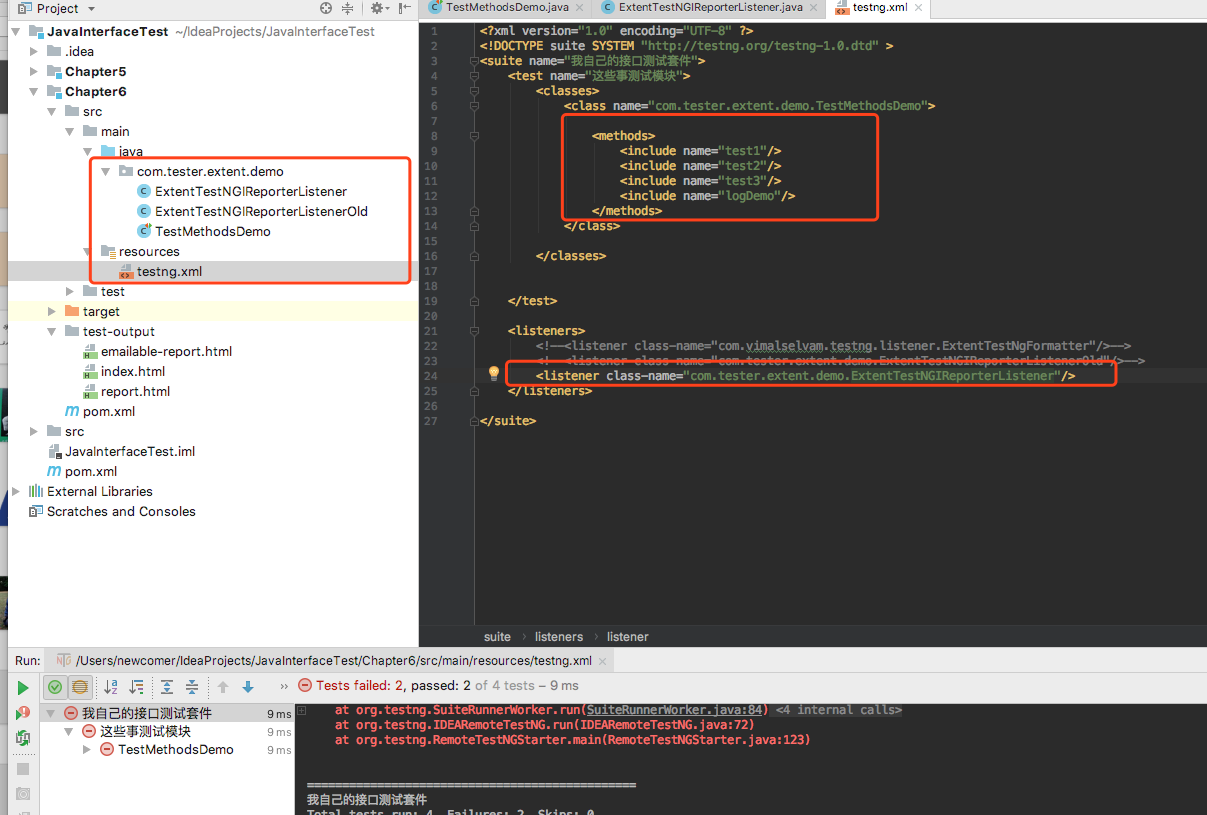
为什么要建两个类呢,因为不建这两个类的话,测试报告打开以后是没有样式的:比如下面的这样,然后查看他的源码
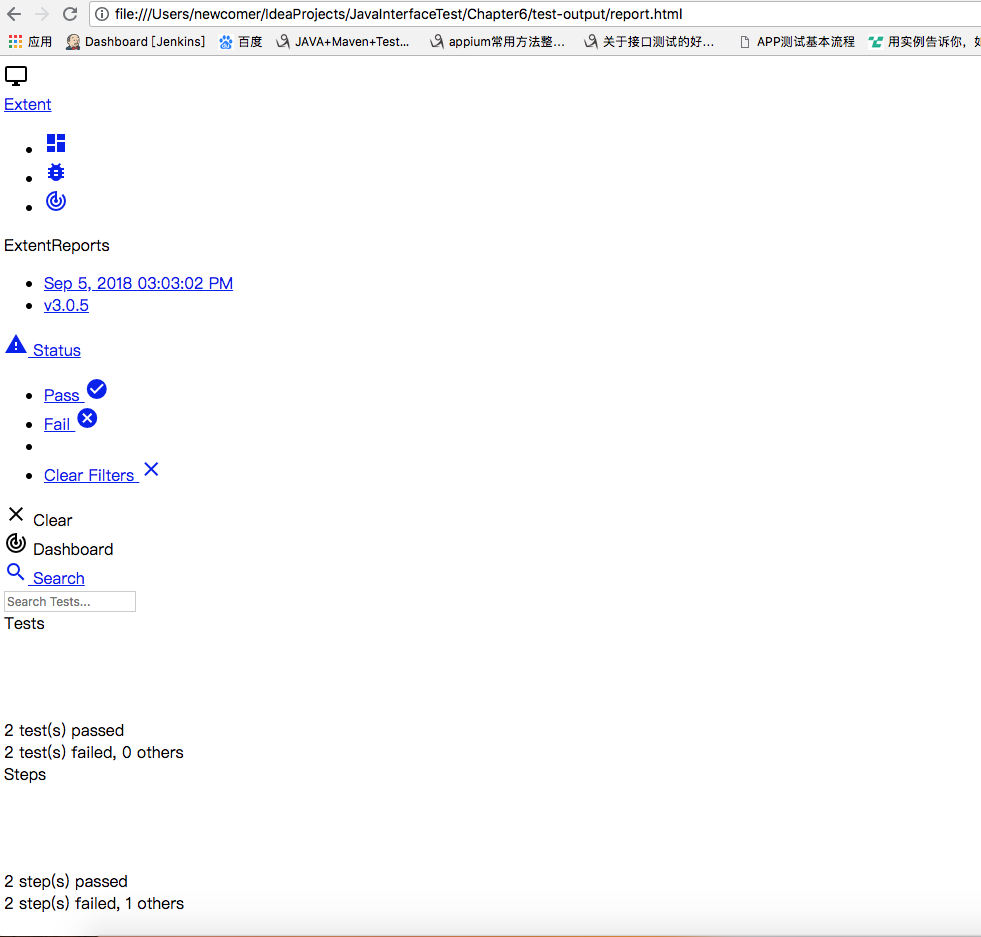
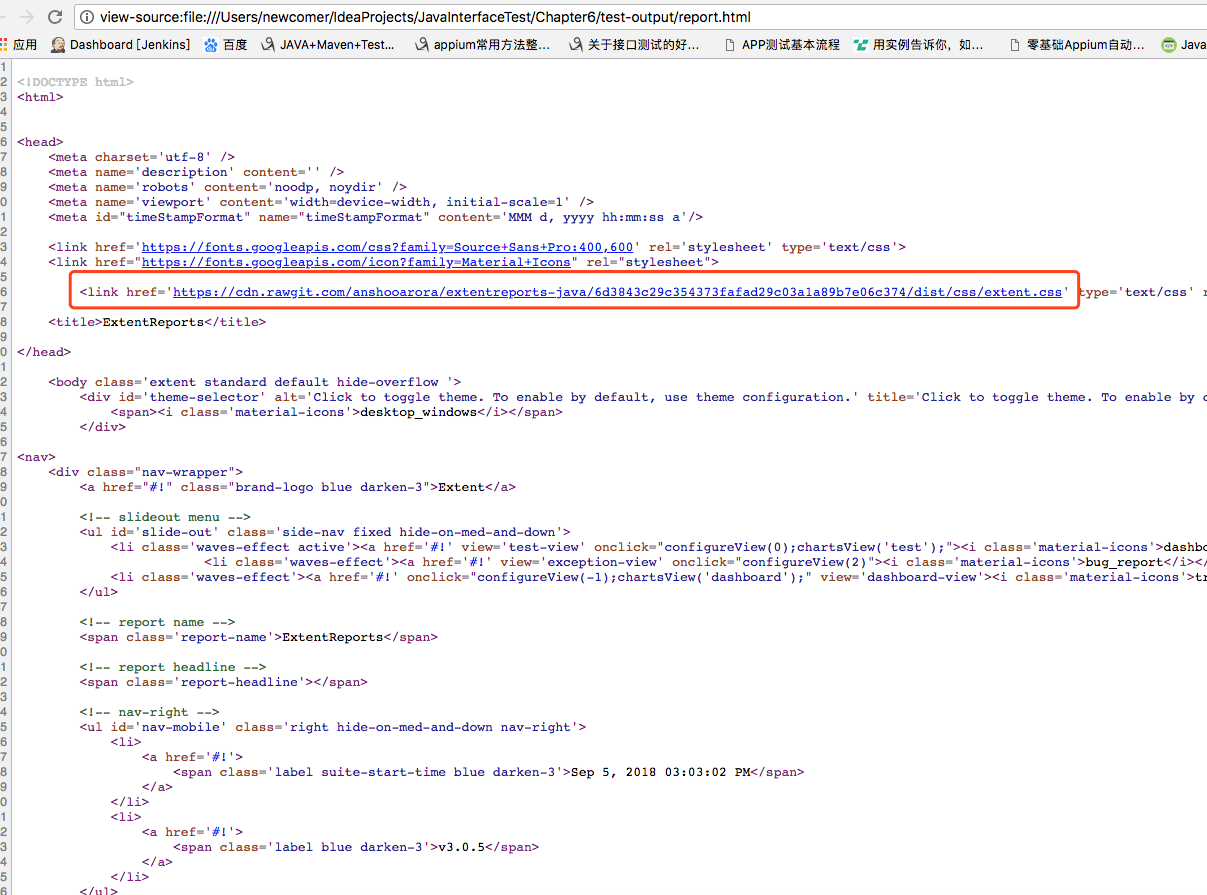
源码:因为css央视没有加载出来,所以,没有样式。我们就需要自己指定一个样式,所以新建一个监听类
TestMethodsDemo.java
package com.tester.extent.demo;

import org.testng.Assert;

import org.testng.Reporter;

import org.testng.annotations.Test;

public class TestMethodsDemo {

    @Test

    public void test1(){

        Assert.assertEquals(1,2);

    }

    @Test

    public void test2(){

        Assert.assertEquals(1,1);

    }

    @Test

    public void test3(){

        Assert.assertEquals("sss","sss");

    }

    @Test

    public void logDemo(){

        Reporter.log("这是我们自己写的日志");

        throw new RuntimeException("这是自己抛得异常");

    }

}
ExtentTestNGIReporterListener.java
package com.tester.extent.demo;

import com.aventstack.extentreports.ExtentReports;

import com.aventstack.extentreports.ExtentTest;

import com.aventstack.extentreports.ResourceCDN;

import com.aventstack.extentreports.Status;

import com.aventstack.extentreports.model.TestAttribute;

import com.aventstack.extentreports.reporter.ExtentHtmlReporter;

import com.aventstack.extentreports.reporter.configuration.ChartLocation;

import com.aventstack.extentreports.reporter.configuration.Theme;

import org.testng.*;

import org.testng.xml.XmlSuite;

import java.io.File;

import java.util.*;

public class ExtentTestNGIReporterListener implements IReporter {

    //生成的路径以及文件名

    private static final String OUTPUT_FOLDER = "test-output/";

    private static final String FILE_NAME = "index.html";

    private ExtentReports extent;

    @Override

    public void generateReport(List<XmlSuite> xmlSuites, List<ISuite> suites, String outputDirectory) {

        init();

        boolean createSuiteNode = false;

        if(suites.size()>1){

            createSuiteNode=true;

        }

        for (ISuite suite : suites) {

            Map<String, ISuiteResult> result = suite.getResults();

            //如果suite里面没有任何用例,直接跳过,不在报告里生成

            if(result.size()==0){

                continue;

            }

            //统计suite下的成功、失败、跳过的总用例数

            int suiteFailSize=0;

            int suitePassSize=0;

            int suiteSkipSize=0;

            ExtentTest suiteTest=null;

            //存在多个suite的情况下,在报告中将同一个一个suite的测试结果归为一类,创建一级节点。

            if(createSuiteNode){

                suiteTest = extent.createTest(suite.getName()).assignCategory(suite.getName());

            }

            boolean createSuiteResultNode = false;

            if(result.size()>1){

                createSuiteResultNode=true;

            }

            for (ISuiteResult r : result.values()) {

                ExtentTest resultNode;

                ITestContext context = r.getTestContext();

                if(createSuiteResultNode){

                    //没有创建suite的情况下,将在SuiteResult的创建为一级节点,否则创建为suite的一个子节点。

                    if( null == suiteTest){

                        resultNode = extent.createTest(r.getTestContext().getName());

                    }else{

                        resultNode = suiteTest.createNode(r.getTestContext().getName());

                    }

                }else{

                    resultNode = suiteTest;

                }

                if(resultNode != null){

                    resultNode.getModel().setName(suite.getName()+" : "+r.getTestContext().getName());

                    if(resultNode.getModel().hasCategory()){

                        resultNode.assignCategory(r.getTestContext().getName());

                    }else{

                        resultNode.assignCategory(suite.getName(),r.getTestContext().getName());

                    }

                    resultNode.getModel().setStartTime(r.getTestContext().getStartDate());

                    resultNode.getModel().setEndTime(r.getTestContext().getEndDate());

                    //统计SuiteResult下的数据

                    int passSize = r.getTestContext().getPassedTests().size();

                    int failSize = r.getTestContext().getFailedTests().size();

                    int skipSize = r.getTestContext().getSkippedTests().size();

                    suitePassSize += passSize;

                    suiteFailSize += failSize;

                    suiteSkipSize += skipSize;

                    if(failSize>0){

                        resultNode.getModel().setStatus(Status.FAIL);

                    }

                    resultNode.getModel().setDescription(String.format("Pass: %s ; Fail: %s ; Skip: %s ;",passSize,failSize,skipSize));

                }

                buildTestNodes(resultNode,context.getFailedTests(), Status.FAIL);

                buildTestNodes(resultNode,context.getSkippedTests(), Status.SKIP);

                buildTestNodes(resultNode,context.getPassedTests(), Status.PASS);

            }

            if(suiteTest!= null){

                suiteTest.getModel().setDescription(String.format("Pass: %s ; Fail: %s ; Skip: %s ;",suitePassSize,suiteFailSize,suiteSkipSize));

                if(suiteFailSize>0){

                    suiteTest.getModel().setStatus(Status.FAIL);

                }

            }

        }

//        for (String s : Reporter.getOutput()) {

//            extent.setTestRunnerOutput(s);

//        }

        extent.flush();

    }

    private void init() {

        //文件夹不存在的话进行创建

        File reportDir= new File(OUTPUT_FOLDER);

        if(!reportDir.exists()&& !reportDir .isDirectory()){

            reportDir.mkdir();

        }

        ExtentHtmlReporter htmlReporter = new ExtentHtmlReporter(OUTPUT_FOLDER + FILE_NAME);

        // 设置静态文件的DNS

        //怎么样解决cdn.rawgit.com访问不了的情况

        htmlReporter.config().setResourceCDN(ResourceCDN.EXTENTREPORTS);

        htmlReporter.config().setDocumentTitle("api自动化测试报告");

        htmlReporter.config().setReportName("api自动化测试报告");

        htmlReporter.config().setChartVisibilityOnOpen(true);

        htmlReporter.config().setTestViewChartLocation(ChartLocation.TOP);

        htmlReporter.config().setTheme(Theme.STANDARD);

        htmlReporter.config().setCSS(".node.level-1  ul{ display:none;} .node.level-1.active ul{display:block;}");

        extent = new ExtentReports();

        extent.attachReporter(htmlReporter);

        extent.setReportUsesManualConfiguration(true);

    }

    private void buildTestNodes(ExtentTest extenttest, IResultMap tests, Status status) {

        //存在父节点时,获取父节点的标签

        String[] categories=new String[0];

        if(extenttest != null ){

            List<TestAttribute> categoryList = extenttest.getModel().getCategoryContext().getAll();

            categories = new String[categoryList.size()];

            for(int index=0;index<categoryList.size();index++){

                categories[index] = categoryList.get(index).getName();

            }

        }

        ExtentTest test;

        if (tests.size() > 0) {

            //调整用例排序,按时间排序

            Set<ITestResult> treeSet = new TreeSet<ITestResult>(new Comparator<ITestResult>() {

                @Override

                public int compare(ITestResult o1, ITestResult o2) {

                    return o1.getStartMillis()<o2.getStartMillis()?-1:1;

                }

            });

            treeSet.addAll(tests.getAllResults());

            for (ITestResult result : treeSet) {

                Object[] parameters = result.getParameters();

                String name="";

                //如果有参数,则使用参数的toString组合代替报告中的name

                for(Object param:parameters){

                    name+=param.toString();

                }

                if(name.length()>0){

                    if(name.length()>50){

                        name= name.substring(0,49)+"...";

                    }

                }else{

                    name = result.getMethod().getMethodName();

                }

                if(extenttest==null){

                    test = extent.createTest(name);

                }else{

                    //作为子节点进行创建时,设置同父节点的标签一致,便于报告检索。

                    test = extenttest.createNode(name).assignCategory(categories);

                }

                //test.getModel().setDescription(description.toString());

                //test = extent.createTest(result.getMethod().getMethodName());

                for (String group : result.getMethod().getGroups())

                    test.assignCategory(group);

                List<String> outputList = Reporter.getOutput(result);

                for(String output:outputList){

                    //将用例的log输出报告中

                    test.debug(output);

                }

                if (result.getThrowable() != null) {

                    test.log(status, result.getThrowable());

                }

                else {

                    test.log(status, "Test " + status.toString().toLowerCase() + "ed");

                }

                test.getModel().setStartTime(getTime(result.getStartMillis()));

                test.getModel().setEndTime(getTime(result.getEndMillis()));

            }

        }

    }

    private Date getTime(long millis) {

        Calendar calendar = Calendar.getInstance();

        calendar.setTimeInMillis(millis);

        return calendar.getTime();

    }

}
testng.xml
<?xml version="1.0" encoding="UTF-8" ?>

<!DOCTYPE suite SYSTEM "http://testng.org/testng-1.0.dtd" >

<suite name="我自己的接口测试套件">

    <test name="这些是测试模块">

        <classes>

            <class name="com.tester.extent.demo.TestMethodsDemo">

                <methods>

                    <include name="test1"/>

                    <include name="test2"/>

                    <include name="test3"/>

                    <include name="logDemo"/>

                </methods>

            </class>

        </classes>

    </test>

    <listeners>

        <!--<listener class-name="com.vimalselvam.testng.listener.ExtentTestNgFormatter"/>-->

        <!--<listener class-name="com.tester.extent.demo.ExtentTestNGIReporterListenerOld"/>-->

        <listener class-name="com.tester.extent.demo.ExtentTestNGIReporterListener"/>

    </listeners>

</suite>
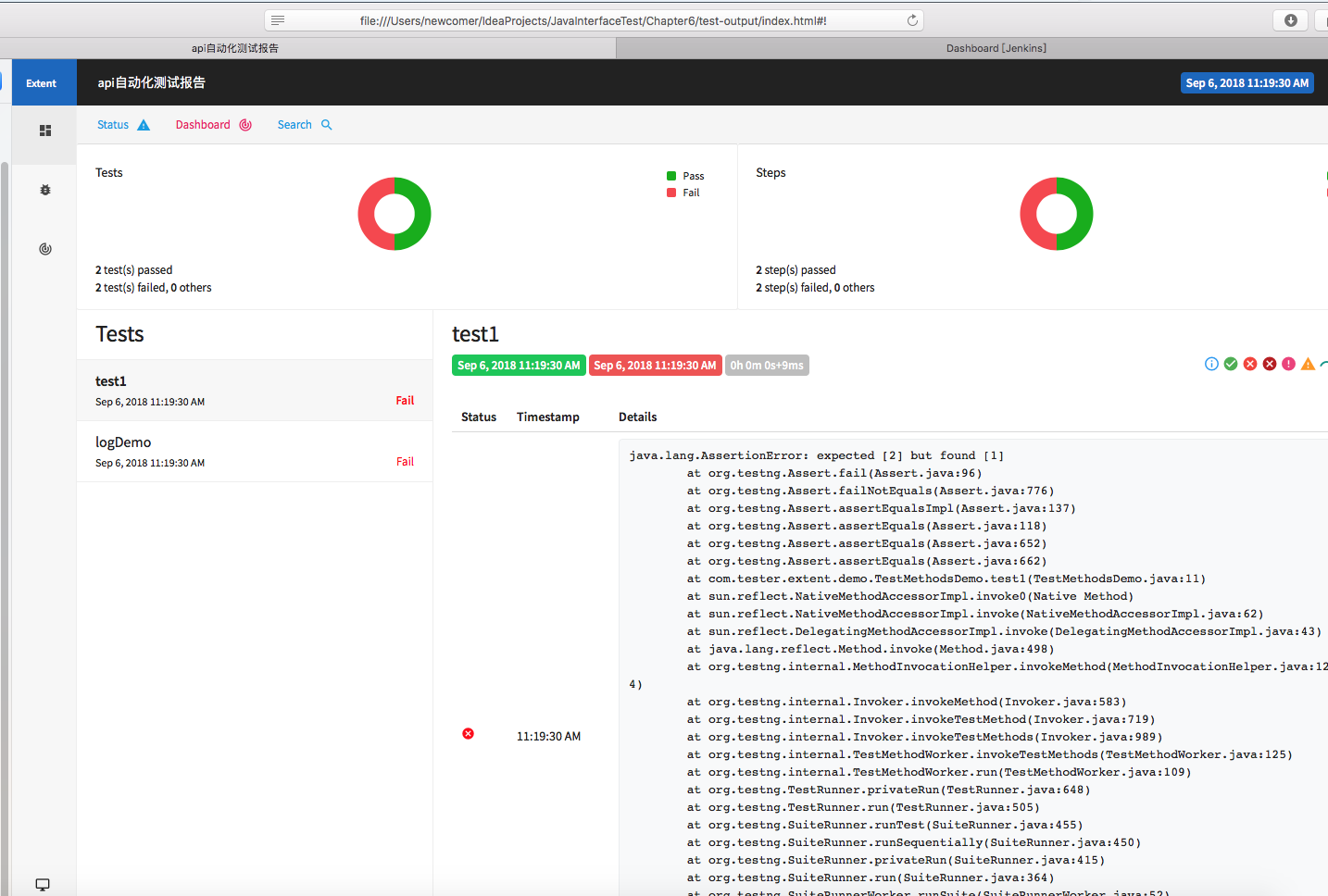
运行结果:
TestNg 12. extentReport测试报告的更多相关文章
- Testng生成的测试报告乱码解决办法
Testng生成的测试报告乱码解决办法 2017-06-16 1 问题描述 乱码是程序编码不统一,比如Java源代码是utf-8,编译是gbk,这时会乱码. 代码如下: org.testng.Repo ...
- 接口自动化框架(java)--5.通过testng.xml生成extentreport测试报告
这套框架的报告是自己封装的 由于之前已经通过Extentreport插件实现了Testng的IReport接口,所以在testng.xml中使用listener标签并指向实现IReport接口的那个类 ...
- Mac Eclipse+Maven+TestNg+ReportNg 生成测试报告
TestNG 是java 的单元测试框架,功能很强大,很方便,但是自动生成的测试报告有待改善,可以使用TestNg 自带的TestNG_xslt更改TestNG报告的样式,这里主要讲解ReportNg ...
- Idea+maven+testng+reportng生成测试报告
TestNG自带的测试报告不是很好用,所以一般结合reportng生成美观的测试报告. 首先,在pom.xml中添加testng和reportng相关依赖 <dependencies> & ...
- Eclipse+Maven+TestNg+ReportNg 生成测试报告
http://blog.csdn.net/a542551042/article/details/46729585
- TestNG单元测试与使用详解
TestNG的基本注解与执行顺序 在类里编辑程序时,在@Test后面,摁 alt+回车,选择对应的插件,可以把目前用到的插件自动添加到 pom.xml 文件中,如下面的testng,每摁一次,就多添加 ...
- Gradle 1.12用户指南翻译——第二十三章. Java 插件
其他章节的翻译请参见: http://blog.csdn.net/column/details/gradle-translation.html 翻译项目请关注Github上的地址: https://g ...
- Java+Selenium3框架设计篇5-如何实现邮件发送测试报告
https://blog.csdn.net/u011541946/article/details/77278837 本篇继续回答网友的问题,这个主题是如何通过邮件发送测试报告.通过邮件发送测试报告,这 ...
- TestNG 搭建测试框架 自动化测试
框架层级及基本组件: 参考:https://www.cnblogs.com/jier888/p/8998724.html Java作为开发语言 Maven管理项目及Jar包 Testng作为测试 ...
随机推荐
- Linux基础学习(11)--Shell编程
第十一章——Shell编程 一.基础正则表达式 1.正则表达式与通配符(*,?,[ ]): 2.基础正则表达式: 二.字符截取命令 1.cut字段提取命令: 空格分割时,不知道空格有多少个,无法分割行 ...
- MySQL执行语句的顺序
MySQL的语句一共分为11步,最先执行的总是FROM操作,最后执行的是LIMIT操作.其中每一个操作都会产生一张虚拟的表,这个虚拟的表作为一个处理的输入,只是这些虚拟的表对用户来说是透明的,但是只有 ...
- 关于mysql远程登录问题
问题:mysql不能实现远程登录 前提:mysql开启了远程登录账号,安全组也放行了3306,防火墙是iptables,也加入了3306放行,但是还是不能实现远程访问 解决办法,使用iptables ...
- LODOP安装参数 及静默安装
在cmd命令里里静默安装lodop(c-lodop不能静默安装),本人的安装文件放在D:\lodopdownload\3060\Lodop6.224_Clodop3.060,如下所示: lodop静默 ...
- spring @Validated 注解开发中使用group分组校验
之前知道spring支持JSR校验,在自己定义的bean中加入@NotNull,@NotBlank,@Length等之类的校验用于处理前台传递过来的request请求,避免在写多余的代码去处理. 但是 ...
- Data Science With R In Visual Studio
R Projects Similar to Python, when we installed the data science tools we get an “R” section in our ...
- Gedit浏览器常用快捷键备注
此处只记录常用的,而通常意义上的应知应会不做汇总 搜索 : Ctrl +F : 查找字符串 Ctrl + G : 查找字符串的下一实例 Ctrl + Shift + G : 查找字符串的前一实例 Ct ...
- EF code first出现错误:列名 Discriminator 无效
转载:https://blog.csdn.net/lanse_my/article/details/38128355 前几天使用code first碰到错误:列名 'Discriminator' 无效 ...
- Python 面试题_未完
基础部分 1. 为什么学习Python 家里有在这个IT圈子里面,也想让我接触这个圈子,然后给我建议学的Python, 然后自己通过百度和向有学过Python的同学了解了Python,Python这门 ...
- Linux block(1k) block(4k) 换算 gb
输入 df 显示1k blocks 大小 再输入 df -h 显示 gb换算大小 结论 block(1k) 计算公式为: block(1k) /1024/1000 = xx gb ...