
Python爬虫小实践:寻找失踪人口,爬取失踪儿童信息并写成csv文件,方便存入数据库
前两天有人私信我,让我爬这个网站,http://bbs.baobeihuijia.com/forum-191-1.html上的失踪儿童信息,准备根据失踪儿童的失踪时的地理位置来更好的寻找失踪儿童,这种事情本就应该义不容辞,如果对网站服务器造成负荷,还请谅解。
这次依然是用第三方爬虫包BeautifulSoup,还有Selenium+Chrome,Selenium+PhantomJS来爬取信息。
通过分析网站的框架,依然分三步来进行。
步骤一:获取http://bbs.baobeihuijia.com/forum-191-1.html这个版块上的所有分页页面链接
步骤二:获取每一个分页链接上所发的帖子的链接
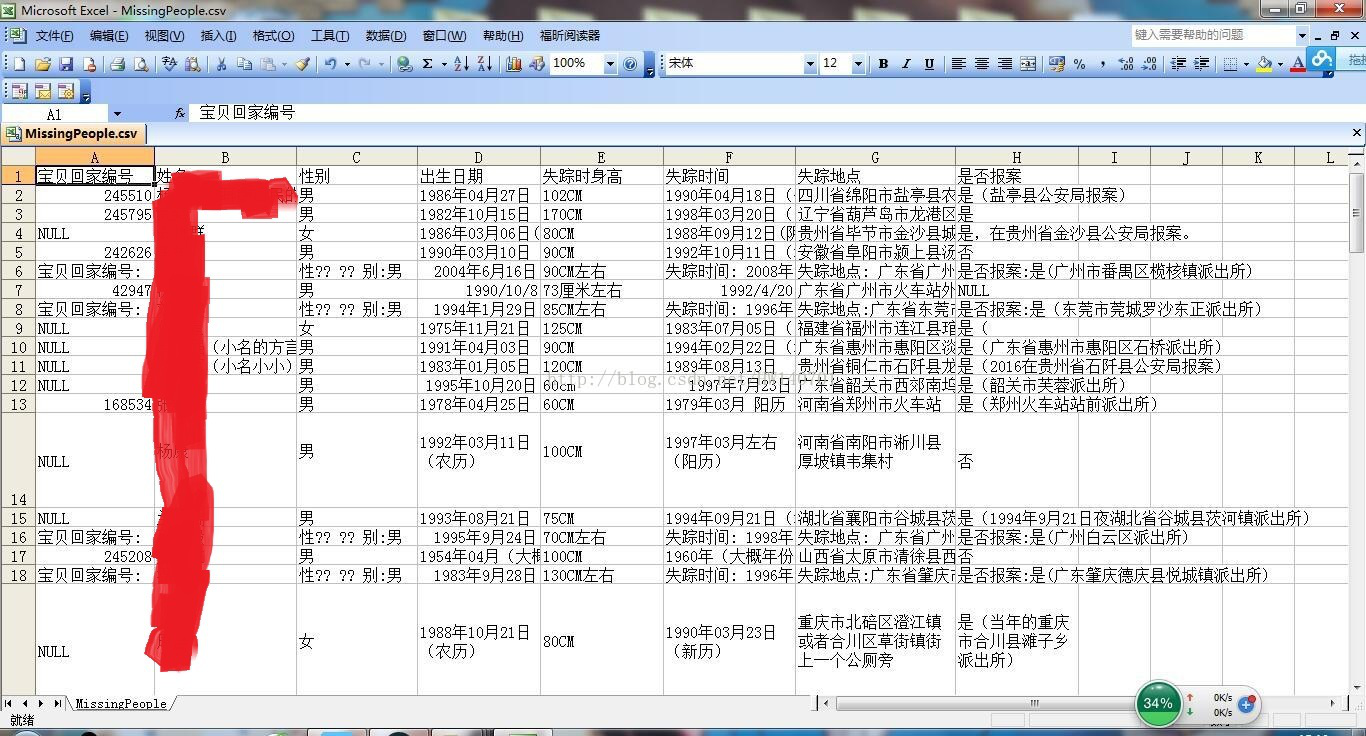
步骤三:获取每一个帖子链接上要爬取的信息,编号,姓名,性别,出生日期,失踪时身高,失踪时间,失踪地点,以及是否报案
起先用的BeautifulSoup,但是被管理员设置了网站重定向,然后就采用selenium的方式,在这里还是对网站管理员说一声抱歉。
1、获取http://bbs.baobeihuijia.com/forum-191-1.html这个版块上的所有分页页面链接
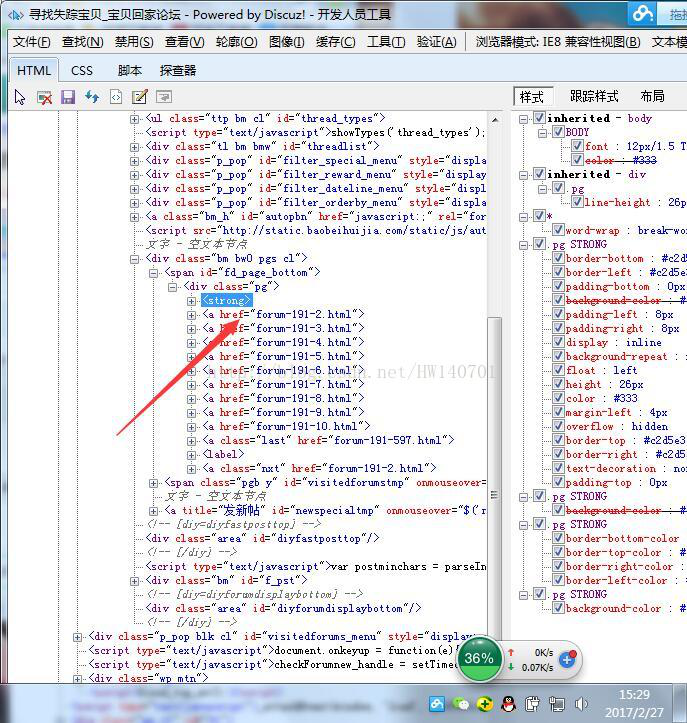
通过分析:发现分页的页面链接处于<div class="pg">下,所以写了以下的代码
BeautifulSoup形式:
[python] view plain copy
- def GetALLPageUrl(siteUrl):
- #设置代理IP访问
- #代理IP可以上http://http.zhimaruanjian.com/获取
- proxy_handler=urllib.request.ProxyHandler({'https':'111.76.129.200:808'})
- proxy_auth_handler=urllib.request.ProxyBasicAuthHandler()
- opener = urllib.request.build_opener(urllib.request.HTTPHandler, proxy_handler)
- urllib.request.install_opener(opener)
- #获取网页信息
- req=request.Request(siteUrl,headers=headers1 or headers2 or headers3)
- html=urlopen(req)
- bsObj=BeautifulSoup(html.read(),"html.parser")
- html.close()
- #http://bbs.baobeihuijia.com/forum-191-1.html变成http://bbs.baobeihuijia.com,以便组成页面链接
- siteindex=siteUrl.rfind("/")
- tempsiteurl=siteUrl[0:siteindex+1]#http://bbs.baobeihuijia.com/
- tempbianhaoqian=siteUrl[siteindex+1:-6]#forum-191-
- #爬取想要的信息
- bianhao=[]#存储页面编号
- pageUrl=[]#存储页面链接
- templist1=bsObj.find("div",{"class":"pg"})
- for templist2 in templist1.findAll("a",href=re.compile("forum-([0-9]+)-([0-9]+).html")):
- lianjie=templist2.attrs['href']
- #print(lianjie)
- index1=lianjie.rfind("-")#查找-在字符串中的位置
- index2=lianjie.rfind(".")#查找.在字符串中的位置
- tempbianhao=lianjie[index1+1:index2]
- bianhao.append(int(tempbianhao))
- bianhaoMax=max(bianhao)#获取页面的最大编号
- for i in range(1,bianhaoMax+1):
- temppageUrl=tempsiteurl+tempbianhaoqian+str(i)+".html"#组成页面链接
- #print(temppageUrl)
- pageUrl.append(temppageUrl)
- return pageUrl#返回页面链接列表
Selenium形式:
[python] view plain copy
- #得到当前板块所有的页面链接
- #siteUrl为当前版块的页面链接
- def GetALLPageUrl(siteUrl):
- #设置代理IP访问
- #代理IP可以上http://http.zhimaruanjian.com/获取
- proxy_handler=urllib.request.ProxyHandler({'post':'123.207.143.51:8080'})
- proxy_auth_handler=urllib.request.ProxyBasicAuthHandler()
- opener = urllib.request.build_opener(urllib.request.HTTPHandler, proxy_handler)
- urllib.request.install_opener(opener)
- try:
- #掉用第三方包selenium打开浏览器登陆
- #driver=webdriver.Chrome()#打开chrome
- driver=webdriver.Chrome()#打开无界面浏览器Chrome
- #driver=webdriver.PhantomJS()#打开无界面浏览器PhantomJS
- driver.set_page_load_timeout(10)
- #driver.implicitly_wait(30)
- try:
- driver.get(siteUrl)#登陆两次
- driver.get(siteUrl)
- except TimeoutError:
- driver.refresh()
- #print(driver.page_source)
- html=driver.page_source#将浏览器执行后的源代码赋给html
- #获取网页信息
- #抓捕网页解析过程中的错误
- try:
- #req=request.Request(tieziUrl,headers=headers5)
- #html=urlopen(req)
- bsObj=BeautifulSoup(html,"html.parser")
- #print(bsObj.find('title').get_text())
- #html.close()
- except UnicodeDecodeError as e:
- print("-----UnicodeDecodeError url",siteUrl)
- except urllib.error.URLError as e:
- print("-----urlError url:",siteUrl)
- except socket.timeout as e:
- print("-----socket timout:",siteUrl)
- while(bsObj.find('title').get_text() == "页面重载开启"):
- print("当前页面不是重加载后的页面,程序会尝试刷新一次到跳转后的页面\n")
- driver.get(siteUrl)
- html=driver.page_source#将浏览器执行后的源代码赋给html
- bsObj=BeautifulSoup(html,"html.parser")
- except Exception as e:
- driver.close() # Close the current window.
- driver.quit()#关闭chrome浏览器
- #time.sleep()
- driver.close() # Close the current window.
- driver.quit()#关闭chrome浏览器
- #http://bbs.baobeihuijia.com/forum-191-1.html变成http://bbs.baobeihuijia.com,以便组成页面链接
- siteindex=siteUrl.rfind("/")
- tempsiteurl=siteUrl[0:siteindex+1]#http://bbs.baobeihuijia.com/
- tempbianhaoqian=siteUrl[siteindex+1:-6]#forum-191-
- #爬取想要的信息
- bianhao=[]#存储页面编号
- pageUrl=[]#存储页面链接
- templist1=bsObj.find("div",{"class":"pg"})
- #if templist1==None:
- #return
- for templist2 in templist1.findAll("a",href=re.compile("forum-([0-9]+)-([0-9]+).html")):
- if templist2==None:
- continue
- lianjie=templist2.attrs['href']
- #print(lianjie)
- index1=lianjie.rfind("-")#查找-在字符串中的位置
- index2=lianjie.rfind(".")#查找.在字符串中的位置
- tempbianhao=lianjie[index1+1:index2]
- bianhao.append(int(tempbianhao))
- bianhaoMax=max(bianhao)#获取页面的最大编号
- for i in range(1,bianhaoMax+1):
- temppageUrl=tempsiteurl+tempbianhaoqian+str(i)+".html"#组成页面链接
- print(temppageUrl)
- pageUrl.append(temppageUrl)
- return pageUrl#返回页面链接列表
2.获取每一个分页链接上所发的帖子的链接
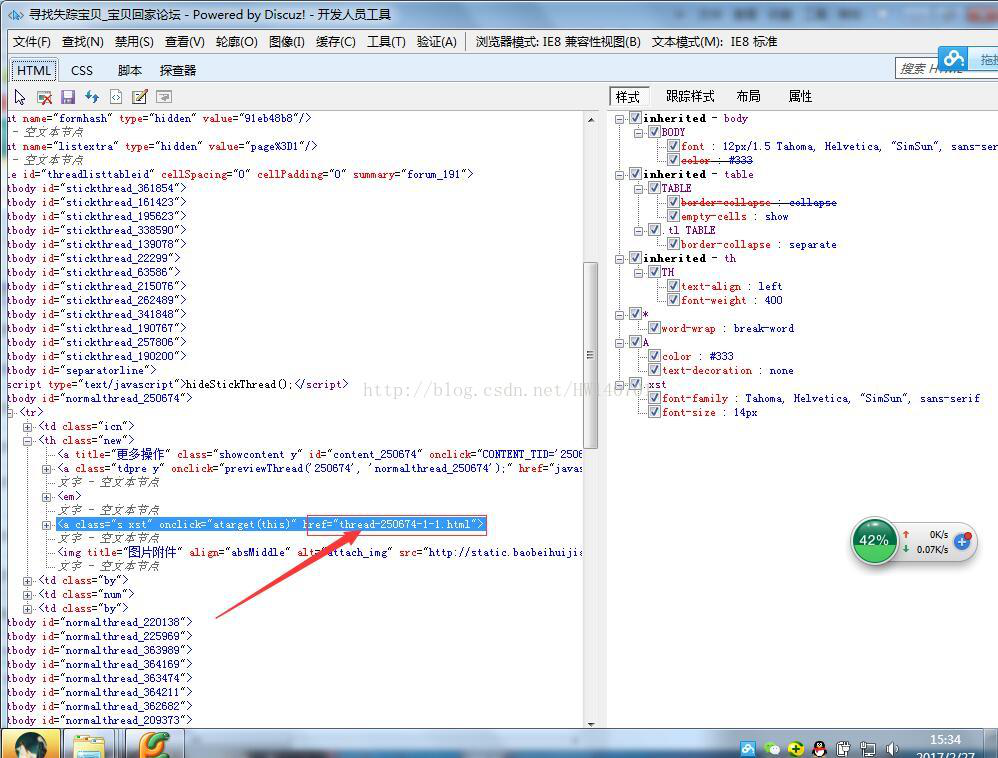
每个帖子的链接都位于href下
所以写了以下的代码:
BeautifulSoup形式:
[python] view plain copy
- #得到当前版块页面所有帖子的链接
- def GetCurrentPageTieziUrl(PageUrl):
- #设置代理IP访问
- #代理IP可以上http://http.zhimaruanjian.com/获取
- proxy_handler=urllib.request.ProxyHandler({'post':'121.22.252.85:8000'})
- proxy_auth_handler=urllib.request.ProxyBasicAuthHandler()
- opener = urllib.request.build_opener(urllib.request.HTTPHandler, proxy_handler)
- urllib.request.install_opener(opener)
- #获取网页信息
- req=request.Request(PageUrl,headers=headers1 or headers2 or headers3)
- html=urlopen(req)
- bsObj=BeautifulSoup(html.read(),"html.parser")
- html.close()
- #http://bbs.baobeihuijia.com/forum-191-1.html变成http://bbs.baobeihuijia.com,以便组成帖子链接
- siteindex=PageUrl.rfind("/")
- tempsiteurl=PageUrl[0:siteindex+1]#http://bbs.baobeihuijia.com/
- #print(tempsiteurl)
- TieziUrl=[]
- #爬取想要的信息
- for templist1 in bsObj.findAll("tbody",id=re.compile("normalthread_([0-9]+)")) :
- for templist2 in templist1.findAll("a",{"class":"s xst"}):
- tempteiziUrl=tempsiteurl+templist2.attrs['href']#组成帖子链接
- print(tempteiziUrl)
- TieziUrl.append(tempteiziUrl)
- return TieziUrl#返回帖子链接列表
Selenium形式:
[python] view plain copy
- #得到当前版块页面所有帖子的链接
- def GetCurrentPageTieziUrl(PageUrl):
- #设置代理IP访问
- #代理IP可以上http://http.zhimaruanjian.com/获取
- proxy_handler=urllib.request.ProxyHandler({'post':'110.73.30.157:8123'})
- proxy_auth_handler=urllib.request.ProxyBasicAuthHandler()
- opener = urllib.request.build_opener(urllib.request.HTTPHandler, proxy_handler)
- urllib.request.install_opener(opener)
- try:
- #掉用第三方包selenium打开浏览器登陆
- #driver=webdriver.Chrome()#打开chrome
- driver=webdriver.Chrome()#打开无界面浏览器Chrome
- #driver=webdriver.PhantomJS()#打开无界面浏览器PhantomJS
- driver.set_page_load_timeout(10)
- try:
- driver.get(PageUrl)#登陆两次
- driver.get(PageUrl)
- except TimeoutError:
- driver.refresh()
- #print(driver.page_source)
- html=driver.page_source#将浏览器执行后的源代码赋给html
- #获取网页信息
- #抓捕网页解析过程中的错误
- try:
- #req=request.Request(tieziUrl,headers=headers5)
- #html=urlopen(req)
- bsObj=BeautifulSoup(html,"html.parser")
- #html.close()
- except UnicodeDecodeError as e:
- print("-----UnicodeDecodeError url",PageUrl)
- except urllib.error.URLError as e:
- print("-----urlError url:",PageUrl)
- except socket.timeout as e:
- print("-----socket timout:",PageUrl)
- n=0
- while(bsObj.find('title').get_text() == "页面重载开启"):
- print("当前页面不是重加载后的页面,程序会尝试刷新一次到跳转后的页面\n")
- driver.get(PageUrl)
- html=driver.page_source#将浏览器执行后的源代码赋给html
- bsObj=BeautifulSoup(html,"html.parser")
- n=n+1
- if n==10:
- driver.close() # Close the current window.
- driver.quit()#关闭chrome浏览器
- return 1
- except Exception as e:
- driver.close() # Close the current window.
- driver.quit()#关闭chrome浏览器
- time.sleep(1)
- driver.close() # Close the current window.
- driver.quit()#关闭chrome浏览器
- #http://bbs.baobeihuijia.com/forum-191-1.html变成http://bbs.baobeihuijia.com,以便组成帖子链接
- siteindex=PageUrl.rfind("/")
- tempsiteurl=PageUrl[0:siteindex+1]#http://bbs.baobeihuijia.com/
- #print(tempsiteurl)
- TieziUrl=[]
- #爬取想要的信息
- for templist1 in bsObj.findAll("tbody",id=re.compile("normalthread_([0-9]+)")) :
- if templist1==None:
- continue
- for templist2 in templist1.findAll("a",{"class":"s xst"}):
- if templist2==None:
- continue
- tempteiziUrl=tempsiteurl+templist2.attrs['href']#组成帖子链接
- print(tempteiziUrl)
- TieziUrl.append(tempteiziUrl)
- return TieziUrl#返回帖子链接列表
3.获取每一个帖子链接上要爬取的信息,编号,姓名,性别,出生日期,失踪时身高,失踪时间,失踪地点,以及是否报案,并写入CSV中
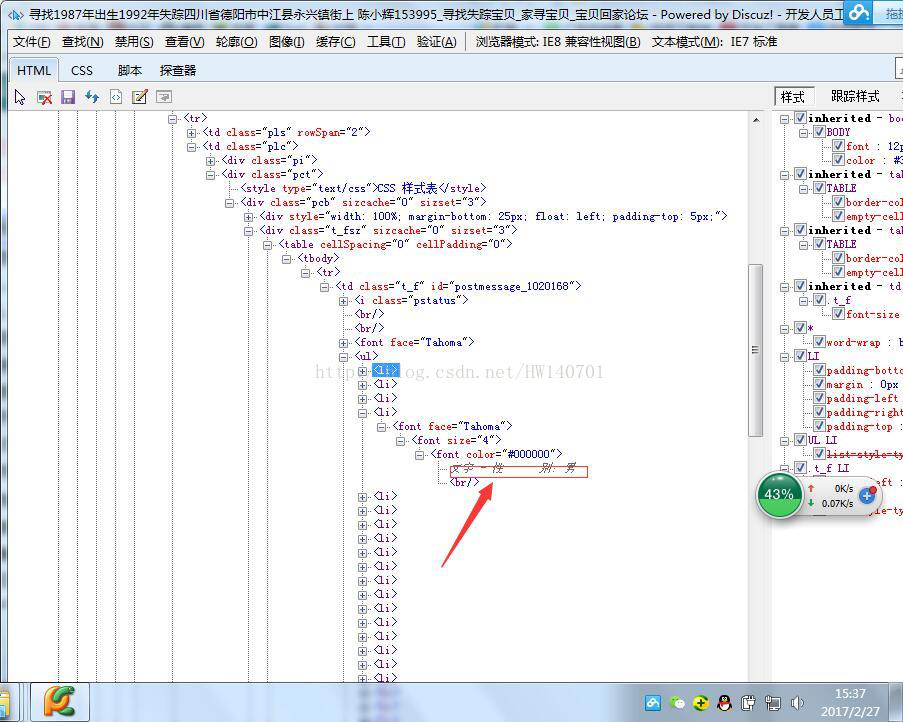
通过查看每一个帖子的链接,发现其失踪人口信息都在<ul>标签下,所以编写了以下的代码
BeautifulSoup形式:
[python] view plain copy
- #得到当前页面失踪人口信息
- #pageUrl为当前帖子页面链接
- def CurrentPageMissingPopulationInformation(tieziUrl):
- #设置代理IP访问
- #代理IP可以上http://http.zhimaruanjian.com/获取
- proxy_handler=urllib.request.ProxyHandler({'post':'210.136.17.78:8080'})
- proxy_auth_handler=urllib.request.ProxyBasicAuthHandler()
- opener = urllib.request.build_opener(urllib.request.HTTPHandler, proxy_handler)
- urllib.request.install_opener(opener)
- #获取网页信息
- req=request.Request(tieziUrl,headers=headers1 or headers2 or headers3)
- html=urlopen(req)
- bsObj=BeautifulSoup(html.read(),"html.parser")
- html.close()
- #查找想要的信息
- templist1=bsObj.find("td",{"class":"t_f"}).ul
- if templist1==None:#判断是否不包含ul字段,如果不,跳出函数
- return
- mycsv=['NULL','NULL','NULL','NULL','NULL','NULL','NULL','NULL']#初始化提取信息列表
- for templist2 in templist1.findAll("font",size=re.compile("^([0-9]+)*$")):
- if len(templist2)==0:
- continue
- tempText=templist2.get_text()
- #print(tempText[0:4])
- if "宝贝回家编号" in tempText[0:6]:
- print(tempText)
- index=tempText.find(":")
- tempText=tempText[index+1:]
- #mycsv.append(tempText)
- if len(tempText)==0:
- tempText="NULL"
- mycsv[0]=tempText
- if "寻亲编号" in tempText[0:6]:
- print(tempText)
- index=tempText.find(":")
- tempText=tempText[index+1:]
- if len(tempText)==0:
- tempText="NULL"
- #mycsv.append(tempText)
- mycsv[0]=tempText
- if "登记编号" in tempText[0:6]:
- print(tempText)
- index=tempText.find(":")
- tempText=tempText[index+1:]
- if len(tempText)==0:
- tempText="NULL"
- #mycsv.append(tempText)
- mycsv[0]=tempText
- if "姓" in tempText[0:6]:
- print(tempText)
- index=tempText.find(":")
- tempText=tempText[index+1:]
- #mycsv.append(tempText)
- mycsv[1]=tempText
- if"性" in tempText[0:6]:
- print(tempText)
- index=tempText.find(":")
- tempText=tempText[index+1:]
- #mycsv.append(tempText)
- mycsv[2]=tempText
- if "出生日期" in tempText[0:6]:
- print(tempText)
- index=tempText.find(":")
- tempText=tempText[index+1:]
- #mycsv.append(tempText)
- mycsv[3]=tempText
- if "失踪时身高" in tempText[0:6]:
- print(tempText)
- index=tempText.find(":")
- tempText=tempText[index+1:]
- #mycsv.append(tempText)
- mycsv[4]=tempText
- if "失踪时间" in tempText[0:6]:
- print(tempText)
- index=tempText.find(":")
- tempText=tempText[index+1:]
- #mycsv.append(tempText)
- mycsv[5]=tempText
- if "失踪日期" in tempText[0:6]:
- print(tempText)
- index=tempText.find(":")
- tempText=tempText[index+1:]
- #mycsv.append(tempText)
- mycsv[5]=tempText
- if "失踪地点" in tempText[0:6]:
- print(tempText)
- index=tempText.find(":")
- tempText=tempText[index+1:]
- #mycsv.append(tempText)
- mycsv[6]=tempText
- if "是否报案" in tempText[0:6]:
- print(tempText)
- index=tempText.find(":")
- tempText=tempText[index+1:]
- #mycsv.append(tempText)
- mycsv[7]=tempText
- try:
- writer.writerow((str(mycsv[0]),str(mycsv[1]),str(mycsv[2]),str(mycsv[3]),str(mycsv[4]),str(mycsv[5]),str(mycsv[6]),str(mycsv[7])))#写入CSV文件
- finally:
- time.sleep(1)#设置爬完之后的睡眠时间,这里先设置为1秒
Selenium形式:
[python] view plain copy
- #得到当前页面失踪人口信息
- #pageUrl为当前帖子页面链接
- def CurrentPageMissingPopulationInformation(tieziUrl):
- #设置代理IP访问
- #代理IP可以上http://http.zhimaruanjian.com/获取
- proxy_handler=urllib.request.ProxyHandler({'post':'128.199.169.17:80'})
- proxy_auth_handler=urllib.request.ProxyBasicAuthHandler()
- opener = urllib.request.build_opener(urllib.request.HTTPHandler, proxy_handler)
- urllib.request.install_opener(opener)
- try:
- #掉用第三方包selenium打开浏览器登陆
- #driver=webdriver.Chrome()#打开chrome
- driver=webdriver.Chrome()#打开无界面浏览器Chrome
- #driver=webdriver.PhantomJS()#打开无界面浏览器PhantomJS
- driver.set_page_load_timeout(10)
- #driver.implicitly_wait(30)
- try:
- driver.get(tieziUrl)#登陆两次
- driver.get(tieziUrl)
- except TimeoutError:
- driver.refresh()
- #print(driver.page_source)
- html=driver.page_source#将浏览器执行后的源代码赋给html
- #获取网页信息
- #抓捕网页解析过程中的错误
- try:
- #req=request.Request(tieziUrl,headers=headers5)
- #html=urlopen(req)
- bsObj=BeautifulSoup(html,"html.parser")
- #html.close()
- except UnicodeDecodeError as e:
- print("-----UnicodeDecodeError url",tieziUrl)
- except urllib.error.URLError as e:
- print("-----urlError url:",tieziUrl)
- except socket.timeout as e:
- print("-----socket timout:",tieziUrl)
- while(bsObj.find('title').get_text() == "页面重载开启"):
- print("当前页面不是重加载后的页面,程序会尝试刷新一次到跳转后的页面\n")
- driver.get(tieziUrl)
- html=driver.page_source#将浏览器执行后的源代码赋给html
- bsObj=BeautifulSoup(html,"html.parser")
- except Exception as e:
- driver.close() # Close the current window.
- driver.quit()#关闭chrome浏览器
- time.sleep(0.5)
- driver.close() # Close the current window.
- driver.quit()#关闭chrome浏览器
- #查找想要的信息
- templist1=bsObj.find("td",{"class":"t_f"}).ul
- if templist1==None:#判断是否不包含ul字段,如果不,跳出函数
- print("当前帖子页面不包含ul字段")
- return 1
- mycsv=['NULL','NULL','NULL','NULL','NULL','NULL','NULL','NULL']#初始化提取信息列表
- for templist2 in templist1.findAll("font",size=re.compile("^([0-9]+)*$")):
- tempText=templist2.get_text()
- #print(tempText[0:4])
- if "宝贝回家编号" in tempText[0:6]:
- print(tempText)
- index=tempText.find(":")
- tempText=tempText[index+1:]
- #mycsv.append(tempText)
- if len(tempText)==0:
- tempText="NULL"
- mycsv[0]=tempText
- if "寻亲编号" in tempText[0:6]:
- print(tempText)
- index=tempText.find(":")
- tempText=tempText[index+1:]
- if len(tempText)==0:
- tempText="NULL"
- #mycsv.append(tempText)
- mycsv[0]=tempText
- if "登记编号" in tempText[0:6]:
- print(tempText)
- index=tempText.find(":")
- tempText=tempText[index+1:]
- if len(tempText)==0:
- tempText="NULL"
- #mycsv.append(tempText)
- mycsv[0]=tempText
- if "姓" in tempText[0:6]:
- print(tempText)
- index=tempText.find(":")
- tempText=tempText[index+1:]
- #mycsv.append(tempText)
- mycsv[1]=tempText
- if"性" in tempText[0:6]:
- print(tempText)
- index=tempText.find(":")
- tempText=tempText[index+1:]
- #mycsv.append(tempText)
- mycsv[2]=tempText
- if "出生日期" in tempText[0:6]:
- print(tempText)
- index=tempText.find(":")
- tempText=tempText[index+1:]
- #mycsv.append(tempText)
- mycsv[3]=tempText
- if "失踪时身高" in tempText[0:6]:
- print(tempText)
- index=tempText.find(":")
- tempText=tempText[index+1:]
- #mycsv.append(tempText)
- mycsv[4]=tempText
- if "失踪时间" in tempText[0:6]:
- print(tempText)
- index=tempText.find(":")
- tempText=tempText[index+1:]
- #mycsv.append(tempText)
- mycsv[5]=tempText
- if "失踪日期" in tempText[0:6]:
- print(tempText)
- index=tempText.find(":")
- tempText=tempText[index+1:]
- #mycsv.append(tempText)
- mycsv[5]=tempText
- if "失踪地点" in tempText[0:6]:
- print(tempText)
- index=tempText.find(":")
- tempText=tempText[index+1:]
- #mycsv.append(tempText)
- mycsv[6]=tempText
- if "是否报案" in tempText[0:6]:
- print(tempText)
- index=tempText.find(":")
- tempText=tempText[index+1:]
- #mycsv.append(tempText)
- mycsv[7]=tempText
- try:
- writer.writerow((str(mycsv[0]),str(mycsv[1]),str(mycsv[2]),str(mycsv[3]),str(mycsv[4]),str(mycsv[5]),str(mycsv[6]),str(mycsv[7])))#写入CSV文件
- csvfile.flush()#马上将这条数据写入csv文件中
- finally:
- print("当前帖子信息写入完成\n")
- time.sleep(5)#设置爬完之后的睡眠时间,这里先设置为1秒
现附上所有代码,此代码仅供参考,不能用于商业用途,网络爬虫易给网站服务器造成巨大负荷,任何人使用本代码所引起的任何后果,本人不予承担法律责任。贴出代码的初衷是供大家学习爬虫,大家只是研究下网络框架即可,不要使用此代码去加重网站负荷,本人由于不当使用,已被封IP,前车之鉴,爬取失踪人口信息只是为了从空间上分析人口失踪的规律,由此给网站造成的什么不便,请见谅。
附上所有代码:
[python] view plain copy
- #__author__ = 'Administrator'
- #coding=utf-8
- import io
- import os
- import sys
- import math
- import urllib
- from urllib.request import urlopen
- from urllib.request import urlretrieve
- from urllib import request
- from bs4 import BeautifulSoup
- import re
- import time
- import socket
- import csv
- from selenium import webdriver
- socket.setdefaulttimeout(5000)#设置全局超时函数
- sys.stdout = io.TextIOWrapper(sys.stdout.buffer,encoding='gb18030')
- #sys.stdout = io.TextIOWrapper(sys.stdout.buffer,encoding='utf-8')
- #设置不同的headers,伪装为不同的浏览器
- headers1={'User-Agent':'Mozilla/5.0 (Windows NT 6.1; WOW64; rv:23.0) Gecko/20100101 Firefox/23.0'}
- headers2={'User-Agent':'Mozilla/5.0 (Windows NT 6.3; WOW64) AppleWebKit/537.36 (KHTML, like Gecko) Chrome/45.0.2454.101 Safari/537.36'}
- headers3={'User-Agent':'Mozilla/5.0 (Windows NT 6.1) AppleWebKit/537.11 (KHTML, like Gecko) Chrome/23.0.1271.64 Safari/537.11'}
- headers4={'User-Agent':'Mozilla/5.0 (Windows NT 10.0; WOW64) AppleWebKit/537.36 (KHTML, like Gecko) Chrome/53.0.2785.104 Safari/537.36 Core/1.53.2372.400 QQBrowser/9.5.10548.400'}
- headers5={'Accept':'text/html,application/xhtml+xml,application/xml;q=0.9,image/webp,*/*;q=0.8',
- 'Connection':'keep-alive',
- 'Host':'bbs.baobeihuijia.com',
- 'Referer':'http://bbs.baobeihuijia.com/forum-191-1.html',
- 'Upgrade-Insecure-Requests':'1',
- 'User-Agent':'Mozilla/5.0 (Windows NT 6.1; WOW64) AppleWebKit/537.36 (KHTML, like Gecko) Chrome/51.0.2704.103 Safari/537.36'}
- headers6={'Host': 'bbs.baobeihuijia.com',
- 'User-Agent': 'Mozilla/5.0 (Windows NT 6.1; WOW64; rv:51.0) Gecko/20100101 Firefox/51.0',
- 'Accept': 'textml,application/xhtml+xml,application/xml;q=0.9,*/*;q=0.8',
- 'Connection': 'keep-alive',
- 'Upgrade-Insecure-Requests':' 1'
- }
- #得到当前页面失踪人口信息
- #pageUrl为当前帖子页面链接
- def CurrentPageMissingPopulationInformation(tieziUrl):
- #设置代理IP访问
- #代理IP可以上http://http.zhimaruanjian.com/获取
- proxy_handler=urllib.request.ProxyHandler({'post':'128.199.169.17:80'})
- proxy_auth_handler=urllib.request.ProxyBasicAuthHandler()
- opener = urllib.request.build_opener(urllib.request.HTTPHandler, proxy_handler)
- urllib.request.install_opener(opener)
- try:
- #掉用第三方包selenium打开浏览器登陆
- #driver=webdriver.Chrome()#打开chrome
- driver=webdriver.Chrome()#打开无界面浏览器Chrome
- #driver=webdriver.PhantomJS()#打开无界面浏览器PhantomJS
- driver.set_page_load_timeout(10)
- #driver.implicitly_wait(30)
- try:
- driver.get(tieziUrl)#登陆两次
- driver.get(tieziUrl)
- except TimeoutError:
- driver.refresh()
- #print(driver.page_source)
- html=driver.page_source#将浏览器执行后的源代码赋给html
- #获取网页信息
- #抓捕网页解析过程中的错误
- try:
- #req=request.Request(tieziUrl,headers=headers5)
- #html=urlopen(req)
- bsObj=BeautifulSoup(html,"html.parser")
- #html.close()
- except UnicodeDecodeError as e:
- print("-----UnicodeDecodeError url",tieziUrl)
- except urllib.error.URLError as e:
- print("-----urlError url:",tieziUrl)
- except socket.timeout as e:
- print("-----socket timout:",tieziUrl)
- while(bsObj.find('title').get_text() == "页面重载开启"):
- print("当前页面不是重加载后的页面,程序会尝试刷新一次到跳转后的页面\n")
- driver.get(tieziUrl)
- html=driver.page_source#将浏览器执行后的源代码赋给html
- bsObj=BeautifulSoup(html,"html.parser")
- except Exception as e:
- driver.close() # Close the current window.
- driver.quit()#关闭chrome浏览器
- time.sleep(0.5)
- driver.close() # Close the current window.
- driver.quit()#关闭chrome浏览器
- #查找想要的信息
- templist1=bsObj.find("td",{"class":"t_f"}).ul
- if templist1==None:#判断是否不包含ul字段,如果不,跳出函数
- print("当前帖子页面不包含ul字段")
- return 1
- mycsv=['NULL','NULL','NULL','NULL','NULL','NULL','NULL','NULL']#初始化提取信息列表
- for templist2 in templist1.findAll("font",size=re.compile("^([0-9]+)*$")):
- tempText=templist2.get_text()
- #print(tempText[0:4])
- if "宝贝回家编号" in tempText[0:6]:
- print(tempText)
- index=tempText.find(":")
- tempText=tempText[index+1:]
- #mycsv.append(tempText)
- if len(tempText)==0:
- tempText="NULL"
- mycsv[0]=tempText
- if "寻亲编号" in tempText[0:6]:
- print(tempText)
- index=tempText.find(":")
- tempText=tempText[index+1:]
- if len(tempText)==0:
- tempText="NULL"
- #mycsv.append(tempText)
- mycsv[0]=tempText
- if "登记编号" in tempText[0:6]:
- print(tempText)
- index=tempText.find(":")
- tempText=tempText[index+1:]
- if len(tempText)==0:
- tempText="NULL"
- #mycsv.append(tempText)
- mycsv[0]=tempText
- if "姓" in tempText[0:6]:
- print(tempText)
- index=tempText.find(":")
- tempText=tempText[index+1:]
- #mycsv.append(tempText)
- mycsv[1]=tempText
- if"性" in tempText[0:6]:
- print(tempText)
- index=tempText.find(":")
- tempText=tempText[index+1:]
- #mycsv.append(tempText)
- mycsv[2]=tempText
- if "出生日期" in tempText[0:6]:
- print(tempText)
- index=tempText.find(":")
- tempText=tempText[index+1:]
- #mycsv.append(tempText)
- mycsv[3]=tempText
- if "失踪时身高" in tempText[0:6]:
- print(tempText)
- index=tempText.find(":")
- tempText=tempText[index+1:]
- #mycsv.append(tempText)
- mycsv[4]=tempText
- if "失踪时间" in tempText[0:6]:
- print(tempText)
- index=tempText.find(":")
- tempText=tempText[index+1:]
- #mycsv.append(tempText)
- mycsv[5]=tempText
- if "失踪日期" in tempText[0:6]:
- print(tempText)
- index=tempText.find(":")
- tempText=tempText[index+1:]
- #mycsv.append(tempText)
- mycsv[5]=tempText
- if "失踪地点" in tempText[0:6]:
- print(tempText)
- index=tempText.find(":")
- tempText=tempText[index+1:]
- #mycsv.append(tempText)
- mycsv[6]=tempText
- if "是否报案" in tempText[0:6]:
- print(tempText)
- index=tempText.find(":")
- tempText=tempText[index+1:]
- #mycsv.append(tempText)
- mycsv[7]=tempText
- try:
- writer.writerow((str(mycsv[0]),str(mycsv[1]),str(mycsv[2]),str(mycsv[3]),str(mycsv[4]),str(mycsv[5]),str(mycsv[6]),str(mycsv[7])))#写入CSV文件
- csvfile.flush()#马上将这条数据写入csv文件中
- finally:
- print("当前帖子信息写入完成\n")
- time.sleep(5)#设置爬完之后的睡眠时间,这里先设置为1秒
- #得到当前板块所有的页面链接
- #siteUrl为当前版块的页面链接
- def GetALLPageUrl(siteUrl):
- #设置代理IP访问
- #代理IP可以上http://http.zhimaruanjian.com/获取
- proxy_handler=urllib.request.ProxyHandler({'post':'123.207.143.51:8080'})
- proxy_auth_handler=urllib.request.ProxyBasicAuthHandler()
- opener = urllib.request.build_opener(urllib.request.HTTPHandler, proxy_handler)
- urllib.request.install_opener(opener)
- try:
- #掉用第三方包selenium打开浏览器登陆
- #driver=webdriver.Chrome()#打开chrome
- driver=webdriver.Chrome()#打开无界面浏览器Chrome
- #driver=webdriver.PhantomJS()#打开无界面浏览器PhantomJS
- driver.set_page_load_timeout(10)
- #driver.implicitly_wait(30)
- try:
- driver.get(siteUrl)#登陆两次
- driver.get(siteUrl)
- except TimeoutError:
- driver.refresh()
- #print(driver.page_source)
- html=driver.page_source#将浏览器执行后的源代码赋给html
- #获取网页信息
- #抓捕网页解析过程中的错误
- try:
- #req=request.Request(tieziUrl,headers=headers5)
- #html=urlopen(req)
- bsObj=BeautifulSoup(html,"html.parser")
- #print(bsObj.find('title').get_text())
- #html.close()
- except UnicodeDecodeError as e:
- print("-----UnicodeDecodeError url",siteUrl)
- except urllib.error.URLError as e:
- print("-----urlError url:",siteUrl)
- except socket.timeout as e:
- print("-----socket timout:",siteUrl)
- while(bsObj.find('title').get_text() == "页面重载开启"):
- print("当前页面不是重加载后的页面,程序会尝试刷新一次到跳转后的页面\n")
- driver.get(siteUrl)
- html=driver.page_source#将浏览器执行后的源代码赋给html
- bsObj=BeautifulSoup(html,"html.parser")
- except Exception as e:
- driver.close() # Close the current window.
- driver.quit()#关闭chrome浏览器
- #time.sleep()
- driver.close() # Close the current window.
- driver.quit()#关闭chrome浏览器
- #http://bbs.baobeihuijia.com/forum-191-1.html变成http://bbs.baobeihuijia.com,以便组成页面链接
- siteindex=siteUrl.rfind("/")
- tempsiteurl=siteUrl[0:siteindex+1]#http://bbs.baobeihuijia.com/
- tempbianhaoqian=siteUrl[siteindex+1:-6]#forum-191-
- #爬取想要的信息
- bianhao=[]#存储页面编号
- pageUrl=[]#存储页面链接
- templist1=bsObj.find("div",{"class":"pg"})
- #if templist1==None:
- #return
- for templist2 in templist1.findAll("a",href=re.compile("forum-([0-9]+)-([0-9]+).html")):
- if templist2==None:
- continue
- lianjie=templist2.attrs['href']
- #print(lianjie)
- index1=lianjie.rfind("-")#查找-在字符串中的位置
- index2=lianjie.rfind(".")#查找.在字符串中的位置
- tempbianhao=lianjie[index1+1:index2]
- bianhao.append(int(tempbianhao))
- bianhaoMax=max(bianhao)#获取页面的最大编号
- for i in range(1,bianhaoMax+1):
- temppageUrl=tempsiteurl+tempbianhaoqian+str(i)+".html"#组成页面链接
- print(temppageUrl)
- pageUrl.append(temppageUrl)
- return pageUrl#返回页面链接列表
- #得到当前版块页面所有帖子的链接
- def GetCurrentPageTieziUrl(PageUrl):
- #设置代理IP访问
- #代理IP可以上http://http.zhimaruanjian.com/获取
- proxy_handler=urllib.request.ProxyHandler({'post':'110.73.30.157:8123'})
- proxy_auth_handler=urllib.request.ProxyBasicAuthHandler()
- opener = urllib.request.build_opener(urllib.request.HTTPHandler, proxy_handler)
- urllib.request.install_opener(opener)
- try:
- #掉用第三方包selenium打开浏览器登陆
- #driver=webdriver.Chrome()#打开chrome
- driver=webdriver.Chrome()#打开无界面浏览器Chrome
- #driver=webdriver.PhantomJS()#打开无界面浏览器PhantomJS
- driver.set_page_load_timeout(10)
- try:
- driver.get(PageUrl)#登陆两次
- driver.get(PageUrl)
- except TimeoutError:
- driver.refresh()
- #print(driver.page_source)
- html=driver.page_source#将浏览器执行后的源代码赋给html
- #获取网页信息
- #抓捕网页解析过程中的错误
- try:
- #req=request.Request(tieziUrl,headers=headers5)
- #html=urlopen(req)
- bsObj=BeautifulSoup(html,"html.parser")
- #html.close()
- except UnicodeDecodeError as e:
- print("-----UnicodeDecodeError url",PageUrl)
- except urllib.error.URLError as e:
- print("-----urlError url:",PageUrl)
- except socket.timeout as e:
- print("-----socket timout:",PageUrl)
- n=0
- while(bsObj.find('title').get_text() == "页面重载开启"):
- print("当前页面不是重加载后的页面,程序会尝试刷新一次到跳转后的页面\n")
- driver.get(PageUrl)
- html=driver.page_source#将浏览器执行后的源代码赋给html
- bsObj=BeautifulSoup(html,"html.parser")
- n=n+1
- if n==10:
- driver.close() # Close the current window.
- driver.quit()#关闭chrome浏览器
- return 1
- except Exception as e:
- driver.close() # Close the current window.
- driver.quit()#关闭chrome浏览器
- time.sleep(1)
- driver.close() # Close the current window.
- driver.quit()#关闭chrome浏览器
- #http://bbs.baobeihuijia.com/forum-191-1.html变成http://bbs.baobeihuijia.com,以便组成帖子链接
- siteindex=PageUrl.rfind("/")
- tempsiteurl=PageUrl[0:siteindex+1]#http://bbs.baobeihuijia.com/
- #print(tempsiteurl)
- TieziUrl=[]
- #爬取想要的信息
- for templist1 in bsObj.findAll("tbody",id=re.compile("normalthread_([0-9]+)")) :
- if templist1==None:
- continue
- for templist2 in templist1.findAll("a",{"class":"s xst"}):
- if templist2==None:
- continue
- tempteiziUrl=tempsiteurl+templist2.attrs['href']#组成帖子链接
- print(tempteiziUrl)
- TieziUrl.append(tempteiziUrl)
- return TieziUrl#返回帖子链接列表
- #CurrentPageMissingPopulationInformation("http://bbs.baobeihuijia.com/thread-213126-1-1.html")
- #GetALLPageUrl("http://bbs.baobeihuijia.com/forum-191-1.html")
- #GetCurrentPageTieziUrl("http://bbs.baobeihuijia.com/forum-191-1.html")
- if __name__ == '__main__':
- csvfile=open("E:/MissingPeople.csv","w+",newline="",encoding='gb18030')
- writer=csv.writer(csvfile)
- writer.writerow(('宝贝回家编号','姓名','性别','出生日期','失踪时身高','失踪时间','失踪地点','是否报案'))
- pageurl=GetALLPageUrl("https://bbs.baobeihuijia.com/forum-191-1.html")#寻找失踪宝贝
- #pageurl=GetALLPageUrl("http://bbs.baobeihuijia.com/forum-189-1.html")#被拐宝贝回家
- time.sleep(5)
- print("所有页面链接获取成功!\n")
- n=0
- for templist1 in pageurl:
- #print(templist1)
- tieziurl=GetCurrentPageTieziUrl(templist1)
- time.sleep(5)
- print("当前页面"+str(templist1)+"所有帖子链接获取成功!\n")
- if tieziurl ==1:
- print("不能得到当前帖子页面!\n")
- continue
- else:
- for templist2 in tieziurl:
- #print(templist2)
- n=n+1
- print("\n正在收集第"+str(n)+"条信息!")
- time.sleep(5)
- tempzhi=CurrentPageMissingPopulationInformation(templist2)
- if tempzhi==1:
- print("\n第"+str(n)+"条信息为空!")
- continue
- print('')
- print("信息爬取完成!请放心的关闭程序!")
- csvfile.close()
写成的CSV文件截图:
Python爬虫小实践:寻找失踪人口,爬取失踪儿童信息并写成csv文件,方便存入数据库的更多相关文章
- [Python爬虫] 使用 Beautiful Soup 4 快速爬取所需的网页信息
[Python爬虫] 使用 Beautiful Soup 4 快速爬取所需的网页信息 2018-07-21 23:53:02 larger5 阅读数 4123更多 分类专栏: 网络爬虫 版权声明: ...
- Python爬虫教程-13-爬虫使用cookie爬取登录后的页面(人人网)(下)
Python爬虫教程-13-爬虫使用cookie爬取登录后的页面(下) 自动使用cookie的方法,告别手动拷贝cookie http模块包含一些关于cookie的模块,通过他们我们可以自动的使用co ...
- Python爬虫小实践:爬取任意CSDN博客所有文章的文字内容(或可改写为保存其他的元素),间接增加博客访问量
Python并不是我的主业,当初学Python主要是为了学爬虫,以为自己觉得能够从网上爬东西是一件非常神奇又是一件非常有用的事情,因为我们可以获取一些方面的数据或者其他的东西,反正各有用处. 这两天闲 ...
- Python爬虫小白入门(六)爬取披头士乐队历年专辑封面-网易云音乐
一.前言 前文说过我的设计师小伙伴的设计需求,他想做一个披头士乐队历年专辑的瀑布图. 通过搜索,发现网易云音乐上有比较全的历年专辑信息加配图,图片质量还可以,虽然有大有小. 我的例子怎么都是爬取图片? ...
- Python爬虫入门教程: 27270图片爬取
今天继续爬取一个网站,http://www.27270.com/ent/meinvtupian/ 这个网站具备反爬,so我们下载的代码有些地方处理的也不是很到位,大家重点学习思路,有啥建议可以在评论的 ...
- Python爬虫实战(2):爬取京东商品列表
1,引言 在上一篇<Python爬虫实战:爬取Drupal论坛帖子列表>,爬取了一个用Drupal做的论坛,是静态页面,抓取比较容易,即使直接解析html源文件都可以抓取到需要的内容.相反 ...
- Python爬虫入门教程 8-100 蜂鸟网图片爬取之三
蜂鸟网图片--啰嗦两句 前几天的教程内容量都比较大,今天写一个相对简单的,爬取的还是蜂鸟,依旧采用aiohttp 希望你喜欢 爬取页面https://tu.fengniao.com/15/ 本篇教程还 ...
- python爬虫学习之使用BeautifulSoup库爬取开奖网站信息-模块化
实例需求:运用python语言爬取http://kaijiang.zhcw.com/zhcw/html/ssq/list_1.html这个开奖网站所有的信息,并且保存为txt文件和excel文件. 实 ...
- Python爬虫个人记录(三)爬取妹子图
这此教程可能会比较简洁,具体细节可参考我的第一篇教程: Python爬虫个人记录(一)豆瓣250 Python爬虫个人记录(二)fishc爬虫 一.目的分析 获取煎蛋妹子图并下载 http://jan ...
随机推荐
- hdu1512 Monkey King(左偏树 + 并查集)
Once in a forest, there lived N aggressive monkeys. At the beginning, they each does things in its o ...
- java中集合的增删改操作及遍历总结
集合的增删改操作及遍历总结
- localStorage和sessionStorage总结以及区别
(1)兼容的手机和浏览器: (2)使用 .setItem( key, value)存键值数据 sessionStorage.setItem("key","value&qu ...
- PHP和JS判断变量是否定义
PHP中: 通过isset(变量名)来判断,定义返回true/未定义返回false JS中: 通过typeof来判断.
- eclipse安装lombok插件问题解决
在 java平台上,lombok 提供了简单的注解的形式来帮助我们消除一些必须有但看起来很臃肿的代码, 比如属性的get/set,及对象的toString等方法,特别是相对于 POJO.简单的说,就是 ...
- 基于SSM之Mybatis接口实现增删改查(CRUD)功能
国庆已过,要安心的学习了. SSM框架以前做过基本的了解,相比于ssh它更为优秀. 现基于JAVA应用程序用Mybatis接口简单的实现CRUD功能: 基本结构: (PS:其实这个就是用的Mapper ...
- 浅谈PHP7的新特性
我以前用过的php的最高版本是php5.6.在换新工作之后,公司使用的是PHP7.据说PHP7的性能比之前提高很多.下面整理下php7的新特性.力求简单了解.不做深入研究. 1.变量类型声明 函数的参 ...
- ubuntu远程桌面介绍
一.windows远程ubuntu14.04 由于xrdp.gnome和unity之间的兼容性问题,在Ubuntu 14.04版本中仍然无法使用xrdp登陆gnome或unity的远程桌面,现象是登录 ...
- Python系列之内置函数
内置函数 一.数学运算类: abs(a):求绝对值如果参数是个复数则返回复数的模. a = abs(-1) print(a) >>>1 compilex([real[, imag]] ...
- ZOJ2286 Sum of Divisors 筛选式打表
我想我是和Segmentation Fault有仇,我一直以为是空间开大的问题,然后一直减少空间,还是SF,谁让n没有给范围了,qwq. 教训:以后注意输入范围和开的空间大小. #include< ...