
Simple Validation in WPF
Introduction
This is a simple example of validation in XAML for WPF controls and displaying error messages.
Background
I was looking for something out-of-the-box from WPF where no extra coding of style or template is needed for displaying validation errors, where we just need to code the validation logic for each control and it should automatically display an error icon or message next to the control. However, I did not find anything straightforward like that in WPF. But it can be achieved in two simple steps.
Using the Code
Here is a very simple form in XAML that is created which has three textbox controls:
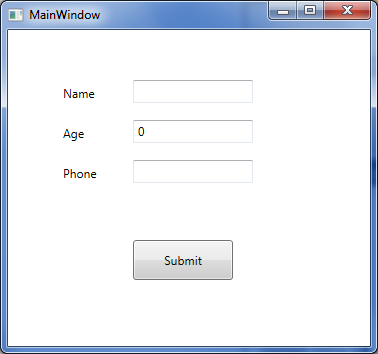
Let us add code so that when values are entered in the above text boxes, they automatically run validation and if there are validation errors, they will be displayed next to the corresponding control. In order to do this, the following two steps are needed:
- Create a
ControlTemplatewithAdornedElementPlaceHolder - Implement a validation class inheriting the abstract class called
ValidationRule
Here is the sample validation control template. Let us start with a very simple validation control template where all we have is a TextBlock which will display a red exclamatory sign next to the control that has an error.
 Collapse | Copy Code
<ControlTemplate x:Key="validationErrorTemplate">
<DockPanel>
<TextBlock Foreground="Red"
DockPanel.Dock="Top">!</TextBlock>
<AdornedElementPlaceholder
x:Name="ErrorAdorner"
></AdornedElementPlaceholder>
</DockPanel>
</ControlTemplate>
Now, let us also create a validator class by inheriting from the ValidationRule class and implementing its abstract method as below:
Collapse | Copy Codepublic class NameValidator : ValidationRule
{
public override ValidationResult Validate
(object value, System.Globalization.CultureInfo cultureInfo)
{
if (value == null)
return new ValidationResult(false, "value cannot be empty.");
else
{
if (value.ToString().Length > 3)
return new ValidationResult
(false, "Name cannot be more than 3 characters long.");
}
return ValidationResult.ValidResult;
}
}
Let's plug this validation control template and the validation rule with control that we want to validate.
Collapse | Copy Code<TextBox Height="23" HorizontalAlignment="Left"
Grid.Column="1" Grid.Row="0" Name="textBox1"
VerticalAlignment="Top" Width="120"
Validation.ErrorTemplate="{StaticResource validationErrorTemplate}"
>
<TextBox.Text>
<Binding Path="Name" Mode="TwoWay"
UpdateSourceTrigger="LostFocus">
<Binding.ValidationRules>
<local:NameValidator></local:NameValidator>
</Binding.ValidationRules>
</Binding>
</TextBox.Text>
</TextBox>
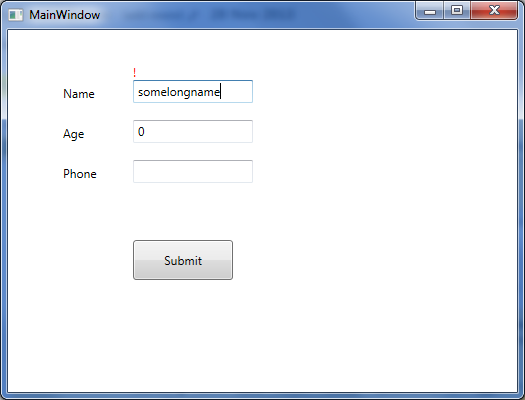
When we run this now and enter a name longer than three characters long, it displays the red exclamatory sign indicating validation error.
Now let us just replace the TextBlock in the above validation control template code (the line that is in bold) with the StackPanel containing an ellipse and a TextBlock to display the same validation error, as below:
Collapse | Copy Code<ControlTemplate x:Key="validationErrorTemplate">
<DockPanel>
<StackPanel Orientation="Horizontal" DockPanel.Dock="Top">
<Grid Width="12" Height="12">
<Ellipse Width="12" Height="12"
Fill="Red" HorizontalAlignment="Center"
VerticalAlignment="Center" ></Ellipse>
<TextBlock Foreground="White" FontWeight="Heavy"
FontSize="8" HorizontalAlignment="Center"
VerticalAlignment="Center" TextAlignment="Center"
ToolTip="{Binding ElementName=ErrorAdorner,
Path=AdornedElement.(Validation.Errors)[0].ErrorContent}"
>X</TextBlock>
</Grid>
<TextBlock Foreground="Red" FontWeight="12" Margin="2,0,0,0"
Text="{Binding ElementName=ErrorAdorner,
Path=AdornedElement.(Validation.Errors)[0].ErrorContent}"
></TextBlock>
</StackPanel>
<AdornedElementPlaceholder
x:Name="ErrorAdorner" ></AdornedElementPlaceholder>
</DockPanel>
</ControlTemplate>
Now when we run the code and validation fails, a validation error will be displayedas shown in the screenshot below (coded validator class for age and phone number as well).
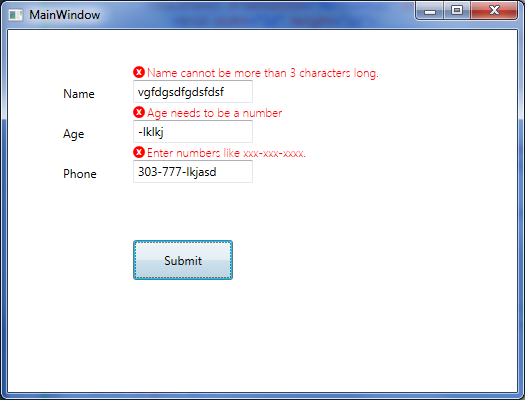
That is all that is needed for the simplest validation error to show up next to the control. Notice in the validation control template, we are using a DockPanel as the layout control, therefore we can easily change where the error icon and error message will be displayed. We can display them on top of the control that is failing validation (as the above picture), or on the left, right, or bottom.
Simple Validation in WPF的更多相关文章
- Reusable async validation for WPF with Prism 5
WPF has supported validation since the first release in .NET 3.0. That support is built into the bin ...
- [WPF系列]-Data Validation
项目经常前台界面涉及到用户输入时,我们常常会用到数据有效性的验证.在网页中我们之前用js来校验Form中的数据有效性.在WPF中我们如何实现这种验证机制了?答案:INotifyDataErrorInf ...
- WPF 验证没有通过无法保存数据(非常好)+ 虚似数据库
Validation control with a single validation rule is easy, but what if we need to validate a control ...
- [WPF系列]-Prism+EF
源码:Prism5_Tutorial 参考文档 Data Validation in WPF √ WPF 4.5 – ASYNCHRONOUS VALIDATION Reusable asyn ...
- WPF 验证
WPF中TextBox的自动验证: 演示 : 用以下两个TextBox分别显示验证IP和非空值验证,先看效果: IP自动验证效果: 非空值自动验证效果: 第一步:定义TextBox验证的样式: < ...
- WPF 自动验证
WPF中TextBox的自动验证: 演示 : 用以下两个TextBox分别显示验证IP和非空值验证,先看效果: IP自动验证效果: 非空值自动验证效果: 第一步:定义TextBox验证的样式: < ...
- 为WIN8 APP创建置顶desktop应用
Windows 8: TopMost window I am working on my next ambitious project “MouseTouch” which is multi to ...
- MVVM中数据验证之 ViewModel vs. Model
MMVM模式示意图. View绑定到ViewModel,然后执行一些命令在向它请求一个动作.而反过来 ...
- nuget packages batch install
d:\nuget\nuget.exe install EnterpriseLibrary.Common -NoCache -Verbosity detailed -OutputDirectory D: ...
随机推荐
- 第一周作业.四则运算生成器(基于python)
题目 从<构建之法>第一章的 "程序" 例子出发,像阿超那样,花二十分钟写一个能自动生成小学四则运算题目的命令行 "软件",满足以下需求: 除了整数 ...
- 团队作业8——第二次项目冲刺(Beta阶段)Day6——5.25
1.提供当天会议照片: 2.会议的内容: (1)讨论已经完成的功能,讨论存在的问题 (2)对于界面,谈谈各自的看法 (3)讨论接下来的任务和改进的地方 3.工作安排: 队员 今日任务 明日任务 贡献比 ...
- Swing-BoxLayout用法-入门
注:本文内容源于http://www.java3z.com/cwbwebhome/article/article20/200016.html?id=4797:细节内容根据笔者理解有修改. BoxLay ...
- 201521123022 《Java程序设计》 第五周学习总结
1. 本周学习总结 1.1 尝试使用思维导图总结有关多态与接口的知识点. 2. 书面作业 1.代码阅读:Child压缩包内源代码 1.1 com.parent包中Child.java文件能否编译通过? ...
- 201521123011 《Java程序设计》第4周学习总结
1. 本周学习总结 1.1 尝试使用思维导图总结有关继承的知识点. 1.2 使用常规方法总结其他上课内容. 答:1.super() 子类不能继承父类的构造方法,但可以通过super关键字去访问父类的构 ...
- 201521123079《java程序设计》第13周学习总结
1. 本周学习总结 1.以你喜欢的方式(思维导图.OneNote或其他)归纳总结多网络相关内容. (1)netassist可以用来链接IP端口 (2)accept方法可以用来监听端口,当没有客户端连接 ...
- TCP/IP协议:OSI七层模型、TCP/IP四层模型的对比
1. OSI七层和TCP/IP四层的关系 1.1 OSI引入了服务.接口.协议.分层的概念,TCP/IP借鉴了OSI的这些概念建立TCP/IP模型. 1.2 OSI先有模型,后有协议,先有标准,后进行 ...
- log4j 日志脱敏处理 + java properties文件加载
Java 加载Properties 配置文件: ResourceBundle bundle = ResourceBundle.getBundle("log4j_filter"); ...
- Java报文或者同步的数据有个别乱码情况的处理.
从其它系统获取到的用户数据,1万多条数据有其中有2条数据是乱码形式,这种形式表现为最后一个字符和本身的分隔符组成了一个乱码 错误数据 : 220296|+|黄燕 鄚+|7|+|7|+|02220 ...
- React——props的使用以及propTypes
组件的props是只读的,组件不能修改自己的props,在React中,组件可以接受任意的props,如函数,对象,基本类型以及react元素 一.props的使用 1.一些组件并不需要知道自己的ch ...