
python车牌精确定位
#coding=utf-8

import cv2

# 使用的是HyperLPR已经训练好了的分类器

watch_cascade = cv2.CascadeClassifier('model/cascade.xml')

# 先读取图片

image = cv2.imread("D:\\Downloads\\License-Plate-Recognition-master\\test\\car5.jpg")

def detectPlateRough(image_gray,resize_h = 720,en_scale =1.08 ,top_bottom_padding_rate = 0.05):

        if top_bottom_padding_rate>0.2:

            print("error:top_bottom_padding_rate > 0.2:",top_bottom_padding_rate)

            exit(1)

        height = image_gray.shape[0]

        padding = int(height*top_bottom_padding_rate)

        scale = image_gray.shape[1]/float(image_gray.shape[0])

        image = cv2.resize(image_gray, (int(scale*resize_h), resize_h))

        image_color_cropped = image[padding:resize_h-padding,0:image_gray.shape[1]]

        image_gray = cv2.cvtColor(image_color_cropped,cv2.COLOR_RGB2GRAY)

        watches = watch_cascade.detectMultiScale(image_gray, en_scale, 2, minSize=(36, 9),maxSize=(36*40, 9*40))

        cropped_images = []

        for (x, y, w, h) in watches:

            #cv2.rectangle(image_color_cropped, (x, y), (x + w, y + h), (0, 0, 255), 1)

            x -= w * 0.14

            w += w * 0.28

            y -= h * 0.15

            h += h * 0.3

            #cv2.rectangle(image_color_cropped, (int(x), int(y)), (int(x + w), int(y + h)), (0, 0, 255), 1)

            cropped = cropImage(image_color_cropped, (int(x), int(y), int(w), int(h)))

            cropped_images.append([cropped,[x, y+padding, w, h]])

            #cv2.imshow("imageShow", cropped)

            #cv2.waitKey(0)

        return cropped_images

def cropImage(image,rect):

        cv2.imshow("imageShow", image)

        cv2.waitKey(0)

        x, y, w, h = computeSafeRegion(image.shape,rect)

        cv2.imshow("imageShow", image[y:y+h,x:x+w])

        cv2.waitKey(0)

        return image[y:y+h,x:x+w]

def computeSafeRegion(shape,bounding_rect):

        top = bounding_rect[1] # y

        bottom  = bounding_rect[1] + bounding_rect[3] # y +  h

        left = bounding_rect[0] # x

        right =   bounding_rect[0] + bounding_rect[2] # x +  w

        min_top = 0

        max_bottom = shape[0]

        min_left = 0

        max_right = shape[1]

        #print(left,top,right,bottom)

        #print(max_bottom,max_right)

        if top < min_top:

            top = min_top

        if left < min_left:

            left = min_left

        if bottom > max_bottom:

            bottom = max_bottom

        if right > max_right:

            right = max_right

        return [left,top,right-left,bottom-top]

images = detectPlateRough(image,image.shape[0],top_bottom_padding_rate=0.1)

print("检测到车牌数", len(images))
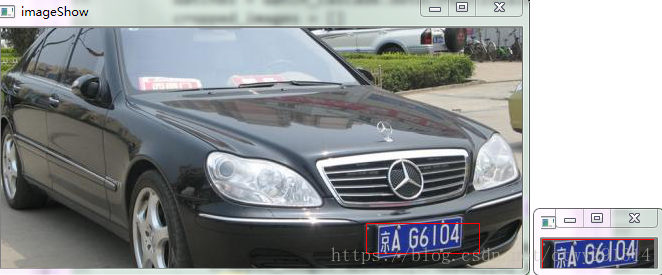
效果:
python车牌精确定位的更多相关文章
- Selenuim+Python之元素定位总结及实例说明
网页自动化最基本的要求就是要定位到各个元素,然后才能对该元素进行各种操作(输入,点击,清除,提交等),所以笔者今天来总结下Selenuim+Python最基本的几种定位方式及实例说明,希望能帮助到大家 ...
- HTML精确定位:scrollLeft,scrollWidth,clientWidth,offsetWidth
HTML精确定位:scrollLeft,scrollWidth,clientWidth,offsetWidth scrollHeight: 获取对象的滚动高度. scrollLeft:设置或获取位于对 ...
- 利用flash精确定位asp.net的图像热点区域
Asp.net的热点区域控件非常有用,但是对于热点区域如何精确定位,设定矩形,圆和多边形要素点的位置,用flash能够精确定位,在flash中制作热点区域的部分,可以是矩形,图形或者文字,然后对于这部 ...
- CSliderCtrl鼠标点击精确定位
实现CSliderCtrl的子类CXXCtrl 响应左键按下消息 ON_WM_LBUTTONDOWN() void CXXCtrl::OnLButtonDown(UINT nFlags, CPoint ...
- Selenium2+python自动化28-table定位
前言 在web页面中经常会遇到table表格,特别是后台操作页面比较常见.本篇详细讲解table表格如何定位. 一.认识table 1.首先看下table长什么样,如下图,这种网状表格的都是table ...
- Python Appium 元素定位方法简单介绍
Python Appium 元素定位 常用的八种定位方法(与selenium通用) # id定位 driver.find_element_by_id() # name定位 driver.find_ ...
- Unity3D中使用Profiler精确定位性能热点的优化技巧
本文由博主(SunboyL)原创,转载请注明出处:http://www.cnblogs.com/xsln/p/BeginProfiler.html 简介 在使用Profiler定位代码的性能热点时,很 ...
- window.location.hash 页面跳转,精确定位,实例展示:
window.location.hash 页面跳转,精确定位,实例展示: (1).index.phtml,页面用于传参 <script id="bb_list_template&quo ...
- Selenium2+python自动化28-table定位【转载】
前言 在web页面中经常会遇到table表格,特别是后台操作页面比较常见.本篇详细讲解table表格如何定位. 一.认识table 1.首先看下table长什么样,如下图,这种网状表格的都是table ...
随机推荐
- [MethodImpl(MethodImplOptions.Synchronized)]、lock(this)与lock(typeof(...))
对于稍微有点经验的.NET开发人员来说,倘若被问及如何保持线程同步,我想很多人都能说好好几种.在众多的线程同步的可选方式中,加锁无疑是最为常用的.如果仅仅是基于方法级别的线程同步,使用System.R ...
- springboot框架中的各种 注解
使用注解的优势: 1.采用纯java代码,不在需要配置繁杂的xml文件 2.在配置中也可享受面向对象带来的好处 3.类型安全对重构可以提供良好的支持 4.减少复杂配置文件的同时亦能享受到springI ...
- Test 6.23 T1 扫雷
题目背景 题目描述 输入格式 输出格式 样例输入输出 数据范围 解析 我们设两个作弊器的参数分别为\((a_1,b_1)\)和\((a_2,b_2)\),那么设 \[ S1=\frac{a_1}{b_ ...
- linux nginx+php源码安装
PHP安装 1)下载 wget http://cn2.php.net/distributions/php-5.6.30.tar.gz 2)解压 tar –xf php-5.6.30 3)进入目录 cd ...
- JavaScript清空数组的三种方法
[文章系摘自网络,看到有用记录在博客,同时共享给大家] 原链接:http://www.2cto.com/kf/201409/335383.html 方式1,splice var ary = [1, ...
- JS判断数组是否为空
var arr = []; if(arr == false){ console.log("arr is empty!"); }else{ console.log("arr ...
- 动态规划 List
例题 #A 传纸条(Accepted) #B 乘积最大 (Unaccepted) #C 石子合并 (Accepted) #D 加分二叉树 (Unaccepted) #E 没有上 ...
- XX-Net 使用教程(Across the Great Wall)
注意: 由于封锁严重,软件自带IP已经被封杀殆尽.因此需要数分钟到数小时的初始化IP扫描,方能正常运行. 虽然系统内置了公共appid, 还是建议部署自己的appid,公共appid限制看视频.需要注 ...
- Linux C编程
Linux C网络编程 1.Linux套接字 1.1 套接字介绍 套接字(Sockets),即为网络进程ID,是由运行这个进程的计算机的IP地址和这个进程使用的端口(Port)组成. 可以只用'net ...
- HDU 1003 解题报告
问题描述:求最大连续字串 分析:一道简单的DP,状态转移方程是d[i] = ( d[i-1]+a[i] > a[i] ) ? d[i-1]+a[i] : a[i] d[i]表示以第i个数字结尾的 ...